Adobe Photoshop is a name synonymous with digital image editing, a powerful suite that has defined professional workflows for decades. However, many users are unaware that Adobe offers not one, but two distinct Photoshop applications: the industry-standard Photoshop, integrated into the Creative Cloud, and the more accessible Photoshop Elements. While both share the esteemed Photoshop brand and are geared towards photo editing, their intended audiences, feature sets, and financial models diverge significantly. Understanding these differences is crucial for selecting the version that aligns with your current skill level, creative aspirations, and financial considerations. This article provides an in-depth comparison of Photoshop Elements and full Photoshop, examining their features, typical applications, system requirements, and pricing structures. We will also explore how advanced hardware, such as the XPPen Artist Ultra 16, can enhance the creative journey for users of both applications.
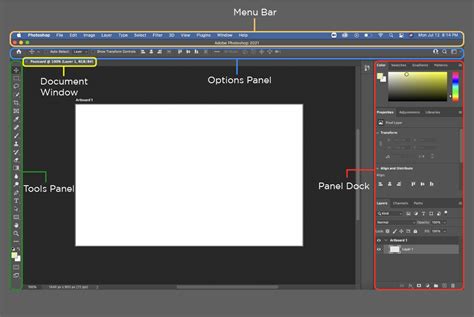
Photoshop Elements: The Gateway for Hobbyists and Beginners
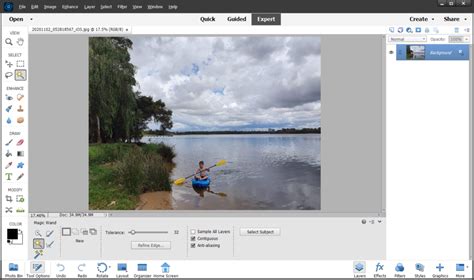
Photoshop Elements is positioned by Adobe as an entry-level photo editing software, specifically tailored for hobbyists, novices, and individuals who edit photos casually. It presents a streamlined user experience, prioritizing simplicity and ease of use. A key differentiator of Elements is its tri-modal editing approach:
- Quick Mode: This mode is designed for immediate, one-click enhancements. Users can effortlessly perform tasks such as removing red-eye, cropping images to desired dimensions, and applying auto color corrections.
- Guided Mode: This feature offers step-by-step tutorials that lead users through more complex editing processes. It’s ideal for learning how to smooth skin tones, replace backgrounds, or construct photo collages by following clear, sequential instructions.
- Expert Mode: For users ready to explore more advanced editing, Expert Mode provides an interface that offers layer support and the ability to make custom edits, bridging the gap towards professional capabilities.
Key Strengths of Photoshop Elements
The strengths of Photoshop Elements lie in its accessibility and user-centric design:
- Beginner-Friendly Interface: The layout is intuitive, reducing the intimidation factor for new users.
- Guided Edits for Learning: The guided tutorials serve as an educational tool, teaching users editing techniques as they work.
- Automated Enhancements: Leveraging Adobe Sensei AI, Elements offers intelligent automated corrections and enhancements, simplifying common editing tasks.
- One-Time Purchase: Unlike the subscription model of full Photoshop, Elements is available for a single purchase, making it a budget-friendly option.
- Lightweight Performance: It is designed to run efficiently on less powerful hardware, offering faster load times and smoother operation on modest systems.
Who Benefits Most from Photoshop Elements?
Photoshop Elements is particularly well-suited for a specific demographic of users:
- Photo Hobbyists: Individuals who wish to enhance personal photographs from vacations, family gatherings, or other life events.
- Beginners in Design: Those interested in learning basic graphic design principles or creating simple graphics for social media posts.
- Students and Educators: The one-time purchase model makes it an attractive and affordable option for educational institutions and individuals.
- Casual Users: Anyone who desires the reputable Photoshop branding and core editing capabilities without the overwhelming complexity of professional-grade software.
It serves as an excellent introduction to the world of image editing, allowing users to achieve satisfying results without being burdened by an extensive array of tools and menus.
Full Photoshop: The Domain of Advanced Editors and Professionals
In stark contrast, Photoshop, the Creative Cloud version, is meticulously engineered for professional photographers, digital artists, graphic designers, and advanced users who require absolute creative command over their projects. Photoshop provides an expansive and sophisticated toolkit for unparalleled image manipulation and creation.
Core Features of Full Photoshop
Photoshop's power lies in its comprehensive feature set:
- Layer Masks and Blending Modes: These fundamental tools allow for intricate, non-destructive compositing and sophisticated visual effects.
- Smart Objects: Enable non-destructive editing by preserving original image data, allowing for transformations and adjustments without degrading image quality.
- Vector Shape Tools and Typography Control: Offers precise control over vector graphics and advanced typographic options for design work.
- Custom Brushes and Actions: Users can create and import custom brushes for unique artistic styles and automate repetitive tasks with Actions.
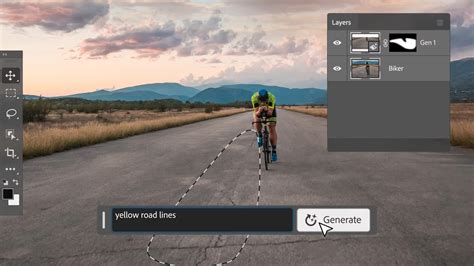
- AI-Powered Tools: Features like Generative Fill, Sky Replacement, and Neural Filters leverage artificial intelligence to perform complex edits with remarkable ease and speed.
- Integration with Adobe Creative Cloud: Seamlessly connects with other Adobe applications such as Illustrator, Lightroom, and After Effects, fostering a cohesive and efficient workflow.
Professional Applications of Photoshop
The versatility and power of Photoshop make it indispensable across a wide spectrum of industries and creative disciplines:
- High-End Photo Retouching: Professional photographers rely on Photoshop for meticulous retouching, color correction, and restoration of images.
- Branding and Logo Design: Designers utilize its robust tools for creating and refining brand identities and logos.
- Web and App UI Design: Used extensively for designing user interfaces, creating mockups, and optimizing assets for digital platforms.
- Digital Painting and Concept Art: Digital artists employ Photoshop for creating intricate illustrations, concept art, and digital paintings.
- Marketing, Publishing, and Advertising: Essential for producing high-quality visuals for advertisements, marketing materials, and print publications.
It is the preferred choice for professionals due to its sheer power, adaptability, and deep integration within the broader Adobe ecosystem. However, this power comes with a more demanding learning curve and necessitates a Creative Cloud subscription.
Feature Comparison: Guided Edits vs. Absolute Control
A direct comparison of key features highlights the fundamental differences between the two applications:
| Feature | Photoshop Elements | Photoshop (Creative Cloud) |
|---|---|---|
| Interface | Beginner-friendly, simplified | Complex, highly customizable |
| Editing Modes | Quick, Guided, Expert | Single, comprehensive professional interface |
| Layers | Basic support | Advanced support with sophisticated masks and effects |
| RAW Editing | Basic support via Camera Raw | Full Camera Raw features and advanced RAW processing |
| Brushes and Tools | Limited preset brushes, basic customization | Full customization, extensive brush engine, third-party support |
| Actions & Batch | No built-in support | Yes, extensive automation capabilities |
| Generative AI Tools | Some automated enhancements (Adobe Sensei) | Full AI toolkit (e.g., Generative Fill, Neural Filters) |
| 3D & Animation | Not supported | Available (limited 3D features) |
| Integration with Suite | Standalone application | Full integration with Adobe Creative Cloud apps |
| Learning Curve | Low | High, especially initially |
The Guided Edits in Photoshop Elements are a significant advantage for users who aim to achieve desired results without dedicating extensive time to mastering every tool. If budget constraints or a dislike for subscription models are primary concerns, Photoshop Elements emerges as the clear choice. Conversely, if continuous updates, professional-grade features, and seamless integration with other Adobe applications are paramount, the cost of Photoshop is well-justified.
The Upgrade Path: From Elements to Full Photoshop
A common trajectory for many creative individuals is to begin their journey with Photoshop Elements and subsequently transition to full Photoshop as their skills advance and their project requirements become more sophisticated. This progression is facilitated by Adobe’s ecosystem. Familiarity gained with Elements' interface and fundamental tools can significantly demystify the learning curve associated with Photoshop.
Typical User Profiles and Scenarios
Understanding who should use which application can help clarify the decision-making process:
Who Should Use Photoshop Elements:
- Photography Hobbyists: Enhancing everyday photos from personal events, travel, or family life.
- Students and Casual Users: Creating flyers, school projects, or simple graphics for personal use.
- Scrapbookers and Crafters: Working on creative photo albums or digital scrapbooking projects.
- Social Media Enthusiasts: Designing basic graphics and visuals for online platforms.
Who Should Use Photoshop:
- Professional Photographers: Editing RAW files, performing high-level retouching on portraits and commercial photography.
- Graphic Designers: Working with multi-layered compositions, branding, and print collateral.
- Digital Painters and Illustrators: Utilizing custom brushes, complex textures, and advanced painting techniques.
- Marketing Professionals: Creating ad campaigns, website mockups, and sophisticated marketing assets.
Adobe provides a natural transition path for users who outgrow Elements. The foundational knowledge acquired in Elements serves as a solid stepping stone towards mastering the more advanced capabilities of Photoshop.
The Adobe Lightroom Ecosystem Explained
The Role of Hardware: XPPen Artist Ultra 16 for All Levels
Regardless of whether one is editing family portraits in Elements or crafting intricate digital art in Photoshop, the hardware used significantly impacts the creative workflow. The XPPen Artist Ultra 16 is a premium drawing display designed to cater to creators across the entire spectrum of skill levels, from beginners to seasoned professionals.
Why the XPPen Artist Ultra 16 is Ideal for All Skill Levels
The XPPen Artist Ultra 16 offers a suite of features that enhance precision, comfort, and visual fidelity:
- 4K OLED Display (3840×2160): Provides exceptional clarity, vibrant colors, and deep contrasts, crucial for detailed image editing and illustration.
- 16,384 Levels of Pressure Sensitivity: Ensures that every nuance of stylus pressure is translated onto the canvas, offering a natural and responsive drawing and editing experience, whether in Elements or Photoshop.
- 1 ms Response Time: Minimizes lag, allowing for fluid and immediate stroke feedback, even when working with large, high-resolution files.
- Exceptional Color Accuracy: With 99% Adobe RGB and 98% Display P3 coverage, the display guarantees that the colors seen on screen are true to life and accurately represent the intended output for print or digital media.
- Dual Stylus Options: Includes both the X3 Pro and X3 Pro Slim styluses, allowing users to select the one that best suits their grip preference and workflow.
- Multi-Touch Support: Enables intuitive navigation through canvases using gestures like zooming, rotating, and panning, streamlining the editing process.
- Eye Comfort Technology: Features TUV-certified blue light filtering and an anti-glare coating, designed to reduce eye strain and allow for longer, more comfortable working sessions.
Whether one is engaged in the straightforward enhancements of Elements or the complex compositions within Photoshop, the XPPen Artist Ultra 16 provides the necessary precision, ergonomic comfort, and color accuracy required for producing professional-quality results.

Core Differences Summarized
In essence, the fundamental distinction between Photoshop Elements and Photoshop lies in their design philosophy and target audience:
- Photoshop Elements is the optimal choice for individuals new to image editing, casual users, and hobbyists who prioritize simplicity, guided assistance, and a straightforward, one-time purchase cost.
- Photoshop (Creative Cloud) is engineered for power users, professionals, and advanced creatives who demand comprehensive control, cutting-edge features, and seamless integration within Adobe's extensive creative ecosystem.
There is no single "best" option; the ideal choice is contingent upon an individual's existing experience level, specific editing requirements, and budget. For those embarking on their creative journey, Photoshop Elements, perhaps paired with a high-quality drawing display like the XPPen Artist Ultra 16, can offer an enjoyable and effective learning experience.
Photoshop, a pixel-based image editing software, is widely used for creating, editing, and manipulating images, developed by Thomas and John Knoll and first released in 1990. Its latest stable version launched in 2022. It offers a vast array of tools, including shape tools, selection tools, clone stamp tools, and pen tools, enabling detailed photo retouching, image manipulation, and creative graphic design.
Advantages of Photoshop
- Professional Tool: It is a highly professional photo editing tool that simplifies advanced editing.
- Format Support: It supports almost all image formats, making it versatile for various projects.
- Cross-Platform: Available across multiple operating systems, providing flexibility for users.
- Resources: Offers numerous templates and design resources to kickstart projects.
- Output Quality: Produces high-quality images suitable for both digital and print media.
Disadvantages of Photoshop
- Subscription Model: Only available via subscription (monthly or yearly), with no one-time purchase option.
- Resource Intensive: The software is resource-intensive, requiring significant memory and storage space.
Photoshop Elements, introduced as a simplified version of Photoshop, is designed for non-professional photographers and hobbyists. It is a user-friendly editing tool offering basic to intermediate features for photo enhancement and creation, with its latest stable version launched in 2021.
Advantages of Photoshop Elements
- Ease of Use: The interface is intuitive and easy to use, making it accessible to beginners.
- Automated Tools: Offers automated editing tools and guided edits to speed up the editing process.
- System Requirements: Requires less processing power, making it suitable for systems with lower specifications.
- Cross-Platform License: A single license allows installation on both Windows and Mac, offering flexibility.
Disadvantages of Photoshop Elements
- CMYK Limitation: Does not support exporting images in CMYK color mode, limiting print design capabilities.
- Keyboard Shortcuts (Mac): Keyboard shortcut customization is not available on Mac versions, potentially reducing workflow efficiency for some users.
The choice between Photoshop and Photoshop Elements ultimately depends on the user’s specific requirements and experience level. Photoshop is the definitive choice for professionals and advanced users needing extensive features for complex tasks, while Photoshop Elements provides a more accessible and affordable solution for beginners and casual users managing and enhancing their photos without a steep learning curve.