Do you enjoy art? Do you want professional-looking graphic designs but don't know what platforms to use? For those who appreciate the visual arts and aspire to create polished, professional graphic designs, the question of which tools to employ often arises. This article delves into Affinity Designer, a powerful and accessible software solution, and explores a comprehensive course designed to equip you with the skills to harness its potential. Whether you're a budding artist or a seasoned professional seeking an alternative to established, often more expensive, software, Affinity Designer offers a compelling path to graphic design mastery.
Introducing Affinity Designer: Your Creative Powerhouse
Affinity Designer has emerged as a leading contender in the graphic design software arena, earning accolades such as "Best App of the Year." It is lauded as the fastest, smoothest, and most precise vector graphic design software available, making it an ideal choice for a wide range of illustration projects. For individuals seeking an inexpensive, yet powerful and professional, alternative to industry giants like Adobe Photoshop, Affinity Designer presents an attractive and highly capable option. This software is perfect for anyone looking to translate their artistic vision into tangible, high-quality graphics.
Navigating the Affinity Designer Landscape: A Course Overview
This comprehensive Affinity Designer course is meticulously crafted to guide users through every facet of the software, ensuring a deep understanding and confident application of its features. The curriculum is designed to be a complete education, catering to both users of Version 1 (V1) and the latest Version 2 (V2) updates. With a substantial 14 hours of content, including 12 hours dedicated to a complete V2 course and an additional 12 hours covering the highly popular V1 course, learners receive an unparalleled immersion into both iterations of the software. This dual-version approach guarantees that the course is 100% a fit for both existing V1 users and those transitioning to or starting with V2.
The primary objective of this course is to empower students with the knowledge and practical skills necessary to feel confident when designing graphics in Affinity Designer. It serves as an accessible entry point for newcomers, demystifying the software and its capabilities.
Unlocking Your Design Potential: What You Will Learn
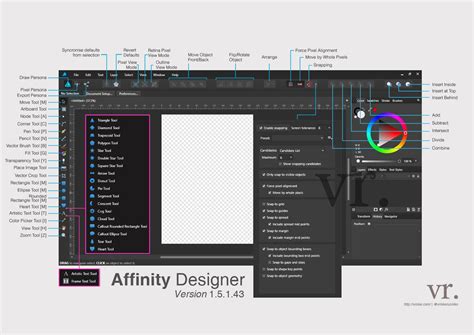
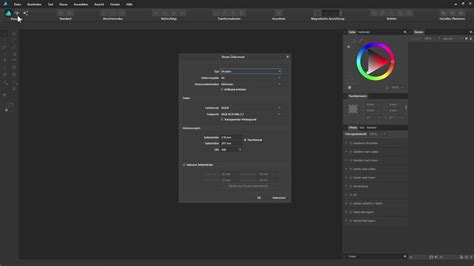
The course systematically breaks down the learning process, starting with the fundamental elements of the Affinity Designer interface. You will gain an intimate understanding of how the software is structured, enabling you to navigate its various panels and tools with ease. A key early learning objective is the creation of new documents tailored for both print and web, ensuring your designs meet the specific requirements of their intended medium.
Moving beyond the basics, the course delves into the manipulation and creation of shapes. You will learn to add and adjust shapes precisely as you envision them, transforming simple forms into complex graphical elements. The curriculum extends to designing advanced shapes, incorporating sophisticated effects such as reflections and expressions, and mastering Boolean operations to construct intricate forms from simpler ones.
A significant portion of the course is dedicated to the critical role of color in design. You will understand the power of color theory and learn how to utilize color effectively and strategically within your projects. This includes exploring various photo editing techniques and tricks, such as blending images seamlessly, creating captivating color transitions, and precisely cropping parts of an image to achieve desired compositions.
Drawing and line work are fundamental to graphic design, and the course provides thorough instruction on using the Pen tool and Brush tool. These tools are essential for creating precise vector paths and expressive freehand strokes, respectively. Furthermore, you will master the art of adding and editing text, utilizing the Character and Paragraph panels to control typography, layout, and overall text aesthetics.
The practical application of these skills is emphasized through the creation of professional logos. You will learn the principles of logo design and how to translate brand identity into compelling visual marks using Affinity Designer. Masking and shading techniques are also covered, allowing for sophisticated layering and depth in your designs. Finally, the course equips you with the knowledge to export and save your projects in various formats, ensuring they are optimized for any intended use, whether it's for digital display, print, or other media.
Affinity Designer Tutorial: Pen Tool for Beginners
Learning by Doing: Real-World Project Application
A cornerstone of this educational approach is the "Learn by Doing" methodology. Throughout the course, students will actively engage with real-world projects. This hands-on experience is crucial for solidifying new skills and demonstrating their practical application. Projects such as designing social media graphics provide tangible outcomes, allowing students to see their newly acquired abilities in action. This practical engagement transforms theoretical knowledge into practical proficiency, building confidence and competence.
The Instructor: Jeremy Hazel's Expertise
The course is led by Jeremy Hazel, a professional graphic artist with a passion for sharing his extensive knowledge. Jeremy is deeply committed to making this the definitive Affinity Designer course available, ensuring that students can easily and effectively begin using this remarkable application. His dedication to student success is evident in his approach, aiming to provide the best possible learning experience on the market. A key aspect of his commitment is his availability to assist students should they encounter any problems, offering a supportive learning environment.

Affinity Designer: A Superior Choice for Creative Professionals
Affinity Designer stands out as a superior choice for a multitude of reasons. Its vector-based nature means that designs can be scaled infinitely without any loss of quality, a critical feature for professional graphic design where flexibility is paramount. The software's performance is exceptionally fluid, even when working with complex files, contributing to a seamless creative workflow. Its intuitive user interface, while powerful, is also remarkably approachable, reducing the learning curve for new users.
The precision offered by Affinity Designer allows for meticulous control over every element of a design, from the finest line work to the most complex gradients. This level of detail is essential for creating polished and professional results. Furthermore, Affinity Designer operates on a perpetual license model, meaning you purchase the software once and own it forever, a stark contrast to subscription-based models that can accumulate significant costs over time. This makes it a highly cost-effective solution for individuals and businesses alike.
Beyond the Basics: Exploring Advanced Techniques
While the foundational elements are crucial, the course also ventures into more advanced techniques that elevate designs from competent to exceptional. Understanding the nuances of vector manipulation, such as non-destructive editing with live filters and effects, allows for greater flexibility and experimentation. You'll explore the creation of complex gradients, intricate patterns, and sophisticated textures that add depth and visual interest to your work.
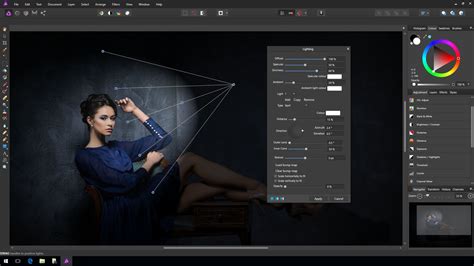
The course will also touch upon the integration of raster elements within a vector workflow, demonstrating how to combine the strengths of both types of imagery for richer compositions. This might include techniques for incorporating photographic elements into vector illustrations or applying vector effects to raster images. Mastering the art of creating responsive designs, which adapt to different screen sizes and resolutions, is another area that can be explored, particularly relevant for web graphics and UI design.
Applications of Affinity Designer Skills
The skills acquired through this Affinity Designer course have a broad range of practical applications across numerous creative fields. Logo design is a primary area, enabling individuals to create unique and memorable brand identities for businesses of all sizes. Illustration, from character design to technical drawings and complex scenes, is another significant application. The software is perfectly suited for creating artwork for print media, including posters, brochures, book covers, and packaging.
For digital applications, Affinity Designer is invaluable for designing user interfaces (UI) and user experiences (UX) for websites and mobile applications. Social media graphics, banners, and digital advertisements can be created with professional polish. The photo editing capabilities, including image manipulation, retouching, and compositing, open doors to a wide array of visual storytelling and enhancement projects. Furthermore, the vector capabilities are ideal for creating icons, infographics, and technical diagrams that require clarity and scalability.
The Learner Experience: Reviews and Feedback
The "Learner Reviews & Feedback" section, as indicated in the course information, highlights the positive impact this training has had on its students. While specific reviews are not detailed here, the mention of "View More Reviews" suggests a strong track record of student satisfaction. This feedback is crucial for potential learners, offering insights into the course's effectiveness and the quality of instruction. The presence of such a section underscores the publisher's commitment to transparency and continuous improvement based on user experiences.
A Risk-Free Investment in Your Creative Future
To further instill confidence in potential students, the course offers a "100% 30-day Money Back Guarantee." This risk-free enrollment policy allows individuals to explore the course content and assess its value without financial commitment. If, within the first 30 days, the course does not meet expectations, a full refund is provided. This guarantee reflects the publisher's confidence in the quality and comprehensiveness of the Affinity Designer training.
Conclusion: Embark on Your Graphic Design Journey
Affinity Designer offers a powerful, accessible, and cost-effective solution for anyone looking to excel in graphic design. This comprehensive course, led by an experienced professional, provides a structured and in-depth learning experience that covers everything from fundamental interface navigation to advanced design techniques. By combining theoretical knowledge with practical, real-world projects, learners are empowered to create beautiful and professional graphics with confidence. The dual-version coverage and risk-free guarantee make this an exceptional opportunity to invest in your creative future and master the art of digital design.