To truly harness the creative power of Adobe Photoshop, understanding its system requirements is paramount. While many modern laptops can technically run the software, achieving a smooth and efficient workflow hinges on meeting and ideally exceeding the specified hardware configurations. This article will dissect these requirements, moving from the fundamental operating system needs to the more nuanced impacts of processors, RAM, storage, and graphics, offering insights for both novice users and seasoned professionals.
Operating System: The Foundation of Your Creative Environment
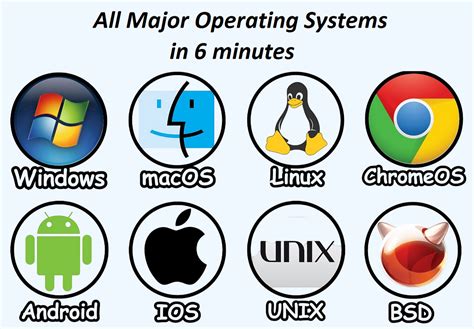
The journey to running Photoshop begins with the operating system (OS). For the latest versions of Photoshop, such as CC 2021 and beyond, a 64-bit version of Microsoft Windows 10 is essential. Specifically, Windows 10 versions 1809 and 1903 are recommended, with support for Windows 7 having been discontinued. This means older operating systems will not be compatible with the newest iterations of the software. HEIF/HEVC import functionality, which is increasingly relevant for modern image formats, is also dependent on these later Windows 10 versions.
While the OS itself isn't the primary driver of Photoshop's performance, its version dictates compatibility and access to certain features. For macOS users, the system requirements are generally less restrictive in terms of specific version numbers, with newer macOS versions being compatible. The critical takeaway is that a modern, 64-bit operating system is the baseline for stable Photoshop operation.
Processor (CPU): The Engine of Your Creative Workflow
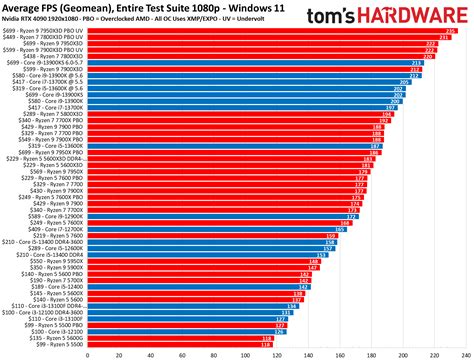
The processor, or CPU, is undeniably one of the most significant components influencing Photoshop's performance. The debate over whether Intel or AMD processors offer superior performance for Photoshop has been a long-standing one within the user community. Historically, Intel CPUs were considered the definitive choice. However, as of recent years, the performance differences between comparable AMD and Intel processors for Adobe Photoshop use have become largely unnoticeable.
For those seeking the best price-to-performance ratio, AMD's 5600X processor has been cited as an excellent option. It's crucial to understand that Photoshop, in its core operations, cannot effectively utilize multiple CPU cores. This means that investing in a high-end CPU with an excessive number of cores will not necessarily translate into a proportional boost in Photoshop's speed. Instead, focusing on a CPU with strong single-core performance and a good balance of clock speed and core count is generally more beneficial. When considering a CPU, remember that it's a primary determinant of how quickly your edits and operations are processed.
RAM (Random Access Memory): The Workspace for Your Creations
When it comes to memory, often referred to as RAM, quantity is king. For Adobe Photoshop, and indeed most creative applications, prioritizing the amount of RAM is far more critical than focusing on secondary specifications like frequency, latency, RGB lighting, or other aesthetic features. RAM acts as Photoshop's immediate workspace; the more RAM available, the more data the program can hold and process without resorting to slower storage methods.
The minimum recommended RAM for Photoshop is 8 GB, but for a more fluid experience, 16 GB or more is strongly advised. Working with large image files, complex layers, or multiple open documents will significantly increase RAM demands. If your computer runs out of RAM, Photoshop will begin to use your storage drive as a temporary "scratch disk," a process that drastically slows down performance.
When planning your RAM configuration, consider future needs. Motherboards typically have four memory slots. If you anticipate needing 32 GB of RAM in the future and are currently aiming for 16 GB, it's more flexible and often more cost-effective to purchase two 8 GB RAM modules rather than four 4 GB modules. This leaves two slots open for future expansion.
RAM Vs. ROM | Animation
Storage: Speeding Up Access to Your Work
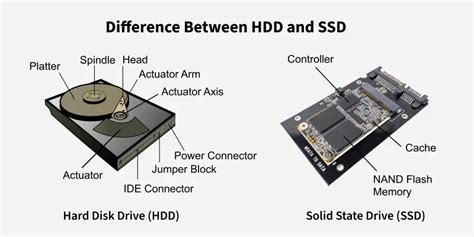
The type of storage drive installed in your computer has a dramatic impact on Photoshop's performance. Swapping out a traditional hard disk drive (HDD) for a solid-state drive (SSD) is one of the most effective upgrades you can make. This is readily accessible within Photoshop's Preferences under the "Performance" settings, where you can designate SSDs as scratch disks.
Scratch disks are utilized by Photoshop when the available RAM is insufficient to handle ongoing operations. The ideal scenario is to have ample free space on a fast SSD to serve as this overflow space. While SSDs are more expensive per gigabyte than HDDs, their speed advantage is undeniable.
It's a common misconception that installing Photoshop itself onto an SSD will yield a significant performance boost. While it can slightly improve application loading times, the primary benefit of an SSD for Photoshop lies in its use as a scratch disk. Furthermore, it's worth noting that SSDs can experience a performance degradation as they become more full. Some users suggest that an SSD operating at over 50% capacity may begin to slow down considerably. Therefore, maintaining free space on your primary SSD, especially if it's designated as a scratch disk, is advisable.
Graphics Card (GPU): A Supporting Role
Adobe Photoshop does not heavily rely on a dedicated graphics card (GPU) for most of its core functionalities. For users on a tight budget, a CPU with integrated graphics can be a viable option, especially if upgrading the GPU is a future consideration. In many cases, the performance difference between a high-end graphics card and a more mediocre one for Photoshop operations is virtually negligible.
The primary role of the GPU in Photoshop is to accelerate specific features like zooming, panning, and certain filter effects. While a capable GPU can enhance the smoothness of these interactions, it is not the bottleneck for most image editing tasks. Therefore, when allocating your budget for a Photoshop-capable system, it is generally more prudent to invest in a superior CPU and more RAM before prioritizing a top-tier graphics card.
The Laptop Conundrum: Mobility vs. Performance
The allure of running Photoshop on a laptop is understandable, driven by the desire for mobility. However, based on experience and the inherent limitations of portable computing, it is often advisable to steer clear of laptops for intensive Photoshop work unless absolutely necessary. Laptops can quickly become a significant financial commitment without delivering comparable performance to a desktop system.
The primary reason for this disparity lies in the thermal and power constraints of laptop design. Processors and graphics cards in laptops are often significantly underpowered compared to their desktop counterparts, even if they bear similar model names (e.g., an "i7" in a laptop is not the same as an "i7" in a desktop). The reduced cooling efficiency in laptops means these components are often throttled to prevent overheating, leading to reduced performance. A US$2000 laptop will almost invariably offer considerably less raw performance than a US$2000 desktop computer.
Online Services and Adobe ID
It's important to note that Adobe Photoshop, like many modern software products, requires an internet connection, an Adobe ID, and acceptance of its license agreement for activation and ongoing use. The software may also integrate with or provide access to certain Adobe or third-party hosted online services. These services are generally available to users aged 13 and older and necessitate agreement to additional terms of use and Adobeâs online privacy policy. These services may not be available in all countries or languages and are subject to change or discontinuation without notice.
Summary of Key System Requirements
- Operating System: Windows 10 (64-bit) version 1809 or later, or a compatible macOS.
- Processor (CPU): Intel or AMD processor (2 GHz or faster). Focus on strong single-core performance.
- RAM: Minimum 8 GB, 16 GB or more strongly recommended.
- Storage: SSD (Solid State Drive) is highly recommended for scratch disk operations.
- Graphics Card (GPU): Less critical than CPU and RAM, but a modern card can aid specific features.
- Internet Connection: Required for activation, updates, and online services.
- Adobe ID: Required for product activation and use.
tags: #photoshop #computer #requirements