Instantly remove background music from audio or video tracks, isolate vocals, or create instrumentals from any song or video. Our online AI vocal remover tool lets you separate voice from music and achieve studio-quality results in seconds. This advanced technology offers unprecedented control and precision, transforming how creators, musicians, and educators interact with sound.

The Power of AI in Audio Separation
At its core, an AI background music remover is a sophisticated tool that leverages advanced machine learning algorithms to deconstruct audio. Unlike basic filters that might muffle or distort sound, these AI-powered systems are designed to understand the sonic characteristics of different audio elements. They can pinpoint and isolate vocals from instrumental tracks, or conversely, extract the instrumental backing by removing the vocals. This capability is crucial for a wide range of applications, from remixing and karaoke to podcast editing and educational analysis.
How AI Achieves Precise Separation
The process involves complex analysis of sound patterns. AI algorithms examine the audio waveform, paying close attention to frequency ranges and stereo positioning. Human voices, for instance, typically occupy a specific frequency spectrum (roughly 85Hz to 8kHz), which makes it easier for AI to distinguish singing or speaking from musical instruments. By studying these patterns across both left and right audio channels, the AI can intelligently identify and separate vocal elements from the instrumental accompaniment. This advanced understanding of sound allows for a much cleaner and more accurate separation than older, less sophisticated methods.
Turn Scripts into Animated Explainer Videos with One Click!
Key Features and Benefits of AI Music Removers
The primary appeal of AI background music removers lies in their ability to provide control and precision over audio. Whether you're a podcaster needing to clarify dialogue, a DJ preparing for a set, or a musician looking to practice a specific part, these tools offer significant advantages.
Vocal & Instrument Separation
One of the most sought-after features is the ability to isolate vocals or create clean instrumental tracks from any song or video. This means you can take a commercial track and extract the lead singer's voice for a remix, or generate a backing track for practice by removing the vocals. The reverse is also true: you can remove the instrumental backing to get a clear acapella version.
Removing Music from Videos & Songs
For content creators, the ability to remove music from videos and songs is invaluable. This allows for the extraction of clear dialogue from videos where background music might be distracting, or the creation of instrumental versions of songs for use as background music in your own content. This ensures your message or primary audio takes center stage.
AI-Powered Audio Processing
The accuracy and quality of the separation are directly tied to the underlying AI-Powered Audio Processing. Built with advanced machine learning, these tools aim for high-fidelity audio separation, meaning the extracted vocals and instrumentals retain their clarity and natural sound without significant quality loss. This moves beyond the "robotic" or "hollow" sound that basic filters might produce.
Multi-Format Support
A good AI music remover should be versatile. They typically support a wide range of audio and video formats, including common ones like MP3, WAV, MP4, and more. This ensures users can upload their files regardless of their origin or recording method.
Speed and Seamlessness
The processing is designed to be fast and seamless. Users can typically upload a file, let the AI work its magic, and download their separated tracks in seconds. This eliminates the need for lengthy manual editing or complex software, making professional audio manipulation accessible to everyone.
Who Benefits from AI Music and Voice Removers?
The versatility of these tools means they cater to a broad spectrum of users, from seasoned professionals to hobbyists.
Singers & Musicians
For singers and musicians, these tools are indispensable. They can isolate instrumentals for rehearsal, practice specific vocal harmonies, or create backing tracks by removing vocals from any song. This provides an affordable and accessible way to generate practice materials.
DJs & Producers
DJs and producers can extract clean acapellas for remixes with AI voice removers and audio samplers. This allows for creative sampling, mashups, and the development of entirely new musical arrangements. The ability to get isolated instrumentals is also key for live sets and creating custom mixes.
Content Creators
Content creators can get crystal-clear audio for their videos by removing background music from any video file. This is essential for interviews, vlogs, tutorials, and any video where dialogue or narration needs to be the primary focus. The ability to extract dialogue cleanly also aids in subtitling and transcription.
Educators & Music Students
In educational settings, these tools offer powerful learning opportunities. Educators and music students can isolate specific instruments or analyze complex vocal harmonies. This is perfect for deconstructing songs for music theory lessons, understanding intricate arrangements, and aiding in practice.
Podcasters & Journalists
Podcasters and journalists can significantly clean up interviews by removing intrusive background music or ambient noise. Isolating dialogue makes it easier for transcription services and ensures the spoken word is clear and prominent, enhancing listener comprehension.
Beyond Basic Music Removal: Studio-Grade Results
It's important to distinguish AI-powered vocal removers from rudimentary tools. While basic filters might degrade audio quality, advanced AI systems are designed for studio-grade stem creation. This means achieving professional results for acapellas, instrumentals, and karaoke tracks with minimal effort. The AI acts as a true voice remover, cleanly splitting vocals and instruments without compromising the overall sound fidelity.
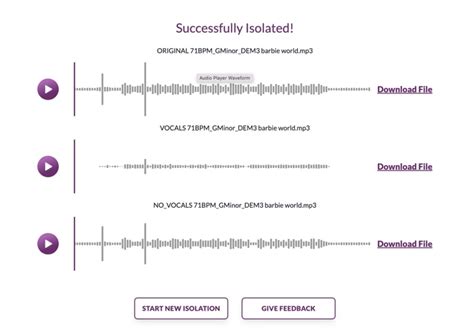
How to Separate Vocals from Music: A Simple Process
The beauty of these AI tools is their user-friendliness. Easily extract vocals or instrumentals from any song, audio, or video in just a few clicks. No audio editing skills needed! The typical workflow involves three simple steps:
- Record/Upload Your Audio/Video: Choose or record audio or video containing vocals and background music.
- Separate Vocals and Instrumentals: Our AI will automatically isolate vocals from music with precision.
- Download Separated Tracks: Download the isolated vocal or instrumental track in your preferred format.
Understanding the Technology: AI Separation in Detail
When you upload a file to an AI vocal remover, sophisticated algorithms get to work. These systems analyze sound patterns, frequency content, and stereo imaging to differentiate between vocal performances and instrumental arrangements.
The Science Behind Voice Isolation
Voice isolation is an advanced AI process that specifically identifies and extracts a spoken or sung vocal track from its background. This is excellent for podcasters and journalists who want to clean up interviews, or for musicians who need a pristine acapella. Unlike older methods that might rely on simple frequency filtering, modern AI can understand the nuances of vocal performances, even within dense musical mixes.
Differentiating from Basic Tools
A basic music vocal remover often uses outdated methods that can result in low-quality audio, characterized by artifacts or a muffled sound. In contrast, a state-of-the-art AI vocal separator intelligently analyzes the audio to deliver clean, professional-grade stems with minimal quality loss. To remove lyrics from music, you simply need to select the "remove voice" function after uploading your song.
Practical Applications and Use Cases
The applications of AI background music removers are diverse and continue to expand.
Creating Karaoke Tracks and Remixes
The ability to create karaoke tracks is a major draw. By removing vocals, any song can be transformed into a sing-along version. Similarly, DJs and producers can extract clean acapellas for remixes, allowing them to build new tracks around existing vocal performances or create mashups.
Enhancing Video Content
For video editors, removing background music from video files is crucial. This can involve isolating dialogue to ensure itâs clearly heard over any incidental music or sound effects. It can also mean removing a distracting soundtrack altogether to replace it with something more fitting for the video's mood or message.
Educational and Analytical Uses
In music education, these tools are invaluable for analyzing complex vocal harmonies or isolating specific instrumental parts. Students can gain a deeper understanding of song structure, arrangement, and performance techniques by dissecting tracks element by element.
Addressing Common Concerns and Misconceptions
While AI audio processing is powerful, it's important to understand its capabilities and limitations.
Will My Voice Sound Robotic?
A common concern is that AI processing might make vocals sound robotic or watery. However, modern AI tools are trained to preserve the natural warmth and clarity of the human voice. Unlike traditional noise reduction tools that can degrade audio, advanced AI is designed for high-fidelity separation, minimizing unwanted artifacts.
Handling Complex Audio Mixes
AI tools perform best when there's a clear distinction between vocals and instruments. In complex arrangements or heavily processed vocals, separation might not be as clean. However, even in these cases, AI generally offers better results than manual editing for most users. Testing different sensitivity settings or processing shorter segments can sometimes improve accuracy with particularly dense tracks.
Copyright and Responsible Use
It's crucial to remember that while AI tools can manipulate audio, copyright compliance remains paramount. Users should always confirm they have the legal right to edit, reuse, or publish any audio content. These tools are best used for personal practice, educational purposes, or with explicit permission from the copyright holder.
Choosing the Right Tool: Online vs. Desktop Solutions
The market offers a variety of AI background music removers, broadly categorized into online services and desktop applications.
Online Vocal Removers
Free online vocal remover tools offer convenience and accessibility. They are perfect for quick edits, basic karaoke track creation, or testing the technology without any software installation. These platforms often use cloud-based AI for rapid processing. However, they may have limitations on file size, processing time, or audio quality for free users.
Desktop Applications
Desktop solutions, such as Wondershare UniConverter or specialized audio editing suites, often provide more power, control, and higher quality results. They are ideal for professionals or users who require batch processing, lossless export options, and more advanced customization. These tools generally offer greater accuracy and faster performance, especially for longer or more complex files.
The Future of AI in Audio Editing
The rapid advancement of AI technology promises even more sophisticated audio manipulation tools. We can expect improved accuracy in vocal and instrumental separation, enhanced noise reduction capabilities, and potentially the ability to isolate even more granular elements within a track, such as individual instruments or specific vocal harmonies. This ongoing evolution will continue to democratize professional audio editing, making powerful tools accessible to an ever-wider audience.
The ability to instantly remove background music, isolate vocals, and create studio-quality audio stems is no longer a niche capability for audio engineers. With the advent of user-friendly AI tools, anyone can now transform their audio, unlock creative possibilities, and produce polished, professional-sounding content.
tags: #ai #background #music #remover