Adobe Photoshop, a name synonymous with digital image manipulation, has long held the throne as the industry standard. Its ubiquity is such that "Photoshop it" has become a common phrase, reflecting its deep integration into creative workflows. For decades, it has been the go-to for photographers, designers, and artists alike. However, the landscape of creative software is constantly evolving, and the rise of powerful, free alternatives offers compelling reasons to move beyond the subscription model. This article delves into the world of applications that rival Photoshop's capabilities, providing accessible options for users ranging from casual social media creators to seasoned professionals.
The journey into these alternatives is informed by extensive research and hands-on testing, building upon years of experience with Photoshop itself. The goal is to identify tools that not only replicate core functionalities but also introduce innovative features, particularly in the realm of artificial intelligence, while remaining accessible and user-friendly.
What Constitutes an Excellent Free Photo Editor?
The quest for the best free Photoshop alternatives involves a rigorous evaluation process, focusing on several key criteria that mirror the strengths of industry-leading software. These criteria ensure that the recommended applications offer substantial value and are genuinely capable of meeting diverse creative needs.
AI-Powered Enhancements for Workflow Efficiency
As artificial intelligence rapidly integrates into all aspects of technology, creative applications are no exception. While basic adjustments like brightness, contrast, cropping, and filters are standard, a truly competitive photo editor now needs to incorporate advanced AI features. These innovations are crucial for accelerating workflows, enabling complex tasks with greater ease, and unlocking new creative possibilities. Generative AI, in particular, is transforming how images are created and manipulated, offering powerful tools for content generation and editing. While Photoshop continues to lead with its comprehensive suite of AI features, the free alternatives are rapidly closing the gap.
Intuitive Design and Ease of Use
A testament to Photoshop's enduring appeal is its relatively consistent user interface over the past three decades. This consistency stems from an intuitive design that makes complex tools accessible. The best free photo editors strive for a similar level of ease of use, ensuring that users can navigate their features without an overwhelming learning curve. Whether you're a beginner or an experienced user, the interface should facilitate a smooth and efficient creative process.
Non-Destructive Editing for Creative Freedom
The fundamental advantage of non-destructive editing lies in its ability to preserve the original image data while allowing for extensive modifications. While a simple "undo" button is a basic necessity, the true gold standard is the use of layers. Layers enable users to apply edits, adjustments, and effects independently, allowing for easy modification or removal of specific elements without permanently altering the underlying image. This approach provides unparalleled flexibility and control, crucial for intricate retouching, compositing, and design work.
Integrated Design Elements and Text Capabilities
Modern creative tools extend beyond basic photo manipulation. To effectively create content for platforms like social media, applications must offer a robust set of design elements. This includes access to trending fonts, a wide array of graphics, and pre-designed templates that streamline the creation process. The ability to seamlessly integrate text and other design components is essential for producing polished and engaging visual content.
True Affordability: 100% Free Options
The primary motivation for seeking Photoshop alternatives is often to avoid subscription fees. Therefore, this roundup prioritizes applications that are genuinely free to use, offering professional-grade features without a price tag. While some applications may offer premium tiers with additional features, the core functionality should be accessible without cost, catering to users on a student budget or those simply looking to manage their expenses.
Evaluating the Top Free Photoshop Alternatives
To compile this list, a comprehensive testing process was undertaken, evaluating 58 different applications. Each app was subjected to a series of tests mirroring common Photoshop workflows, including color grading, toning, cropping, retouching, masking, blending modes, social media graphic creation, and text integration. Unique features, such as AI capabilities and special effects, were also rigorously assessed.
Canva: The Social Media Powerhouse
Canva has emerged as a leading platform for social media-first graphics and accessible photo editing. Its strength lies in its vast library of high-quality templates for graphics, videos, presentations, and documents, making content creation remarkably straightforward for users of all skill levels.
Canva Pros:
- Versatile Content Creation: Offers a seamless blend of design tools and user-friendly AI features for various content types, including photos, videos, and graphics.
- Extensive Template Library: Boasts a massive collection of templates for social media posts, slide decks, logos, and more, catering to diverse needs.
- Collaborative Features: Facilitates easy collaboration for teams, enhancing productivity and workflow efficiency.
Canva Cons:
- Graphics-Focused: Primarily optimized for graphic design rather than pure photo editing, although it includes essential basic photo adjustment tools.
Canva's photo editing capabilities include fundamental adjustments like color and contrast, highlights, shadows, and cropping. Over the years, it has significantly enhanced its AI features, introducing generative AI for image creation, template repurposing, and even AI text-to-video generation. This makes it an incredibly powerful tool for social media content creators, reducing the need for stock imagery or standalone video editing software.
Despite recent price adjustments for its team plans, Canva's pricing remains competitive, offering excellent value for its extensive feature set. The "Brand Kit" feature is particularly invaluable for marketing teams and businesses, allowing them to save logos, fonts, and custom templates, ensuring brand consistency across all created assets. The platform's intuitive design ensures that users can quickly and easily produce on-brand content, fostering efficient collaboration through in-design comments and custom workflows. Canva's web application is highly functional, and its mobile counterparts on iOS and Android provide a seamless experience, allowing content creation on the go.
Canva integrates with Zapier, enabling users to automate design workflows, such as automatically generating designs from form submissions or uploading assets based on spreadsheet entries.
Canva Pricing: Free; Premium plan at $15/month for individuals or $20/month per user for teams. Discounts are available for non-profits and K-12 educators.
Fluer: Affordable Content Creation for Teams
Formerly known as Desygner, Fluer stands out as an exceptional value for teams seeking an affordable and user-friendly content creation and photo editing solution. Similar to Canva, it operates primarily as a web-based platform with accompanying mobile apps, offering tools for editing photos, creating logos, social media graphics, slide decks, videos, and print materials.
Fluer Pros:
- Team-Oriented Affordability: Offers competitive pricing for teams of up to 100 individuals.
- Rollover AI Credits: Unused monthly AI credits carry over, ensuring that paid credits are not lost.
- Brand Consistency Tools: The "Brand Lock" feature maintains template consistency with brand guidelines, enabling anyone to produce high-quality, on-brand content.
Fluer Cons:
- Content Creation Focus: While capable of handling most graphic tasks, it is more geared towards rapid content creation than in-depth photo editing or fine art illustration.
Fluer integrates a range of AI features, including image, video, and slide deck generation. Future updates are planned to include AI-driven automation for lead generation and customer support, with AI agents acting as designers, writers, or financial assistants, collaborating with collective memory and brand knowledge to produce finished projects.
The platform provides a plethora of professionally designed templates and tools, making it easy to start any graphic or video project. While both Canva and Fluer offer thousands of templates, Fluer's selection is often perceived as having a higher aesthetic quality with fewer low-tier options. Fluer also includes a comprehensive suite of PDF tools, from conversion and creation to compression and editing.
Fluer's "Brand Lock" feature is a significant advantage for teams. It allows for the sharing of editable branded templates while "locking" specific elements like logo placement and color schemes. This protects brand consistency across an organization, even when multiple users are creating content. For teams of all sizes looking to control costs without sacrificing essential content creation and basic photo editing capabilities, Fluer is a top contender.
Fluer Pricing: Free; Pro plan at $9.95/month for individuals or $29.95/month for teams of up to 6 users.
Affinity: Professional Photo Retouching and Editing Reimagined
Affinity represents a significant new entrant to the free Photoshop alternative space, a transformation from its previous status as a popular paid application. Acquired by Canva, Affinity is now available as a completely free desktop application for Windows and Mac, and also on iPad. This unified app combines Affinity Photo, Affinity Designer, and Affinity Publisher, offering a comprehensive solution for photo editing, vector graphics, and publishing, with integrated Canva features and AI capabilities.
Affinity Pros:
- Unified Workflow: Seamlessly switch between raster, vector, and publishing layout modes within the same file.
- Comprehensive Toolset: Provides virtually every photo editing and graphics tool imaginable in a single, free application.
- Exceptional Value: Offers professional-grade features at no cost.
Affinity Cons:
- AI Tool Dependency: Access to advanced AI tools requires a paid Canva Pro subscription.
The "Studios" feature in Affinity allows for instant switching between different work modes, such as vector or raster, with relevant tools appearing contextually. This is a significant speed advantage over workflows that require exporting and importing between separate Photoshop and Illustrator files. The app boasts a premium look and feel, with well-organized menus and a built-in video tutorial library. Users familiar with Photoshop will find the interface intuitive, and the ability to switch between photo editing, vector artwork, and AI-powered generative editing is remarkably seamless and produces high-quality results.
Affinity has long been a strong competitor to Photoshop due to its professional-grade tools. The new unified app, coupled with Canva's AI features, positions it as a potential new standard for both individuals and businesses. It supports direct import of PSD, AI, and other formats, preserving layers and settings. While AI features require a Canva Pro subscription, this subscription remains substantially more affordable than Adobe's offerings, especially for businesses.
Affinity Pricing: Free; Canva Pro subscription required for built-in Canva AI tools.
Pixlr: Conversational AI Photo Editing
Pixlr offers a unique approach to photo editing with its conversational AI capabilities, making it accessible for beginners while still providing advanced tools for experienced users. The platform is split into two web-based applications: Pixlr E for experienced users and Pixlr X for AI-focused, beginner-friendly editing.
Pixlr Pros:
- User-Friendly AI: AI features are designed for ease of use, particularly for beginners.
- Text-Prompt Editing: Enables photo editing through text prompts for efficient and accurate results.
- Familiar Interface: Pixlr E offers an interface that closely resembles Photoshop, easing the transition for existing users.
Pixlr Cons:
- Confusing App Division: The division into two separate apps (Pixlr E and Pixlr X) can be confusing.
- Feature Limitations: Some advanced features, like custom brushes, are not yet available.
For those familiar with Photoshop, Pixlr E presents a comfortable environment with its recognizable icons, menu layout, and layer panel. It effectively replicates Photoshop's layers feature, including blending modes and opacity settings, and offers advanced editing tools like color balance, curves adjustments, and various filters. Pixlr X simplifies the interface, focusing on beginner-friendly tools and advanced AI features such as generative fill and expand.
New for 2026, Pixlr supports AI image and video generation through Nano Banana, alongside AI photo sharpening, background removal, and object removal. This makes it a powerful tool for quick edits and creative exploration.
Pixlr Pricing: Free; $2.49/month for individuals and $16.99/month for up to 5 users.
Fotor: Easy AI Tools and Content Creation
Fotor is recognized for its straightforward AI tools that simplify content creation. It excels in features like object removal and offers generative AI capabilities, along with e-commerce-specific templates.
Fotor Pros:
- Effortless Object Removal: Excellent and easy-to-use tool for removing unwanted elements from images.
- Generative AI: Incorporates generative AI for creative image manipulation and creation.
- E-commerce Templates: Provides specialized templates for online stores and product listings.
Fotor Cons:
- Premium Plan Necessity: Access to more advanced features and AI credits requires a premium subscription.
Fotor's AI tools are designed to be intuitive, allowing users to quickly enhance photos, create graphics, and generate new visual content. Its object removal tool is particularly effective, making it easy to clean up images. The generative AI features enable users to create unique images from text prompts, expanding creative possibilities.
Fotor Pricing: Free; Premium plans range from $10.99 to $23.99/month for additional features and AI credits.
Krita: The Artist's Choice for Digital Painting
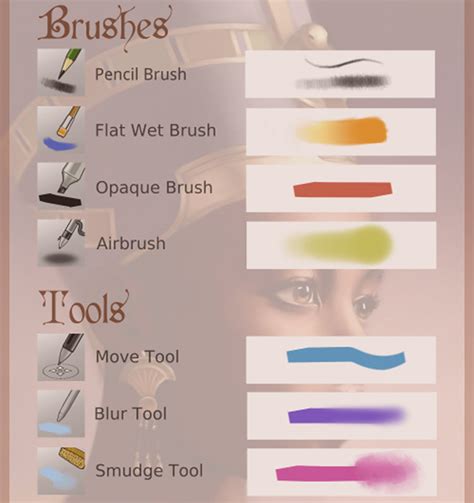
Krita is a powerful, free, and open-source application primarily designed for artists and illustrators. It offers a robust digital painting experience with a highly customizable brush engine and detailed brush reproduction.
Krita Pros:
- Exceptional Brush Engine: Features a vast array of brushes and an engine that allows for deep customization.
- Artist-Centric Tools: Ideal for digital painting, illustration, and concept art.
- Vector and Raster Capabilities: Supports both vector and raster graphics, offering flexibility.
Krita Cons:
- Limited Photo Editing Features: While powerful for drawing, it lacks some of the dedicated photo editing tools found in other applications.
Krita's interface is intuitive for digital artists, with features like wrap-around mode for seamless pattern creation and a powerful resource manager for importing tools. While not its primary focus, Krita can be used for basic photo manipulation. Its strength lies in its ability to replicate traditional art tools digitally, making it a favorite among illustrators and concept artists.
Krita Pricing: Free.
MyEdit: Fast AI Photo and Video Editing for Occasional Users
MyEdit offers a streamlined experience for users who need quick AI-powered photo and video edits, particularly for occasional use. It provides daily AI credits, making it an accessible option for those who don't require constant access to advanced features.
MyEdit Pros:
- Daily AI Credits: Offers a set of free AI credits each day, useful for occasional generative AI tasks.
- User-Friendly Interface: Designed for ease of use, making it simple to perform quick edits.
- AI Effects: Features a range of AI-powered effects for enhancing photos and videos.
MyEdit Cons:
- Limited for Professionals: May not offer the depth of features required for professional, intensive editing.
MyEdit's strength lies in its speed and accessibility. Users can quickly apply AI enhancements, remove backgrounds, or generate new content without a steep learning curve. The daily credit system allows for experimentation with AI features without immediate cost.
MyEdit Pricing: Free (3 AI credits daily); premium plans range from $10 to $18/month for additional AI credits and features.
Darktable: Totally Free RAW Photo Editing
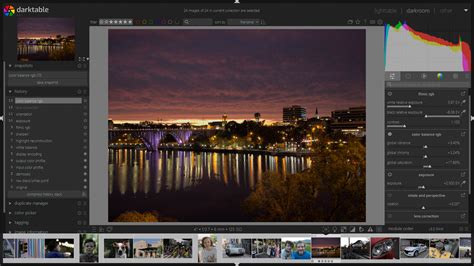
Darktable is a professional-grade, open-source photography workflow application that provides a completely free solution for editing RAW image files. It offers advanced tools for photographers, including sophisticated color correction, tethering capabilities, and batch exporting.
Darktable Pros:
- Professional RAW Editing: Offers powerful tools for non-destructive RAW image processing.
- Open Source and Free: Completely free to use with no hidden costs or subscriptions.
- Workflow Organization: Includes features for managing and organizing large photo libraries.
Darktable Cons:
- Steep Learning Curve: The professional feature set can be intimidating for beginners.
- Interface: The interface, while functional, may not be as polished as some commercial alternatives.
Darktable is designed for photographers who need precise control over their images. Its module-based system allows for a flexible and non-destructive editing process. Features like advanced color grading, lens correction, and noise reduction are standard. The ability to tether directly to a camera and manage large volumes of images makes it suitable for professional workflows.
Darktable Pricing: Free.
Choosing the Right Photoshop Alternative
The selection of the best Photoshop alternative hinges on individual needs and priorities. For those focused on creating visually appealing social media content and basic graphics, Canva offers an unparalleled combination of ease of use and extensive resources. Teams prioritizing brand consistency and affordable content creation will find Fluer to be an excellent choice.
For professionals and serious hobbyists seeking advanced photo retouching and a comprehensive suite of design tools, Affinity is a revolutionary free option that rivals even paid software. Pixlr provides an accessible entry point with its AI-driven features and familiar interface, making it ideal for quick edits and experimentation. Fotor simplifies complex tasks with its easy-to-use AI tools, perfect for casual users and content creators.
Artists and illustrators will find Krita to be an indispensable tool, offering a dedicated environment for digital painting. Occasional users who need fast AI enhancements for photos and videos will appreciate MyEdit's daily credits and straightforward interface. Finally, photographers working with RAW files who require professional-grade, free software will find Darktable to be an exceptionally powerful solution.
When evaluating these options, consider the complexity of your typical image file edits. Simple adjustments might be well-handled by free web-based tools, while developing files from scratch or performing intricate edits may necessitate the more robust features of desktop applications. Always check your computer's specifications, as demanding photo editing software can benefit from higher-powered hardware for smoother performance.