DaVinci Resolve stands as a pinnacle in the realm of multimedia editing software, offering a free, all-in-one solution that seamlessly integrates cutting, color correction, visual effects, and audio post-production within a singular, powerful workspace. This professional-grade platform is designed to empower creators, from aspiring enthusiasts to seasoned Hollywood professionals, with an unparalleled set of tools. At its core, DaVinci Resolve 20 is engineered to streamline complex tasks and amplify creative possibilities across every stage of post-production, making it an indispensable asset for anyone serious about video editing.
The All-Encompassing Workspace: Pages for Every Task
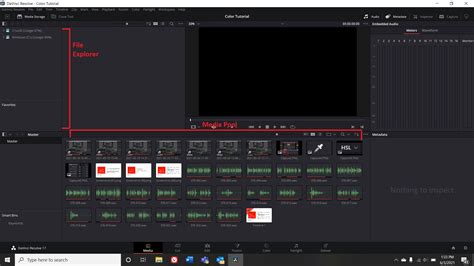
DaVinci Resolve's ingenious design is built around a modular layout, referred to as "pages," each dedicated to a specific aspect of the post-production workflow. This structure allows users to transition effortlessly between different tasks, fostering a fluid and efficient creative process.
Media and Deliver Pages: The Foundation of Your Project
The journey begins on the Media Page, a full-screen workspace meticulously designed for preparing footage. Here, users can import and organize media into bins, sync clips, and add crucial metadata before diving into the editing process. A vital feature for data integrity is the clone palette, ensuring an exact copy of every bit of data from camera media cards during backup. For professionals working with external hardware, the ability to stream video outputs to a remote client monitor via DeckLink is also available.
Complementing the Media Page is the Deliver Page, which offers comprehensive control over all encoding options and formats. This page houses a render queue, allowing for the efficient export of multiple jobs. DaVinci Resolve 20 enhances this process with AI-based smart caching and background rendering, crucial for maintaining performance when processing complex projects. Export options are highly customizable, featuring presets for common platforms and GPU-accelerated encoding for expedited delivery.
Cut and Edit Pages: Crafting Your Narrative
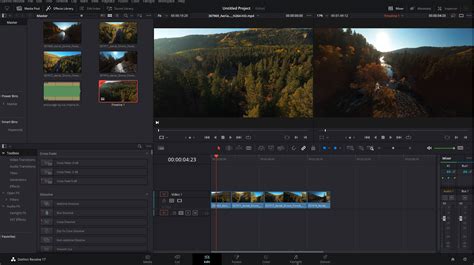
The Cut Page is a revolutionary interface specifically engineered for editors who demand speed and efficiency, particularly for projects with tight deadlines. Its streamlined design is fast to learn and optimized for rapid editing. Features such as Source Tape, Dual Timelines, and Smart Editing Tools accelerate the workflow, allowing users to spend more time editing and less time searching for commands. The Sync Bin and Source Overwrite tools are particularly valuable for quickly assembling multicam programs, making it ideal for documentaries, live broadcast editing, and replay scenarios. The "Multi Source" feature provides an incredibly fast way to view and edit multiple camera angles simultaneously, even while recording is in progress. Everything on the Cut Page is action-based, ensuring that every click yields a tangible result.
For more intricate control, the Edit Page serves as the world’s most advanced professional non-linear editor. Its familiar track layout, dual-monitor design, and traditional workflow make it accessible for new users while retaining the power required by seasoned professionals. This page is perfect for larger-scale projects such as feature films, television shows, streaming content, commercials, and documentaries. Key features include drag-and-drop editing, context-sensitive automatic trimming tools, fully customizable keyboard shortcuts for enhanced speed, and a rich library of hundreds of titles, transitions, and effects that can be easily added and animated. Comprehensive media management, organization, and timeline management tools are also integrated to facilitate a fast turnaround.
Fusion Page: Unleashing Visual Effects and Motion Graphics
The Fusion Page is where cinematic visual effects and broadcast-quality motion graphics come to life, directly within DaVinci Resolve. Fusion employs a node-based compositing interface, a workflow that often proves faster and more intuitive for creating sophisticated effects and animations compared to layer-based approaches. It provides hundreds of 2D and 3D tools, supporting detailed compositions and advanced motion graphics. For professionals working with advanced workflows, Fusion 20 introduces deep image compositing, multi-layer pipelining for OpenXR and PSD files, and support for VR 180. The node graph system offers immense flexibility for complex visual tasks. AI-enhanced tools are also deeply integrated here, with Magic Mask and Depth Map receiving significant updates.
Color Page: Hollywood's Premier Color Grading Suite
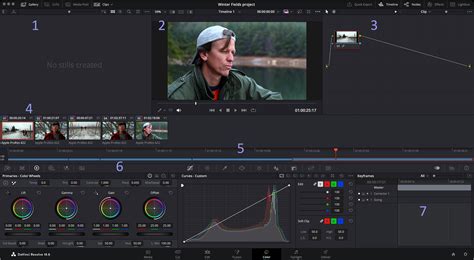
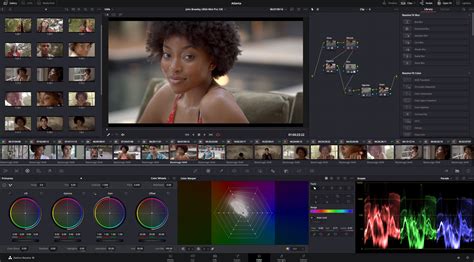
Renowned as Hollywood's most advanced color corrector, the Color Page has been instrumental in the color grading and finishing of countless high-end feature films and television shows. Despite its professional-grade capabilities, it's also designed to be approachable for new users. Primary control sliders, familiar to users of image editing software, make it easy to adjust fundamental aspects like contrast, temperature, midtone detail, and saturation. For those seeking deeper control, a node-based workflow allows for intricate, layered adjustments. DaVinci Resolve 20 enhances this with advanced HDR primary color grading tools, unlimited secondary corrections, power windows, and robust tracking. The Color Warper now includes Chroma Warp, and features like Magic Mask and Depth Map have seen substantial improvements. New AI-powered tools like auto color balancing and color matching further streamline the process, while the introduction of the Film Look Creator allows for the emulation of cinematic film looks by altering color shading, vibrance, hue, and luminance, and even adding film grain. UltraNR, a new AI-driven denoise mode within the spatial noise reduction palette, dramatically reduces digital noise while preserving image clarity.
Fairlight Page: Professional Audio Post-Production
The Fairlight Page is a fully integrated digital audio workstation (DAW) offering hundreds of professional tools for audio post-production. The Fairlight Audio Core supports up to 2,000 tracks simultaneously, with real-time effects, EQ, and dynamics processing. It provides sample-accurate editing tools, advanced ADR and Foley capabilities, and a suite of Fairlight FX, including reverb, de-esser, and hum remover. AI-powered tools like Voice Isolation and Music Remixer further enhance audio cleanup and manipulation. IntelliTrack AI tracking allows users to use video to control the Fairlight audio panner, and the system supports mixing and mastering in stereo, 5.1, 7.1, and even immersive 3D audio formats, including 5th order ambisonics. The introduction of AI Audio Assistant analyzes audio and intelligently creates a professional audio mix, streamlining a traditionally time-consuming task.
This Davinci Resolve Audio Mixing Trick will SAVE YOU HOURS | Davinci Resolve Fairlight Tutorial
The Power of AI Integration
A significant advancement in DaVinci Resolve 20 is the deep integration of advanced AI-powered tools, collectively driven by the DaVinci AI Neural Engine. This engine utilizes state-of-the-art deep neural networks and machine learning to power features that streamline complex post-production tasks and unlock new creative possibilities.
AI-Enhanced Workflow Streamlining
AI-driven scene cut detection and smart reframing are prime examples, automatically adjusting shots for different aspect ratios - a crucial feature for adapting content for various platforms. The Magic Mask leverages AI to track and isolate subjects in real-time, simplifying complex rotoscoping and masking tasks. AI-powered object removal, background replacement, and auto color balancing further reduce the manual effort required for intricate edits.
For video editing, AI IntelliScript can create timelines based on a text script, and AI Animated Subtitles can animate words as they are spoken. AI Multicam SmartSwitch assists in assembling multicam timelines by intelligently selecting camera angles based on speaker detection. The DaVinci Neural Engine also powers features like facial recognition, object detection, speed warp retiming, and super scale upscaling, all designed to simplify complex, repetitive, and time-consuming problems. The Blackmagic Proxy Generator App, powered by AI, automatically creates and manages proxies from camera originals, significantly accelerating editing workflows.
DaVinci Resolve Studio: Expanding Creative Horizons
While the free version of DaVinci Resolve offers an incredibly robust feature set, DaVinci Resolve Studio unlocks a wealth of additional capabilities, making it the ultimate solution for high-end professionals. The Studio version includes the DaVinci AI Neural Engine, dozens of additional Resolve FX, temporal and AI spatial noise reduction, text-based editing, film grain, optical blur, and much more.
Advanced AI and Effects in Studio
DaVinci Resolve Studio 20 introduces over 100 new features, with a strong emphasis on AI tools. These include Dialogue Match for matching audio characteristics between clips, Music Editor for automatically adjusting track length, Animated Subtitles, Beat Detectors, and enhanced IntelliScript. In Fusion, Studio users gain access to advanced multi-layer compositing workflows, including deep image compositing and a multipoly rotoscoping tool that displays all masks in a single list for faster, more accurate work. Studio v20 also brings major updates to Magic Mask and Depth Map.
Collaborative Workflows and Project Management
DaVinci Resolve Studio is uniquely positioned as the world’s only solution designed for true multi-user collaboration. Editors, assistants, colorists, VFX artists, and sound designers can all work simultaneously on the same project within a real-time, collaborative environment. Project libraries are built for both local and remote collaboration, supporting Blackmagic Cloud for cloud-based workflows. The Organizations app within Blackmagic Cloud allows larger companies to define a single organization, create groups or teams, and share projects efficiently. This eliminates the need for constant importing, exporting, project translation, and managing changes, fostering unparalleled efficiency in team-based post-production.
Hardware Integration: Enhancing the User Experience
Blackmagic Design offers a range of specialized hardware designed to complement DaVinci Resolve, further enhancing speed and creative control.
DaVinci Resolve Keyboards and Control Panels
The DaVinci Speed Editor is designed for significantly faster editing than using a mouse. It features dedicated edit function keys and a high-quality search dial with transport controls, allowing users to locate shots, mark in/out points, and perform live trimming simultaneously with both hands. The DaVinci Resolve Editor Keyboard offers a full QWERTY layout with color-coded shortcut keycaps for editors who spend extensive hours at their workstations.
For colorists, the DaVinci Resolve Micro Color Panel is a compact and portable option with high-quality trackballs and knobs for primary grading. The DaVinci Resolve Mini Panel provides additional controls and screens for accessing a broader range of palettes and tools, while the DaVinci Resolve Advanced Panel offers ultimate control, mapping every single feature and command to a dedicated button for high-end professional colorists.
Fairlight Hardware Consoles
Designed in collaboration with professional sound engineers, Fairlight hardware consoles act as a natural extension of the software. The Fairlight Desktop Console is a complete mixing console ideal for smaller studios or on-the-go work. For larger facilities, Fairlight Studio Console components can be integrated into custom desks, or pre-configured multi-bay consoles are available for dedicated audio suites and scoring stages. These consoles provide intuitive, task-based controls that adapt automatically, putting the necessary tools at the fingertips for faster, more creative work.
System Requirements and Accessibility
DaVinci Resolve is available for macOS, Windows, and Linux. While it is a professional-grade application, it can be used on budget PCs, albeit with certain limitations.
Minimum Specifications for the Free Version
For the free version to function well for basic editing, a system should ideally meet the minimum specifications: a decent multi-core CPU, at least 16GB of RAM (32GB is preferred), and a dedicated GPU with at least 2-4GB of VRAM. To optimize performance on less powerful systems, users can employ strategies such as optimizing media, using proxy files, lowering the timeline resolution, and enabling Render Cache. The free version supports virtually all 8-bit video formats at up to 60fps in resolutions as high as Ultra HD (3840 x 2160).
macOS Specifics
For macOS users, a current model Mac with Apple silicon is recommended. The system requires at least 8GB of system memory, increasing to 16GB when using Fusion. Mac OS X 14 or higher is necessary, along with a display resolution of at least 1440 x 900. It's important to note that the Mac App Store version of DaVinci Resolve Studio 20 may have limitations regarding external control panel compatibility and may not support all 3rd party OpenFX or VST plugins.
DaVinci Resolve vs. Alternatives
While DaVinci Resolve offers an unparalleled integrated experience, it's beneficial to understand its position relative to other popular editing software. Adobe Premiere Pro, for instance, excels in its integration with the Adobe Creative Cloud suite, which is a significant advantage for users heavily invested in After Effects, Photoshop, or Illustrator. However, DaVinci Resolve is particularly strong for filmmakers and editors who prefer an all-in-one solution for advanced features without the need to switch between multiple programs. Beyond DaVinci Resolve, other free video editors like VSDC Free Video Editor, Shotcut, and Movavi Video Editor Plus exist, but they generally do not offer the same depth of professional-grade features and integration as Resolve.
Embracing the Future of Post-Production
DaVinci Resolve 20, with its extensive AI integrations, powerful toolset, and collaborative capabilities, represents a significant leap forward in post-production technology. Whether you are downloading the free version to learn professional tools or investing in DaVinci Resolve Studio for its advanced features and collaborative power, it offers an accessible yet incredibly potent platform. The ability to perform editing, color correction, visual effects, motion graphics, and audio post-production all within a single application is a game-changer, allowing creators to focus on their artistic vision without being hindered by the limitations of multiple software packages. The continuous development, exemplified by the 100+ new features in version 20 and the ongoing advancements in AI, ensures that DaVinci Resolve remains at the forefront of the industry, empowering users to achieve Hollywood-level results.