In an era where visual storytelling reigns supreme, the ability to artfully arrange multiple images into a cohesive and compelling narrative has become an invaluable skill. Whether capturing the essence of a cherished memory, creating a vibrant social media post, or designing a personalized greeting, photo collages offer a unique way to express creativity and convey more than a single image ever could. Fortunately, the digital landscape is brimming with an array of applications designed to simplify and elevate this creative process. From intuitive mobile apps to robust desktop software, the best collage makers empower users of all skill levels to transform their collections of photos into personalized masterpieces.
The Power of the Grid: Essential Features of Collage Apps
At the heart of most collage applications lies the concept of a grid. These predefined structures provide a framework for arranging multiple images, ensuring a balanced and aesthetically pleasing composition. The variety of grid templates available within an app can significantly influence the final outcome, ranging from classic and symmetrical arrangements to more dynamic and unconventional layouts. Users often have the flexibility to adjust the spacing between photos, modify the border thickness and color, and even apply corner radius to create a softer look.
Beyond simple grids, advanced collage makers offer a wealth of features to enhance creative expression. The ability to import and export images in various formats, such as JPG and PNG, is crucial for maintaining quality and compatibility. Many apps also provide a suite of editing tools, allowing users to crop, resize, rotate, and apply filters to individual photos before or after they are placed within the collage. This level of control ensures that each element contributes perfectly to the overall vision.
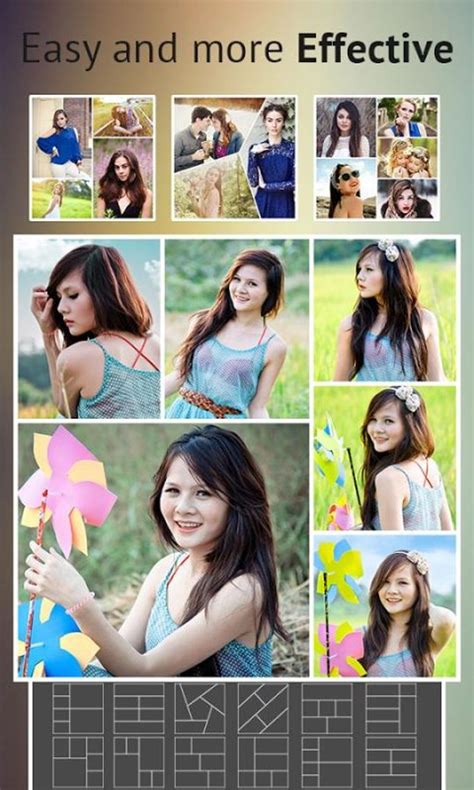
One of the most sought-after features in modern collage apps is the integration of AI-powered tools. These intelligent assistants can streamline the creative process in several ways. For instance, AI can automatically detect the focal point of an image, ensuring that the most important subject remains prominent within the collage. Magic Edit prompts, as seen in PicCollage, allow users to transform their photos by simply typing in desired changes, opening up new avenues for artistic exploration. Furthermore, AI can assist in generating unique collage templates, offering fresh and innovative ways to combine images.
Top Contenders for Your Collage Creation Needs
The market for collage-making applications is diverse, with options catering to every preference and technical skill level. For those seeking a straightforward and efficient experience, simplicity is key. Apps that present grid options immediately upon opening, like PhotoGrid and Pic Stitch, allow for rapid creation of basic collages. These applications often feature drag-and-drop functionality, making the process intuitive even for beginners.
PicCollage stands out as a versatile and feature-rich application, suitable for both everyday use and more ambitious design projects. It offers a broad spectrum of functionalities, including the ability to create photo collages, video collages, and even animated slideshows. Its extensive library of templates, stickers, fonts, and backgrounds, many of which are exclusive through collaborations with artists, allows for deep personalization. Features like cutouts, doodles, and the ability to add videos to collages transform static arrangements into dynamic visual stories. The AI-powered highlight detection and Magic Edit prompts further enhance its creative potential. PicCollage VIP offers an expanded feature set, removing watermarks and ads for a more seamless experience.
Canva has established itself as a powerhouse in the design world, and its collage-making capabilities are equally impressive. While not exclusively a collage app, Canva provides a user-friendly platform for creating a wide range of visual content, including stunning photo collages. Its strength lies in its vast library of templates, graphics, and stock photos, many of which are free. The drag-and-drop interface is intuitive, and the integrated photo editor allows for quick enhancements like filter application, contrast adjustment, and background removal (for Pro users). Canva's collaborative features also make it an excellent choice for group projects, enabling real-time co-creation from any device.
Adobe Express (formerly Adobe Spark) offers a similar creative playground to Canva, boasting a remarkable variety of templates and design options. While finding a dedicated "collage" section might require some navigation through broader categories, the platform's flexibility allows for the creation of collages for diverse purposes, from social media posts to phone wallpapers. Its web-based editor is powerful, granting users access to a wealth of creative tools.
For users who prioritize a seamless integration with their photo library, Google Photos offers a surprisingly capable, albeit basic, collage maker. It automatically generates collages from selected images, fitting them into a simple square grid with decent spacing. While it lacks advanced editing capabilities, its ease of use and direct link to photo storage make it a convenient option for quick creations.
How to Create Photo Collages Automatically with Google AI for Free 2025
Icecream Photo Editor is highlighted as a strong desktop option for PC users, offering a dedicated photo collage section with a range of template choices, including classic grid styles. It provides 100% control over the collage creation process, allowing users to easily swap photos, adjust frame borders, and even change their color. Beyond collage creation, it includes other useful editing tools for individual photos.
Fotor presents itself as another robust option, available as both a web-based program and downloadable software. Its strength lies in the sheer variety of its template library, which includes not only standard grids but also more unique shapes like heart-shaped collages. The drag-and-drop interface ensures ease of use, and users can fine-tune spacing, margins, and corner radius for a polished look.
Fotojet is a free, web-based editor that excels in offering users ultimate control over the positioning of individual photos within a collage. Its dedicated collage feature includes a helpful drop-down list for finding specific layout types, such as "2-3 photos" or "Big Photo Wrap." Once the basic layout is established, users can further enhance their creations with text, clipart, and background changes.
PhotoPad, despite its somewhat dated interface, offers surprisingly good collage functionality. Its pop-up box for collage creation presents a wealth of options, including pictographically represented preset layouts. Users can choose from various grid, circular, and freehand options, and then individually add photos to each section. The impressive range of filters, including retro effects, adds another layer of creative possibility.
Shape Collage offers a unique and engaging approach to collage creation. Users upload a series of photos, adjust parameters, and the software scatters them into an artistic heap, often resembling scattered Polaroids. While it takes some time to master its settings, the results can be quite astounding. However, the free version lacks editing capabilities for the final collage, requiring an upgrade for more control.
For smartphone users who want to combine images on the go, InCollage is lauded as a user-friendly and effective free collage maker. Its interface is intuitive, making it accessible even for those with no prior editing experience. It offers a good range of standard grid layouts, along with the ability to add graphics, stickers, and freestyle elements.
Pixlr is a well-regarded online photo editing service that includes a competent collage maker. Known for its user-friendly interface and comprehensive toolset, Pixlr allows users to create collages directly in their web browsers. Users can choose from different templates, adjust aspect ratios, spacing, color, and corner settings, with the final output saved in PNG format.
PicsArt is a highly versatile platform that extends beyond simple photo editing to encompass creative design and social media integration. Available as both a web-based tool and a mobile app, PicsArt offers a variety of collage templates that can be customized by adjusting spacing, borders, and background colors. While its collage features might not be as prominently highlighted as its broader editing capabilities, it provides a professional level of output, with multiple downloadable formats, though some require payment. The platform also encourages a community aspect, with users sharing their creations and engaging with each other's work.
Layout from Instagram is a streamlined mobile app specifically designed for effortless photo collage creation. Its straightforward interface and drag-and-drop functionality enable users to quickly combine multiple pictures into various layouts. Users can either select images from their device's gallery or capture new ones directly within the app. It offers a selection of adjustable preset grid templates.
Tips for Crafting the Perfect Collage
Regardless of the application chosen, a few guiding principles can elevate the quality of any photo collage:
- Plan Your Theme: Before diving into the creation process, decide on a central theme or concept for your collage. This will help guide your image selection and overall aesthetic.
- Select High-Quality Images: The clarity and sharpness of your final collage depend heavily on the resolution of the source images. Opt for high-resolution photos whenever possible.
- Resize Thoughtfully: While it's often necessary to crop or resize images to fit your chosen layout, be mindful of maintaining the integrity of the original content. Avoid excessive cropping that distorts the subject.
- Embrace Templates: Most collage makers provide a wide array of templates. Utilizing these can provide a strong starting point and ensure a balanced composition.
- Strive for Symmetry and Balance: Aim for a visually harmonious arrangement. Consider the placement of lighter and darker images, as well as the overall distribution of elements.
- Incorporate Text: Adding text, such as captions, quotes, dates, or titles, can provide context and enhance the narrative of your collage. Explore different font styles and sizes to match your theme.
- Experiment with Filters and Effects: Filters and effects can dramatically alter the mood and style of your collage. Play around with various options to find what best suits your vision.
- Maintain Consistency: While variety can be appealing, a degree of consistency in terms of color palette, filter usage, or overall style can result in a more unified and professional-looking collage.
Addressing Common Concerns
A frequent question regarding free collage makers is the presence of watermarks. While some applications may add watermarks to collages created with their free versions, many offer the option to save creations without them, often by viewing ads or through a premium subscription. It is always advisable to check the specific terms of service for the application you are using.
The accessibility of collage makers on mobile devices is another significant advantage. Most online picture collage makers can be readily accessed through a web browser on smartphones, offering convenience and flexibility. Similarly, the ability to add text and captions is a standard feature in the majority of free collage creators, allowing for personalized messaging.
When considering commercial use, it is crucial to review the terms of service of each collage creator. While many apps permit both personal and commercial use, understanding the licensing agreements and terms of use is essential to ensure compliance and avoid any legal issues.
The capability of collage software to handle videos alongside photos is also evolving. While traditional programs primarily focused on image editing, many modern applications now support the integration of video clips, enabling the creation of dynamic video collages and animated slideshows. This expansion of functionality allows for even richer and more engaging visual storytelling.
Ultimately, the best app for making collages is subjective and depends on individual needs and preferences. Whether you're a beginner looking for simplicity or an experienced designer seeking advanced tools, the diverse range of available applications ensures that a perfect fit exists for everyone. The journey of transforming individual photos into a cohesive narrative is an accessible and rewarding creative endeavor, made even more so by the powerful and user-friendly collage makers available today.