For digital artists, illustrators, and designers, the iPad has become an indispensable tool, particularly when paired with the powerful Procreate app. However, with a diverse range of iPad models available, selecting the right one can feel overwhelming. This comprehensive guide, drawing on the extensive experience of professional illustrator Iva, aims to demystify the process, helping you find the perfect iPad that meets your artistic needs and budget.
Understanding Procreate's Demands
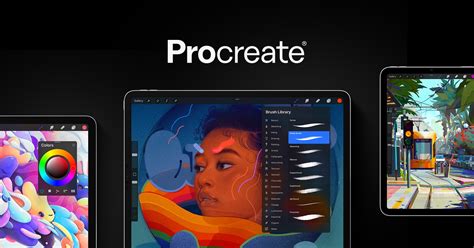
Procreate is an incredibly versatile and powerful digital art application, but its capabilities come with specific hardware requirements. To ensure a smooth and enjoyable creative experience, it's crucial to consider how Procreate utilizes an iPad's features. The app is designed to work seamlessly with the Apple Pencil, leveraging its pressure sensitivity, tilt, and other advanced features to mimic traditional art tools. Beyond the stylus, Procreate's performance is significantly influenced by the iPad's processor, RAM, screen size, and storage capacity. Understanding these elements is key to making an informed decision.
Compatibility: Which iPads Can Run Procreate?
Fortunately, Procreate is accessible on a wide array of iPad models, ensuring that many existing users can get started without needing a new device. Procreate works with all iPads released after 2015. This means that the only models that are not compatible with Procreate are the iPad Air 2, the iPad Mini 4, and the iPad 5th generation. If you already own an iPad that meets these criteria, the best iPad for Procreate is the one you have right now. Simply acquire an Apple Pencil and begin your creative journey. To check your iPad's model, navigate to Settings > General > About, where the model name will be listed.
Current iPad Models: A Comparative Overview
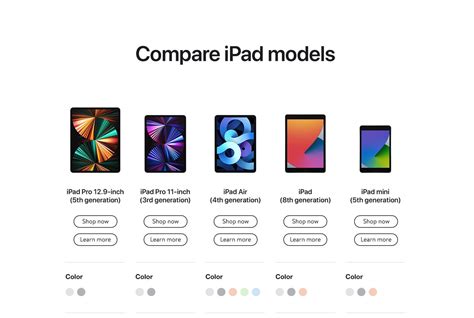
Apple offers several distinct iPad lines, each with its own strengths and price points. For Procreate users, the most relevant models are the iPad, iPad Air, and iPad Pro.
The Standard iPad: A Budget-Friendly Entry Point
The standard iPad, such as the 9th or 10th generation, represents the most accessible option for aspiring digital artists. These models offer a solid foundation for Procreate, particularly for beginners or those on a tight budget.
- iPad 9th Generation: This basic model is the least expensive and works with the 1st generation Apple Pencil. While storage options of 64GB are available, a 256GB capacity is highly recommended to avoid frequent file management. The 9th generation iPad, with its A13 Bionic chip, offers decent performance for casual use and sketching.
- iPad 10th Generation: A slightly more advanced option, the 10th generation iPad features a larger 10.9-inch screen and an A14 Bionic chip, providing improved performance over the 9th generation. It is compatible with the 1st generation Apple Pencil. While not as powerful as the Pro or Air models, it remains a strong contender for budget-conscious artists.
While these iPads are perfectly capable of running Procreate, they might become a limitation for professionals or those pushing the boundaries of complex artwork with numerous layers.
The iPad Air: The Sweet Spot for Performance and Value
The iPad Air series has consistently hit a sweet spot, offering a compelling blend of performance, features, and affordability that makes it a top recommendation for many Procreate users.
- iPad Air (M4 Chip): Released in March 2026, the M4-equipped iPad Air models represent a significant leap in performance. These iPads are fast, ensuring smooth operation within Procreate, and support the latest Apple Pencil features. Their pricing often positions them as a more accessible alternative to the Pro models, making them an excellent choice for artists who need robust performance without the premium price tag.
- Older iPad Air Models (M3, M2, M1, A14 Bionic): Previous generations of the iPad Air, such as the 4th generation (released in 2020 with a faster processor than pre-2021 iPad Pros) and the 5th generation (with the M1 chip), also provide excellent Procreate experiences. These models offer faster processors than older iPads and are compatible with the 2nd generation Apple Pencil. The iPad Air 4, in particular, is noted for its speed and often comes with higher storage and RAM than the standard iPad.
The iPad Air models are praised for their speed, smooth performance in Procreate, and support for the best Apple Pencil. They are often recommended as an easy option to "grow into" for artists who are expanding their digital art skills.
The iPad Pro: The Pinnacle of Power and Features
For artists who demand the absolute best in performance, display technology, and comfort for long working sessions, the iPad Pro remains the ultimate choice.
- iPad Pro (M5 Chip): The latest iPad Pro models, featuring the M5 chip (released October 2025), offer unparalleled processing power and improved battery life. These devices are built for demanding professional workflows, ensuring Procreate runs flawlessly even with the most complex projects.
- iPad Pro (M4 Chip): The M4-equipped iPad Pro models, released in March 2026, also deliver exceptional performance. These models, along with the M5 chip versions, come with enhanced battery life and are compatible with the latest Apple Pencil.
- iPad Pro (M2 Chip): The M2 chip models, available in 11-inch and 12.9-inch sizes, offer robust performance suitable for professional use. The 12.9-inch model, with its expansive screen real estate, is particularly favored for detailed work, typography, comics, and split-screen multitasking.
- iPad Pro (2021 Models): These powerful iPads, available in 11-inch and 12.9-inch sizes, feature M1 chips and offer substantial RAM options (8GB or 16GB), directly impacting the number of layers available in Procreate. The 2021 12.9-inch iPad Pro is lauded for its large display and the convenience of color history.
The iPad Pro is the ideal choice for artists who require more layers, superior display technology, and the most comfortable drawing experience for extended periods.
The Apple Pencil: An Essential Creative Partner
The Apple Pencil is not just an accessory; it's an integral part of the Procreate experience. Its ability to detect pressure and tilt allows for nuanced line work, shading, and expressive brush strokes, mimicking the feel of traditional art tools.
- Apple Pencil (1st Generation): Compatible with the standard iPad and older iPad Air models, this pencil charges via a Lightning port.
- Apple Pencil (2nd Generation): This generation offers magnetic charging by attaching to the side of compatible iPads (iPad Air, iPad Pro, and some newer standard iPads). It also features a programmable double-tap function, which can be customized for actions like switching to the eraser.
- Apple Pencil (USB-C): While this pencil offers features like Hover and low latency, it notably does not support pressure sensitivity. For Procreate, where pressure sensitivity is fundamental to brush control and artistic expression, the Apple Pencil (USB-C) is generally not recommended unless the user is prepared to forgo this critical feature.
When choosing an iPad, prioritize compatibility with the 2nd generation Apple Pencil if possible, as its charging convenience and enhanced features can significantly improve the workflow.
Key Specifications for Procreate Artists
Beyond model names, specific technical specifications play a crucial role in how well an iPad performs with Procreate.
Screen Size: Your Digital Canvas
The size of your iPad's screen directly impacts your workspace.
- 12.9-inch iPad Pro: Offers the largest canvas, ideal for detailed work, complex illustrations, comics, typography, and split-screen multitasking. This size provides ample room to see the entire artwork and a dedicated color history display, which is a significant convenience for many artists.
- 11-inch iPad Pro / 10.9-inch iPad Air/Standard iPad: These offer a more portable solution, still providing a good amount of drawing space. While they may require more zooming and panning for intricate details compared to the 12.9-inch model, they are still excellent for a wide range of artistic tasks.
- Smaller Screens (e.g., iPad Mini): While portable, smaller screens can feel restrictive for Procreate. Constant zooming and panning can become tedious, especially for detailed work.
The display's quality, including resolution and color accuracy, also contributes to the overall artistic experience. Higher resolutions mean sharper details and more vibrant artwork. Some users may also opt for a nano-texture display on certain iPad Pro models to reduce glare, though the display might feel less "draw-friendly" than the glass on Air or Pro models.
Memory (RAM): The Gateway to More Layers
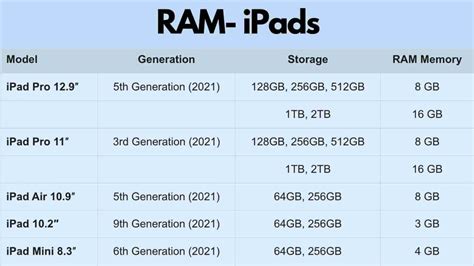
RAM is a critical factor for Procreate, as it directly determines the number of layers you can use in your artwork. More RAM means more layers, which is essential for complex projects involving numerous elements, clipping masks, texture layers, and separate lighting passes.
- 16GB RAM (iPad Pro 1TB+ models): Offers the highest layer counts, allowing for incredibly complex and detailed artworks. The 2021 iPad Pro with 16GB RAM could support up to 196 layers on a 2048x2048 canvas at 300 DPI, and even up to 444 layers with Procreate 5.2 beta.
- 8GB RAM (Most iPad Pros, some iPad Airs): Provides a substantial number of layers, sufficient for most professional workflows.
- Lower RAM (Standard iPads, older Airs): While still capable, these models will have fewer layers available, which might necessitate merging layers more frequently on larger or more intricate projects.
If layers are a top priority, choosing an iPad with more RAM should be a primary consideration.
Processor (Chip): The Engine of Performance
The processor (CPU and GPU) dictates the overall speed and responsiveness of the iPad. Newer chips, such as Apple's M-series (M1, M2, M4, M5) and the A-series Bionic chips, offer increasingly faster performance.
- M-Series Chips (M1, M2, M4, M5): Found in iPad Pro and newer iPad Air models, these chips provide exceptional speed and efficiency, ensuring Procreate runs smoothly even with demanding tasks.
- A-Series Bionic Chips (A14, A13): Present in standard iPads and older Air models, these chips offer good performance for everyday use and Procreate, though they may not match the raw power of the M-series for extremely complex workflows.
A faster processor means quicker app loading times, smoother brush strokes, faster rendering, and overall a more fluid creative process.
Storage Capacity: Room for Your Creations
While cloud storage solutions like iCloud can offload some of the burden, internal storage remains important for quick access to your files and for storing Procreate's time-lapse recordings of your artwork.
- 256GB and 512GB: Often considered the sweet spot for many artists, offering ample space for Procreate, your art files, and other applications.
- 1TB and 2TB (iPad Pro): Ideal for artists who create a vast amount of work, including animations and videos, or who prefer to keep all their projects readily accessible on the device.
- 64GB (Standard iPad): While functional, this capacity can be limiting, especially if you store photos, videos, or other large files on your iPad. Frequent management of storage space might be necessary.
Consider how much space Procreate and your other apps and media consume. For instance, Procreate itself can take up a significant amount of storage, and time-lapse recordings can add up.
Recommendations for Different Artist Needs
The Best iPad for Procreate Beginners
For those just starting with Procreate, the iPad (10th generation) or the iPad (9th generation) is an excellent and affordable choice. If budget allows, the iPad Air is a fantastic "grow into it" option, providing more power and longevity. The key is to start with a compatible iPad and an Apple Pencil to experience Procreate's core functionalities.
The Best All-Around iPad for Procreate
The iPad Air (M4) strikes an ideal balance between performance, features, and price. It offers a fast processor, ample RAM for most users, and supports the latest Apple Pencil, making it a highly capable device for both hobbyists and professionals.
The Best iPad for Professional Illustrators
For professionals who demand the utmost in performance, display quality, and layer capacity, the iPad Pro 12.9-inch (with M5 or M4 chip) is the ultimate tool. Its large screen, powerful processing, and extensive RAM options ensure that no creative endeavor is limited by hardware. The 11-inch iPad Pro is also an excellent, more portable professional option.
Essential iPad Accessories for Procreate
Beyond the iPad and Apple Pencil, a few accessories can further enhance your Procreate experience.
- Protective Case: Essential for safeguarding your investment. Look for cases that offer good protection and, if desired, a stable stand for drawing or viewing. Some cases also have integrated Apple Pencil holders.
- Screen Protector: While not universally used, a screen protector can prevent scratches and damage. Some offer a "paper-like" texture, which some artists prefer for a more tactile drawing feel. Ensure it's compatible with Apple Pencil.
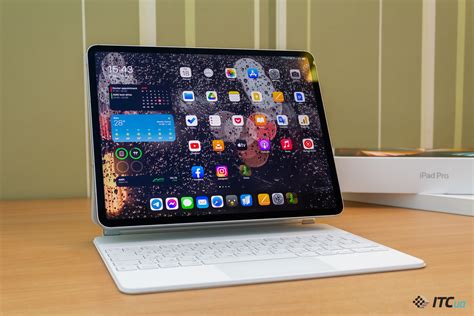
- Keyboard Case (Optional): For artists who also use their iPad for writing, note-taking, or other productivity tasks, a keyboard case like the Apple Magic Keyboard can be a valuable addition, though it significantly increases the cost.
Tips for Maximizing Your Procreate Experience
- Custom Canvas: Create custom canvas presets with dimensions, resolution (300 DPI is recommended for print), and color profiles suited to your artwork's intended use.
- Brush Customization: Explore Procreate's vast brush library and learn to customize existing brushes or import new ones to match your unique style.
- Master Layers: Utilize the Layers Panel effectively to organize your artwork, experiment with different effects, and make edits without affecting other parts of your drawing.
- Gestures and Shortcuts: Learn Procreate's quick gestures and shortcuts to speed up your workflow and reduce reliance on menus.
- Practice Regularly: Consistent practice is key to mastering any digital art tool. Utilize the vast resources available on platforms like YouTube and Skillshare to learn new techniques.
By carefully considering your artistic needs, budget, and the specific capabilities of each iPad model, you can confidently choose the best iPad for Procreate and unlock your full creative potential.