Krita, a powerful and free open-source digital painting application, offers a robust set of default brushes. However, the true magic of digital art often lies in the ability to customize and expand one's toolkit. For artists seeking to elevate their digital painting workflow, exploring specialized brush packs can be transformative. This guide delves into some of the most highly regarded Krita brush sets, offering insights into their unique characteristics, intended uses, and how they can enhance your creative process.
The Foundation: David Revoy's Brush Kits
Among the most celebrated contributors to the Krita community is artist David Revoy. His dedication to the platform and his commitment to open-source principles have resulted in several invaluable brush packs. Revoy's brushes are not only high-quality but are also frequently updated to align with the latest Krita versions, ensuring compatibility and introducing new features.
Revoy's "Brush Duo" and Beyond: Sketching and Line Art Essentials
Revoy's journey into brush creation for Krita began with a focus on practical, everyday tools. He meticulously cleaned up and refined his personal brush presets, aiming for seamless integration with Krita's default set.
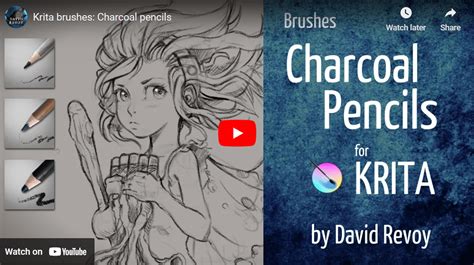
One of his early favorites is a sketching preset. While not aiming for hyperrealism, its pressure curve and the way it gradually builds up lines make it exceptionally well-suited for initial sketching and line art. This preset features a subtle grain and a soft rendering, offering more expression than earlier default options. It provides a distinct digital and plastic feeling, akin to drawing with a perfect pencil on smooth bristol paper. This tool is particularly effective for reducing noise in crosshatching, often replacing it with thin gray tones.
During the storyboard creation for "episode 30," Revoy employed a large, heavily textured pencil brush. This choice deliberately steered away from intricate details, working wonders when paired with a bright gray color. Its purpose was to streamline the process of painting over, smoothing, and adding details, while also producing very soft line-arts.
Another frequently used brush from Revoy's collection is characterized by its subtle glazing capabilities at low opacity, yet it can also deliver expressive strokes at full pressure. For "episode 30," he developed a preset to achieve a rendering style that was less smooth than in previous episodes, using it for the majority of the episode's artwork.
Hardpainting Brushes: Embracing Texture and Expressive Strokes
Revoy's "Hardpainting" family of brushes represents a deliberate departure from his usual soft shading techniques. These brushes are designed to offer a more textured and less forgiving painting experience, hence the codename.
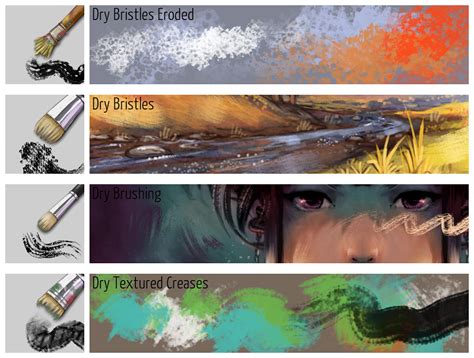
The first in this series is a detail brush. It shares similarities with an inking preset from a year prior, featuring a subtle "ghosting" in its strokes that adds an interesting, less digital, and more organic quality to lines. This preset is engineered to reveal the canvas texture during detail work, performing optimally with bright-on-dark strokes.
A distinct "knife" brush within this set adds highly expressive, hard-edged, and somewhat "dirty" strokes. It excels at simulating the effect of a loaded knife hitting the canvas for highlights or for flattening areas without achieving an overly digital or flat appearance.
Another brush from the Hardpainting set is designed to ease the modeling of volumes and the smoothing of softer edges. It behaves much like a soft brush but possesses a slightly flat and angular tip. However, overuse of this brush can lead to less desirable results, such as wobbly volumes on hard surfaces or glossy materials.
Textured Strokes and Advanced Techniques
Working with textured brushes often necessitates a careful approach to opacity. While adjusting colors can be challenging without opacity control, some brushes are designed to work effectively by allowing the texture to show through.
One such brush is ideal for post-fix details and adding subtle textural elements, rather than blocking out main volumes. It allows for a translucent texture, which is crucial for certain effects.
For breaking hard edges, a brush with some mixing capabilities significantly simplifies the process.
A brush preset that adds a fine grain to the artwork, simulating the rub of a small brush on canvas, is also invaluable. A larger version of this effect is achieved with a separate preset, as Krita doesn't natively support scaling texture size concurrently with brush diameter. This necessitates the use of a secondary preset for larger textural applications.
Tilt-Dynamic Brushes: Advanced Control for Experienced Artists
Revoy's personal favorite at the moment is a rake brush with tilt dynamic capabilities. This brush requires a drawing tablet that supports tilt input, a feature not universally found on all devices. It's used for quickly cutting shapes and laying down the initial layers of a painting. This rake brush can introduce noise and a scratch-like texture to the canvas, useful for adding visual complexity or "confusion" to an area without resorting to blur effects. The eyes naturally avoid such chaotic areas, especially when combined with brushes that add fine dots or rub the canvas.
Another brush in Revoy's collection adds a large, coarse texture, mimicking a thick impasto application where some paint remains caught in the canvas fibers after excess has been removed. This brush is excellent for establishing a base layer on a new canvas or for hiding overly flat areas during the post-fix stage.
Specialized Brushes for Specific Needs
Krita's flexibility allows for the creation of highly specialized brushes for unique workflows.
For instance, Revoy developed a brush to address issues with thin line-art that proved problematic for Krita's colorize mask feature. This preset allows for quick drawing of thin, aliased marker lines, featuring a thumbnail icon reminiscent of the colorize-mask brush in the Krita toolbar.
During the illustration of a medical paper, a dashed line preset was created. This brush works exceptionally well with Krita's shape tools and offers a level of texture that vector-based dashed lines cannot replicate.
A unique brush generates a multitude of stars, ideal for night scenes. However, it's often necessary to reduce the density with an eraser to avoid an overly saturated starfield. When used with a large diameter and a slight blur, this brush can also effectively simulate snow.
Making BRUSHES in KRITA 2022. Part 1
Expanding Your Krita Brush Library: Other Notable Packs
While David Revoy's contributions are paramount, the Krita community is rich with other talented artists who have shared their brush creations.
Hushcoil Brushes: Unique and Detailed Textures
The Hushcoil Brushes offer a unique and highly detailed collection. Often found on Gumroad, these brushes are a testament to the diverse artistic styles available within the Krita ecosystem.
GDquest's Freemium Alternative: Game Art Brushes
The GDquest team provides a freemium alternative to their paid game art brush pack. Their current bundle, version 7.0, is available for free download and offers a solid foundation for various digital art styles, particularly those geared towards game development and concept art. These brushes are designed to mimic traditional cartooning tools, making them suitable for comic and graphic novel creation. All brushes in this pack are optimized for 300 DPI, ensuring high-definition output for both print and digital screens.
Radian1's Painting-Focused Set
User "radian1" has released a brush set on DeviantArt that is primarily geared towards painting. While direct download from DeviantArt may not be as straightforward, the pack contains a wealth of useful tools. This set requires Krita version 3.2 or later.
Bristle Brush Emulation
For artists who prefer the feel of traditional bristle brushes, a specific set emulates these real-world tools. Originally designed for Krita 2.9, these brushes are compatible with later versions. They are particularly useful for blending opaque colors and achieving realistic color mixing effects.
GrindGod's Extensive Pack
DeviantArt creator GrindGod offers a substantial brush pack, with demos included, that presents a massive download size. Their version 5 set, compatible with Krita 2.9+, includes all previous brushes with updates and new additions. This pack boasts a diverse range of styles, from dabbed/splatter brushes to more refined options, providing a comprehensive toolkit for various artistic needs. The brushes in this pack were designed with a smaller size range (30px-100px) in mind.
Raghavendra Kamath's Versatile Brushes
Mumbai illustrator Raghavendra Kamath published a brush pack that has been available for a considerable time, dating back to Krita 2.0. Despite their age, these brushes remain surprisingly versatile. Released as open-source on GitHub, they are best downloaded from this platform. While compatible with older Krita versions, testing is recommended for versions 2.8 and below. These brushes are designed for pixel-perfect strokes, allowing for resizing without loss of quality.
Nylnook's Traditional and Digital Blend
The Nylnook brush pack is highly regarded for its ability to mimic both traditional pen-and-paper and digital art styles. The full pack is available for free on GitLab (accessible via Framagit). Version 2 of Nylnook's set addresses bugs and introduces new brushes. Detailed information, techniques, and installation instructions are available on the Framagit page and the original blog post. This pack is considered excellent for beginners, though it may require some time to master.
Aliciane's (Elésiane Huve) Derived Set
User Aliciane (Elésiane Huve) created a smaller, simpler set of brushes derived from David Revoy's pack, with notable modifications. These brushes work with Krita 2.8 and higher. Unique additions include smudge brushes and a custom move tool.
Aldys Brush Pack: Simplicity and Accessibility
The Aldys Brush Pack has been available since Krita 2.3.1. While many of its brushes are basic, their simplicity makes them a worthwhile option for those who find other packs too complex. The primary drawback is their outdated nature.
The Philosophy of Sharing: Open Source and Community Support
David Revoy's decision to make his brush packs freely available underscores a commitment to the open-source ethos. He believes in an internet that fosters sharing and collaboration over restrictive paywalls. While acknowledging the potential revenue from selling his brushes, he prioritizes accessibility. This philosophy extends to Krita itself, a powerful tool developed through community effort.
Revoy's brushes are licensed under the Creative Commons Attribution 4.0 license. This requires attribution to "David Revoy, www.davidrevoy.com" when redistributing, commercializing, or modifying the brush files. However, attribution is not necessary for personal use, artwork creation, or for taking screenshots and screen recordings while using the brushes.
This spirit of sharing benefits the entire Krita community, allowing artists of all levels to access high-quality tools and learn from the creations of experienced professionals. Supporting artists like David Revoy, and indeed Krita itself, through donations or patronage is a way to ensure the continued development and availability of these valuable resources.
The landscape of digital art tools is constantly evolving, and Krita's brush system is no exception. The availability of these diverse brush packs, from the meticulously crafted sets of David Revoy to the specialized offerings of other community members, empowers artists to find the perfect tools for their unique styles and projects. Experimentation is key, and by exploring these various options, digital painters can unlock new creative possibilities and refine their artistic expression within the Krita environment.