DaVinci Resolve has undergone a remarkable transformation from its origins as a specialized, high-end color grading tool to its current status as a comprehensive, all-in-one video editing suite. This evolution has made professional-grade post-production accessible to a wider audience, with Blackmagic Design offering a robust free version alongside its more feature-rich Studio counterpart. Understanding the distinctions between these two offerings, particularly concerning their capabilities and pricing, is crucial for creators seeking to optimize their workflow and achieve professional results.
The Evolution of DaVinci Resolve: From Hollywood Staple to All-in-One Suite
The journey of DaVinci Resolve began as an exclusive tool for Hollywood professionals, renowned for its unparalleled color grading and correction capabilities. Its initial cost was prohibitive, limiting its use to the highest echelons of the film industry. This changed significantly in 2009 when Blackmagic Design acquired DaVinci Systems. Under new ownership, the software was meticulously developed into a full-fledged video editing suite, integrating editing, visual effects, motion graphics, and audio post-production into a single, cohesive application.
A pivotal moment in this evolution was the introduction of the DaVinci Resolve free version. Prior to this, access to such advanced tools came with a substantial financial commitment. The free version democratized access, allowing anyone to download and utilize a powerful editing platform. This version provides access to lite versions of key modules like Fusion for special effects and Fairlight for audio editing, all without trial periods or watermarks on exported projects. This move by Blackmagic Design not only broadened the user base but also fostered a community of creators who could learn and grow with the software.
As DaVinci Resolve continued to mature, Blackmagic Design consistently introduced new features and enhancements. The addition of the Cut Page streamlined the editing process for faster workflows, while the integration of AI-based tools, such as the DaVinci Neural Engine, further revolutionized tasks like object tracking, facial recognition, and smart reframing. Support for emerging hardware and evolving industry standards has also been a constant, ensuring Resolve remains at the forefront of post-production technology.
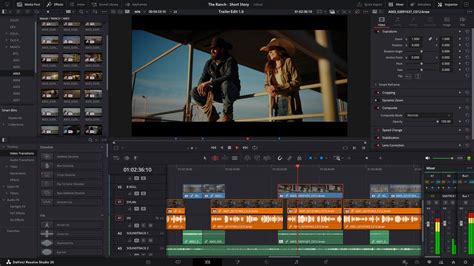
DaVinci Resolve Free vs. Studio: Key Differences and Pricing
The core distinction between DaVinci Resolve and DaVinci Resolve Studio lies in the depth and breadth of features available. While the free version is remarkably capable and offers a vast array of professional tools, the Studio version unlocks a higher tier of functionality, catering to more demanding professional workflows.
Pricing Structure: A One-Time Investment
One of the most attractive aspects of DaVinci Resolve Studio is its pricing model. Unlike many contemporary software suites that operate on a subscription basis, DaVinci Resolve Studio is available for a one-time purchase of $295. This fee grants users a perpetual license, which includes all future updates to the software at no additional cost. This approach offers significant long-term value for creators, eliminating recurring expenses and providing a predictable budget for software investment.
Resolution and Frame Rate Capabilities
The free version of DaVinci Resolve is more than sufficient for a majority of content creators, allowing exports in resolutions up to 4K UHD at a maximum of 60 frames per second. This is ample for online content, broadcast television, and many professional projects.
However, for high-end production work, such as feature films, IMAX, or specialized visual effects, the DaVinci Resolve Studio version supports significantly higher resolutions, scaling up to an astonishing 32K, and frame rates of up to 120fps. This expanded capability is essential for projects demanding the utmost in visual fidelity and smoothness, especially when dealing with high-speed motion or advanced cinematic requirements. The Studio version also provides advanced HDR delivery options, crucial for mastering content for modern display technologies.
Performance Enhancements: Harnessing the Power of GPUs
Performance is a critical consideration for any video editing software, and DaVinci Resolve Studio offers distinct advantages in this area. While both versions utilize GPU acceleration for processing, the Studio version can leverage multiple GPUs simultaneously. This multi-GPU support can lead to substantial performance gains, particularly during demanding tasks such as rendering complex timelines, color grading intricate scenes, or processing high-resolution footage.
Furthermore, DaVinci Resolve Studio includes hardware-accelerated encoding and decoding for popular codecs like H.264 and H.265. This feature significantly speeds up the import of these file types and dramatically reduces rendering times when exporting projects, a crucial advantage for professionals working under tight deadlines.
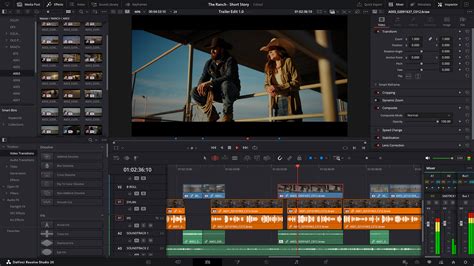
Advanced Noise Reduction
Noise reduction is a vital tool for cleaning up footage, especially when shooting in low-light conditions or at high ISO settings. DaVinci Resolve Studio offers some of the most powerful and sophisticated built-in noise reduction tools available. It includes advanced temporal noise reduction, which analyzes changes between frames to reduce noise, and spatial noise reduction, which examines neighboring pixels to achieve a cleaner image. These tools can be used independently or in conjunction, offering granular control over noise removal without the need for third-party plugins. The free version lacks these advanced noise reduction capabilities.
The DaVinci Neural Engine and AI-Powered Features
The DaVinci Neural Engine is a core component of the Studio version, leveraging advanced AI and machine learning to power a suite of intelligent features. These tools are designed to automate complex tasks, speed up workflows, and enhance creative possibilities.
Key AI-powered features exclusive to DaVinci Resolve Studio include:
- IntelliTrack AI: This technology can track motion within a scene, enabling automatic object tracking for effects and even automatic audio panning.
- Face Refinement: This tool offers sophisticated options for smoothing skin tones, enhancing facial features, and performing beauty touch-ups with remarkable subtlety and control.
- Magic Mask: This allows for incredibly precise and efficient isolation of subjects or objects within a frame, simplifying complex masking and rotoscoping tasks.
- Object Removal: The Neural Engine facilitates the removal of unwanted objects from footage, seamlessly integrating the background.
- Scene Cut Detection: This AI feature can automatically analyze footage and identify individual scene cuts, streamlining the assembly of rough edits.
- Speed Warp Retiming: This advanced optical flow technology allows for incredibly smooth and realistic slow-motion effects, even when dramatically altering the speed of footage.
- Facial Recognition: This feature automatically analyzes footage and organizes clips into bins based on the individuals present, greatly simplifying media management for projects with many characters.
5 creative ways to use the Magic Mask in DaVinci Resolve and how to apply the Magic Mask
Exclusive Resolve FX and Creative Tools
DaVinci Resolve Studio unlocks a vast library of powerful visual effects, known as Resolve FX, that are not available in the free version. These include a wide range of cinematic effects designed to add polish and stylistic flair to projects.
Examples of exclusive Resolve FX and creative tools include:
- Film Grain: Adds authentic film grain for a classic cinematic look.
- Lens Flares and Reflections: Provides realistic lens artifacts for enhanced visual depth.
- Analog Damage: Emulates the aesthetic of vintage film degradation for a retro feel.
- Motion Blur and Motion Trails: Adds realistic motion blur to moving objects and creates compelling motion trails.
- Automatic Dirt Removal and Dust Buster: Tools for cleaning up artifacts from scanned film or imperfect footage.
- Stylize and Pencil Sketch: Effects that transform footage into artistic styles.
- Chromatic Aberration and Chromatic Adaptation: Tools for correcting or emulating lens distortions.
- Lens Distortion Correction: Automatically corrects for common lens distortions like barrel or pincushion effects.
- Depth Map: Analyzes an image to create a depth matte, allowing for differential grading of foreground and background elements.
- Film Look Creator: A comprehensive set of tools to emulate various film stocks, color shading, vibrance, and luminance.
- Patch Replacer and Object Removal: Advanced tools for cloning, painting out unwanted elements, or removing entire objects from a scene.
Advanced Color Grading Features
While the free version offers an exceptional suite of color grading tools, DaVinci Resolve Studio extends these capabilities with advanced features essential for professional colorists.
These include:
- HDR Grading Capabilities: Studio supports full High Dynamic Range (HDR) grading, including Dolby Vision and HDR10+ workflows, along with dedicated HDR scopes for accurate monitoring of ST.2084 and HLG images.
- Remote Grading: Enables colorists to collaborate with clients or other colorists remotely, facilitating real-time feedback and adjustments over the internet.
- Stereoscopic 3D Grading: Provides specialized tools for correcting alignment errors and color issues in stereoscopic 3D footage, offering greater control over depth perception.
- DCTL Import: Allows for the import and application of DaVinci Color Transform Language (DCTL) scripts, offering advanced image manipulation capabilities akin to LUTs or plugins.
- Re-light Tool: Enables the addition of virtual light sources to scenes, allowing for creative relighting after the footage has been shot.
Enhanced Audio Post-Production in Fairlight
The Fairlight page, DaVinci Resolve's integrated Digital Audio Workstation (DAW), also benefits from Studio-exclusive features. While the free version provides robust audio editing tools, the Studio version expands upon this with professional-grade immersive audio support and advanced processing.
Key Fairlight enhancements in Studio include:
- Dolby Atmos and Auro-3D Support: Full integration for mixing and mastering immersive 3D audio formats, crucial for modern cinema and high-end broadcast.
- Voice Isolation: An AI-powered tool that intelligently separates dialogue from background noise, providing cleaner vocal tracks.
- Music Remixer FX: An AI tool that can intelligently remix music tracks, adjusting levels and elements for better integration into a mix.
- Advanced Monitoring: Support for B-chain audio monitoring and higher sample rates (up to 192 kHz) for professional studio environments.
Fusion Page Advancements
The Fusion page, DaVinci Resolve's node-based compositing and motion graphics environment, also sees enhancements in the Studio version, though the differences are less pronounced than in other areas.
Studio-exclusive Fusion features include:
- Fusion Camera Tracker: More advanced camera tracking capabilities for integrating 3D elements into live-action footage.
- Fusion VR Toolset: Tools specifically designed for working with virtual reality content.
- External Scripting Support: Enables automation and custom workflows through Python, LUA, and JavaScript.
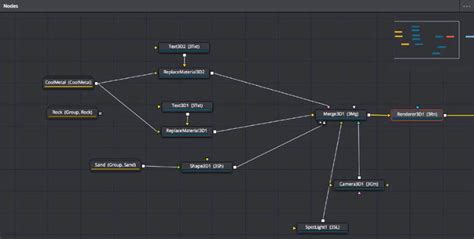
The Role of Video Templates in DaVinci Resolve
Regardless of whether you are using the free or Studio version, DaVinci Resolveâs ability to utilize video templates can significantly accelerate your editing workflow and elevate the professional polish of your projects. Templates are pre-designed files that provide ready-made animations, titles, transitions, and effects, allowing users to quickly implement sophisticated visual elements without needing to create them from scratch.
A particularly exciting development for users is the Autograph 2025 live link feature, which facilitates direct creation of templates within DaVinci Resolve by animators. This integration streamlines the process of developing custom assets.
A vast array of video templates can be found from various sources, including platforms like Artlist, featuring designs from international artists. These templates can add stunning titles with cinematic animations, create dynamic logo reveals, and provide social media-ready graphics. Transition templates are also invaluable for smoothly connecting shots and scenes, adding a professional flow to your edits.
Which Version is Right for You?
The decision between DaVinci Resolve and DaVinci Resolve Studio ultimately depends on your individual needs, workflow, and budget.
DaVinci Resolve (Free Version) is ideal for:
- Beginners and aspiring video editors.
- Content creators for platforms like YouTube, Instagram, and TikTok.
- Educators and students learning video post-production.
- Hobbyists and independent filmmakers working on personal projects.
- Professionals who primarily require editing, basic color correction, and standard export resolutions (up to 4K).
- Those who want to explore the full capabilities of a professional NLE without any financial commitment.
The free version offers an astonishing amount of power and functionality, making it possible to create high-quality, professional-looking videos without spending a dime. Its limitations, such as the 4K export cap and the absence of advanced AI tools or specific Resolve FX, are often not a barrier for many users.
DaVinci Resolve Studio is recommended for:
- Professional editors, colorists, and post-production houses.
- Filmmakers working on feature films, documentaries, or high-end commercials.
- Visual effects artists requiring advanced tools and GPU acceleration.
- Broadcasters and those working with high-resolution or HDR content.
- Users who frequently work with specific codecs (like 10-bit formats) or require advanced noise reduction.
- Anyone who can benefit from the significant time savings offered by AI-powered features and faster rendering.
- Those who require advanced audio mixing capabilities, such as Dolby Atmos.
The $295 one-time fee for DaVinci Resolve Studio is an investment that pays for itself through increased efficiency, access to advanced creative tools, and the ability to handle more demanding professional projects. If you find yourself consistently encountering limitations in the free version, or if your work demands the highest possible quality and efficiency, the Studio version is a logical and worthwhile upgrade. The generous feature set in the free version allows users to thoroughly explore the software and determine if the additional capabilities of the Studio version are truly necessary for their evolving needs.