In the world of digital art and photo manipulation, the mouse is more than just a pointing device; it's an extension of the artist's hand, a critical tool that can significantly impact workflow, precision, and comfort. For professionals and hobbyists alike who spend countless hours in applications like Adobe Photoshop, selecting the right mouse can be the difference between a fluid, intuitive editing experience and a frustrating, fatiguing one. This guide delves into the essential features, types, and top recommendations for mice that excel in creative applications, ensuring your digital canvas is as responsive as your imagination.
The Importance of a Dedicated Editing Mouse
While any mouse can technically navigate Photoshop, a dedicated editing mouse offers distinct advantages. The core of photo and video editing relies on precision and control, where every click, drag, and scroll motion accumulates over extended work sessions. Investing in a high-quality mouse, therefore, is not merely an expense but a strategic decision that can dramatically enhance your productivity and reduce physical strain. Even entry-level modern mice often boast reliable pointer tracking and wireless convenience, but for demanding tasks, specific features become paramount.
The selection of a mouse is deeply personal, influenced by individual hand shapes, grip styles, and desk setups. What feels comfortable and intuitive for one user might not for another. However, by understanding the key considerations and exploring the leading options, you can make an informed choice that best suits your needs. This guide aims to provide a comprehensive overview, focusing on performance, comfort, and customization - the pillars of an effective editing tool.
Key Features to Consider for Photoshop
When selecting a mouse for Photoshop, several features stand out as crucial for an optimized editing experience:
Comfort and Ergonomics
This is arguably the most critical factor, especially for extended editing sessions. A mouse that fits your hand naturally and allows for a comfortable grip can prevent aches, pains, and repetitive strain injuries. Ergonomic designs often incorporate features like generous thumb rests and shapes that promote a more neutral wrist posture, reducing strain. Consider whether you prefer a contoured design for right-handed use or an ambidextrous or left-handed option if needed.
- Hand Size and Grip Style: Mice come in various sizes and shapes. Some are designed for smaller hands, offering a more compact and nimble feel, while others are larger and more substantial, providing ample support for bigger hands. Grip styles (palm, claw, fingertip) also influence what feels most comfortable.
- Vertical Mice: For those experiencing wrist discomfort, vertical mice offer a "handshake" position that can alleviate pressure and promote better posture.
Precision and Sensor Technology
Accurate cursor tracking is non-negotiable for detailed photo editing. The sensor technology dictates how precisely the mouse translates physical movement to on-screen actions.
- DPI (Dots Per Inch): This measures a mouse's sensitivity. A higher DPI allows the cursor to travel further across the screen with smaller hand movements, which can be beneficial for quick navigation. Conversely, a lower DPI offers finer control for detailed work. Many modern mice offer adjustable DPI settings, allowing users to switch between modes for different tasks.
- Optical vs. Laser: Optical mice use an LED to track movement and are generally reliable on most surfaces. Laser mice, while often offering higher precision and the ability to track on more varied surfaces (including glass), can sometimes be overly sensitive or exhibit jitter on certain textures.
Programmable Buttons and Customization
The ability to customize buttons is a game-changer for Photoshop workflows. Assigning frequently used tools, shortcuts, or macros to mouse buttons can dramatically speed up your editing process, reducing the need to constantly reach for the keyboard.
- Software Support: Most customizable mice come with accompanying software (e.g., Logitech's Logi Options+). This software allows users to remap buttons, adjust sensitivity, and even set application-specific profiles, so your mouse behaves differently in Photoshop compared to other applications.
- Thumb Wheel: A secondary scroll wheel, typically operated by the thumb, can be invaluable for horizontal scrolling in large documents or timelines, adjusting brush sizes in Photoshop, or scrubbing through video edits.
Connectivity
The choice between wired and wireless mice involves trade-offs.
- Wired Mice: Generally offer a more stable connection and do not require batteries or charging. However, they introduce cable clutter.
- Wireless Mice: Provide freedom of movement and a cleaner desk setup. Modern wireless technology is highly reliable, with options for both Bluetooth and 2.4 GHz USB receivers (dongles).
- Bluetooth: Offers versatility, connecting directly to devices without a dongle, which is convenient for laptops with limited USB ports.
- 2.4 GHz USB Receiver (Dongle): Often provides a more stable and lower-latency connection than Bluetooth, though it occupies a USB port. Some users prefer dongles that can be stored within the mouse when not in use.
- Battery Life: For wireless mice, long battery life, whether via replaceable batteries or rechargeable cells, is essential to avoid interruption during critical editing tasks.
Top Mouse Recommendations for Photoshop
Based on extensive research and testing, several mice consistently emerge as top contenders for photo and video editing.
Top Pick: Logitech M720 Triathlon Multi-Device
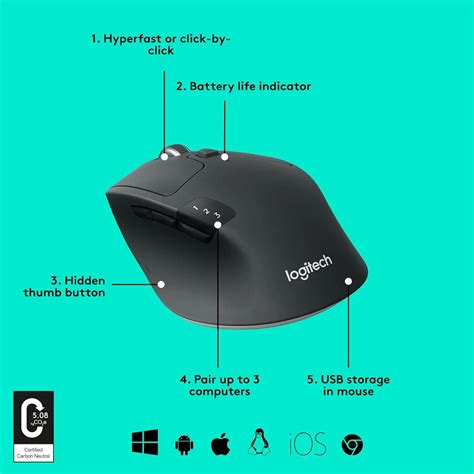
The Logitech M720 Triathlon Multi-Device has been a long-standing favorite for its exceptional comfort, versatility, and value. Since its introduction, it has consistently provided a comfortable experience for a wide range of hand sizes and grip styles.
- Comfort and Design: Its contoured shape is designed for right-handed users, featuring a supportive back arch and a grippy, non-sweaty surface. Panel testers across various hand sizes have consistently rated its comfort highly.
- Connectivity: The M720 Triathlon excels in its connectivity options. It can pair with and seamlessly switch between up to three devices via Bluetooth, or connect using its included 2.4 GHz USB Unifying Receiver. This multi-device capability is ideal for users who work across multiple computers or operating systems. The dongle can also be conveniently stored within the mouse when not in use.
- Customization: It features six programmable buttons, including an application switcher and a device toggle, which can be customized using the Logi Options+ software. This allows for quick access to frequently used Photoshop tools and shortcuts.
- Scroll Wheel: The scroll wheel offers a unique toggle between precise, ratcheted scrolling and hyper-fast, smooth scrolling, which is incredibly useful for navigating long documents or timelines.
- Battery Life: Logitech claims a remarkable two-year battery life from a single AA battery, a claim that long-term testing has largely supported. The ease of replacing AA batteries is also a plus.
- Limitations: The Logi Options+ software, while powerful, can sometimes be confusing to navigate. Some users find the click sound to be on the louder side, though others appreciate the crisp auditory feedback. Crucially, it is contoured for right-handed use and does not perform well on glass or mirrored surfaces.
Upgrade Pick: Logitech MX Master 4
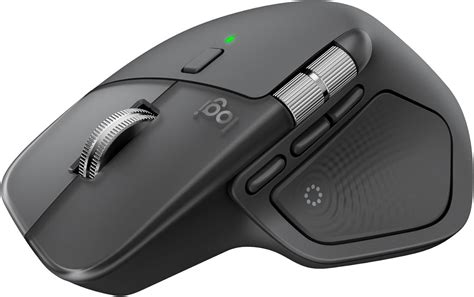
For those who spend all day with a mouse in hand and are willing to invest more, the Logitech MX Master 4 (and its Mac-specific variant) offers a premium experience with advanced features.
- Ergonomics for Larger Hands: The MX Master 4 is larger than the M720 Triathlon, making it particularly comfortable for users with average to large hands. Its sculpted shape, complete with a dedicated thumb rest, provides excellent support for long work sessions.
- Advanced Features: A standout feature is the thumb-scroll wheel, which is incredibly useful for horizontal scrolling in Photoshop, video editing timelines, or large spreadsheets. It also includes a thumb button with haptic feedback, offering a unique tactile experience. The MagSpeed scroll wheel can automatically switch between ratcheted and smooth scrolling.
- Customization Powerhouse: With seven programmable buttons in total, including the thumb wheel and a gesture button integrated into the thumb rest, the MX Master 4 offers extensive customization. The Logi Options+ software allows for app-specific shortcuts, including tailored options for Photoshop and Lightroom. The "Actions Ring" feature, which creates a ring of shortcuts assigned to a button, is particularly powerful for creative professionals.
- Connectivity: It connects via Bluetooth to up to three devices. The standard version includes a Logi Bolt USB-C receiver, while the Mac version does not. Unlike the M720, there is no built-in storage for the dongle.
- Surface Compatibility: A significant advantage over the M720 is its ability to track accurately on glass and mirrored surfaces.
- Battery Life: It boasts approximately 70 days of battery life on a single charge, and recharges via USB-C. Logitech's previous battery-life estimates have proven accurate.
- Limitations: The MX Master 4 comes with a higher price tag. Its larger size can be uncomfortable for users with small hands. The Logi Options+ software is required for full customization.
Best Vertical Mouse: Logitech Lift
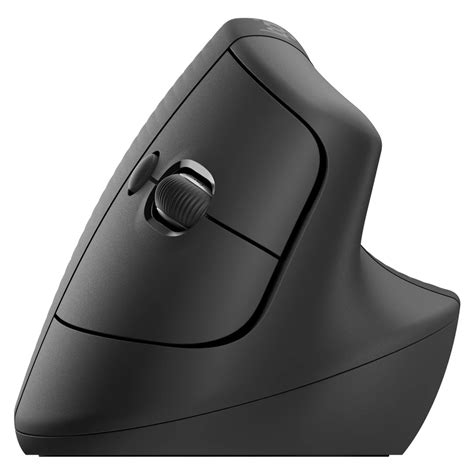
For users seeking to alleviate hand and wrist strain, the Logitech Lift vertical mouse is a highly recommended option, offering a comfortable and ergonomic experience for a broad range of users.
- Ergonomic Design: The Lift promotes a natural "handshake" posture with its 57° angle, significantly reducing pressure on the wrist and promoting better arm and upper body posture during long editing sessions. An integrated thumb rest provides additional support.
- Comfort for Various Hand Sizes: Panel testers with a variety of hand sizes found the Lift to be the most comfortable vertical mouse, holding their wrists at a neutral angle.
- Functionality: It features six customizable buttons, configurable via Logi Options+ for application-specific workflows. The 4000dpi precision sensor is suitable for detailed photo editing.
- Connectivity: The Lift can connect to three devices via Bluetooth or its included USB dongle. Logitech also offers left-handed models and Mac versions.
- Learning Curve: It's important to note that vertical mice have a learning curve, and they are not a universal cure for all hand and wrist pain. Some users may find the angled scroll wheel feels unnatural initially.
Other Notable Options for Specific Needs
While the above represent the top-tier recommendations, other mice cater to specific preferences and budgets:
- Logitech MX Anywhere 3S: For those who prefer a smaller, more compact mouse, the MX Anywhere 3S is a good option. It features six programmable buttons, Bluetooth connectivity for up to three devices, and an estimated 70 days of battery life. However, its flatter, more compact shape might be uncomfortable for users with average to larger hands, and it is also an expensive option without a USB receiver.
- Microsoft Ergonomic Mouse: This wired mouse offers a comfortable, ergonomic shape at a more accessible price point. It features a generous thumb rest and two thumb buttons for convenient shortcuts. While not wireless, its ergonomic design makes it a solid choice for preventing aches and pains during long editing sessions.
- Logitech M185 Wireless Mouse: For users on a tight budget who still want improved control over a laptop trackpad, the M185 is a simple, affordable, and travel-friendly option. It's ambidextrous and offers basic wireless functionality with a long battery life. However, it only has three buttons and is not particularly ergonomic.
- Logitech M330 Silent Plus: This compact wireless mouse is designed for portability and quiet operation. It features silent clicking and a silent scroll wheel, making it ideal for public spaces. It offers a reasonable battery life and a comfortable subtle sculpting for right-handers, but it only has three buttons and is not exceptionally ergonomic.
- Trackball Mice (e.g., Logitech MX Ergo): Trackball mice offer a unique approach to cursor control, where the user manipulates a ball instead of moving the entire mouse. This can significantly reduce muscle strain by eliminating the need to move the wrist and arm, making them beneficial for individuals with carpal tunnel syndrome or arthritis. The MX Ergo, for instance, features an adjustable tilt angle and silent clicks.
Photoshop Running Slow? 10 Quick Fixes!
The Evolution of Input Devices for Creative Work
The journey from basic wired mice to sophisticated wireless peripherals reflects the evolving demands of digital creativity. Early computing relied on the simplicity of wired connections, offering reliability but at the cost of desk tidiness. The advent of wireless technology, initially plagued by latency and battery issues, has matured into a robust and dependable solution. Bluetooth and proprietary 2.4 GHz protocols now offer seamless integration, allowing artists to navigate their digital workspaces with unprecedented freedom.
The user feedback highlights a common sentiment: the importance of reliable connectivity and the frustration associated with lost dongles or proprietary wireless systems that fail to function when not connected wirelessly. This underscores the value of devices that offer flexible connectivity options, such as both Bluetooth and a reliable USB receiver, and ideally, a way to store that receiver. The preference for wired connections for some users, particularly in scenarios where power outages or system crashes are a concern, also speaks to the enduring reliability of cabled peripherals.
Furthermore, the discussion around charging mechanisms, especially for Apple's Magic Mouse, where charging renders the device unusable, contrasts with the convenience of devices that can be used while charging or that simply offer extended battery life. This highlights the practical considerations that impact daily workflow.
The integration of specialized input devices like the Loupedeck+ or the desire for keyboards with USB pass-through ports indicates a broader trend towards optimizing the entire input ecosystem for creative tasks. The goal is to minimize friction, maximize efficiency, and ensure that the tools themselves become an unobtrusive, even invisible, part of the creative process.
Conclusion
Choosing the best mouse for Photoshop is a decision that profoundly impacts your creative workflow, comfort, and efficiency. While personal preference plays a significant role, understanding the key features-ergonomics, precision, customization, and connectivity-will guide you towards a device that enhances your artistic endeavors. Whether you opt for the versatile Logitech M720 Triathlon, the feature-rich Logitech MX Master 4, the ergonomic Logitech Lift, or another specialized option, investing in a quality mouse is an investment in your productivity and well-being. By carefully considering your needs and exploring the top recommendations, you can ensure your primary input device is a true asset in your digital art studio.