Adobe Photoshop has long been the undisputed king of photo editing software, setting the benchmark for professional tools and effects. Its ubiquity has even led to its name becoming a verb, synonymous with image manipulation. However, the rise of subscription models and the sheer complexity of Photoshop have prompted many users, from seasoned professionals to casual hobbyists, to seek out more accessible and affordable alternatives. Fortunately, the digital landscape is rich with powerful and versatile options that can rival Photoshop's capabilities, especially for Mac users. Whether you're looking to perform intricate retouching, create stunning graphic designs, or simply touch up a few blemishes, there's a Photoshop alternative out there that can meet your needs without breaking the bank or overwhelming your workflow.
Affinity Photo: The Closest Contender
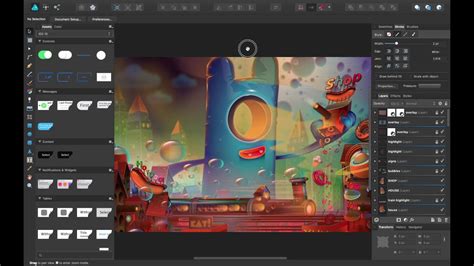
When it comes to finding a genuine rival to Adobe Photoshop, Serif Affinity Photo stands out as a remarkably close match in terms of features and workflow. In testing, this application proved to be a highly capable app that easily rivals almost everything you can do in Photoshop. A significant advantage is its availability across Windows, macOS, and iPad, all offered for a one-off cost, making it an excellent choice for those seeking to avoid recurring subscription fees.
Reasons to buy:
- Works on Windows, macOS, and iPad.
- Impressively large toolkit comparable to Photoshop.
- No subscriptions, just a one-off cost.
Reasons to avoid:
- The sheer volume of tools might be overwhelming for new users.
- Some interface choices can be less intuitive.
Affinity Photo, developed by Serif, is positively packed with professional-grade tools, positioning it as a true contender for both Windows and macOS users, with a tablet version also available for iPad users. During our testing, we observed an impressively clean interface, although the UI can occasionally be glitchy. The software boasts a comprehensive suite of useful tools, including robust support for PSD files, RAW file editing, advanced masking and layering capabilities, retouching tools for removing blemishes, curve adjustments, and a full set of 16-bit filters. The sheer amount of tools available is impressively large, capably rivalling the professional feature-set of Photoshop. However, users should be prepared for the power on offer and not get too overwhelmed. The most compelling aspect, however, is the absence of endless subscriptions; it's a one-off purchase, making it an ideal solution for those working to a budget, which is a primary reason for its high regard. The app is available as a standalone download.
GIMP: The Open-Source Powerhouse
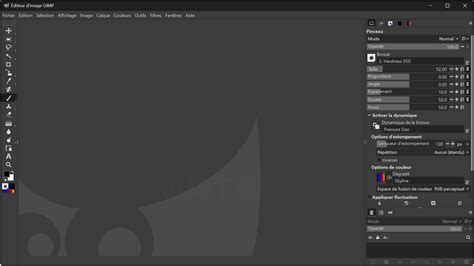
For those seeking a free yet professional-grade solution, the GNU Image Manipulation Program (GIMP) is an outstanding choice. This open-source powerhouse operates on Linux, Windows, and macOS, making it a versatile and accessible Photoshop alternative. It stands out as both a top-tier overall alternative and an excellent free option.
Reasons to buy:
- Huge number of features, easily extensible with plugins.
- Compatible with RAW and PSD files.
- Completely free and open-source.
Reasons to avoid:
- Complex interface with a steep learning curve for beginners.
- Lacks native CMYK color mode (though an add-on is available).
In our review, GIMP was lauded for its absolutely huge range of pro-grade tools for editing images, drawing, and more. For users already familiar with Photoshop, grasping the interface won't take long. For newcomers, a vast community of developers and artists has created a wide array of plugins, making GIMP a highly adaptable program. If a specific feature is desired, there's likely an add-on available for it. The interface is highly customizable, allowing users to pare it back or leverage multiple windows and toolbars as needed.
Pixlr: Browser-Based Editing at Your Fingertips
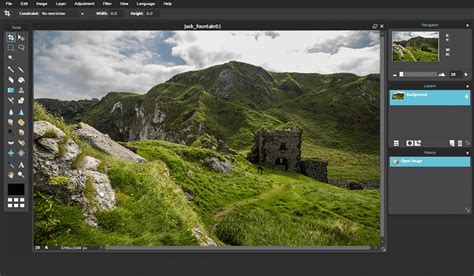
Pixlr emerges as one of the best free Photoshop alternatives available online, primarily because it functions as a web application. During our review of this HTML5 photo editing software, we found it to be impressively feature-rich, often surpassing downloadable software in its convenience.
Reasons to buy:
- Supports layers for advanced editing.
- Web-based app, accessible from any browser.
- Clean and intuitive design.
- Streamlined workflow experience.
Reasons to avoid:
- Missing some advanced features (e.g., custom brushes).
- Limited file type compatibility, notably no direct PSD support.
- Requires an internet connection as it's online-only.
Pixlr is a tool that many find themselves using for quick image edits and compositions when the full power of Photoshop isn't necessary. Its interface is more minimalist than Photoshop or GIMP, which can be a distinct advantage. The workflow is streamlined and intuitive: users can drag-and-drop photos from their computer or add a URL, and then begin adjusting images with familiar one-click filters and sliders. Despite being a web app, Pixlr offers surprisingly robust layer support, a key reason it's considered a strong Photoshop alternative. However, some important features are still absent. Custom brushes, for instance, are planned for future development but are not yet available. Overall, Pixlr provides a super clean and intuitive interface suitable for basic to medium-complexity photo editing.
ACDSee Photo Studio Ultimate: The Intermediate's Choice
ACDSee Photo Studio Ultimate is an image manipulation tool that, like any good Photoshop alternative, allows users to perform many of the functions found in Adobe's popular photo editor, but at a significantly lower cost. We found this app to be an ideal middle-ground for users who are past the beginner stage but not yet aiming for professional-level complexity.
Reasons to buy:
- Excellent image management capabilities.
- Impressive RAW processing.
- A single, unified interface that can be switched between different editing modes.
Reasons to avoid:
- The "Edit Mode" could benefit from additional functionality.
- New AI features produce mixed results.
- As a whole, it's not ideally suited for professional-level demands.
When we tested the software, we identified it as a versatile alternative to Photoshop. While it might not match every powerful feature in Adobe's top-tier tool, it delivers most of the tools required by the majority of photographers and designers, including layers and RAW file editing. As expected, it also offers AI tools. For us, this is an ideal Photoshop alternative for intermediates, rather than full professionals. A particularly appealing aspect is the option to purchase a perpetual license, which is great for those wanting to avoid subscriptions. However, it can still be acquired via a monthly or annual fee, with various cloud storage options depending on the chosen plan. Ultimately, it's one of the best Photoshop alternatives for creating professional-looking content while adhering to a budget.
Luminar Neo: AI-Powered Photography Enhancement
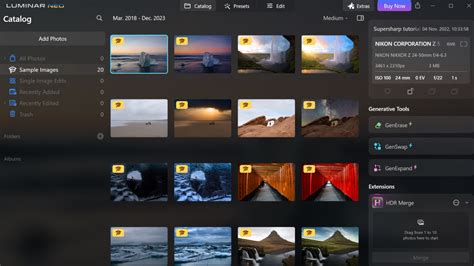
Photoshop is heavily laden with AI tools, making it essential for a good alternative to offer similar features. Luminar Neo fits this bill perfectly. This app boasts a wealth of industry-standard AI tools designed to simplify and expedite design and content creation.
Reasons to buy:
- Leverages AI for impressive features.
- Available as a standalone application or as a plug-in for Adobe and Apple software.
- Allows syncing AI edits across multiple photos.
- Offers sky replacement tools and the ability to upload custom skies.
Reasons to avoid:
- Can be resource-intensive on system performance.
- No mobile version or web app is available.
Key features include tools for tweaking curves, white balance adjustments, a cropping tool, and Luminar's highly acclaimed sky replacement tool. In our tests, these features generally performed very well, and despite a couple of minor hitches, we were left generally impressed with the results. Luminar Neo is an ideal tool for amateur photographers. Unfortunately, for professional use, it's missing certain features, and its performance, much like its simpler sibling Luminar AI, can occasionally be spotty.
Photopea: The Web-Based Photoshop Clone
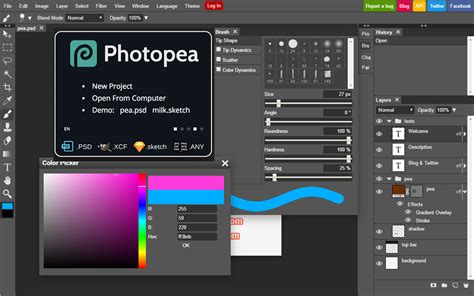
Photopea is a remarkable free, web-based image editor that serves as an incredibly capable Photoshop alternative. It boasts a familiar interface that closely mimics Photoshop's layout, making the transition for existing Photoshop users exceptionally smooth.
Reasons to buy:
- Free and accessible via a web browser.
- Supports a wide range of file formats, including PSD, AI, XD, and Sketch.
- Offers a comprehensive set of professional editing tools.
- No registration or login required for basic use.
Reasons to avoid:
- Can be slower than desktop applications, especially with large files.
- Relies on advertisements for revenue, which can be distracting.
- Lacks some of the advanced AI features found in newer desktop software.
Photopea's strength lies in its ability to handle complex tasks that are typically reserved for desktop software. It supports layers, masks, blend modes, filters, and a vast array of selection and retouching tools. The fact that it can open and edit Photoshop files (PSD) directly, preserving layers and effects, is a significant advantage. For users who need Photoshop's power on the go or are looking to avoid software installation, Photopea offers a compelling solution.
Krita: A Free Haven for Artists and Illustrators
Krita is an open-source and free alternative to Adobe Photoshop, strongly supported by a large community of developers and talented artists who actively share artwork and methods. If you're looking for an active user base dedicated to discussing and sharing art, Krita is a fantastic Photoshop alternative for drawing and digital painting.
Reasons to buy:
- Excellent tablet support for drawing and digital painting.
- Highly customizable brush engine.
- Supports both vector and raster graphics.
- Large and active community.
Reasons to avoid:
- Some photo editing features are missing compared to dedicated photo editors.
- Primarily geared towards digital art creation rather than photo manipulation.
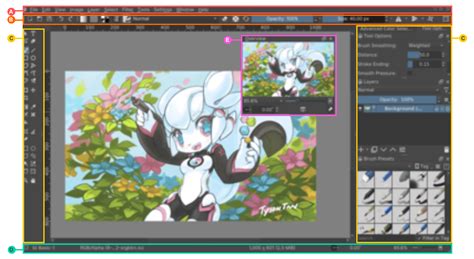
Beyond its community, Krita is an incredibly powerful photo editing software, featuring hundreds of brushes and a sophisticated brush customization engine. It also includes vector and text capabilities suitable for comic strips, a wrap-around mode for seamless repeating images and patterns, and a powerful resource manager for importing tools from other artists. We found the interface intuitive and familiar, with minor functions like being able to scroll sliders with the trackpad and helpful tooltips that guide users to the right tool. However, Krita isn't among the best Adobe Photoshop alternatives specifically for its photo editing tools; it's more of a drawing tool. Consequently, certain features are missing, such as fewer photo filters and no automatic heal tool.
Choosing the Right Tool for Your Needs
When deciding which alternative to Photoshop is best for you, consider the scope of your image editing needs. If you're primarily making simple edits to existing image files, a free software program might suffice. However, if you plan to develop files from scratch or undertake a series of complicated edits using advanced photo-editing tools and filters, it's generally better to aim for one of the more robust and potentially higher-cost programs.
It's also crucial to check your current computer specifications. While photo editors often have low minimum requirements, more seamless workflows may necessitate a higher-powered device. To assist with this, consider exploring reviews of the best laptops for graphic design, the best laptops for photo editing, and the best photo editing PCs. For professionals, selecting one of the best monitors for photo editing is also highly recommended.
Common Photo Editing Tools - Layers Explained
How We Tested the Best Alternatives to Adobe Photoshop
To rigorously test the best Adobe Photoshop alternatives, we began by setting up accounts with the relevant software platforms, whether as downloads or online services. We then tested each service using a handful of images to assess how the software could be utilized for editing and developing each image. The aim was to push each software platform to its limits, determining whether it could simply and easily not only edit a range of content types but also do so faithfully and consistently without introducing formatting issues or similar problems. Our evaluation process is designed to provide authentic and trustworthy recommendations.