Adobe Photoshop stands as a titan in the realm of digital imaging, a powerful and complex tool that empowers creators to transform pixels into astonishing visual realities. For both aspiring newcomers and seasoned professionals, understanding its vast capabilities can unlock a world of creative expression. This guide delves into a curated selection of tutorials and techniques designed to elevate your Photoshop proficiency, from fundamental operations to advanced artistic endeavors.
Getting Started with Photoshop: Core Concepts and Essential Tools
For those new to the program, Photoshop tutorials can be instrumental in getting started quickly. The software offers a vast array of tools, and it's common for even long-time users to discover new functionalities. A foundational understanding of Photoshop's basic functions is paramount. This involves mastering fundamental operations and comprehending how the system operates.
One of the most crucial aspects of any visual project in Photoshop is understanding how to bring out the best in your photographs. Expert guidance can illuminate the most important features, making complex processes accessible. For instance, learning to cut through the technical jargon and navigate the complex interface is key to identifying the features essential for getting started.
The Power of Layers and Layer Masks
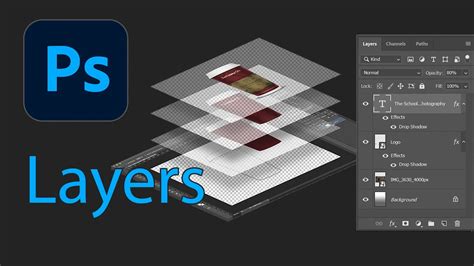
Layers are a fundamental concept in Photoshop, forming the bedrock of non-destructive editing and complex image manipulation. Without a solid grasp of layers, your work can often appear flat and lack depth. Layer Masks are particularly indispensable for anyone working with multiple layers. They allow for precise control over the visibility of layers, enabling seamless blending and intricate adjustments. Exploring how blending modes and various adjustments can significantly simplify the editing of Layer Masks when tackling complex images is a vital skill. Whether you are a Photoshop beginner or a seasoned pro, the tools and techniques learned in mastering Layer Masks will undoubtedly make your images more incredible.
Enhancing Your Images: Editing, Retouching, and Creative Treatments
Photoshop offers unparalleled control over image enhancement, from subtle adjustments to dramatic transformations. Mastering basic editing tips and tricks can significantly improve the quality of your photographs. Beyond basic adjustments, advanced retouching techniques are essential for professional-grade results. For example, learning how to achieve silky smooth skin through modern frequency separation methods is a highly sought-after skill for high-end retouching.
The Art of Compositing and Special Effects
Compositing is where the vivid images of your dreams can be brought to life. This process involves the artistic and technical steps essential to creating stunning composite images. Whether it’s cutting through technical jargon to focus on essential features or exploring the best-kept Photoshop secrets for amazing image results, these in-demand techniques will ensure your work looks current and cutting-edge. Special effects, color treatments, and other Photoshop secrets are frequently offered in dedicated courses, opening up a world of creative expression.
Learn how to create a breathtaking Northern Lights composite by blending different images, meticulously matching colors and light, and employing essential tools like Levels, Clipping Masks, Smart Objects, and Custom Photoshop Brushes. You can also learn to create a unique artistic effect by combining a portrait with splatter effects, or combine graphics and photos to create beautiful visual effects.

Mastering Blend Modes for Creative Control
Blend modes are among the most powerful, game-changing creative tools available in Photoshop. They dictate how two layers interact and blend together, or how certain tools affect your pixels. Understanding blend modes offers greater control and leads to breathtaking creative results. You will be amazed at how blend modes can fundamentally alter the way you use Photoshop and unlock its full capabilities. This is truly a game changer for any creative workflow.
Fixing Imperfections: Perspective and Background Removal
Photoshop provides powerful tools to address common photographic challenges. You can fix warped perspectives in your photos, ensuring architectural shots are straight and horizons are level. Furthermore, learning to accurately and professionally remove backgrounds from graphics and illustrations is a fundamental skill for many design applications, from product mock-ups to e-commerce listings.
Exploring Advanced Techniques and New Features
As you progress in your Photoshop journey, the software continually evolves with new features and advanced techniques. Ready to take your Photoshop skills to the next level? Dedicated courses offer techniques that distinguish novices from seasoned professionals.
Embracing the "Smartflow" Workflow
Transforming your image editing workflow into an efficient, 'smartflow' system is achievable with expert guidance. Discover how a non-destructive editing process can enhance accuracy, creativity, and efficiency. Presets are an integral part of this smartflow, and learning to efficiently create and leverage them allows you to utilize the full spectrum of Photoshop features, including adjustment layers, smart objects, filters, templates, and Camera Raw smart objects.
Harnessing the Power of AI: Generative Fill and Expand
Recent advancements in Photoshop have introduced powerful AI-driven tools that are revolutionizing image creation. Generative Fill allows users to generate new imagery or remove and modify existing elements using text prompts. Powered by Adobe's Firefly AI, new elements are generated on separate layers, allowing for individual manipulation without compromising the original image. The AI technology automatically incorporates details like reflections and shadows to seamlessly integrate new elements.
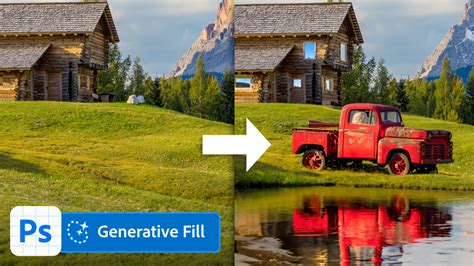
Generative Expand, also powered by Firefly, enables you to extend the dimensions of an image beyond its original boundaries. If a photo is too narrow or short for its intended placement, Generative Expand can fill the expanded borders with AI-generated visuals that match the existing scene. This is incredibly useful for adapting images for different layouts and formats.
AI-Powered Selection Tools
The Subject Select tool is another AI-enhanced addition. It automatically identifies and selects subjects within an image, saving significant manual effort. While it may not always achieve perfection, it often gets you most of the way there, with options to refine the selection for greater accuracy. This tool is particularly beneficial for isolating people for separate layers or creating headshots.
Specialized Creative Applications
Photoshop's versatility extends to a wide range of creative applications, from digital painting and concept art to graphic design and animation.
Digital Painting and Artistic Effects
Dive into the world of creating conceptual artwork in Photoshop. Tutorials can cover everything from mastering subject cutouts and harmonizing color and lighting in multiple images to crafting captivating animations. For those interested in digital painting, many of the same techniques used with traditional paints can be directly applied within Photoshop. Exploring tutorials on creating loose, colorful portraits or even mimicking the distinctive styles of comic book artists can be incredibly rewarding.
Text Effects and Typography
Photoshop offers a vast playground for creative typography. Learn to create glowing neon text, realistic embroidery effects, graffiti styles, glass effects, and even stylized medieval lettering. Combining text with graphics and photos can lead to beautiful visual effects, and the ability to create custom font effects from scratch opens up endless possibilities.

Creating Realistic Lighting and Shadows
Achieving stunning and realistic lighting effects is a hallmark of advanced Photoshop work. This includes learning to create realistic shadows for compositing, product mock-ups, and graphic layouts, which is crucial for adding depth and believability to your creations. Techniques for creating realistic light rays using tools like Levels, Radial Blur, and Layer Masks further enhance the visual impact of your images.
Workflow Optimization and Professional Practices
Beyond creative techniques, optimizing your workflow and adopting professional practices are essential for efficiency and high-quality output.
Non-Destructive Editing and Smart Objects
A non-destructive editing process is key to maintaining flexibility and control throughout your project. This approach, often facilitated by using Smart Objects and adjustment layers, allows you to make changes without permanently altering your original pixel data. Smart Objects, in particular, are invaluable for their reusability, reproducibility, and the ability to apply non-destructive filters.
Utilizing Presets and Actions
Presets are an essential component of an efficient workflow. Learning how to create and leverage them effectively allows you to apply complex adjustments, filters, and layer styles with a single click. Similarly, Photoshop actions can automate repetitive tasks, saving significant time and ensuring consistency across multiple images.
Further Exploration and Resources
The journey of mastering Photoshop is ongoing, with new techniques and creative avenues constantly emerging. Whether you're looking to learn about specific tools, find general inspiration, or delve into advanced workflows, a wealth of resources is available. From comprehensive online courses to in-depth tutorials covering niche effects and artistic styles, the learning opportunities are virtually limitless.
For those seeking to expand their creative horizons, exploring tutorials on topics such as creating isometric icons, designing movie posters, or even replicating the distinct styles of renowned artists can provide fresh perspectives and ignite new project ideas. The continuous evolution of Photoshop, particularly with its AI-driven features, ensures that there are always new skills to acquire and creative frontiers to explore.