Choosing the right iPad for Procreate can feel like navigating a labyrinth, especially with Apple offering a dozen different models, each boasting a unique set of features, screen sizes, and storage capacities. For aspiring and seasoned digital artists alike, the question of which iPad serves as the ultimate canvas for Procreate is paramount. While it might seem intuitive to gravitate towards the iPad model favored by professional digital artists, this approach isn't always the wisest. A high-end model might boast the best display quality and a generous screen size, but is it truly tailored to your specific needs and budget? As dedicated users and educators of Procreate, we aim to demystify the selection process, guiding you through the compatible iPad models and the essential stylus options that will elevate your digital art experience.
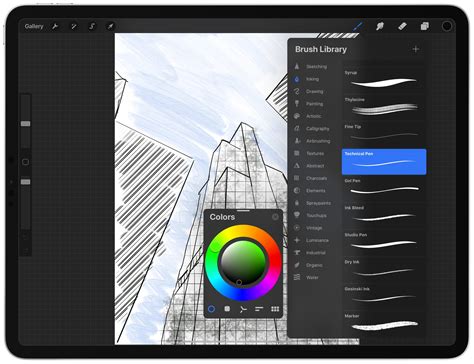
Understanding the iPad Lineup for Procreate
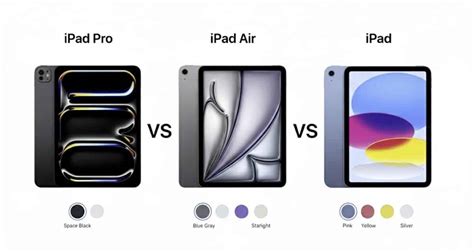
Currently, Apple offers four primary iPad models: the standard iPad, the iPad Air, the iPad Mini, and the iPad Pro. Each caters to a different user profile and set of priorities. The standard iPad represents the most basic and budget-friendly entry point into the Apple tablet ecosystem. The iPad Mini, as its name suggests, is essentially a more compact version of the iPad Air, prioritizing portability.
The good news for anyone looking to dive into digital art with Procreate is that compatibility is remarkably broad. All iPads released after 2015 are compatible with the latest version of the Procreate app. This means a significant portion of Apple's tablet history can serve as your digital sketchbook.
The Crucial Role of the Apple Pencil
Complementing the iPad is the Apple Pencil, the stylus that unlocks the full potential of Procreate. For digital calligraphy and nuanced artistic expression, pressure sensitivity is not merely a feature; it is a fundamental requirement. The ability to vary stroke thickness by adjusting the pressure applied to the screen is what mimics the feel of traditional drawing and painting tools. The first-generation, second-generation, and the newer Apple Pencil Pro are all equally well-suited for calligraphy and drawing due to their inherent pressure sensitivity.
While the pencils may appear similar, their compatibility with specific iPad models varies, and their price points differ. The Apple Pencil Pro, released in 2023, offers advanced features like hover, double-tap functionality for seamless tool switching (e.g., between drawing and erasing), squeeze gestures, barrel roll, and pixel-perfect precision. The Second-Generation Apple Pencil also boasts pressure sensitivity and the convenient double-tap function. The First-Generation Apple Pencil, while lacking some of the newer features, still provides essential pressure sensitivity crucial for Procreate.
It is important to note that Apple also released the Apple Pencil USB-C, which, while more affordable, is not recommended for Procreate due to its lack of pressure sensitivity. This feature is critical for achieving the dynamic thick and thin strokes characteristic of digital calligraphy and many art styles. Always double-check the Apple Support site for the most up-to-date compatibility information between specific Apple Pencil generations and iPad models before making a purchase.
DON’T WASTE YOUR MONEY! 2025 Apple Pencil Comparison
Matching Your Needs to the iPad Model
The "best" iPad for Procreate is not a one-size-fits-all answer. It is a deeply personal decision that hinges on your individual goals, artistic style, and, crucially, your budget. A professional-grade iPad favored by graphic designers might be overkill and unnecessarily expensive for your specific artistic pursuits.
The Budget-Conscious Artist: The Standard iPadFor those on a tight budget, the regular iPad (base model) is an excellent starting point. It is the most affordable option, often beginning at a price point that makes it accessible to a wider audience. The current models typically feature a generous screen size, around 10.9 inches, which is more than adequate for creating art in Procreate. If your primary intention for purchasing an iPad is for Procreate, opting for 64GB of storage on the base model is often sufficient. However, if you envision using your iPad for a broader range of applications beyond art, such as photography, video editing, or extensive multitasking, you might want to consider a model with more storage and processing power.
The Multitasker and Power User: The iPad AirThe iPad Air strikes a compelling balance between performance, features, and price. It generally offers more storage options than the base iPad, starting at 64GB for the current models, and runs significantly faster. This makes it a strong contender for users who plan to juggle Procreate with other demanding applications. The iPad Air models released in March 2026 with the M4 chip, and those with M3 and M2 chips, offer robust performance suitable for complex art projects. It supports the latest Apple Pencils, ensuring a responsive and precise drawing experience. For many artists, the iPad Air hits the sweet spot, offering the speed and smoothness needed for Procreate without the premium price tag of the iPad Pro.
The Traveler and Minimalist: The iPad MiniIf portability is your paramount concern, the iPad Mini is the clear choice. It boasts the smallest screen size in the lineup, typically around 8.3 inches, making it incredibly convenient for on-the-go sketching, note-taking, or creative work while traveling. Despite its compact form factor, it offers comparable processing power and storage options to some of the larger models, often at a more accessible price point than the iPad Air. Its smaller size makes it ideal for quick sketches and ideation sessions when you're away from your main workspace.
The Professional and Powerhouse: The iPad ProThe iPad Pro is Apple's flagship tablet, engineered for maximum performance and featuring cutting-edge technology. It is exceptionally fast and powerful, equipped with stunning Liquid Retina displays that offer exceptional color accuracy and detail. The camera systems are also top-tier, and storage options extend up to a massive 2TB. The iPad Pro is available in two screen sizes: 11-inch and 13-inch. For artists who demand the absolute best in display technology, require the most layers for complex artworks, or work long hours and seek the most comfortable and immersive drawing experience, the iPad Pro is the ultimate tool. Models released in October 2025 with the M5 chip, and those with M4 chips, offer unparalleled speed and efficiency, along with improved battery life. The larger 13-inch screen is particularly beneficial for detailed work, typography, comic creation, or extensive split-screen multitasking. For those who find glare bothersome, the option for nano-texture glass on some Pro models can further enhance the drawing experience.
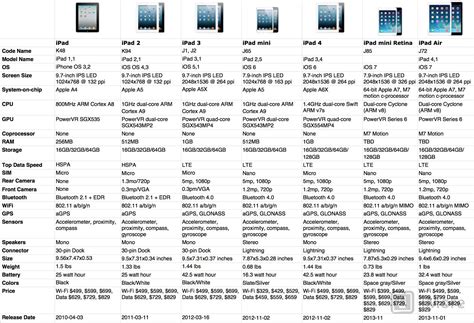
Storage, Performance, and Budget Considerations
When selecting an iPad for Procreate, several technical specifications warrant close attention:
Storage Capacity: Procreate files, especially those with numerous layers, high resolutions, and complex brush sets, can consume significant storage space. While 64GB might suffice for basic Procreate use, artists who plan to work on extensive projects, store a large library of brushes, or use their iPad for other media-intensive applications (like photo editing or video) should strongly consider models with 128GB, 256GB, or even higher capacities. Investing in sufficient storage upfront can prevent performance issues and the frustration of running out of space. The iPad Pro models offer the highest storage ceilings, up to 2TB.
Performance and RAM: The speed and responsiveness of your iPad directly impact your Procreate workflow. Newer iPad models, particularly those with M-series chips (M4, M5, etc.), offer exceptional performance. For art styles that heavily rely on clipping masks, texture layers, and multiple lighting passes, the number of layers available is crucial, and this is often tied to the amount of RAM in the device. While Apple doesn't always explicitly state RAM for all models, higher-tier iPads generally come with more RAM, enabling smoother operation with complex canvases.
Screen Size and Display: The screen size is a matter of personal preference and workflow. A larger screen, like that of the 12.9-inch iPad Pro, provides more drawing real estate and can be more comfortable for detailed work and extended drawing sessions. However, it also increases the device's overall size and weight, making it less portable. The 11-inch models offer a good compromise, and the 9.7-inch iPad Pro, while older, was a popular choice for its portability. Display quality, including color accuracy and brightness, is also a factor, with the iPad Pro models generally offering the most advanced displays. Some users also appreciate a laminated display, where the screen layers are bonded together, reducing the gap between the glass and the pixels for a more direct drawing feel.
Apple Pencil Compatibility: As previously emphasized, ensuring your chosen iPad is compatible with a pressure-sensitive Apple Pencil is non-negotiable for Procreate. Match the Apple Pencil generation to your iPad model to unlock its full artistic potential.
Price Tag: The cost of iPads varies significantly across the lineup. The standard iPad is the most affordable, followed by the iPad Mini, iPad Air, and finally the iPad Pro, which represents the highest investment. It's important to view the iPad as an investment in your creative business or hobby. Consider looking for certified refurbished models from Apple or reputable retailers, or wait for sales events, as Apple frequently updates its lineup, leading to price reductions on previous generations.
Beyond Procreate: A Multifaceted Creative Tool
While Procreate is a primary driver for many iPad purchases, these devices are incredibly versatile. They can serve as replacements for traditional sketchbooks, portable art studios, and even as extensions of your desktop workflow.
Sketching, Reading, and Browsing: All iPad models are excellent for these tasks. The portability of the Mini and the larger screens of the Air and Pro offer different advantages depending on your preference.
Graphic Design and Digital Art: As detailed, the iPad Air and iPad Pro are particularly well-suited for intensive graphic design and digital art due to their processing power and display quality.
Adobe Creative Suite: Many Adobe applications, including Photoshop, Illustrator, and Fresco, are available on the iPad and offer robust functionality. While they may not replicate the full desktop experience, they are powerful tools for creative professionals.
iPad as a Mac Extension: Yes, an iPad can function as an extension of your Mac, similar to a Wacom tablet, using features like Sidecar (for newer macOS versions) or third-party apps. This allows you to use your Apple Pencil to draw directly onto your Mac's screen within compatible applications.
Music Creation: For musicians, the iPad can be a surprisingly capable tool for recording and mixing ideas on the go. With a plethora of audio interface options and powerful Digital Audio Workstations (DAWs) like GarageBand, Logic Pro for iPad, and Cubasis, you can capture melodic ideas, sketch out arrangements, and even produce complete tracks directly on your tablet. The iPad Pro, with its superior processing power and potentially larger storage, would offer the most robust experience for music production.
Making the Final Decision
Ultimately, the best iPad for Procreate is the one that best aligns with your budget, your artistic workflow, and your lifestyle.
For beginners and budget-conscious artists: Start with the standard iPad. It offers a capable Procreate experience at an accessible price point. If you can stretch your budget, the iPad Air is an excellent "grow into it" option.
For artists prioritizing portability: The iPad Mini is ideal for sketching and creating on the move.
For those needing more power, layers, and a superior display: The iPad Air is often the recommended sweet spot, providing a fast, smooth Procreate experience with support for the best Apple Pencils.
For professionals demanding the highest performance, the most layers, and the best display technology: The iPad Pro is the ultimate digital canvas. The 13-inch model is particularly beneficial for detailed work and extensive multitasking.
Remember to also consider essential accessories like a quality case with a stable stand and a screen protector, such as Paperlike, which can enhance the drawing feel and protect your device. Investing in a reliable backup strategy for your Procreate artwork is also crucial to avoid the heartache of losing your creative work, a lesson many artists learn the hard way. By carefully considering these factors, you can confidently select the iPad that will empower your creativity and transform your digital art journey.