The world of digital photography is constantly evolving, with tools and applications emerging to enhance the way we capture and refine our visual stories. For a long time, the distinction between the immediate, often unedited output of a camera and the sophisticated manipulations possible within software like Adobe Photoshop has been a significant one. This divide has been addressed by various Adobe initiatives, from the powerful raw processing capabilities of Adobe Camera Raw to the more accessible, AI-driven features found in applications like Photoshop Camera. While Photoshop Camera itself has seen its support conclude, understanding its role and the broader ecosystem of Adobe's imaging tools offers valuable insights into the modern photographic workflow.
The Promise of Intelligent Photography: Photoshop Camera's Vision
Imagine if the magic of Photoshop was inside your camera. With Photoshop Camera, it really is. This was the core concept behind the intelligent camera app, designed to suggest the best lenses and filters for your photos-before you even take the shot. Users could scroll through stunning, "insta-worthy" lenses and camera effects to apply either before or after capturing an image. The ease with which these could be swapped in and out meant users didn't have to worry about changing their minds, and the ability to keep favorite lenses for repeated use added a layer of personalization. Photoshop Camera was packed with amazing AI-powered features, leveraging Adobe's Sensei technology to help users take gorgeous selfies, food, and scenery shots, and more. It aimed to empower users to show off their unique style with Photoshop lenses created by featured artists and influencers, including notable figures like Billie Eilish.
However, it's crucial to note that Photoshop Camera has been discontinued. Adobe ended official support for existing users starting on May 1, 2024. The app was no longer available for download on iOS and Android devices. Users who had already downloaded the application could continue to use it until June 4, 2024. After this date, Photoshop Fix and Photoshop Mix, related applications, also ceased to be operational, preventing access to the apps or projects. Adobe strongly recommended that users save all their projects locally to their devices as soon as possible, as after June 4, 2024, projects would no longer be accessible.
The Foundation of Image Quality: Understanding RAW vs. JPEG
To fully appreciate the advancements in image editing, it's important to understand the fundamental differences in how cameras capture images. In a previous tutorial, the benefits that the raw file format has over JPEG when capturing images with our camera were explored. It was learned that a camera's JPEG conversion process acts like a mini photo lab, developing images according to the camera's internal logic, with no input from the user, while simultaneously discarding much of the original image information captured by the camera's sensor.
A raw file, on the other hand, contains every bit of image detail straight from the camera's sensor with no processing of any kind. This allows the user to develop the image themselves from scratch, according to their own vision, rather than the camera's. This distinction is critical for photographers seeking maximum control over their final output.
Adobe Camera Raw: The Digital Darkroom
In order to process raw files, specialized software is required. Adobe Camera Raw (ACR) emerged as a primary solution. There's no question that Photoshop has become the world's most popular and powerful image editor, but one thing Photoshop cannot do on its own is process raw files. Raw files, as mentioned, contain nothing more than the raw image data captured by the camera's sensor, with no processing of any kind (which is where the name "raw" originates). To work with these files, special software that understands how to interpret raw data is needed.
Adobe offered two excellent solutions:
- Adobe Lightroom: A completely separate, standalone application. Lightroom includes additional features to help with overall workflow, such as the ability to catalog photos. It needs to be purchased separately.
- Adobe Camera Raw (ACR): A free plug-in for Photoshop itself that ships and installs with Photoshop. ACR is strictly an image editing application focused on raw file processing.
Like Adobe Lightroom, Camera Raw provides everything necessary for processing raw images. While initially built for raw image processing, ACR has evolved over time to include the ability to process JPEG and TIFF images as well.
The Camera Raw vs. Photoshop Debate: A Workflow Synergy
So, which should you use for editing your images, Camera Raw or Photoshop? The simple answer is-both! Think of Camera Raw as an image developer, and Photoshop as an image editor.
In a typical Camera Raw/Photoshop workflow, Camera Raw serves as the initial development stage, much like processing a film negative in a darkroom. This is where all the initial processing work is done: setting the overall white balance, exposure, contrast, and color saturation, adding some initial sharpening, and reducing noise. Generally, work in Camera Raw can be considered "global edits"-edits that affect the entire image as a whole.
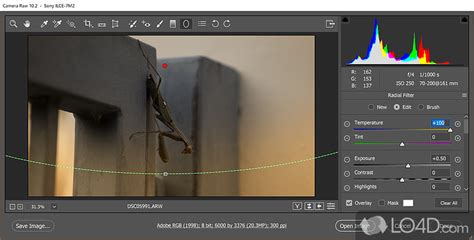
Once the overall image looks as desired, the workflow moves to Photoshop for more specific "local edits," where Photoshop truly excels. While it's possible to perform some local edits within Camera Raw, its primary strength lies in making the initial overall image look good.
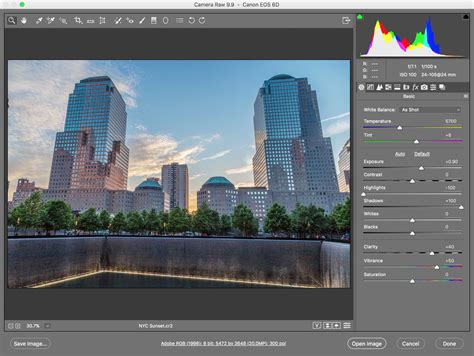
Of course, global edits can also be performed in Photoshop using features like Levels and Curves. Photoshop has become so expansive over the years that what began as a photo editing program is now utilized in virtually every creative field imaginable, including graphic and multimedia design, video editing, 3D rendering, and even medical research. For a photographer new to Photoshop, its vast array of capabilities can be overwhelming, making the learning process more difficult and time-consuming. The lack of a clear starting point once an image is open can leave users wondering, "Now what?"
Camera Raw addresses this problem. Despite being a plug-in running within Photoshop (or Adobe Bridge), it presents itself as a distinct program built with photographers in mind and streamlined for photo editing. Its logical format and structure follow a standard image editing workflow, eliminating guesswork. Like Photoshop, it uses tools and panels for image development and processing, but they are presented in a simple, intuitive, and easy-to-understand layout. Crucially, unlike Photoshop, Camera Raw is not cluttered with features that most photographers will never need. This streamlined approach is a significant advantage.
The Power of Non-Destructive Editing: Camera Raw's Parametric Approach
Photoshop itself is a pixel-based editor, meaning it makes direct changes to the image's pixels. This is known as "destructive editing" because it alters the original image information. The opposite of pixel-based editing is "parametric editing," and Camera Raw is a parametric image editor.
Parametric editing is non-destructive because it uses a series of instructions (metadata) to tell the software application how to display the image on the screen. As an image is processed and developed in Camera Raw, it records and saves all settings as a list of instructions. What is seen on the screen is not the edited image itself, but rather a live preview of how the image looks based on the current instructions. Moving a slider, changing an option, or using a tool in Camera Raw simply updates these instructions and the live preview, allowing users to see the effect of their changes without actually altering the original image data.
The original photo and the instructions for processing it remain separate entities in Camera Raw. No changes are ever made to the original image data. Users are essentially asking Camera Raw to display the photo with specific adjustments: "Show me what the photo would look like if I increased the exposure, or boosted the color saturation, or converted the image to black and white." Users can change these instructions as many times as they wish with absolutely no loss of image quality.
While non-destructive workflows are possible in Photoshop through methods like duplicating images, using layers, adjustment layers, and Smart Objects, Camera Raw is non-destructive by its very nature, eliminating the need for constant worry about preserving the original file. It is only when the image is opened in Photoshop for further editing or saved as a JPEG or other file type that the Camera Raw instructions are actually applied to the image's pixels.
Efficiency and Batch Processing: Camera Raw's Workflow Advantages
Another significant advantage of Camera Raw is its ability to easily edit multiple images simultaneously, a capability not directly available in Photoshop. Furthermore, Camera Raw settings can be copied and pasted from one image to another directly within Adobe Bridge.
When these advantages are combined-Camera Raw's streamlined interface for photo editing, its non-destructive nature, and its batch processing capabilities-it becomes clear that Camera Raw is simply faster than Photoshop for initial image development. The intuitive, logical presentation of its tools and panels makes Camera Raw feel almost second nature. Because it's a parametric editor that uses instructions to display a live preview, there's no rendering time; every change made with a tool or panel happens instantly on the screen.
The question is not which tool to use, but rather the order in which to use them. Camera Raw is not intended to compete with or replace Photoshop. Both have their strengths, and knowing when to use each is key to an efficient workflow. Camera Raw should be the starting point, the digital darkroom where all initial developing and processing of the image takes place.
Exploring Photoshop Camera's Features and Compatibility (Historical Context)
While Photoshop Camera is no longer supported, its features offer a glimpse into the direction of mobile photography. It aimed to provide an accessible way to achieve polished results with AI-driven enhancements.
Compatibility: Initially, Photoshop Camera had specific compatibility requirements. For Android, devices needed to be running Android 9.0 Pie or Android 10. Supported phones included Google Pixel 3/XL and Pixel 4/XL, along with recent Samsung Galaxy phones (S9/S9+, S10 series, S20 series) and OnePlus 6/6T or later. For iOS, devices required iOS 12 or iOS 13, with support extending to the iPhone 6S and original iPhone SE or later. Smoother experiences were generally found on newer iPhones. Notably, support for multiple camera lenses (zoom or wide-angle) was initially limited to the iPhone 11 series.
Features and Usage:Photoshop Camera referred to its filters as 'lenses.' Users could access a 'Lens Library' to download additional lenses beyond the handful initially provided. These lenses, while functioning similarly to filters on other social media apps, offered more advanced capabilities due to automatic scene recognition and masking. Users could organize their favorite lenses into a playlist for quick access.
A key consideration for users was image quality. Photoshop Camera's default setting was to compress photos to under 1MB for social media sharing, sacrificing original detail. However, users could enable the 'Save Original to Camera Roll' option in the settings to retain a less compressed version of their original photo alongside the edited one. Alternatively, users could import photos from other sources.
The app offered various lenses for different types of shots. For instance, the 'Celestial' lens, developed with artist Jaxson Pohlman, suggested using minimal scenes like silhouettes or nature landscapes for the best results. Other lenses, like 'Vibrant' and 'Neon Pulse,' were geared towards portraits, with specific composition advice provided by contributing artists like Brandon Woelfel. Some lenses, such as 'Blue Skies,' allowed for artificial sky replacements, and others, like 'Reverie,' offered fantasy-inspired elements that could be manually repositioned and scaled.
For those seeking more granular control beyond the automated effects, Photoshop Camera offered a link to the free Photoshop Express app. While direct editing of masks or layers created by Photoshop Camera was not possible, Photoshop Express provided tools for applying extra effects like vignetting and adding text through themes.
Creating Lenses: It was not possible to create custom lenses directly within the Photoshop Camera app. However, users could apply to become a 'featured lens creator' through the 'Create a Lens' banner in the 'All Lenses' section, which led to the Creator's Program.
While Photoshop Camera's chapter has closed, its existence highlighted Adobe's ongoing commitment to making sophisticated image editing accessible, even on mobile devices, and underscored the fundamental principles of image processing that remain central to the broader Adobe photography ecosystem. The synergy between tools like Camera Raw and Photoshop continues to define the professional and enthusiast photographic workflow, offering a powerful and flexible approach to image creation.