WordPerfect, a name once synonymous with word processing excellence, has a rich and complex history that significantly shaped the landscape of personal computing. From its origins as a groundbreaking DOS application to its eventual acquisition by Corel, WordPerfect’s journey is a compelling narrative of innovation, market shifts, and the enduring quest for powerful, user-friendly software. This article delves into the evolution of WordPerfect, its core features, its impact on the industry, and its continued relevance in the modern software ecosystem.
Genesis: The Birth of a Word Processing Powerhouse
The story of WordPerfect begins in 1979, a pivotal year for personal computing. Bruce Bastian and Alan Ashton, then affiliated with Brigham Young University (BYU) in Orem, Utah, embarked on a project that would redefine document creation. Originally developed under contract for use on a Data General minicomputer, the software was initially marketed under the name SSI*WP in March 1980 by Satellite Software International (SSI), the company they formed to retain rights to their creation.

The program's move to the MS-DOS operating system in 1982 marked a significant turning point, by which time the name WordPerfect was firmly in place. The application's feature set was considerably more advanced than its primary competitor, WordStar. WordPerfect gained immediate praise for its "look of sparseness" and its clean, efficient display. This was largely due to its development in x86 assembly language, which, unlike WordStar's reliance on strictly DOS API functions, allowed for a high degree of direct screen access. This architectural choice gave WordPerfect a significant performance advantage, making it notably faster and more responsive.
The developers initially hoped to program WordPerfect in C, but the absence of C compilers for the IBM PC at that early stage necessitated the use of assembly language. This dedication to performance was a key differentiator.
Ascendancy: Dominating the DOS Era
The release of WordPerfect 4.2 in 1986 was a watershed moment, solidifying its position as the de facto standard in the DOS market by version 5.1 in 1989. Its rapid displacement of most other systems was fueled by a combination of superior functionality and a growing reputation for robustness.
WordPerfect 3.0, released for DOS in 1983, represented a significant leap forward. It introduced support for DOS 2.x, sub-directories, and hard disks. Crucially, it also expanded printer support. While earlier versions (2.x) were hard-coded to support only Epson and Diablo printers, version 3.0 introduced printer drivers. These files contained control codes specific to each printer model, a system that drastically simplified adding support for new hardware. Version 3.0 boasted support for 50 different printers, a number that doubled within a year.
By 1984, WordPerfect 4.0 had been released, and the software was already the third most-popular word processor, trailing only WordStar and MultiMate. WordPerfect 4.1 appeared in 1985, with versions tailored for various non-PC compatibles such as the Tandy 2000 and DEC Rainbow.
The release of WordPerfect 4.2 in 1986 was particularly significant, introducing automatic paragraph numbering, a feature highly valued in legal offices. It also included automatic numbering and placement of footnotes and endnotes, which proved invaluable to both legal professionals and academics. By 1986, more than 300 large companies were using WordPerfect, which had become the best-selling word processor in the United States, with an astonishing 60% of sales generated through word-of-mouth referrals. SSI, by then renaming itself WordPerfect Corporation, was the fifth-largest independent software company, boasting $52 million in annual sales. Sales continued to surge, more than doubling to over $100 million in 1987.
Compute! magazine at the time described WordPerfect as "a standard in the MS-DOS world" and "a powerhouse program that includes almost everything." Competitors even acknowledged its dominance, with WordMARC advertising, "WordPerfect Ain't."
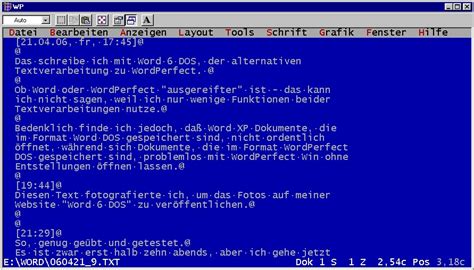
In November 1989, WordPerfect Corporation released what is widely considered its most successful version: WordPerfect 5.1 for DOS. This iteration introduced pull-down menus to complement the traditional function key combinations, support for tables (a spreadsheet-like feature), and comprehensive support for typesetting options like italic, redline, and strike-through. A pivotal feature was "print preview," a graphical representation of the final printed output, which laid the groundwork for the graphic screen editing capabilities in WordPerfect 6.0. WordPerfect 5.1+ for DOS was later introduced to allow older DOS-based PCs to utilize the new WordPerfect 6 file format.
The Streaming Code Architecture: A Unique Approach to Formatting
A defining characteristic of WordPerfect's design, and a key contributor to its flexibility, was its streaming code architecture. This approach bore a resemblance to the formatting features found in HTML and Cascading Style Sheets. Documents were constructed with text interspersed by "codes" (akin to HTML tags) that dictated formatting until a corresponding closing tag was encountered. At that point, the settings active at the opening tag would resume control.
Like HTML, these tags could be nested. Certain data structures, such as footnotes and styles, were treated as distinct objects within the stream. However, the bulk of a WordPerfect document's data and formatting codes appeared as a single, continuous stream. While HTML tags are text-based and enclosed in angle brackets, WordPerfect codes were more specialized tokens.
The addition of styles and style libraries in WP 5.0 significantly enhanced the power and flexibility of document formatting while preserving the streaming-code architecture. Styles are predefined sets of formatting settings related to fonts, spacing, tab stops, margins, and other text layout elements. Users could create their own styles to expedite the setup of new documents, saving them in the program's style library for future use.
After acquiring the desktop publishing program Ventura, Corel enhanced the WordPerfect styles editor and its behavior, incorporating many of Ventura's capabilities. Furthermore, as WordPerfect was enriched with properties from the CorelDraw Graphics suite, graphic styles became editable. The Graphics Styles editor allowed for the customization of boxes, borders, lines, and fills, enabling users to store these custom designs for reuse. This included patterns and color gradients for fills, and detailed line properties like corner type, endpoint, pen type, and thickness. Box styles could function as container styles, encompassing borders, lines, fills, text, and captions, each with its own independent style.
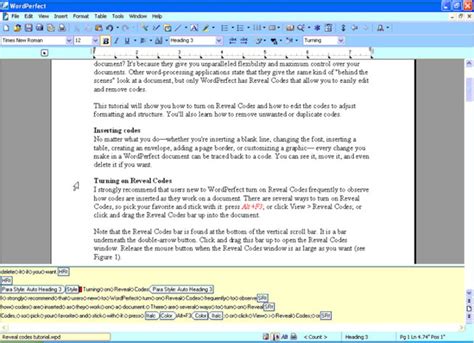
The "Reveal Codes" feature provided users with a detailed view of these formatting codes, interspersed with tags and object tokens. This offered a more granular way to troubleshoot formatting issues compared to style-based word processors. Object tokens could be clicked to directly open the configuration editor for that specific object type, such as clicking a style token to bring up the style editor.
Evolution to Windows and the Shifting Tides of the Market
The transition to the Microsoft Windows graphical user interface (GUI) presented a significant challenge for many established DOS software developers, and WordPerfect was no exception. While WordPerfect 5.1 for DOS was a triumph, its initial Windows counterparts struggled to gain traction.
WordPerfect 5.1 for Windows, introduced in 1991, required installation from DOS and suffered from serious stability issues, largely due to Microsoft not initially sharing its Windows Application Programming Interface (API) specifications. This caused the WordPerfect for Windows application to be slow and cumbersome. After WordPerfect eventually received the necessary APIs, there was a considerable delay in reprogramming before an improved version could be introduced.
Microsoft Word, introduced around the same time as WordPerfect's first Windows attempt, capitalized on this delay. While WordPerfect initially held the highest market share for Windows word processors, Microsoft Word's faster performance, aggressive corporate sales contracts, and strategic bundling deals, which ultimately formed the foundation of Microsoft Office, allowed it to swiftly capture the market. By the late 1990s, WordPerfect was no longer the dominant force it once was.
The company reported that Microsoft did not initially share its Windows Application Programming Interface (API) specifications, causing the WordPerfect for Windows application to be slow. After WordPerfect received the Windows APIs, there was a long delay in reprogramming before introducing an improved version. Microsoft Word had been introduced at the same time as their first attempt, and while WordPerfect initially enjoyed the highest market share of word processors for Windows, in a matter of years, Word took over the market because it was faster, employed aggressive corporate sales contracts, and was promoted by aggressive bundling deals that ultimately produced Microsoft Office.
The first mature Windows version, WordPerfect 5.2 for Windows, was released in November 1992, followed by WordPerfect 6.0 for Windows in 1993. However, by the time WordPerfect 5.2 for Windows arrived, Microsoft Word for Windows version 2 had been on the market for over a year and had received its third interim release. WordPerfect's function-key-centered user interface, deeply ingrained from its DOS heritage, did not adapt well to the new paradigm of mouse-driven interactions and pull-down menus. Many of WordPerfect's standard key combinations were overridden by incompatible Windows shortcuts, such as Alt-F4, which became "Exit Program" in Windows, replacing WordPerfect's "Block Text" function.
Tech History - Episode 12 WordPerfect
Acquisitions and the Corel Era
The challenges of the Windows transition and increasing competition led to significant changes in WordPerfect Corporation's structure. In November 1993, WordPerfect acquired SoftSolutions, another Orem, Utah-based software company, to bolster its "work-group computing" capabilities. However, the company's struggles continued. In 1994, WordPerfect Corporation was sold to Novell. Novell, in turn, sold the WordPerfect product to Corel in 1996.
Corel Corporation, established in 1985 by Michael Cowpland and George Doré, initially found success with its vector graphics editor, CorelDRAW. Over time, Corel expanded its product portfolio to include a range of graphics applications, word processing, and desktop publishing software. Under Corel's ownership, WordPerfect continued to be developed, though it never regained its former market dominance.
The product direction of Corel Corporation has centered on offering high-quality software that is simple to use and economical, intended for use by enterprises and individuals of all levels of expertise. Corel's primary products include CorelDRAW, Corel PHOTO-PAINT, Corel Painter, and Corel VideoStudio, alongside Corel WordPerfect.
WordPerfect's Lasting Influence and Features
Despite its decline from market leadership, WordPerfect's legacy is undeniable. Its innovations profoundly influenced subsequent word processors. Its graphical user interface (GUI), though initially a challenge to implement, was a significant step toward making word processing more accessible. Features like spell checking and grammar checking, which WordPerfect was among the first to offer, are now standard in virtually all word processing software.
The company's contributions to the software industry were also substantial. WordPerfect was one of the first word processing products to be ported to numerous operating systems, including DOS, Windows, and macOS, which helped popularize the use of word processing software on personal computers. The features and innovations introduced by WordPerfect were often imitated by competitors, including Microsoft Word, contributing to the overall development of more powerful and user-friendly word processing software.
Key Features and Enduring Capabilities
Even in its current iterations under Corel, WordPerfect retains many powerful features that appeal to its dedicated user base. The WordPerfect document format is designed for continuous extension of functionality without jeopardizing backward and forward compatibility. Newer versions can fully interact with older documents, with the older software simply ignoring unknown codes while rendering known features.
Corel WordPerfect Office Standard, for instance, offers a comprehensive suite of tools for everyday work. It includes robust capabilities for crafting documents, creating presentations, and developing impressive spreadsheets. Users can publish eBooks, edit PDFs, and import or export files in over 60 different formats.
The legendary word processor continues to be favored for creating documents, letters, brochures, and resumes. Its presentation software allows for the design of captivating presentations. A significant advantage remains its compatibility with Microsoft Office file formats, enabling seamless opening, editing, and saving of files.
The "Reveal Codes" window, a hallmark feature, has been enhanced to display codes for font attributes and text alignment within table cells, rows, and columns. Cell and row codes now appear before table text, providing a clearer understanding of applied formatting.
Security and data integrity are also addressed. WordPerfect offers features to redact sensitive or confidential information, ensuring that text cannot be retrieved or revealed. It can also strip metadata-such as undo/redo history, reviewers' notes, and hidden text-from files, keeping documents clean, safe, and secure.
For legal and medical professionals, the ability to add Bates numbering to critical files is a time-saving tool, allowing for the insertion of unique, incremental page numbers for quick identification.
The WordPerfect eBook Publisher supports the EPUB format, ensuring compatibility with various eBook devices. It facilitates relative font and graphic sizing and automatically converts footnotes to cross-linked endnotes, allowing users to save WordPerfect files directly as EPUB eBooks.
Spreadsheet functionality has also seen enhancements, with a redesigned UI and the ability to tap into recently used search criteria for faster data pinpointing. The Macro Manager provides a centralized location to view, run, or edit WordPerfect macros, which can be used to automate repetitive tasks.
WordPerfect's ability to handle multiple documents simultaneously through multiple windows is another enduring feature. The Keystroke Menu offers quick access to settings and commands, streamlining workflow.
Furthermore, Corel WordPerfect Office boasts unparalleled compatibility, enabling users to work with a vast array of file formats, including over 60 supported types. The ability to save a document in multiple formats simultaneously, such as WPD, PDF, and HTML5, through macro automation further enhances productivity. The "Publish to HTML" option supports modern HTML standards, including HTML5.
The PDF Form feature allows for the creation of fillable forms with various controls like text fields, check boxes, and drop-down lists, with easy customization of form appearance. Suite-wide PDF publishing options, including password protection, ensure secure document sharing.
WordPerfect Office also includes built-in tools specifically designed for legal professionals, such as Corel® Perfect Authority, which automates the creation of Tables of Authorities by locating, sorting, and generating them from citations.
Lessons for Startups and the Modern Landscape
The journey of WordPerfect Corporation offers valuable lessons for startups and entrepreneurs. Its successes highlight the importance of a strong technical foundation, user-centric design, and early market adoption. However, its failures underscore the critical need for adaptability, particularly in the face of rapid technological shifts like the transition to graphical user interfaces. The company's struggle to adapt to the Windows platform gave Microsoft Word a significant advantage.
Key lessons include:
- Focus on Core Customers: Prioritizing the needs of the core customer base is crucial to avoid diluting focus.
- Listen to Customer Feedback: Actively seeking and incorporating feedback is vital for developing features that meet user needs.
- Embrace Adaptability: Staying open to change and adapting to evolving market dynamics is essential for sustained success.
- Continuous Innovation: Fostering a culture of innovation is necessary to meet changing customer needs and outpace competitors.
- Strategic Partnerships: Collaborating with industry players can leverage resources, expand market reach, and enhance offerings.
- Learn from Mistakes: Reflecting on past failures provides valuable lessons for future decision-making.
In the contemporary software landscape, alternatives like WPS Office have emerged, offering a modern, feature-rich, and often free or more economically priced suite of office productivity tools. WPS Office provides a word processor, spreadsheet, presentation program, PDF reader, and cloud storage, supporting a wide range of operating systems. Its modern user interface, extensive features, and compatibility with Microsoft Office formats make it a compelling choice for many users.
While WordPerfect may no longer command the market share it once did, its impact on the evolution of word processing software is undeniable. Its pioneering features, robust architecture, and dedicated user base ensure its continued relevance, offering a powerful and feature-rich alternative in today's diverse software ecosystem. The .wpd filename extension remains a recognizable marker of this enduring software legacy.