The landscape of acquiring Adobe Photoshop has shifted dramatically over the years, moving away from simple, one-time purchases to a subscription-based model. For many, the question of the "cheapest way to get Photoshop" has become a recurring concern, especially with the evolution of Adobe's pricing structures and the introduction of new features. This article delves into the various avenues available for obtaining Photoshop, from official subscription plans to alternative software, aiming to provide clarity for both casual users and seasoned professionals.
Understanding Adobe's Subscription Model: The Core Offering
Adobe has largely transitioned its software suite, including Photoshop, to the Creative Cloud (CC) subscription model. This means that acquiring the full, latest version of Photoshop typically requires a recurring payment, either monthly or annually. The days of a simple, permanent Photoshop purchase are, for all intents and purposes, over.
The primary ways to access Photoshop through Adobe's official channels are through specific plans designed to cater to different user needs.
1. The Photography Plan: A Focused Approach for Image Editors
For many photographers, the Photography Plan represents the most cost-effective entry point into the Photoshop ecosystem. This plan has seen some evolution. Previously, a 20GB Photography Plan was available, but currently, the most accessible option is the Photography 1TB Plan, which comes with a 7-day free trial.
- What it includes: This plan grants you full access to Adobe Photoshop on both desktop and iPad. Crucially, it also bundles in Adobe Lightroom and Lightroom Classic, along with a generous 1TB of cloud storage. The subscription provides the latest updates and access to AI-powered tools, such as Generative Fill and Remove.
- Cost: The Photography 1TB Plan is priced at US$19.99 per month. While the Photography (20GB) plan is no longer available for new customers, the 1TB version offers substantial value for those who need both Photoshop and Lightroom.
- Pros: This plan is often considered the "sweet spot" for individuals who primarily focus on photo editing. The inclusion of Lightroom is a significant advantage for cataloging, organizing, and performing initial RAW file processing. The 1TB of cloud storage is ample for most users, facilitating seamless syncing across devices. The overall cost is significantly lower than broader plans if your needs are confined to photography.
- Cons: If you have absolutely no need for Lightroom or Lightroom Classic, you might feel you are paying for bundled software you won't utilize. However, the organizational and quick-editing capabilities of Lightroom can still be beneficial even for those who primarily use Photoshop for more in-depth retouching.
2. The Photoshop Plan: Standalone Power
Adobe also offers a Photoshop Plan that, as the name suggests, focuses solely on Photoshop itself, without the bundled Lightroom applications.
- What it includes: This plan provides access to Photoshop on desktop and iPad, along with 100GB of cloud storage. It also includes other Adobe applications like Adobe Fresco, Photoshop Express, Adobe Express, and Adobe Firefly.
- Cost: When paid monthly, this plan is typically around US$22.99 per month for an annual subscription. A prepaid yearly subscription amounts to approximately $239.88.
- Pros: This plan is ideal if you are certain you will not benefit from or use Lightroom and prefer to manage your photo library and initial edits through other means, such as Adobe Camera Raw within Photoshop itself. The 100GB of cloud storage is still a decent amount for file syncing.
- Cons: Compared to the Photography Plan, this standalone Photoshop Plan is more expensive on a monthly basis. Given that the Photography Plan offers Photoshop plus Lightroom and more storage for a lower price, the Photoshop Plan often represents less value for money for photographers.
3. The Creative Cloud All Apps Plan: The Comprehensive Suite
For users who require access to the entire spectrum of Adobe's creative software, the Creative Cloud All Apps Plan is the most encompassing option.
- What it includes: This plan provides access to over 20 Adobe applications, including Photoshop, Illustrator, Premiere Pro, After Effects, InDesign, Acrobat Pro, and many more. It also typically comes with an allocation of cloud storage, though this can vary and may be more quickly consumed by larger projects in video or design.
- Cost: For individuals, this plan is the most expensive. However, for students and teachers, there are significant discounts available. The Creative Cloud All Apps plan for students and teachers can cost as little as US$19.99 per month for the first year, a substantial saving compared to the regular individual pricing, which can be upwards of $54.99 per month.
- Pros: This is the ultimate package for creative professionals who utilize a wide range of Adobe tools for various disciplines, such as graphic design, video editing, web development, and photography. Having all applications in one subscription simplifies workflow and access. The student and teacher discount makes it incredibly affordable for eligible individuals.
- Cons: For users whose primary need is just Photoshop, this plan is overkill and significantly more expensive than the Photography Plan. The sheer number of applications can also be overwhelming if you only intend to use a fraction of them.
Beyond Subscriptions: Exploring Alternatives and One-Time Purchases
While Adobe has shifted to subscriptions, there are still avenues for acquiring Photoshop or similar powerful editing capabilities without a recurring monthly fee.
1. Photoshop Elements: A User-Friendly, Permanent Option
For individuals who need robust photo editing capabilities but find the Creative Cloud subscription model too costly or complex, Photoshop Elements is an excellent alternative.
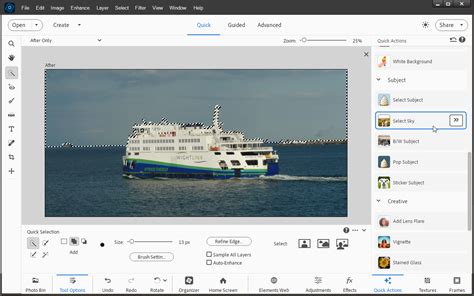
- What it is: Photoshop Elements is a streamlined, more user-friendly version of Photoshop designed for hobbyists and those with less demanding editing needs. It retains many of Photoshop's core features and tools but simplifies the interface and workflow.
- Cost: This is a one-time purchase, typically costing around US$99.99. Discounts are often available, especially from third-party retailers like Amazon.
- Pros: The primary advantage is the permanent ownership; you pay once and own the software indefinitely. It’s significantly cheaper in the long run than a subscription if you plan to use it for an extended period. Elements offers a good balance of power and ease of use, with features like Guided Edits to help users through complex tasks. It also includes tools for organizing photos and creating slideshows. It supports layers, masks, and offers features like sky replacement and a meme generator, and even works with RAW files.
- Cons: Elements lacks some of the advanced features and cutting-edge tools found in Photoshop CC, such as advanced AI-powered features like Generative Fill. It does not receive the same frequent updates as CC. While it has an "Expert" mode that mimics Photoshop's interface, it's not a direct replacement for professional workflows that rely on the very latest Photoshop innovations.
2. Free Trials and Free Adobe Apps: Sampling the Goods
Adobe understands that potential customers may want to test the waters before committing to a subscription.
- Free Trials: Adobe offers a 7-day free trial for all its Creative Cloud applications, including Photoshop. This is an ideal way to experience the full version of Photoshop, test its features, and see if it fits your workflow before making any financial commitment. It's crucial to remember to cancel before the trial period ends if you do not wish to be charged.
- Photoshop Express: This is a free, mobile-first application that offers basic photo editing tools. It's akin to other quick editing apps found on smartphones, allowing for filters, cropping, adjustments to brightness and saturation, and some basic retouching. It's not comparable to the full Photoshop but is useful for quick edits on the go.
- Photoshop Camera: This app integrates editing features directly into the camera experience, allowing users to apply effects and filters as they are capturing photos. It's designed for spontaneous, creative image capture.
3. Educational Discounts: A Significant Advantage for Students and Teachers
As mentioned, students and teachers are eligible for substantial discounts on the Creative Cloud All Apps plan. This is arguably the most cost-effective way to get access to Photoshop and a vast array of other professional Adobe software. Eligibility requirements must be met, and proof of enrollment or affiliation is typically necessary. The savings can be over 60%, making it a "no-brainer" for those who qualify.
Unofficial and Grey Market Options: Proceed with Extreme Caution
The existence of "pirated" or illegally obtained versions of Photoshop is a well-known phenomenon. However, these methods come with significant risks and are strongly discouraged.
- Risks: Using pirated software can expose your computer to malware, viruses, and security vulnerabilities. It also deprives developers of fair compensation for their work, impacting future innovation. Furthermore, these versions often lack updates, crucial bug fixes, and access to new features, including AI tools. Legally, using such software can lead to severe penalties.
- Recommendation: It is unequivocally recommended to avoid these unofficial channels. The risks far outweigh any perceived short-term savings. As the saying goes, "there’s simply no such thing as a ‘free Photoshop’" in a legitimate and secure sense.
Photoshop Generative Fill - Your Ultimate Guide To AI
Strategic Purchasing and Timing: Saving Money on Subscriptions
Even within the subscription model, there are ways to reduce the overall cost.
- Annual vs. Monthly Payments: Opting for a prepaid annual subscription is almost always cheaper in the long run than paying month-to-month. While the upfront cost is higher, the total amount paid over a year is less.
- Seasonal Sales and Discounts: Adobe periodically offers discounts, particularly around major shopping events like Black Friday, Cyber Monday, or back-to-school periods. Waiting for these sales can lead to significant savings on the All Apps plan, and sometimes on other plans as well. Keeping an eye on Adobe's official website and reputable deal sites can pay off if you don't need immediate access.
- Bundle Deals: As highlighted, the Photography Plan often provides the best value because it bundles Photoshop with Lightroom and ample storage for a lower price than the standalone Photoshop plan.
Third-Party Alternatives: Open-Source and Feature-Rich Competitors
Beyond Adobe's own offerings, several other software applications provide powerful photo editing capabilities, often at a lower cost or for free.
- GIMP (GNU Image Manipulation Program): GIMP is a free and open-source image editor that has been around for a long time. It boasts a comprehensive set of tools, including layers, brushes, masks, and various effects. While its user interface may not be as modern as Photoshop's, it is a highly capable program that receives regular updates.
- Photopea: This is a remarkable, free, web-based image editor that runs directly in your browser. It closely mimics the look and feel of Photoshop and can open and save PSD files. It supports layers, text, masks, and smart objects, making it a powerful tool for those who need Photoshop-like functionality without any installation.
- PhotoScape X: PhotoScape X is another free application that offers a good range of tools for quick edits, batch processing, creating collages, and even making GIFs. It supports RAW files and is useful for more straightforward editing tasks.
- Canva: While not a direct Photoshop competitor for in-depth retouching, Canva is an incredibly user-friendly design platform with a capable photo editor. It's ideal for creating social media graphics, presentations, and other visual content quickly, utilizing a vast library of templates and design elements.
Conclusion: Finding Your Photoshop Fit
The "cheapest way to get Photoshop" is not a one-size-fits-all answer. It depends heavily on your individual needs, budget, and intended use. For most photographers, the Photography Plan offers the best balance of features, value, and cost. If you require a broader suite of creative tools and qualify for educational pricing, the Creative Cloud All Apps Plan is an exceptional deal. For those who prefer a permanent ownership model and don't need the absolute latest features, Photoshop Elements is a compelling and cost-effective choice. Always consider the free trial to thoroughly evaluate your options before committing to any purchase. And remember, steering clear of unofficial sources is paramount for security and ethical reasons.