Clip Studio Paint EX is a powerful and versatile digital art application renowned for its extensive features catering to illustrators, comic artists, webtoon creators, and animators. With over 45 million users worldwide, its widespread adoption across various platforms, including Windows, macOS, iPad, iPhone, and Android, underscores its accessibility and appeal to a broad spectrum of creators. Celsys, the developer, actively supports the creator economy by providing tools like Clip Studio Paint and new service platforms that foster creators' activities. The application has seen continuous development, with recent updates like the December 2024 update (Ver. 3.2) and the release of Ver. 4.0, introducing a host of new functionalities and improvements designed to enhance both the quality and efficiency of creative workflows.
Advanced Comic and Manga Creation Tools
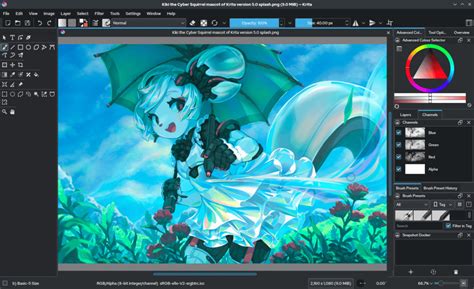
For those focused on comic and manga creation, Clip Studio Paint EX offers a robust suite of tools that streamline the entire process, from initial drafting to final output. A standout feature is the [Story] menu, which provides comprehensive management for multi-page comic or manga files. This menu allows users to meticulously control page display, add new pages with ease, and manage all essential story information. This multi-page management capability is crucial for maintaining a cohesive narrative flow and organizing complex projects efficiently.
Furthermore, the ability to export works in EPUB data format is a significant advantage for digital publishing. This functionality allows creators to save their completed works and directly publish them as e-books, reaching a wider audience without the need for intermediate conversion steps. For creators who envision their work in print, Clip Studio Paint EX also supports outputting fanzines directly to printing vendors. This direct integration with printing services simplifies the production process for physical releases, making it more accessible for independent creators.
The software's commitment to supporting traditional comic workflows is evident in its integration with tools like the Toei Animation Digital Exposure Sheet. This allows for the use of a vertical exposure sheet to edit the contents of the [Timeline] palette, a feature particularly beneficial for animators but also useful for complex panel sequencing in comics.
Revolutionizing Illustration with 3D and Vector Capabilities
Clip Studio Paint EX significantly enhances the illustration process through its advanced 3D and vector layer functionalities. The introduction of poseable 3D models serves as an invaluable reference tool, directly integrated into the software. These models can be manipulated to achieve desired poses, offering a solid foundation for character illustrations and reducing the reliance on external references. The [All Sides View] palette further empowers users when editing 3D layers, allowing them to view a 3D material from four directions simultaneously. This comprehensive view aids in understanding the form and structure of the model from all angles, leading to more accurate and detailed drawings.
The power of vector layers is another cornerstone of Clip Studio Paint EX's appeal. Users can draw their line art on a vector layer, which offers unparalleled flexibility. Unlike raster lines, vector lines can be adjusted in terms of position, shape, thickness, and even brush properties after they have been drawn. This non-destructive editing capability means that artists can refine their linework extensively without sacrificing image quality. This is particularly beneficial for achieving clean, polished line art that is characteristic of professional illustrations and comics.
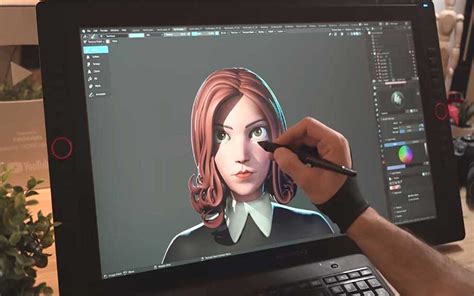
The software also excels in converting existing imagery into usable art assets. The ability to draw backgrounds the easy way, by importing photos and converting them into line art immediately, is a game-changer for artists who want to incorporate photographic elements into their work. This feature automates a time-consuming process, allowing for quick generation of line art from reference photos, which can then be further refined or used as a base for detailed backgrounds.
Integrated Animation Production Suite
Clip Studio Paint EX is not merely an illustration or comic creation tool; it is a fully-fledged animation production suite that rivals professional studios. The application includes animation features that are used by professional animation studios, offering unlimited frames for professional animations. This scalability ensures that creators can undertake projects of any length and complexity.
Key features that bolster its animation capabilities include the ability to separate color images and 3D layers into outlines (line drawings) and tones and convert each of them into different layers. This granular control over image elements facilitates sophisticated animation workflows, allowing for precise manipulation of line art, color, and shading. The capacity to extract outlines from a selected layer is another powerful tool for animators, enabling the isolation of linework for various animation techniques.
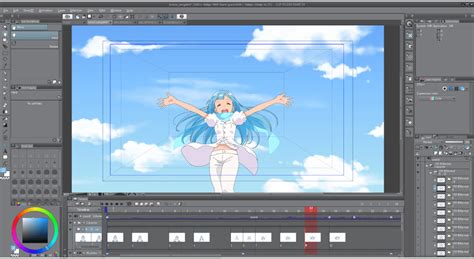
The [Timeline] palette is central to the animation workflow, providing a visual interface for managing frames, layers, and timing. The integration with the Toei Animation Digital Exposure Sheet further refines this process, offering specialized tools for detailed frame-by-frame editing. The ability to set values before 0 for [Start frame] provides additional flexibility in timing and sequencing animations.
Your FIRST ANIMATION in Clip Studio Paint - Beginner tutorial 2022
Enhanced Workflow and Output Options
Clip Studio Paint EX continuously evolves with new versions, each bringing significant improvements. For instance, Ver. 4.0, released in March 2025, encompasses all features added since previous versions, offering a comprehensive upgrade. Users with a monthly/annual plan or an Update Pass automatically gain access to the latest versions, including Ver. 4.0 and beyond. Those with perpetual licenses can upgrade to the latest version by purchasing an upgrade or signing up for an Update Pass.
The software’s commitment to accessibility is further demonstrated through its trial offers. For example, the latest version (December 2024 Update / Ver. 3.2) was available as a free trial until January 6, 2025, allowing users to experience its new features firsthand. Similarly, users of Clip Studio Paint PRO could try out the functions of Clip Studio Paint EX for free until January 19, 2021. These trial periods are invaluable for creators to explore the full potential of the EX version before committing to a purchase.
Beyond standard image formats, Clip Studio Paint EX supports a variety of output options. Works created in Clip Studio Paint can be exported in Kindle format, and the software allows you to export works as EPUB data, facilitating direct e-book publishing. It also supports exporting in PDF format, which is essential for print workflows and professional distribution.
Understanding and Utilizing Clip Studio Paint EX
Clip Studio Paint EX is designed to be intuitive yet powerful, catering to a wide range of users. For beginners, official tutorials and tips are readily available, providing guidance on operations and procedures. The software’s interface is designed to be accessible, with features like the 3D head model assisting character illustration beginners. For more advanced users, the depth of features, from sophisticated animation tools to vector layer manipulation, offers extensive creative freedom.
The availability of different versions, such as DEBUT, PRO, and EX, allows users to choose the tier that best suits their needs and budget. However, the EX version stands out for its advanced functionalities, particularly in multi-page management, animation, and professional output formats, making it the preferred choice for professionals and serious hobbyists alike.
The perpetual license model, alongside monthly/annual plans, provides flexibility in how users acquire and maintain access to the software. Keeping the software updated ensures access to the latest features and improvements, such as those introduced in Ver. 2.0, Ver. 3.0, and the latest Ver. 4.0.
Clip Studio Paint EX is more than just a drawing program; it's a comprehensive creative ecosystem. Its continuous development, extensive feature set, and multi-platform availability solidify its position as a leading application for digital artists across various disciplines. Whether you're creating a simple illustration, a multi-page comic, a professional animation, or preparing your work for e-book publication, Clip Studio Paint EX provides the tools and flexibility to bring your vision to life.
The software's core strength lies in its ability to cater to specific professional needs. For instance, the 2D/3D LT conversion feature is incredibly useful for quickly generating line art from 3D models or existing images, a process that used to be significantly more time-consuming. The line extraction feature further aids in this by allowing artists to isolate linework from complex layers, which is critical for achieving clean, professional-looking art. The batch text editing with the story editor streamlines the process of managing dialogue and captions across multiple pages, a vital feature for comic and webtoon creators dealing with extensive text. Specialized features for Webtoon creation are also integrated, recognizing the growing importance of this digital format.
The continuous release of new versions, such as Ver. 4.0, ensures that Clip Studio Paint EX remains at the cutting edge of digital art technology. These updates not only introduce new features but also refine existing ones, based on user feedback and evolving industry standards. The ability to update Clip Studio Paint to the latest version is a straightforward process, ensuring users can always leverage the most advanced tools available. For Windows users, activating a free trial involves navigating through the Help menu, while macOS users find it under the CLIP STUDIO PAINT menu. Similar activation paths exist for iPad, Chromebook, and Android tablet users, making the trial accessible across all supported devices.
For those who have previously used older versions, the transition to newer ones is managed efficiently. After a campaign ends, users can select "Install previous version" if they wish to revert, ensuring compatibility with their existing licenses. This thoughtful approach to version management adds another layer of user-friendliness to the software.
The emphasis on providing resources like Official Tutorials & Tips and a help forum underscores Celsys's commitment to user support. This ensures that creators, regardless of their experience level, can find answers to their questions and master the software's capabilities. The availability of these resources is crucial for a tool as feature-rich as Clip Studio Paint EX, allowing users to fully exploit its potential.
The software's ability to support both raster and vector workflows within a single application is a significant advantage. While raster layers offer traditional painting and texturing capabilities, vector layers provide the precision and editability required for clean line art. This hybrid approach allows artists to combine the best of both worlds, creating dynamic and polished artwork. The freedom to adjust brush properties on vector layers, for example, means that the expressive qualities of different brushes can be applied to editable line art, offering a level of control not found in many other applications.
The mention of a "perpetual license" suggests a model where users purchase the software outright, offering a one-time cost for ongoing use of a specific version. This contrasts with subscription-based models, providing an alternative for users who prefer to own their software. However, for access to the very latest features and continuous updates, the Update Pass or subscription models are the way forward, ensuring users are always equipped with the most advanced tools.
The sheer breadth of features, from the precise control over linework and color to the comprehensive animation tools and robust publishing options, makes Clip Studio Paint EX an indispensable asset for a wide range of creative professionals. Its ongoing development and user-focused approach by Celsys ensure that it will continue to be a dominant force in the digital art landscape for years to come.