Clip Studio Paint (CSP) has established itself as a leading digital art suite, trusted by professionals worldwide for its versatile brush engine, drawing performance, and comprehensive feature set. Whether you're a comic artist, manga creator, animator, concept artist, illustrator, or designer, understanding how to acquire and manage your Clip Studio Paint license is crucial for maximizing your creative output and staying current with the software's advancements. This guide delves into the various licensing options, version upgrades, and key features that define the Clip Studio Paint experience.
Understanding Clip Studio Paint Versions and Updates
The evolution of Clip Studio Paint is marked by significant version releases, each bringing substantial enhancements. Clip Studio Paint Ver. 5.0, for instance, represents a leap forward with notable improvements to drawing performance. This includes the introduction of Smart Shape for creating clean lines and shapes with ease, enhanced blurring and watercolor edge quality, and faster rendering and filling capabilities. Beyond core drawing, Ver. 5.0 also boasts improved 3D features, such as 3D hand models, alongside general enhancements to the interface and overall ease of use.
Active subscribers and users of the Update Pass are automatically entitled to Ver. 5.0 as part of their ongoing plan. For users who have purchased perpetual licenses for Windows or macOS versions prior to Ver. 5.0 (specifically Ver. 4.0 or earlier), there are pathways to access the latest version. These typically involve purchasing an Update Pass add-on or opting for a discounted upgrade to Ver. 5.0.
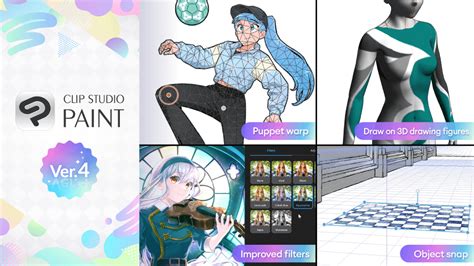
The development cycle continues, with Ver. 5.0 incorporating features that were planned for release in 2025, alongside numerous additional new functionalities. This commitment to continuous improvement ensures users have access to cutting-edge tools. New settings have been introduced for faster painting with large brushes, even with rougher rendering quality, and blending quality has been added to the Ink settings for brush tools, offering finer control over artistic effects. Furthermore, when utilizing the Blur tool or a brush with "Running Color" enabled, colors outside the brush cursor or selection area are no longer blended, providing more precise control over artistic diffusion. The software also incorporates continuous data saving for restoration, ensuring that creative work is protected against unexpected interruptions.
Navigating Licensing Models: Subscription vs. Perpetual
Clip Studio Paint offers two primary licensing models: subscription-based and perpetual licenses. Each caters to different user needs and financial preferences.
Subscription Plans (Annual/Monthly)
The Annual/Monthly Plan provides access to Clip Studio Paint through recurring payments, offering flexibility and continuous access to the latest features. Users can choose between monthly payments, allowing for easier budget management, or annual payments, which typically offer cost savings over time. This model ensures that users are always on the latest version, including all new features and updates, without the need for separate upgrade purchases. The terms of use for these plans are as stipulated in the dedicated Terms of Annual/Monthly Plans.
For subscription users, future updates are seamlessly integrated into their plan. This means that when a new major version is released, subscribers automatically gain access to it as part of their ongoing subscription. This model is particularly beneficial for those who want to stay at the forefront of digital art software capabilities without the concern of future upgrade costs.
Perpetual Licenses
A Perpetual License grants users the right to use a specific version of Clip Studio Paint indefinitely, as long as the product operates under the conditions set by Celsys. These licenses are typically a one-time purchase. Users with perpetual licenses for older versions, such as Ver. 4.0 or earlier, have several options to access newer versions like Ver. 5.0.
- Update Pass: This add-on allows users with existing perpetual licenses to access the latest version of the product for a predetermined period. Purchasing an Update Pass is often a cost-effective way to gain access to Ver. 5.0 and all subsequent updates for a year. The Update Pass is particularly recommended for perpetual license holders as it offers access to new features at a reasonable price.
- Version Upgrades: For older perpetual licenses, Celsys sometimes offers discounted version upgrades. However, it's important to note that there isn't always a direct discounted upgrade path from very old versions to the latest. For instance, a perpetual license user might need to upgrade through intermediate versions sequentially to reach the latest one at a discounted rate. The company often provides detailed charts and upgrade paths on their website to help users determine the most economical route.
Important Considerations for Perpetual License Holders:
- Using Older Versions: Users with perpetual licenses for Ver. 4.0 and earlier versions can continue to use their existing licensed software even after the release of Ver. 5.0. The license remains valid for the version purchased.
- File Compatibility: While .clip files created in Ver. 5.0 can generally be opened in Ver. 4.0 or earlier, there might be limitations. Parts of the file that utilize new features introduced in Ver. 5.0 may not be editable when opened in older versions.
Discounted Upgrade Paths
Celsys provides specific discounted upgrade paths for users looking to move from older perpetual license versions to newer ones. The available options and pricing depend heavily on the version of the perpetual license currently owned.
- From Ver. 4.0: Users with a Ver. 4.0 perpetual license can typically purchase a discounted version upgrade to Ver. 5.0. For example, a Ver. 4.0 » Ver. 5.0 PRO upgrade or a Ver. 4.0 » Ver. 5.0 EX upgrade is usually available. There are also options to upgrade from PRO to EX within the same version, such as Ver. 4.0 PRO » Ver. 5.0 EX.
- From Ver. 3.0: Similarly, users with Ver. 3.0 perpetual licenses can upgrade to Ver. 5.0. The upgrade path might involve a direct upgrade or a phased approach through intermediate versions. The company recommends the Update Pass (annual payment) for perpetual license users as a cost-effective way to access the latest versions. It's important to note that direct upgrades from Ver. 1, Ver. 2.0, or Ver. 3.0 to Ver. 5.0 are generally not possible; users must follow the specified upgrade chains.
- From Ver. 2.0: For Ver. 2.0 perpetual license holders, discounted upgrades to Ver. 5.0 are available, following similar patterns of PRO to PRO, EX to EX, or PRO to EX upgrades.
- From Ver. 1.0: Users with Ver. 1.0 perpetual licenses have the option to upgrade. For PRO Ver. 1.0, it may be more economical to purchase a new PRO Ver. 5.0 license. For EX Ver. 1.0, users can upgrade through subsequent versions (e.g., Ver. 1.0 » Ver. 2.0 » Ver. 3.0 » Ver. 4.0 » Ver. 5.0) or purchase a new license.
Special Upgrade Offers:
Clip Studio Paint PRO/EX perpetual one-time purchase users might be eligible for a special rate to sign up for a monthly plan. This offer is typically a one-time opportunity per perpetual license owned. It's important to note that this special rate often excludes a 3-month free period, even for first-time users. Monthly usage plans are compatible with Clip Studio Paint Ver. 1.0 and later.
Understanding License Authentication and Usage
Clip Studio Paint employs a robust system for license authentication to protect intellectual property rights.
- License Authentication: The software authenticates its license through the internet. This process requires Celsys to obtain necessary information, including serial numbers, Activation Codes, and hardware information from the user's computer or device. Failure to perform license authentication within a certain period after initial activation may restrict the user's rights.
- Activation Methods:
- Serial Authenticated Products and Value Version: These are activated by entering a serial number upon initial startup.
- Annual/Monthly Plan Products, Perpetual Licenses, and Update Pass Products: These are automatically activated by logging into the user's Clip Studio account.
- Device Usage:
- Perpetual License and Update Pass Products: These can typically be installed on one primary computer ("Main Computer") and one additional computer ("Sub Computer") owned and controlled by the user.
- Serial Authenticated Products and Value Version: These are generally restricted to one Main Computer. An additional Sub Computer installation might be permitted under specific conditions.
- Volume Licenses: These allow for installation on up to two computer, tablet, or smartphone devices per person.
Volume Licenses for Teams and Institutions
Clip Studio Paint also offers volume licenses designed for companies and educational institutions. These licenses are tailored to support remote working and learning environments. Key benefits include:
- Centralized Management: Licenses can be managed from a single platform, streamlining administration and deployment for large-scale implementations.
- Multi-Device Support: Each license can be used on up to two devices per person, offering flexibility for users who work across different platforms or devices.
- Remote Access: Features are included to support remote working and learning scenarios.
Volume License Management:
- License Administrators: A designated administrator manages the licenses, appointing users ("Other Users") within the purchased license count. The administrator is responsible for ensuring that these users adhere to the license agreement.
- Adding Licenses: Licenses can be added to an existing contract. For credit card payments, adding licenses might require a new contract that renews separately. For bank transfers, additional charges are calculated monthly until the next contract renewal.
- Contract Renewal: Licenses can be subtracted from a plan during the contract renewal period.
Clip Studio Assets and Community Features
Beyond the core software, Clip Studio Paint fosters a vibrant creative ecosystem through Clip Studio Assets.
- GOLD Points: This in-app currency can be used to purchase materials from Clip Studio Assets. GOLD can be bought using credit cards or PayPal accounts and can also be sent as a gift to other creators.
- Clippy: This is a reward system for active users. The longer a user remains a member, the more Clippy they receive each month. There are two types of Clippy: Clippy tokens (stored in a wallet) and Clippy tickets (stored in My Uploads and exchangeable for prizes).
Legal and Usage Terms
The use of Clip Studio Paint is governed by a comprehensive License Agreement. Key aspects include:
- Intellectual Property: All copyrights and intellectual property rights belong to Celsys or their licensors.
- Transferability: Serial Authenticated Products may be transferred to a third party, provided the transfer does not violate the agreement. However, users who have upgraded a product generally cannot transfer the pre-upgraded version. The recipient inherits all rights and obligations.
- Warranty Disclaimer: Celsys provides the software "as is" and makes no guarantees regarding its suitability for a user's specific purpose, accuracy, completeness, or uninterrupted operation. Celsys' liability is limited to the amount paid by the user for the product.
- Data Processing: For certain features like "Remove tones," "Colorize," and "Pose Scanner," Celsys may process user data uploaded to their servers via the internet. This processing is done without personal information and the data is not released to third parties.
- Governing Law: The agreement is governed by the laws of Japan.
Key Features and Benefits Highlighted by Users
Numerous artists and studios have shared their positive experiences with Clip Studio Paint, highlighting specific features that contribute to its effectiveness:
- Customizable Brushes: The highly customizable and versatile brush engine offers an authentic, natural drawing experience, a feature consistently praised by professionals.
- Linework and Drawing: CSP is often lauded for its excellent linework capabilities, making it ideal for comic and manga creation. Features like "fill with closing gaps" are particularly appreciated for efficiency.
- Layer Management: Robust layer management tools empower artists to create diverse artwork and organize complex projects.
- Animation Tools: For animators, especially those working in tradigital 2D animation, CSP provides a program based on classic techniques and meets production requirements.
- Webtoon Production: CSP is considered the industry standard for webtoon production, offering all the necessary tools and features to streamline the creation process and deliver high-quality results.
- Concept Art and Illustration: For concept artists and illustrators, features like perspective rulers, modifier hotkeys, and the Quick Access palette enhance workflow and precision.
- Asset Library: The Clip Studio Assets library provides a vast collection of brushes, materials, and assets that inspire creativity and expedite the production process.
From its advanced drawing performance and intuitive interface to its flexible licensing options and robust community features, Clip Studio Paint continues to empower creators worldwide. Whether opting for a subscription or a perpetual license, understanding these elements ensures artists can leverage the full potential of this powerful digital art suite for their creative endeavors.