In the realm of digital imaging, achieving a polished and professional look often hinges on the meticulous separation of subjects from their backgrounds. This crucial process is most effectively achieved through the use of a clipping path, a sophisticated technique that allows for precise isolation of elements within an image. While often synonymous with simple background removal, the clipping path is a foundational tool that underpins a vast array of professional photo editing services, enabling a level of detail and control that transforms raw imagery into compelling visuals.
Understanding the Clipping Path: A Vector Vector for Isolation
At its core, a clipping path, also known as "deep etch" or "deep etching," is a closed vector path, essentially a shape, created within image editing software. This path acts as a digital stencil, defining which parts of a two-dimensional image will be retained and which will be discarded. Anything enclosed within the path is preserved, while anything outside is omitted from the final output. The direction of the path is conventional; it dictates what is considered "inside" or "outside." Reversing this direction effectively reverses the preservation criteria, turning an inclusive path into an exclusive one, and vice versa. The interplay of multiple paths, combined through Boolean operations, can result in a compound path, offering even more intricate control over the final image composition.
The concept of clipping planes also exists in 3D computer graphics, where they serve to prevent the renderer from calculating surfaces at extreme distances, thereby optimizing performance. However, the application of clipping planes in 3D can sometimes detract from realism if not handled carefully, as objects at the threshold may not render correctly or appear to vanish abruptly. In the context of 2D image editing, the clipping path's purpose is far more focused on aesthetic precision and preparation for various media.
The Role of Clipping Path Services in Professional Workflows
Clipping path services are specialized offerings provided by companies and freelance professionals, dedicated to the extraction of objects or people from still imagery. These services are an indispensable part of the broader photo editing and manipulation landscape. The primary clientele for these services includes photography studios, graphic design firms, advertising agencies, web designers, and printing companies, all of whom rely on clean, isolated images for their projects.
For designers, photographers, and illustrators preparing designs for commercial printing or digital dissemination, understanding image cutting is paramount. Cutting an image, in this context, means isolating the foreground subject from its background. This is typically achieved with a sharp, knife-like line, creating excellent contrast between the subject and its surroundings. A clipping path offers a more accurate and controlled method than manual cutting, preventing unwanted accidental cuts and precisely isolating pixels.
Photoshop Layer Masks Explained in 7 Minutes!
In software like Adobe Photoshop, users can create custom clipping paths or utilize templates for different clipping styles. The ability to modify any part of the path by dragging the mouse or using keyboard shortcuts makes it a versatile tool. Exploring various clip styles is often recommended to find the best fit for a particular image.
Deconstructing Clipping Path Services: A Spectrum of Precision
Clipping path services are essentially expert-driven image editing processes. A skilled graphic designer digitally crafts a path to meticulously remove any background, leaving only the desired object. This is also referred to as masking or vectorizing an object. The quality of a clipping service hinges on the experience, skill, time, and meticulous attention to detail invested by the designer.
The spectrum of clipping path services can be broadly categorized, reflecting varying levels of complexity and application:
Simple Selection: This is a quick and easy path to create, often suitable for straightforward objects or text. However, it may sometimes lack the fine detail of more professional paths and might be visible upon close inspection. Examples include clipping out text or basic objects from a uniform background.
Regular Selection: Often created using tools like the Pen tool, this path offers a good balance of detail and efficiency. The edges tend to have smooth transitions between shapes, making it suitable for a wider range of images. Clipping out images or text from backgrounds falls under this category.
Complex Selection: This path is typically most effective when created with the Pen tool and involves numerous anchor points to precisely outline intricate subjects. The edges are characterized by sharp transitions between points, making it ideal for cutting out detailed images or removing text from busy backgrounds.
Vector Selection: Drawn with the Pen tool, this path often appears as a solid line with no jagged transitions between points, offering a very clean and smooth appearance. This is particularly useful for images where a crisp, defined outline is essential.
Artwork Selection: This path is not just technically created but also artistically designed, often by illustrators or designers, to enhance the visual narrative of the image. It goes beyond simple extraction to consider the aesthetic integration of the subject.
Seamless: Primarily used in image restoration, this path ensures that the extracted object integrates seamlessly back into a restored image, often generated with industry-standard software. It can also be referred to as a "soft selection."
Vector Masking: Similar to vector selections, this technique utilizes the shape of an object or image as a mask, offering a flexible approach to isolating elements.
Non-Destructive: This method involves erasing parts of an image using special tools without permanently altering the original data, allowing for greater flexibility in editing.
Composite: This path is formed by combining different types of selection paths, allowing for complex extractions that might involve multiple layers of detail or varying levels of precision.
Composite Dissolves: Used in image restoration and compositing, this path employs various methods to create sophisticated blending effects, such as additive, subtractive, and obstructed dissolves.
The Pen Tool: The Cornerstone of Precision Clipping
The Pen Tool in Adobe Photoshop is the undisputed champion for creating clipping paths. Its ability to draw precise vector paths with adjustable anchor points and Bezier curves allows editors to meticulously outline even the most complex subjects. This pinpoint precision makes it the go-to tool for achieving professional-grade results. Beyond the Pen Tool, other selection tools like the Magnetic Lasso Tool can simplify the process by intelligently snapping to edges, though for critical professional work, the Pen Tool remains the standard.
Applications Across Industries: Where Clipping Paths Shine
The demand for clipping path services spans numerous sectors, each leveraging its unique benefits:
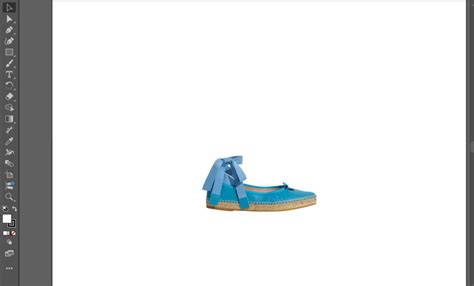
E-commerce: This industry heavily relies on clipping paths for optimized product photo editing. Cleanly isolated product images, often presented on white backgrounds with drop shadows, are crucial for online listings, enhancing customer focus and trust.
Fashion and Model Photography: Clipping paths are essential for removing distracting backgrounds and replacing them with more relevant or aesthetically pleasing ones that complement the subject. This technique also grants editors complete control over the isolation of models and apparel, simplifying further editing.
Advertising and Marketing: Clipping paths are used to create eye-catching collages and composite images, combining elements from different sources to craft compelling advertising materials and social media graphics.
Publishing: For book covers, magazine layouts, and brochures, clipping paths ensure that images are perfectly integrated, with elements aligning precisely.
Real Estate: Property images benefit greatly from clipping paths, which can remove clutter and distractions, focusing attention on the architectural features and interior spaces.
Automotive: High-quality images of vehicles, often with isolated backgrounds, are used in brochures and online listings to highlight specific features and designs.
The Nuances of Clipping: Path vs. Masking
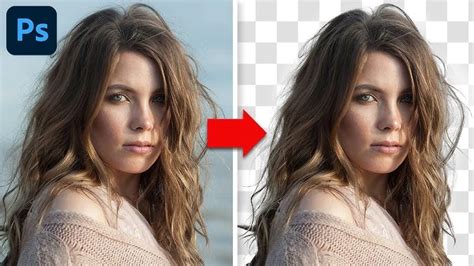
While clipping paths are highly effective, they are not the only tool for background removal. Image masking offers a more advanced and flexible approach, particularly for subjects with soft edges, such as hair, fur, or transparent materials. Image masking is a non-destructive editing technique that allows for more nuanced adjustments. However, clipping paths are often preferred for their speed and efficiency when dealing with subjects that have hard, well-defined edges. For complex images that require both hard-edge isolation and soft-edge refinement, a combination of clipping path and image masking is often employed. A clipping path might be used for the main subjectâs hard edges, followed by masking for finer details like hair strands.
The Professional Edge: Outsourcing Clipping Path Services
The creation of clipping paths is a labor-intensive process that demands time, concentration, and a keen eye for detail. For individuals or businesses with a high volume of images, outsourcing these tasks to professional clipping path services can be a significant time and cost saver. These services allow professionals to focus on more creative and revenue-generating aspects of their work.
When selecting a clipping path service, it's crucial to consider several factors beyond just the per-image price. These include:
- Quality of Work: Look for providers with strong portfolios showcasing diverse and high-quality examples of their work.
- Turnaround Time: Timely delivery is essential, especially for e-commerce businesses with tight deadlines.
- Communication: Clear and efficient communication channels are vital for conveying instructions and addressing any issues.
- Scalability: The service should be able to handle fluctuating volumes of images without compromising quality or speed.
- Revisions: The ability to request revisions ensures that the final output meets your specific requirements.
- Expertise: Specialists in product photography or specific industries can often provide superior results.
Services that offer hand-drawn clipping paths, meticulous attention to detail, and a robust online interface for managing instructions and reviewing results are generally considered top-tier. The best providers also offer options for custom instructions, ensuring that each image is processed according to specific needs, whether it involves including natural shadows, specific cropping, or file formats.
The Future of Clipping Paths: Automation and AI
The evolution of image editing technology, particularly in the realm of Artificial Intelligence (AI), is beginning to impact clipping path creation. AI-powered tools can automate background removal, offering a faster alternative for less complex images or when speed is prioritized over absolute precision. However, for professional applications demanding the highest quality and intricate detail, human expertise remains indispensable. The future likely holds a synergistic approach, where AI assists in initial selections, allowing human editors to focus on refining the most critical details and ensuring flawless results.
Ultimately, the clipping path remains a fundamental technique in digital imaging, empowering creators to isolate subjects with unparalleled precision. Whether used for e-commerce, advertising, or artistic endeavors, its ability to transform raw images into clean, impactful visuals makes it an enduring cornerstone of professional photo editing.