Capturing the perfect shot is often just the first step in creating a truly compelling visual. We’ve all been there: You’ve captured the perfect shot - a beautiful portrait, an eye-catching product photo, or a memorable moment - but the background looks cluttered, distracting, or doesn’t align with your vision. The good news? You don’t need to spend hours in Photoshop removing the background to achieve the perfect picture. With Picsart, it’s easier than ever to supercharge your pictures with transparent backgrounds, fresh colors, and stunning AI-generated backdrops. Welcome to the future of effortless editing!
The Power of Background Removal in Digital Imaging
Background removal is a fundamental technique in photo editing, offering a gateway to a world of creative possibilities. For photographers, background removal tools are essential. They allow you to swiftly remove backgrounds without taking the focus away from the subjects, allowing for seamless integration into different settings. This capability is particularly crucial when aiming to isolate a subject for compositing into a new environment, whether that’s for artistic expression or practical application. The ability to detach a subject from its original context opens up avenues for storytelling and visual manipulation that would otherwise be impossible.
In the realm of commerce, particularly for online businesses, the presentation of products is paramount. AI-powered background removal tools for eCommerce offer a hassle-free solution for showcasing products with clean cutouts. A clean, consistent background for product images ensures that potential customers can focus solely on the item itself, free from visual clutter that might detract from its appeal. This professionalism can significantly impact purchasing decisions. From removing backgrounds from brand logos to designing striking social media posts, background removal tools for marketing provide the freedom to experiment with various backgrounds, textures, or settings. This flexibility allows marketers to craft visually engaging content that resonates with their target audience and effectively communicates brand identity.
Beyond commercial applications, background removal serves as a powerful tool for visual storytellers and digital artists. By effortlessly isolating subjects from their backgrounds, you can explore imaginative compositions, surreal landscapes, or extraordinary digital artwork. This opens up a vast canvas for creativity, enabling the creation of images that defy reality and spark the imagination. The process of background removal, once a complex and time-consuming task, has been democratized by modern editing software, making sophisticated visual effects accessible to a wider audience.
Picsart: Your All-in-One Background Removal Solution
Picsart has emerged as a leading platform for photo editing, offering an intuitive and powerful suite of tools designed for users of all skill levels. Ready to turn ordinary pictures into stunning edits? Open the Picsart app. The platform's commitment to user-friendliness is particularly evident in its background removal capabilities. Unlike more complex software, Picsart streamlines the process, making it accessible even for those new to digital editing.
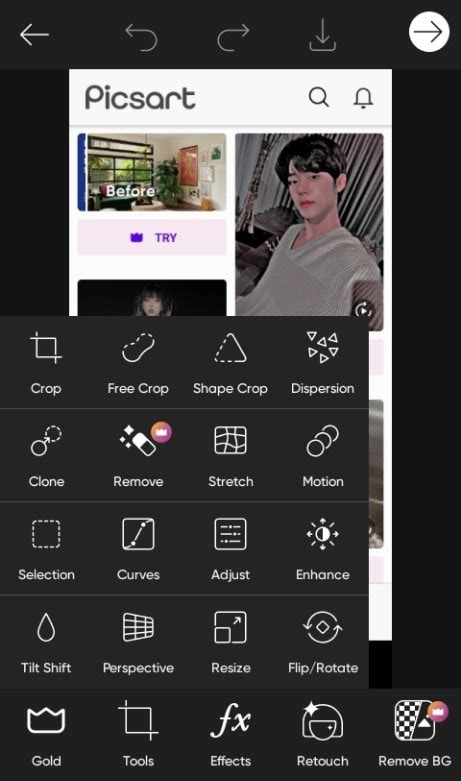
For those accustomed to more traditional editing workflows, it's worth noting how Picsart contrasts with other tools. Removing backgrounds with Photoshop can be more time-consuming for newer editors, but it’s still possible to achieve professional-grade edits. In Photoshop, a common approach involves using tools like the Magic Wand, Quick Selection Tool, or the Pen Tool, each requiring a degree of precision and practice. The Background Eraser Tool, another option, requires careful manipulation. Select the Background Eraser Tool from the toolbar on the left. Adjust the settings in the top toolbar. Choose the right brush size, hardness, and tolerance. Click and drag the Background Eraser Tool over the background you want to remove. While effective, these methods often involve multiple steps and a learning curve.
Picsart, on the other hand, often employs AI-powered algorithms to automate much of this process. With Picsart’s new background remove tool, you can instantly remove backgrounds from any photo, even if you’re not a seasoned editor. This AI-driven approach analyzes the image, identifies the subject, and intelligently separates it from the background with remarkable accuracy. This not only saves time but also significantly lowers the barrier to entry for achieving professional-looking results.
Practical Applications and Creative Possibilities
The ability to remove backgrounds opens up a plethora of creative avenues. Once you’ve discovered how to remove backgrounds from pictures, it’s time to step up your editing game.
Enhancing Subject Prominence
To make your subject stand out, try changing the background color. By removing distractions or incorporating a contrasting background, the subject becomes more prominent and eye-catching. This is a fundamental principle of visual design: contrast draws attention. A subject that might have been lost in a busy or unappealing original background can be brought to the forefront with a simple, solid color backdrop. This technique is invaluable for portraits, product shots, and any image where the subject is the primary focus.

Leveraging Picsart's Extensive Library
If you’re going for a fresh look, try scrolling through Picsart’s extensive library of #FreeToEdit backdrops to find the perfect fit. This curated collection offers a diverse range of scenes, textures, and styles, providing instant access to high-quality backgrounds that can transform your images. Whether you're looking for a serene landscape, an urban backdrop, or an abstract design, Picsart's library has something to offer. The #FreeToEdit tag signifies that these assets can be used and modified without copyright concerns, further empowering creators.
The Magic of AI-Generated Backgrounds
Want to take a different approach? AI-generated backgrounds are the answer. Instead of spending hours searching for the perfect backdrop, all you have to do is type a text prompt about your desired background and let AI do the hard work for you. This innovative feature harnesses the power of artificial intelligence to create unique backgrounds based on your textual descriptions. This opens up limitless creative potential, allowing you to generate backdrops that are precisely tailored to your vision, no matter how fantastical or specific. For instance, you could describe "a mystical forest at twilight with glowing mushrooms" or "a minimalist studio with soft, diffused lighting" and have the AI create it for you.

Addressing Specific Editing Challenges
The versatility of background removal extends to tackling common editing issues. Wondering how to remove black and white backgrounds from pictures? Simply follow the steps outlined above to learn how to remove white backgrounds from images. The tools within Picsart are designed to handle various background complexities, including solid colors, gradients, and even more intricate patterns.
How to Remove a Background in Picsart (2025)
The Broader Significance of Background Manipulation
Backgrounds are a powerful tool for any kind of editor - from photographers and marketers to visual storytellers. They are not merely the space behind a subject; they are an integral part of the narrative and aesthetic of an image. By harnessing the capabilities of AI background removal, you can effortlessly remove backgrounds and wave goodbye to monotonous editing processes. This empowers creators to focus on the artistic and conceptual aspects of their work, rather than getting bogged down in technicalities.
The implications of advanced background removal extend to several fields:
- E-commerce: As mentioned, clean product images are crucial. Beyond simple white backgrounds, e-commerce businesses can use background removal to place products in lifestyle settings, demonstrating their use and appeal in a more engaging way. This can involve placing a piece of furniture in a virtual room or showcasing apparel on a model in a scenic location.
- Social Media Marketing: Creating eye-catching content for social media requires constant innovation. Background removal allows for the creation of memes, promotional graphics, and engaging visual stories that stand out in crowded feeds. Imagine creating a campaign where your brand mascot is placed in a series of trending locations or interacting with popular cultural elements.
- Digital Art and Design: Artists can use background removal to create unique collages, digital paintings, and surreal compositions. The ability to extract elements from one image and integrate them seamlessly into another is a cornerstone of digital art. This can lead to entirely new visual languages and artistic expressions.
- Personal Projects: For individuals, background removal can be used to create personalized greeting cards, custom avatars, or fun edits of personal photos. It allows for a high degree of personalization and creativity in everyday digital interactions.
Workflow and Best Practices
While Picsart simplifies the process, a few considerations can enhance the quality of your background removal:
- Image Quality: Start with the highest resolution image possible. Clearer, sharper images will yield better results, as the AI has more detail to work with.
- Subject Contrast: Images where the subject has good contrast with the background are generally easier to process. If the subject and background are very similar in color or tone, the AI might struggle to differentiate them perfectly.
- Refinement: Even with advanced AI, some minor touch-ups might be necessary. Picsart offers tools to refine edges, restore small details, or clean up any stray pixels. Take a moment to zoom in and check for imperfections.
- Experimentation: Don't be afraid to experiment with different backgrounds. Try solid colors, gradients, patterns, or even other images. The goal is to find a combination that enhances your subject and communicates your intended message.
The evolution of background removal technology, particularly with AI integration, signifies a major leap forward in digital creativity. Tools like Picsart are not just making editing easier; they are fundamentally changing how we approach image creation, empowering a new generation of visual communicators to bring their ideas to life with unprecedented ease and flexibility. By mastering these tools, you can unlock a new level of visual storytelling and design.

The journey from a raw photograph to a polished, impactful image is now more accessible than ever. With Picsart’s intuitive background removal features, coupled with the boundless potential of AI-generated content, the only limit is your imagination. Whether you are a professional seeking efficiency, a marketer aiming for engagement, or an artist exploring new frontiers, the power to transform your visuals is at your fingertips. This democratization of advanced editing techniques ensures that compelling visual communication is within reach for everyone.
tags: #picsart #background #remove