In today's visually driven world, a single photograph, while potent, can sometimes fall short of expressing the full spectrum of a creative vision. Collages offer a dynamic and expansive canvas, allowing for the amalgamation of multiple images and even videos to tell a richer, more nuanced story. However, the journey to crafting professional-looking collages can often be fraught with challenges, from finding suitable, expertly designed templates to possessing the technical skills required for seamless integration. This is precisely where the advent of user-friendly Android collage maker apps has revolutionized the creative process. These applications aim to democratize the art of collage, making it accessible to everyone, regardless of their design expertise.
The Quest for User-Friendliness: Grids as the Foundation
The sheer volume of collage apps available on the Google Play Store can be overwhelming. To navigate this crowded marketplace and identify the most intuitive options for grouping images and videos, a closer examination of their core functionalities is essential. Many of the best free photo collage makers distinguish themselves by offering designer-made templates, eliminating the need for users to start from scratch.
A common thread among the most user-friendly apps is the prominence of grid layouts. As the name suggests, PhotoGrid places a significant emphasis on this feature, with a readily accessible "Grid" button serving as its primary entry point. This direct approach is mirrored by other applications that prominently display all available grid layouts on their interface, enabling users to construct grids with remarkable speed. The intention is to facilitate an immediate and uncomplicated collage creation experience.
How to Make a Photo Grid
Streamlining the Process: Instant Grids and Manual Placement
For those who desire to combine images or videos instantaneously, apps like PhotoGrid offer a straightforward solution. PhotoGrid is frequently lauded as an exceptional app for imbuing collages with dynamism and vibrancy. For users prioritizing speed and simplicity in creating picture collages, Pic Stitch emerges as a leading contender. This app eschews the need for users to actively search for grid or collage buttons; upon opening the application, a comprehensive selection of over 400 grid options is immediately presented.
Pic Stitch further categorizes these layouts into classic, standard configurations and more stylized, thematic designs, such as star or flower shapes. While the process of creating a collage with Pic Stitch is designed to be step-by-step, it does involve a degree of manual input. Users first select an image from their album, but these images do not automatically populate the grid. Instead, they must be manually dragged and placed into the designated collage cells.
Pic Stitch: Pros and Cons
- Pros:
- A clear and intuitive interface, making it exceptionally easy for beginners and ideal for quick collage creation.
- Cons:
- Lacks themed or versatile collage templates, focusing primarily on basic grid structures.
- Requires users to swipe left and right to browse through the extensive grid options.
- Users may be required to watch lengthy advertisements before downloading the app.
Sleek Interfaces and Instant Capture
Some applications adopt a minimalist aesthetic, with a black background that lends a sleek and sophisticated feel to the interface, further enhancing its intuitiveness. These apps often provide the ability to select images directly from the photo library or, in a manner akin to creating Instagram Stories, to capture photos using a built-in camera for instant collage creation.
However, users seeking elaborate, fancy collage templates with seasonal or festive themes, akin to those found in PhotoGrid, might find these simpler apps somewhat disappointing, as such options are often limited. Despite this, the core functionality of quickly creating a basic grid with a single tap remains a significant advantage.
Interestingly, some applications, despite not having received recent updates for several years, still offer superior grid functionality compared to some newer entrants in the market. These older, yet effective, apps might provide basic editing tools that are free to use, and offer downloadable formats such as JPG (with customization options) and PNG.
Navigating Complexity: The Step-by-Step Approach
The PicPlayPost app, for instance, presents an interface that might evoke a sense of an older, computer-based system, requiring a sequential, step-by-step approach to task completion. While this might seem less immediate, it can foster a sense of intuitiveness and ease of use for individuals who prefer a more structured and deliberate interface. The background of such interfaces is often clean and black, intentionally designed to minimize distractions and avoid intrusive advertisements.
Other grid layout apps prioritize simplicity by displaying all layout options immediately upon opening. While this offers immediate access, it can initially feel cluttered and overwhelming to new users. These apps often compensate by providing a generous number of free grid layouts, capable of accommodating over 16 images, and employ less intrusive advertising, typically confined to the bottom of the interface.
A notable drawback encountered in some editing processes is the blurring of the entire image when text is added, making it challenging to preview edits accurately.
Advanced Customization and AI Integration
Beyond basic grids, advanced collage makers empower users with a rich array of tools for professional design. PhotoGrid, for example, excels in providing professionally designed stickers and text options, allowing users to easily browse and select elements that align with their stylistic preferences. To enhance efficiency, these apps often incorporate intuitive image swapping mechanisms. Beyond a basic swap button, a long-press and drag gesture allows for quick rearrangement of images within the collage cells.
For those seeking versatile and expertly crafted collage options, PhotoGrid stands out as a premier choice. It not only offers a vast array of grid layouts but also boasts over 20,000 collage templates that are easily discoverable and adaptable.
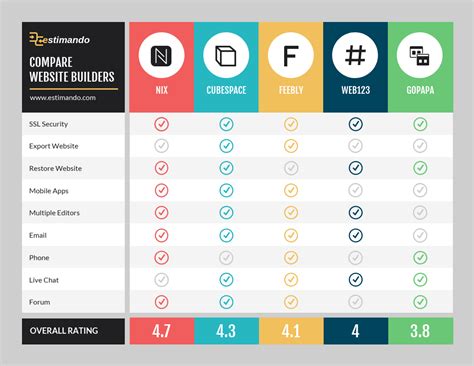
Powered by state-of-the-art AI, PhotoGrid is positioned as an all-in-one collage maker. Its capabilities extend to generating AI-driven collage templates, enabling users to create unique and dynamic content, such as AI-generated video collages and live photo collage wallpapers.
PhotoGrid: Key Features and Highlights
- 20,000+ Collage Templates: A vast and diverse library, with all templates clearly organized and searchable by theme, occasion, or usage.
- Multimedia Integration: Ability to add both video and music to collages, enhancing their dynamism and engagement.
- Regular Updates: Continuous addition of new templates, features, and improvements to keep the app fresh and relevant.
Beyond Grids: Themed Templates and Creative Expression
While grids form the backbone of many collage apps, some applications, like Collageable, place a greater emphasis on curated, themed collage templates rather than purely grid-based structures. Users can initially select their images and preview the potential collage at the top of the screen. Collageable then offers options for the number of images and allows users to seamlessly switch between different layout configurations. The ability to add standard text and stickers is also present, though some apps might necessitate leaving the editing interface to add individual stickers.
Live Collage emerges as a powerful dedicated video collage application, offering the flexibility to save final creations as videos, GIFs, or still images, often without intrusive watermarks.
Versatility for Everyday and Professional Needs
PicCollage is a versatile application suitable for a wide range of tasks, from crafting festive greeting cards for personal use to designing professional flyers and invitations. Its flexibility is evident in its handling of image quantities; for instance, in a collage with 13 grids, uploading more than 12 but fewer than 20 images is permissible, although this can sometimes lead to certain images being partially hidden. An ideal app, in this regard, would proactively guide users, akin to PhotoGrid, ensuring optimal image display.
The ability to integrate short videos, and to search online for memes and GIFs, further enhances the creative possibilities.
Community-Focused Platforms and Professional Formats
PicsArt, while a robust photo editing platform, is more deeply rooted in its identity as an image community focused on social media. Consequently, its collage tools may not be as prominently highlighted, and locating specific functions like collage templates or grid layouts might require more exploration within its interface.
PicsArt does, however, distinguish itself by offering professional-grade downloadable formats. While JPG export is typically free, access to formats like PNG, PDF, GIF, and MP4 videos often requires a purchase. This app is notable for its informative approach, educating users on the distinct uses of each format, thereby aiding in informed selection. For free usage, users are generally required to watch a full advertisement and endure a waiting period, a trade-off that users might perceive as a cost-saving measure.
Simplifying Grid Creation and Template Variety
Using PiZap for rapid grid creation is straightforward; a simple tap on "Collage Templates" upon opening the app initiates the process. It's important to note that PiZap's "collage templates" are often more accurately described as basic grids organized by shape and tailored for social media applications. Users can access full grid versions by tapping "see all." However, PiZap may not provide the same breadth of creative, themed collage templates as seen in platforms like PhotoGrid, which continuously updates an extensive collection for various festive events, including video collages and live wallpapers.
Clean Interfaces and Pro-Level Features
MOLDIV presents a clean and uncluttered interface, with a prominent "Grid" button on its homepage. Tapping this button reveals the total number of available templates. A key distinction for MOLDIV is that its more advanced collage templates, particularly those involving live photos and video, are often reserved for Pro users, with fewer options available for standard phone collages.
Mixgram adopts a user-friendly approach by categorizing its collage templates based on specific usage scenarios, such as holidays and annual events. This organization simplifies navigation and expedites the process of finding the appropriate design. The app's overall aesthetic is often described as cute and cheerful, facilitating the creation of playful birthday cards or festive greeting cards. However, the visual presentation of Mixgram's templates can sometimes appear minimalistic, making it challenging to fully visualize the final photo collage.
AI-Powered Layout Generation and DIY Customization
The convenience of automatic grid and collage layout generation, as offered by apps like PhotoGrid and PicsArt, is a significant advancement. Users can upload their images, and the app intelligently suggests various layouts, often with the ability to preview and swipe through different artistic outcomes. For those who prefer a more hands-on, DIY approach, PhotoGrid provides extensive editing capabilities. Users can meticulously edit each cell, incorporate animations, apply AI filters, remove unwanted objects from photos, and ultimately craft a collage that is truly unique and personalized.
Navigating Subscription Models and AI Enhancements
A common hurdle encountered when downloading collage apps is the immediate appearance of subscription interfaces. However, this does not necessarily preclude free usage. For users concerned about image quality, particularly with lower-resolution photos, choosing collage apps equipped with advanced AI tools is paramount. PhotoGrid, frequently cited as a top-tier free photo collage app, distinguishes itself through its intuitive editing interface and its capacity for creating exceptionally unique and versatile collages.
The app offers a vast array of resources, including over 20,000 collage templates, 1,000 filters, 5,000 stickers, and 2,000 backgrounds. Furthermore, it provides nearly 40 preset resizers tailored for various social media formats, including stories, feeds, posters, live photos, and phone wallpapers.
Users can browse professionally crafted collage templates organized by themes, occasions, and specific uses, facilitating quick customization. The flexibility to upload personal photos and videos, or to utilize PhotoGrid's extensive library of free online stock images, further enhances creative freedom. Experimentation with diverse layouts and grids allows for creative arrangement, and final creations can be saved in high-definition PNG or JPG formats.
PhotoGrid is consistently recognized as one of the best free picture collage makers available for both iPhone and Android devices, boasting a 4.9-star rating on iOS and over 100,000 reviews. Its appeal lies in its ability to facilitate the creation of engaging photo collages on mobile devices without cost. The app is particularly adept at incorporating videos into collages, ensuring that creations capture attention immediately.
With access to over 20,000 collage templates, many specifically curated for social media platforms, PhotoGrid serves as an exceptional Instagram collage app. Its collection of over 200 poster templates, designed for every conceivable event and festival, further empowers users to create visually striking content.
The ease with which PhotoGrid allows for the creation of both video and picture collages is a significant draw. Users can bypass the time-consuming process of sifting through thousands of templates by simply tapping the "Grid" button, uploading their images and videos, and allowing the app to automatically generate a variety of creative collage previews. This "handy-dandy" feature ensures that even users with no prior experience with grids can effortlessly produce stunning collages.
Cost-Effective Solutions and All-in-One Powerhouses
For users seeking a simple and cost-effective collage app, Ribbet is often recommended as a great choice that saves both time and money. However, for an all-encompassing collage-making experience, PhotoGrid emerges as a top recommendation, excelling in both the creation of simple grids and complex, creative collages. Its AI-powered engine continuously generates new collage templates, significantly reducing the time investment required from the user. Ultimately, the selection of a collage app should prioritize those that consistently offer updated templates, customizable elements, and advanced AI tools, ensuring a fresh and intelligent user experience with every interaction.
The magic of PhotoGrid lies in its ability to transform simple uploads into AI-powered photographic art in mere seconds. Instant download to both iPhone and Android devices makes this powerful tool readily accessible.
Comprehensive Editing and Creative Freedom
FotoCollage Photo Editor is presented as a powerful yet user-friendly application that combines photo collage making with comprehensive photo editing capabilities. The process is designed to be intuitive: users select their favorite images, arrange them in a preferred layout, and then enhance their creations with a variety of backgrounds, text, stickers, and frames to produce unique and impressive collages.
FotoCollage: Key Features
- Layout Combinations: Seamlessly merge photos into beautiful collages using a wide array of layouts, supporting the combination of up to 100 photos.
- Layout Customization: Adjust photo layouts, including the rounding of corners, to achieve desired aesthetic effects.
- Advanced Photo Editing: Access tools to fine-tune sharpness and shadows, adjust brightness, contrast, and warmth, and apply a range of 37 unique photo effects for distinctive collages.
- Creative Elements: Utilize an extensive collection of stickers, tags, emojis, texts, and a wide selection of photo borders and frames.
- Image Manipulation: Effortlessly rotate, mirror, flip, drag, swap, and zoom images within the collage.
- Stylish Enhancements: Add emojis and tags to personalize photos and make them more stylish.
- Artistic Transformation: Convert pictures into art using perfect filters, effects, and photo editing tools.
FotoCollage: Template and Customization Options
- 500+ Layouts: Over 100 popular design templates are available, allowing users to flexibly create collages with up to 100 images and even design shaped collages (e.g., heart or diamond).
- Text Features: Enjoy a comprehensive suite of text editing options, including font sizes, colors, gradients, outlines, shadows, spacing, and background adjustments, all free of charge. Insert text anywhere to convey moods or enhance the visual narrative.
- Emoji Stickers: Choose from over 500 regularly updated, trendy stickers, including makeup-themed options like neon, muscle, and wing effects, to add a festive touch.
- Backgrounds & Patterns: Select from a diverse range of cute patterns (love, dot, xoxo, texture) as backgrounds, with adjustable opacity, spacing, size, and angle. Move beyond dull styles with lively backgrounds and sophisticated solid color, blur, or gradient options.
- Photo Filters: Revolutionize photos with a single tap using a wide array of filter effects designed to perfect people, pets, and food.
- Graffiti Brush: Utilize customizable brushes for a unique artistic touch.
Collage Maker is presented as another go-to application for photo collage creation, photo framing, and general picture editing. It allows users to select multiple photos and instantly remix them into visually appealing collages. Users can pick their preferred layout, edit individual pictures, and embellish them with filters, stickers, and text.
Collage Maker: Key Features
- Photo Combination: Combine up to 100 photos to create intricate pic collages.
- Layout Variety: Choose from over 100 different frame or grid layouts.
- Abundant Resources: Access a vast selection of backgrounds, stickers, fonts, and doodle tools.
- Stylish Frames: Add photo frames for various occasions, including love, celebrations, and everyday moments.
- Collage Customization: Adjust collage ratios and edit border styles.
- Creation Modes: Create photo collages in either Free Style or Grid Style.
- Photo Editing Suite: Crop pictures and apply filters, text, and other editing tools.
- Social Media Optimization: Create Insta square photos with blur backgrounds for seamless Instagram integration.
- High-Resolution Output: Save photos in high resolution and share them across social media platforms.
Collage Maker: Specific Functionalities
- Side by Side Photos: Offers inspirational uses for creating side-by-side photo comparisons, ideal for SNS covers, YouTube thumbnails, or Instagram outfit posts.
- Grid Photo: Rapidly create photo collages with hundreds of layout options. Customize grid size, border, and background for personalized designs.
- Edit Photo: An all-in-one photo editor providing tools for cropping, applying filters, adding stickers and text, drawing with a doodle tool, and performing rotations and flips.
- Freestyle: Select beautiful backgrounds and layouts with full-screen ratios to create scrapbooks, decorated with pictures, stickers, texts, and doodles, shareable on Instagram Stories and Snapchat Stories.
- Story Template: Over 100 stylized templates (including Film, Magazine, and Ripped Paper styles) for creating engaging Instagram Stories.
- Multi-fit: Create Insta square photos with blur or white backgrounds to fit Instagram, supporting various ratios (1:1, 4:5, 3:2, etc.) for no-crop posting. Can square up to 10 photos simultaneously.
Collage Maker also details its permission requests, explaining that "READ_EXTERNAL_STORAGE" and "WRITE_EXTERNAL_STORAGE" are necessary for reading and saving photos/videos, and are not used for any other purpose. The app is positioned as a comprehensive solution for Instagram and printing needs, with opportunities for user content to be featured.
Google Photos: Evolving Collage Capabilities
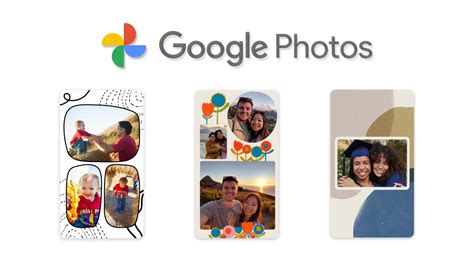
While not a dedicated collage app in the same vein as others, Google Photos has long served as a digital time capsule for many users, backing up photos reliably. Beyond automatically generated "Memories," users can create collages within the Photos app itself. However, the built-in Collage Editor has historically been perceived as somewhat limiting compared to third-party alternatives. Google has been actively testing and introducing new features to enhance its collage capabilities, allowing users greater control and customization.
Recent updates have introduced new grid options and frame presets, along with editing features that permit configuration changes without necessitating a complete restart. A cleaner interface is also being tested, consolidating templates into a single option and adding more border styles. Dedicated buttons for "Templates" and "Borders" have been observed in beta versions, replacing a scrolling carousel of buttons.
The "Templates" option groups existing layouts onto a single page, while the "Borders" option offers customization for frames, including adjustments to border width, radius, and color. It's important to note that these border options currently apply primarily to simpler frames and may not be available for more complex, graphic-intensive frame designs. As these are pre-release features, their final implementation and rollout timeline remain uncertain.
PicCollage: A Feature-Rich Creative Hub
PicCollage is presented as a comprehensive photo editor and collage maker designed for celebrating life's moments. It empowers users to create photo collages, video collages, picture collages, and design scrapbook layouts. Its grid templates and layout tools are instrumental in combining photos, pictures, and videos into collages, cards, and visual stories.
PicCollage: Core Features
- Diverse Creation Options: Create photo collages, video collages, greeting cards, scrapbook pages, Insta stories, and more.
- Photo & Video Editing: Edit photos and videos with a suite of tools including filters, effects, retouching, and cropping.
- AI-Powered Tools: Remove backgrounds with AI and expand images using Magic Expand.
- Animated Templates: Utilize layouts, grids, and animated templates featuring firework and confetti animations.
- Decorative Elements: Enhance creations with fonts, stickers, doodles, crayon borders, film frame effects, and scrapbook paper-tear borders.
PicCollage: Organization and Template Library
- Photo Grid, Layout & Grid Templates: Organize photos into picture collages using the grid feature. Choose from a library of grid templates, ranging from two-photo layouts to multi-photo arrangements. PicCollage caters to all collage needs, from simple grids to complex scrapbook styles, with customizable grid sizes and backgrounds.
- Collage Maker Template Library: Explore a diverse template collection for photo and picture collages, including Magic Cutouts, filters, and Slideshow layouts for all occasions. Animations like fireworks and confetti, film frames, scrapbook styles, and festive designs enhance every photo. The library includes templates for Christmas cards, invitations, and scrapbook layouts.
PicCollage: Design and Editing Tools
- Cutout & Design with Photo Editor: Use the cutout tool to remove backgrounds and make subjects stand out. Design collages with regularly updated templates, photo frames, scrapbook borders, stickers, and backgrounds, adding elements to any grid layout or template.
- Fonts & Doodle Maker: Add text to photo collages with font tools and curved text options. Personalize layouts using the doodle maker and apply crayon borders and scrapbook frames.
- Animation & Video Collage Maker: Animate photo collages and combine pictures with videos using the photo editor. Apply filters and effects to create animated invitations and greeting cards using any grid template.
- Create Card & Invitation Templates: Design invitation and greeting cards with the photo editor. Card templates serve as photo frames for birthdays, weddings, and holidays, transforming photos into invitations.
PicCollage VIP offers an enhanced experience with ad-free editing, no watermarks, and access to premium content, including all stickers, backgrounds, templates, fonts, scrapbook elements, photo frames, picture layouts, and grid layouts.
The app reiterates its utility as a go-to photo collage maker, pic stitch, and photo editor for Instagram and printing. It provides features for combining up to 20 photos, over 100 layouts, a vast selection of backgrounds, stickers, fonts, and doodles, and options for adjusting collage ratios and borders. The Freestyle mode allows for scrapbook creation, while Story Templates offer stylized designs for social media. The Multi-fit feature ensures photos can be posted without cropping, supporting various aspect ratios.
The app's permissions for reading and writing external storage are solely for photo and video editing and saving. PicCollage encourages user feedback and suggestions for improvement.