The world of color is vast and intricate, especially when translating digital designs into tangible print. While computer screens can display millions of colors, the realm of print operates under different principles, primarily governed by the CMYK color model. Understanding CMYK is crucial for any creator aiming for accurate color reproduction in their printed materials, from comic books and graphic novels to children's books and art portfolios. This guide delves into the specifics of CMYK, with a particular focus on how the color red is represented and reproduced.
The Foundation of Print: Understanding CMYK
CMYK is a subtractive color model used extensively in color printing. The acronym stands for Cyan, Magenta, Yellow, and Key (which is black). Unlike additive color models like RGB (Red, Green, Blue) used for digital displays, CMYK works by subtracting light. When inks are applied to a white or light-colored substrate (like paper), they absorb certain wavelengths of light and reflect others. White is the color of the paper itself, and black is achieved by combining the four inks.
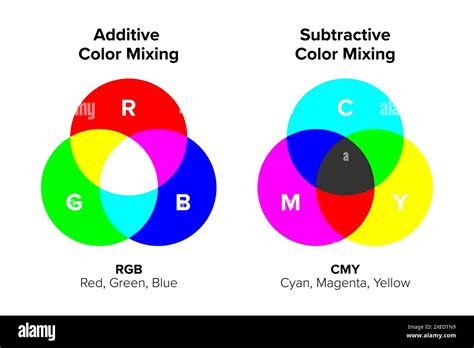
The CMYK model is an extension of the CMY model, which omits black ink. The addition of black, or "Key," ink is essential for achieving deeper blacks, better contrast, and sharper details, especially in text and fine lines. This contrasts with spot color printing, where specific pre-mixed inks are used for fixed colors. While some presses can combine process (CMYK) and spot colors, understanding the CMYK process is fundamental for most print projects.
Decoding the Color Red in CMYK
When you simply ask for "red," it can mean many things. Color psychology plays a role in our perception; do you want a red that signifies passion, danger, or warmth? This is where precise color models become invaluable. CMYK provides specific values that translate into distinct shades of red, allowing for predictable and accurate reproduction.
The beauty of the CMYK system lies in its ability to create a vast spectrum of reds, each with its own subtle nuance. Unlike a single RGB value for red, CMYK offers a granular approach. For instance, a bold 'Carmine' red, often described as daring, might have a CMYK value of C0 M100 Y60 K10. This indicates it's rich in Magenta and Yellow, with a touch of Cyan and no black, resulting in an intense, velvety depth.
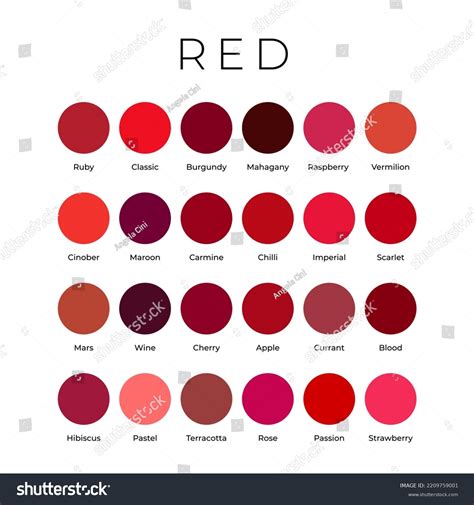
Even within the broad category of "red," the variations are incredible. 'Ruby' red, evoking a sense of opulence, might be represented differently. 'Rose-red,' often associated with elegance, might be C0 M95 Y35 K0, a softer, more delicate hue. Compare this to 'Vermilion,' a vibrant, active red at C0 M85 Y85 K0, or 'Scarlet,' bursting with life at C0 M100 Y100 K0.
It's interesting to note how different shades of red are achieved. Many vibrant reds, like those described as 'daring' or 'passionate,' rely heavily on Magenta (M) and Yellow (Y) components, with minimal or no Cyan (C) and Black (K). This combination naturally produces warm, fiery tones. The underlying principles of CMYK are mathematical, but the way these values translate into visual perception is almost poetic. Each combination, from a bright 'Tangerine' (C0 M80 Y90 K0) that feels so full of life, to a deep, grounding 'Brown' (C45 M75 Y100 K40), tells a visual story.
CMYK vs. RGB: A Fundamental Distinction
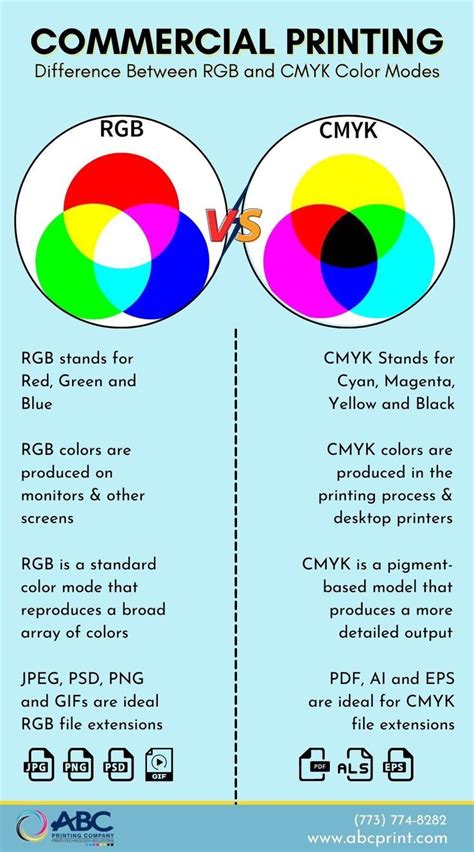
The primary difference between RGB and CMYK lies in their intended use. RGB (Red, Green, Blue) is an additive color model, meaning colors are created by emitting light. Each value in the RGB color model indicates the amount of red, green, and blue within a color, typically ranging from 0 to 255. For example, pure red in RGB is (255, 0, 0). RGB is ideal for digital screens - computers, smartphones, tablets, and televisions - where light emission is the basis of color display. In RGB, (0,0,0) represents black (absence of light), and (255,255,255) represents white (all lights at full intensity).
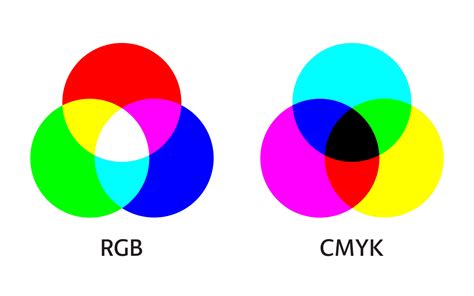
CMYK, on the other hand, is a subtractive color model used for printed materials. It works by layering inks that absorb light. Cyan absorbs red, magenta absorbs green, and yellow absorbs blue. Black ink is added for depth and contrast. In CMYK, lower values generally mean lighter colors, as less ink is applied to the white paper. For example, pure white in CMYK is (0,0,0,0) - no ink is applied.
The transition from RGB to CMYK is a critical step in professional printing. While a computer can display a vibrant RGB red (255,0,0), this exact hue may not be achievable with standard CMYK inks. When Photoshop, for example, attempts to convert a full RGB red to its CMYK equivalent, it might produce values like C0 M99 Y100 K0. This combination is the closest CMYK can get to that specific RGB red, but it's important to note that the resulting printed color will likely be less saturated than what you see on your screen. This discrepancy is due to the difference in how light is emitted versus how it's absorbed and reflected.
Gamut and Color Reproduction Challenges
The collection of colors that can be coded within a color space is called a "gamut." The gamut of CMYK is different from RGB's. This means that some colors visible on an RGB screen simply cannot be reproduced using standard CMYK inks. This is why design software often provides warnings, such as an exclamation mark in Photoshop's Color Picker, indicating that a chosen color is "out of gamut for printing." When this happens, the software will offer the closest printable CMYK equivalent.
This limitation is particularly noticeable with highly saturated colors, including certain vibrant reds, blues, and greens. For instance, the intense RGB red (255,0,0) might be flagged as out of gamut. The CMYK values that Photoshop suggests, like C0 M99 Y100 K0, represent the best achievable red within the CMYK printing process, but it won't be as luminous as the light-emitted RGB version.
Specific Color Reproduction Considerations in CMYK:
- Reds: Red can often appear orange or rusty when printing. This is usually due to the balance of magenta and yellow. If red looks too pinkish, it indicates too much magenta. For vibrant reds, a high percentage of both magenta and yellow, with minimal cyan and black, is typically used. For example, 'Scarlet' at C0 M100 Y100 K0 is a very intense red.
- Blues: In CMYK, blue is one of the more challenging colors to reproduce accurately. Achieving a true, deep blue often requires careful balancing of cyan and magenta, with minimal yellow and black. Suggestions like 100-50-0-0 (C-M-Y-K) can be a starting point for some blues.
- Purples: Regal purple tones are generally more CMYK-friendly than some other colors. They are typically achieved by combining significant amounts of cyan and magenta, with varying levels of yellow and black depending on the specific shade.
- Pinks: Pinks in CMYK printing are primarily about the magenta component. For stand-out pinks, high magenta levels are crucial, with low yellow, cyan, and black.
- Black: While pure black is achieved with K100 (C0 M0 Y0 K100), this is often referred to as "true black" or "process black." For richer, more saturated black areas, especially in large blocks of color, a "rich black" is recommended. This is created by blending CMYK colors, typically with a combination like C60 M60 Y60 K100. This adds depth and prevents the black from looking too flat or appearing as a dark brown under certain lighting conditions. However, care must be taken, as over-inking can lead to issues.
Practical Application and Best Practices
Understanding CMYK codes is essential for anyone involved in design work that requires printing. Whether you're creating brochures, posters, packaging, or any other printed material, familiarity with CMYK will help ensure your designs maintain color fidelity from screen to print.
When designing, it's beneficial to work within a CMYK color mode in your design software (like Adobe Illustrator or Photoshop) if your final output will be printed. This allows you to preview colors more accurately as they will appear in print and avoid out-of-gamut issues. If you start a project in RGB, converting it to CMYK before sending it to print is crucial. Be aware that some colors may shift during this conversion, and you may need to make minor adjustments to maintain your desired aesthetic.
Understanding Color Models in Adobe Illustrator | RGB vs CMYK Explained
Print providers like PrintNinja, who have printed millions of books and other materials, often provide guides with reliable CMYK color values that are known to produce accurate results. While no color matching can be guaranteed without ordering a spot color, these charts offer excellent starting points for ensuring accurate color reproduction. The color charts are typically organized with a dark "base" color on the top left, with decreasing color values as you progress around the color wheel.
It's also important to remember that monitor settings can affect how colors appear on your screen. What you see may differ slightly from how the colors print on an offset press. Similarly, printing this guide on an inkjet or laser printer might result in variations compared to professional offset printing.
CMYK and Gamut Considerations
The concept of "gamut" is central to understanding the limitations and capabilities of CMYK. Different printing processes and ink formulations can result in slightly different CMYK gamuts. For instance, the "Web Coated (SWOP) v2" profile, commonly used for press printing of books and magazines, has a more limited color reproduction range than some high-quality inkjet printers.
The fact that CMYK numbers are not always unique is another characteristic difference from RGB. While a specific RGB value always corresponds to one unique combination of Red, Green, and Blue, a particular CMYK color can sometimes be represented by multiple combinations of Cyan, Magenta, Yellow, and Black. This is especially true for less-saturated colors and is largely due to the flexibility offered by the black component.
In essence, CMYK is a system designed to work with the physical properties of ink and paper. While it has its complexities and limitations compared to the more expansive RGB model, a thorough understanding of its principles, particularly how specific colors like red are constructed, is fundamental for achieving professional and visually appealing printed designs. By leveraging precise CMYK values and understanding the nuances of color reproduction, designers can bridge the gap between the digital realm and the tangible world of print with confidence.