In today's digital age, preserving and sharing memories has become an art form. With the proliferation of smartphones and high-quality cameras, we're capturing more moments than ever before. However, a camera roll filled with individual photos can sometimes feel overwhelming and fail to tell a cohesive story. This is where photo collage maker apps step in, offering a creative and engaging way to group, display, and add context to your cherished memories. These applications transform a collection of individual images into a visually appealing narrative, acting as a digital scrapbook or a mini-series of your experiences.
The market is flooded with a plethora of collage apps, each promising to be the best. Navigating this landscape can be daunting, but understanding the core functionalities and unique offerings of each can help you make the right choice. Whether you're looking to create a simple grid for social media or a more elaborate design for printing, there's an app out there for you. This guide aims to demystify the world of photo collage makers, highlighting their features, benefits, and how to select the one that best suits your needs.
Understanding the Core Functionality of Collage Makers
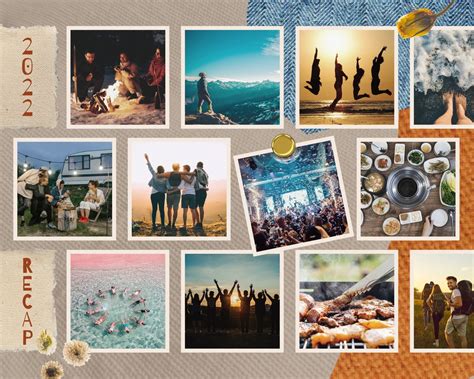
At their heart, collage maker apps are designed to facilitate the combination of multiple images into a single, unified composition. This is typically achieved through various layout options, often referred to as grids or templates. These layouts dictate how your chosen photos are arranged, including their size, shape, and the spacing between them. Beyond mere arrangement, these apps empower users with a suite of editing tools to further enhance their creations.
The fundamental process usually involves selecting your desired photos from your device's gallery. Once chosen, the app's interface allows you to experiment with different pre-designed templates. These templates can range from simple, clean grids to more artistic and thematic arrangements. Many apps also offer the ability to customize these templates, adjusting the size of the borders, the roundness of the corners, and the overall aspect ratio to fit specific platforms like Instagram or for printing purposes.
Beyond the visual arrangement, collage makers often provide a comprehensive set of photo editing tools. These can include basic adjustments like cropping, rotating, and resizing, as well as more advanced features such as applying filters, adjusting brightness and contrast, and even performing more complex edits like background removal. The addition of text, stickers, emojis, and frames further allows for personalization, enabling users to add captions, dates, personal messages, or decorative elements to their collages.
For those looking to go beyond static images, many of the best collage apps now support the integration of videos and even Live Photos. This capability opens up new avenues for storytelling, allowing users to create dynamic video collages, slideshows with music, or animated compositions. The ability to add music from your library or even find new tracks to purchase adds another layer of engagement to these multimedia creations.
Key Features to Look for in a Collage Maker App
When evaluating photo collage maker apps, several key features can significantly enhance your creative experience and the quality of your final output. Understanding these features will help you identify the most versatile and user-friendly options available.
Layouts and Templates: The Foundation of Your Collage
The variety and quality of layouts and templates are paramount. A good collage maker will offer a vast selection, ranging from classic grid structures to more unique and artistic shapes. Apps like PhotoGrid boast over 20,000 stylish and free layouts, organized by theme, occasion, and usage, making it easy to find the perfect starting point. Others, like InCollage, provide over 500 picture collage layouts, catering to various needs including holidays, weddings, and "before & after" scenarios. The ability to create shaped collages, such as hearts or diamonds, adds an extra dimension of creativity.
Photo Editing Tools: Polishing Your Images
While the focus is on combining images, robust individual photo editing capabilities are crucial. This includes standard tools like cropping, rotating, and resizing, as well as filters, brightness, contrast, and saturation adjustments. Some apps, such as Moldiv and PicsArt, offer comprehensive editing toolbars that rival standalone photo editors, allowing you to perfect each image before incorporating it into the collage. Features like AI-powered editing for background removal or avatar creation, as seen with InCollage, represent the cutting edge of this functionality.
Text and Sticker Customization: Adding Personal Touches
The ability to add text and stickers is essential for conveying messages and adding personality. Look for apps that offer a wide range of fonts, colors, and text effects (outlines, shadows, gradients). Similarly, a diverse and regularly updated sticker library, including emojis, makeup stickers, and themed packs, can significantly enhance the visual appeal and expressiveness of your collages. FotoCollage, for instance, offers tens of thousands of photo borders and frames, along with a plethora of emoji stickers.
Backgrounds and Patterns: Setting the Scene
The background of your collage plays a crucial role in its overall aesthetic. The best apps provide a wide array of background options, including cute patterns, solid colors, and gradients. The ability to adjust the opacity, space, size, and angle of patterns, as seen with FotoCollage, allows for subtle yet impactful customization.
Video and Multimedia Support: Beyond Static Images
As technology advances, so does the functionality of collage apps. Many now support the inclusion of video clips, Live Photos, and GIFs, transforming static collages into dynamic multimedia experiences. Apps like Diptic and PicPlayPost excel in this area, allowing users to combine photos and videos within the same frame, and even create animated slideshows with music.
AI Tools: The Future of Collage Making
Artificial intelligence is increasingly being integrated into collage maker apps. These AI tools can automate complex editing tasks, generate unique collage templates, or even transform selfies into playful avatars, as highlighted by LiveCollage. AI-powered features can streamline the creative process and unlock new possibilities for personalization.
User Interface and Ease of Use: Intuitive Design
A powerful app is only effective if it's easy to use. An intuitive interface, clear navigation, and drag-and-drop functionality are crucial, especially for beginners. Apps like PhotoGrid are praised for their clean and intuitive editing interfaces, while others, like Pic Stitch, offer immediate access to grid options, streamlining the initial steps.
Watermarks and Ads: The Free vs. Premium Trade-off
Many apps offer a free version with basic functionality, often accompanied by advertisements or watermarks on the final output. Premium versions typically remove these limitations and unlock additional features, templates, and editing tools. Some apps, like Icecream Photo Editor, allow you to save collages without watermarks even in the free version, which is a significant advantage.
Top Photo Collage Maker Apps Reviewed
The following is a curated selection of some of the best photo collage maker apps available, each with its unique strengths and target audience.
1. PhotoGrid: The All-in-One Powerhouse
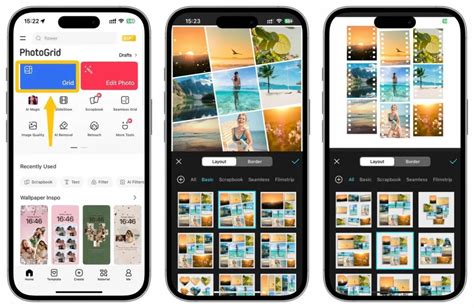
PhotoGrid consistently ranks as a top choice due to its comprehensive feature set and user-friendly design. It's lauded as the best all-in-one collage maker, offering over 20,000 collage templates, 1,000 filters, 5,000 stickers, and 2,000 backgrounds. The app's AI capabilities allow for the generation of AI-driven collage templates, ensuring a fresh and smart experience with each use. PhotoGrid excels in its ability to create both static photo collages and dynamic video collages, making it incredibly versatile. Its "Grid" button provides instant access to a wide array of layout options, and the app automatically generates various collage previews as you upload images, simplifying the process even for novice users. PhotoGrid is also praised for its ability to integrate videos and music, create animated text, and offer nearly 40 preset resizers for social media stories and feeds. It's available for both iPhone and Android and boasts a high user rating.
2. LiveCollage: Storytelling Through Visuals
LiveCollage positions itself as a comprehensive tool for capturing and sharing your best moments and memories. With over 100 million installs, it's a testament to its popularity. The app offers a vast library of over 20,000 stylish and free layouts in different shapes and styles, alongside powerful video editing and slideshow-making capabilities. Users can beautify portraits with a pro selfie editor, decorate photos with exclusive stickers, and add music to create stunning slideshows. The "LiveCollage VIP" subscription unlocks all templates, layouts, effects, and exclusive features. It's designed for a wide range of Apple devices, from iPhone to Mac and Apple Vision.
3. InCollage: Feature-Rich and Intuitive
InCollage is a full-featured photo collage maker and photo editor that offers over 500 picture collage layouts, frames, backgrounds, templates, stickers, and text fonts. It's particularly noted for its "one-tap" AI avatar transformation, allowing users to turn selfies into playful avatars. The app provides a powerful yet easy-to-use photo editor with tools for cropping, applying filters, adding stickers and text, and drawing on photos. Its pic collage editor is designed for Instagram, supporting multiple aspect ratios. InCollage serves as a pocket collage maker, meme generator, and pic stitch tool, making it a versatile option for social media and printing.
4. FotoCollage: Creative Freedom and Customization
FotoCollage is a powerful and user-friendly app that allows users to combine photos into beautiful collages with amazing layouts. It supports remixing up to 100 photos to create stunning layouts and offers a variety of backgrounds, text, stickers, and frames. Key features include the ability to change photo layouts, apply unique photo effects (37 in total), add emojis and tags, and use customizable graffiti brushes. The app's extensive collection of over 500 layouts, including shaped collages, and its robust text and emoji sticker options make it a compelling choice for creative expression.
5. Canva: Versatile Design for All Purposes
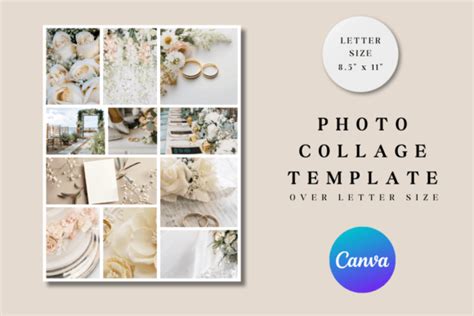
Canva is a highly popular web-based design tool that extends its capabilities to photo collage creation. While not solely a collage maker, its intuitive interface and vast library of templates, graphics, and fonts make it an excellent choice for creating professional-looking collages for marketing, social media, or personal use. Canva allows users to combine images with graphics, remove photo backgrounds, and offers a basic image editor. Its strength lies in its versatility, enabling users to create a wide range of visual content beyond just collages. The platform's ease of use, even for those with no prior editing experience, makes it accessible to a broad audience.
6. Adobe Express: Creativity and Variety
Formerly known as Adobe Spark, Adobe Express is a robust free collage maker that rivals Canva in terms of creativity and variety. It offers a sheer volume of templates and photo options, making it ideal for various purposes, including book covers, phone wallpapers, calendars, and social media posts. While a dedicated collage section might not be immediately apparent, users can find collage layouts within several categories that allow for multiple photos. The web browser editor is particularly praised for its creative potential.
7. Google Photos: Simple and Integrated
Google Photos offers a surprisingly capable, albeit basic, collage maker that seamlessly integrates with its photo storage service. To create a collage, users simply select the photos they wish to include, and Google Photos automatically generates a square photo grid with a decent white border. While its simplicity is an advantage for quick creations, it lacks customization options, meaning the layout is fixed, and the overall shape cannot be altered. It's a great option if you prioritize ease of use and integration with your existing photo library.
8. Shape Collage: Unique and Artistic Arrangements
Shape Collage offers a distinct approach to picture collages. It allows users to upload a series of photos and then play with parameters to create collages that resemble scattered polaroid images. While the software's interface might appear basic, and the free version offers no editing of the final collage, its unique artistic output makes it a fun and engaging tool for those seeking something different. The learning curve for mastering its parameters is worth the effort for its distinctive results.
9. Fotor: Template Variety and Ease of Use
Fotor is another versatile photo collage maker available as both a web-based program and downloadable software. It stands out for its template variety, offering layouts ranging from simple grids to diagonal and heart-shaped designs. The drag-and-drop interface makes it easy to learn and use, and users can adjust spacing, margins, and corner radius depending on the chosen template.
10. Icecream Photo Editor: User-Friendly PC Option
For PC users, Icecream Photo Editor is a standout choice. It's an easy-to-use, free image editor with a dedicated photo collage section. Users can select from various template options, including classic grid styles, and easily swap photos by clicking and dragging. The software also allows for adjustments to frame border sizes and colors. Beyond collage creation, it offers a decent range of other editing tools for individual photos.
11. Pixlr: Professional Features in the Browser
Pixlr is a popular online photo editing service that includes a capable collage maker. It offers a user-friendly interface with a comprehensive set of editing tools, making it convenient for both casual and professional users. Pixlr allows users to choose from different templates, adjust aspect ratios, spacing, colors, and corner settings. The ability to edit directly in the web browser without downloads makes it highly accessible.
12. PicsArt: Socially Driven Creative Platform
PicsArt is a versatile platform that blends photo editing with creative design, available both online and as a mobile app. It has a strong social orientation, featuring a community feed showcasing user creations. PicsArt offers a wide array of editing features, including drawing tools, templates, background images, HDR filters, and AI-style effects. It also allows for advanced edits like double exposures and meme creation. While its collage tools might not be as prominently highlighted as its broader creative features, its extensive capabilities make it a powerful option.
13. Layout from Instagram: Simplicity and Speed
Layout from Instagram is a free mobile app designed for straightforward photo collage creation. It features a simple interface with drag-and-drop functionality, enabling users to combine multiple pictures into various collage layouts. The app provides a selection of preset grid templates that can be adjusted by resizing and rearranging. Users can select images from their gallery or capture new ones directly within the app, making it a quick and efficient tool.
14. Diptic: Combining Photos and Videos Seamlessly
Diptic stands out for its ability to combine photos and videos within the same collage frame. It offers a wide range of templates categorized into styles like Animated, Classic, and Jumbo. Users can adjust all aspects of the design, including cell borders, frames, aspect ratios, and fonts. Diptic allows for the integration of photos, videos, and Live Photos captured by an iPhone, and users can even save custom layouts for future use.
Tips for Creating Stunning Collages
Regardless of the app you choose, a few best practices can elevate your collage-making game:
- Plan Your Theme: Before you start, decide on a theme or concept for your collage. This will guide your image selection and overall design.
- Select High-Quality Images: Always opt for high-resolution images to ensure clarity and sharpness in your final collage.
- Resize Thoughtfully: Crop or resize images as needed to fit the collage, but be mindful of maintaining the integrity of the original content and avoiding excessive distortion.
- Utilize Templates: Collage makers often provide templates that offer a great starting point and can save you significant time.
- Aim for Symmetry and Balance: A well-composed collage often benefits from a balanced arrangement of elements. Consider the visual weight and placement of each photo.
- Add Text and Captions: Use the text feature to add captions, quotes, dates, or personal messages that enhance the narrative of your collage.
- Explore Filters and Effects: Experiment with filters and effects to enhance the mood, style, or aesthetic of your collage. However, use them judiciously to avoid an overly busy or inconsistent look.
- Maintain Consistency: While creativity is encouraged, try to maintain a degree of visual consistency in terms of color palette, style, and overall tone.
How to Make Video with Pictures and Music
Frequently Asked Questions About Collage Makers
Are there watermarks on collages created with free collage makers?
Some photo collage makers may add watermarks to the final collage if you use the free version. However, many apps, like Icecream Photo Editor, allow you to save collages without any watermarks even in the free version. It's always advisable to check the app's policy on watermarks.
Can I use collage makers on mobile devices?
Yes, most of the best photo collage maker apps are available as mobile applications for both iOS and Android devices. Many web-based collage makers can also be accessed through a browser on your smartphone.
Can I add text and captions to my collages?
Yes, most free and premium collage makers allow you to add captions or text to your collages. The level of customization for text, such as font choices, colors, and effects, can vary between apps.
Can I utilize collage makers for commercial purposes?
This depends on the terms of service of the specific collage creator you choose. Many apps permit personal and commercial use, but it is essential to review the licensing agreements and terms of use to ensure compliance.
Can collage making software handle videos as well as photos?
While most traditional programs focus on photo and image editing, an increasing number of modern collage apps now support the integration of videos. Apps like PhotoGrid, Diptic, and LiveCollage are excellent examples of tools that can handle both photos and videos in their creations.