Corel Painter Essentials has long been recognized as a powerful yet accessible gateway into the world of digital painting. Designed with beginners and hobbyists in mind, this software offers a robust set of tools and features that empower users to transform their creative visions into stunning digital artwork. From realistic paintings and vibrant drawings to impressive illustrations, Painter Essentials provides a comprehensive workshop for digital art creation, bridging the gap between traditional art practices and the digital realm. Whether you are a seasoned traditional artist looking to explore digital mediums or a complete novice embarking on your creative journey, Painter Essentials equips you with the necessary instruments to achieve remarkable results.
Embracing the Enhanced User Interface
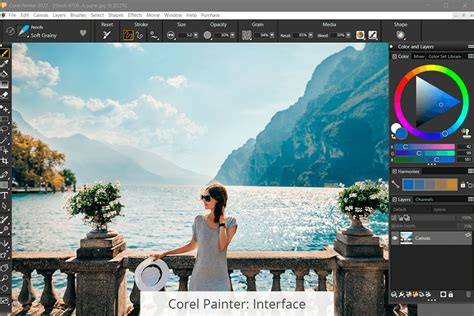
The user interface of Corel Painter Essentials has undergone significant enhancements, focusing on a more streamlined and intuitive painting experience. A tour of these improvements reveals a modern aesthetic, including a welcome dark theme that reduces eye strain during extended creative sessions. Tool highlights have been implemented to provide clearer visual cues, ensuring that users can easily identify and select the tools they need. Furthermore, the introduction of new icons contributes to a cleaner and more organized workspace, allowing artists to focus more on their canvas and less on navigating complex menus. This thoughtful evolution of the interface ensures that both new and returning users can quickly acclimate and begin creating.
Exploring a Universe of Brushes
The true magic of digital painting often lies in the diversity and expressiveness of its brushes, and Corel Painter Essentials does not disappoint. Painter Master Elite Don Seegmiller demonstrates a variety of unique brushes that go beyond simple strokes, offering capabilities to glow, jitter, shatter, distort, and add decorative flair to artwork. These specialized brushes allow for an incredible range of artistic expression, enabling users to mimic traditional media with uncanny realism or to explore entirely new visual effects. From the subtle nuances of watercolor and oil paints to the bold statements of ink and charcoal, the program provides authentic dry media like chalks, pencils, and pastels, alongside realistic wet media including oils, airbrushes, and pens. This vast brush library means that every canvas truly is a fresh start, inviting experimentation and the realization of unique artistic visions.
Mastering Color Selection and Blending
Effective color management is fundamental to any painting, and Painter Essentials offers sophisticated tools to achieve this. The Color Selector has been updated with features like circular grabbers, providing a more tactile and precise way to choose colors. A particularly useful innovation is the split color and clone painting preview, which allows artists to see their color choices and cloning effects simultaneously, leading to more informed decisions and smoother integration of elements. For those looking to achieve the nuanced build-up of color characteristic of traditional techniques, Painter Essentials' glazing brushes are invaluable. These brushes allow opacity to build up smoothly along brushstrokes, enabling the creation of subtle transitions and rich depth, much like a master painter would achieve with oils or acrylics.
The Power of Pressure Sensitivity and Drawing Tablets
The integration of pressure-sensitive drawing tablets with Corel Painter Essentials unlocks a new level of control and expressiveness. Painter Master Elite Cher Pendarvis highlights the significant benefits of using such a tablet, where varying the pressure applied directly translates to variations in brush stroke thickness, opacity, and other parameters. This dynamic interaction allows artists to recreate the look and sensation of painting with traditional media with remarkable fidelity. For instance, a light touch can produce a delicate, almost transparent stroke, while a firmer press can yield a bolder, more opaque mark. This pressure-sensitive control is crucial for achieving natural-looking results, especially when working with mediums like pencils, watercolors, or oils, and significantly enhances the overall painting experience.
The benefits of using a pressure sensitive drawing tablet for painting
From Sketch to Finished Artwork: Pencil and Pen Techniques
Corel Painter Essentials provides dedicated tools and workflows for creating both pencil sketches and pen-and-ink drawings. Users can learn how to find and use various pencil media types, organizing them effectively within custom palettes for quick access. This organization is key to maintaining a fluid workflow, especially when developing complex pieces. Similarly, the program facilitates the creation of simple pen and ink sketches, offering a range of pen brushes that mimic different ink tools. Tips on organizing these brushes in custom palettes are provided, ensuring that artists can easily switch between different line weights and ink styles. This meticulous attention to detail in foundational sketching and linework sets a strong precedent for the rest of the painting process.
Unleashing the Potential of AI-Powered Photo Artistry
One of the most transformative features of Corel Painter Essentials is its AI-based tools, particularly for photo artistry. The software leverages artificial intelligence to automate and enhance the process of turning photographs into paintings. The Photo Painting function allows users to quickly transform their images into stunning paintings with just a few clicks, offering a variety of styles to choose from. This AI-driven approach is not merely about applying a filter; it intelligently analyzes the photo, identifying areas of focus and applying details and strokes in a manner that mimics a trained artist. Users can even combine multiple AI auto-painting styles and effects to create truly unique and impressive works of art.
Refining AI Creations with Hand-Painted Touches
While AI auto-painting offers a fantastic starting point, Corel Painter Essentials empowers users to refine and personalize these results. Artists can add hand-painted brushstrokes, textures, and blending techniques to infuse their AI-generated artwork with a unique, human touch. This hybrid approach allows for the best of both worlds: the speed and efficiency of AI combined with the artistic control and nuance of manual painting. Painter Master Elite Collin Chan demonstrates how to remove background elements, apply auto-painting, and then add hand-painted strokes to elevate the final artwork. This process ensures that the resulting piece is not just a converted photograph, but a genuine work of art with depth and character.
Glimpses into the Creative Process of Master Artists
Corel Painter Essentials serves as the canvas for a diverse range of professional artists, offering insights into their unique workflows and favorite tools. Illustrator Pavel Goloviy, for instance, shares his painting process for creating a 19th-century character and a character portrait of "The Mistress of Copperhead Mountain." These demonstrations provide invaluable lessons in character design, rendering, and atmospheric detail. Concept artist Magdalena Proszowska offers her expertise in painting realistic eyes and eyebrows, along with a glimpse into the creative development behind her beautiful artwork for Painter Essentials. These master classes demystify complex techniques and inspire users to push their own artistic boundaries.
The benefits of using a pressure sensitive drawing tablet for painting
Specialized Techniques: Hair, Eyes, and Dynamic Brushes
Mastering specific elements within a portrait or character study can be challenging, and Painter Essentials provides targeted guidance. Helpful tips are available on how to paint hair, covering the entire process from initial sketch to adding color, highlights, and fine details. Similarly, concept artist Magdalena Proszowska's demonstrations offer expert advice on rendering realistic eyes and eyebrows, crucial components for conveying emotion and personality in a portrait. Beyond representational art, the software also boasts dynamic brush categories like Dynamic Speckles, which introduce a variety of unique brush strokes with extensive controls and settings for experimental artistic effects.
Time-Saving Tools and Artistic Exploration
Efficiency is paramount in the digital art process, and Painter Essentials includes tools designed to save time without sacrificing creative output. Painter Master Elite Don Seegmiller showcases the utility of the Mirror tool, a time-saving feature that allows for symmetrical painting, effectively doubling the progress on mirrored elements of a composition. This is particularly useful for symmetrical subjects or for quickly establishing a balanced structure.
Landscape Painting with Painter Essentials
The creation of compelling landscapes is another area where Painter Essentials excels. Painter Master Elite Cliff Cramp offers guidance on setting the composition and establishing a strong focal point to begin a landscape painting. The process is then continued by learning how to add light and dark values, and refining details in both the background and foreground to bring the scene to life. Painter Artist Davey Baker provides a comprehensive introduction to concept landscape painting, demonstrating how to set canvas color, create the underlying structure for elements like clouds, mountains, and rivers, and choose complementary colors for a harmonious palette. He further illustrates how to add natural light accents to hills and rivers, making the landscape sparkle with depth and interest.
Transitioning and Customization: From Essentials to Painter
For artists who begin their digital journey with Painter Essentials and wish to progress to the more advanced Corel Painter, there is a clear pathway. Painter Master Elite Cher Pendarvis provides tutorials that introduce the interface and key tools of the full Painter application, easing the transition. A significant aspect of mastering any digital art software is personalization. Painter Essentials allows users to organize and personalize their user interface by creating custom panels and palettes, ensuring that frequently used brushes, commands, and tools are always readily accessible. This ability to set up and save custom layouts significantly improves workflow efficiency. Furthermore, Cher Pendarvis shares her expertise on modifying default brushes to create unique custom brushes, tailored to individual artistic needs and preferences.
Delving Deeper: Clone Painting and Texture Brushes
Corel Painter Essentials offers specialized workspaces and brush categories for advanced techniques. The Photo Art layout introduces users to clone painting tools, providing tips on clone sources, underpainting, tracing, and the Quick Clone feature, which streamlines the process of creating painterly effects from photographs. For adding surface richness and visual interest, the texture brushes are particularly exciting. These brushes allow artists to apply texture from a source image directly onto their digital canvas, adding a tactile dimension to digital paintings that can mimic the appearance of canvas, paper, or other materials.
The benefits of using a pressure sensitive drawing tablet for painting
The Foundation of Art: Rough Drawings and Workflow Tips
Even the most sophisticated digital painting begins with a fundamental step: the rough drawing. Professional artist Aaron Blaise demonstrates how to create a rough drawing using an Intuos tablet and Painter Essentials, emphasizing this as the crucial first step in creating any work of art. This foundational approach, combined with the software's intuitive Welcome Screen that offers layout options, helpful tutorials, and workflow tips, ensures that users are well-equipped from the moment they launch the application.
Mac Workflow Enhancements and Creative Freedom
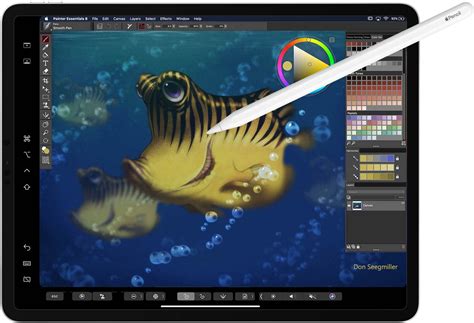
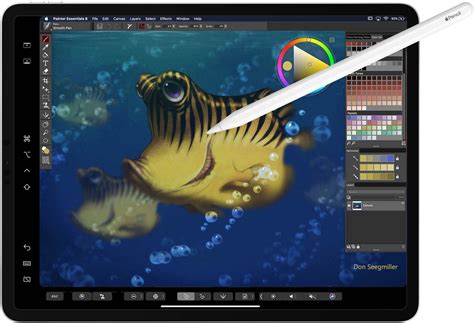
Corel Painter Essentials has also been optimized for enhanced workflows on macOS. The integration with macOS Catalina's Sidecar feature allows users to mirror their Mac desktop onto an iPad and paint using the Apple Pencil with tilt support, offering a versatile and portable creative setup. For MacBook Pro and iPad users, support for the context-sensitive Touch Bar and multi-touch Trackpad further increases efficiency. The software embraces powerful new algorithms and AI technologies, such as Core ML and the Apple Vision Framework, to enhance auto-painting presets. These advancements enable the intelligent determination of focus areas within a photo, resulting in more natural-looking paintings with greater depth and focus. By applying more detail to areas of interest and using larger, more gestural strokes in the background, the AI-generated results more closely resemble the work of a trained artist. Users can choose from a selection of new AI Styles to experience stunning artistic results on their Mac. Furthermore, the ability to easily narrow down perfect painting colors using new harmonies and color sets, including complementary, light monochromatic, and dark monochromatic options, ensures balanced and aesthetically pleasing color palettes. Working with layers is also improved, with enhanced contextual menus, information dialogs, layer adjuster options, and easy access to commands, all contributing to a more user-friendly experience.
A World of Artistic Possibilities Awaits
Corel Painter Essentials is more than just a painting program; it is an entire workshop for digital art. It offers endless possibilities with its diverse brush types that mimic traditional mediums, its AI-powered tools for rapid photo transformations, and its intuitive interface designed for ease of use. The availability of a FREE 15-day trial encourages aspiring artists to embark on their creative journey, exploring easy-to-learn tools, AI-based photo art, and a vast selection of brushes for all styles of art. Whether you are drawn to the realism of oils, the fluidity of watercolors, the boldness of ink, or the expressive nature of pencils and pastels, Painter Essentials provides the platform to craft your masterpiece with stunning reality. As Isabelle, an artist who began creating art at the young age of four, attests, "Painter Essentials is an absolute steal," underscoring its value for artists of all ages and skill levels.
tags: #corel #painter #essentials