CorelDRAW, a long-standing name in the graphic design industry, has taken a significant step into the future with its latest update, integrating a suite of powerful, albeit controversial, generative AI tools. This move positions CorelDRAW to compete in a rapidly evolving creative landscape where AI is becoming an indispensable component. The new features, including integrations with models like Stable Diffusion 3.5, Flux Schnell, and Nano Banana, bring the capabilities of advanced AI directly into the familiar vector-drawing environment of CorelDRAW and its companion, Corel PHOTO-PAINT.
The AI Integration: Convenience Meets Controversy
The integration of generative AI into CorelDRAW is, on the surface, what one might expect in the current technological climate. Major creative platforms are all vying to incorporate these cutting-edge features, and Corel is no exception. The new AI tools allow users to generate images from text prompts, create variations of existing artwork, and experiment with different visual concepts without ever leaving the software. While the convenience of these features is undeniable, as experienced firsthand, they don't yet feel entirely essential to the core identity of CorelDRAW. The implementation, while functional, can feel somewhat like an effort to keep pace with industry trends rather than a fundamental enhancement of the software's established strengths.
A primary reason for this perception lies in the nature of the AI-generated outputs. Models like Stable Diffusion and Nano Banana produce raster-based images. For a vector design workflow, which is built on the principles of clean lines, infinite scalability, and precise control, this introduces an extra step: conversion. The generated raster images must be converted into vector art, which can interrupt the speed and fluidity that generative AI is often marketed to provide. CorelDRAW does possess one of the best vector conversion tools available, capable of transforming both AI-generated and other raster images into editable vector graphics. However, this added step in the AI workflow could potentially lead to user frustration.
Enhancing Presentation and Workflow with AI
Where CorelDRAW's AI tools truly begin to shine is in their ability to enhance the presentation of existing work. This is particularly evident with tools like Nano Banana, which excels not at creating final artwork from scratch, but at reframing and contextualizing designs that have already been created. For instance, a designer working on a wine label can use the AI to place their design onto a realistic bottle, set within an atmospheric scene like a sun-dappled vineyard. This transforms a flat design into a compelling, client-ready visual that can significantly aid in the approval process. In this capacity, the AI is not replacing the designer's skill but augmenting their ability to pitch and present their work effectively, saving valuable time, especially for freelancers and studios managing multiple client approvals.

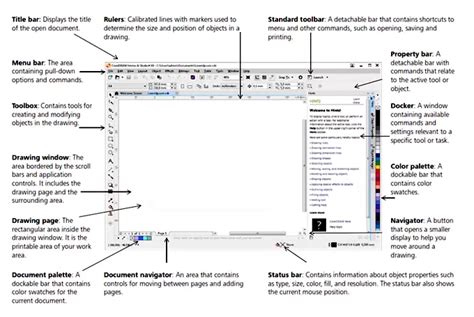
The AI tools integrated into CorelDRAW function essentially as a dock, providing access to established AI models. This dock offers more than just raw generation; it includes additional controls that allow for a greater degree of customization and refinement. Users can select aspect ratios, generate multiple variations of an image, apply optional styles and color palettes, and control the strength of reference images. These features aim to give designers more agency over the AI's output, moving beyond the perception of AI as a purely unpredictable "slot machine." As Prakash Channagiri, Senior Director of Product Management for CorelDRAW, emphasizes, the goal is to empower designers to remain "fully in control of every creative decision." During demonstrations, this control was palpable, particularly when generating client-facing materials from existing artwork.
A crucial point of reassurance for users is Corel's commitment to privacy. In demonstrations, it was stressed that any artwork or images uploaded by users for AI generation will not be used to train the underlying AI models. However, in an era of increasing scrutiny over large language models (LLMs) and their data usage, user trust in these systems remains a significant consideration.
Discover an impressive collection of AI tools
Corel PHOTO-PAINT: Closing the Gap with Photoshop
In Corel PHOTO-PAINT, the AI additions feel more directly competitive with industry giants like Adobe Photoshop. Features such as one-click background removal, AI-assisted subject selection, and image clean-up tools are now built directly into the software. These enhancements are steadily narrowing the gap that Photoshop has held for some time in rapid, AI-powered photo manipulation. Corel is clearly working to chip away at this advantage, and the distinction between the two software packages in this area is becoming less pronounced.
The Business Model Differentiator: Choice in a Subscription World
Perhaps the most significant differentiator for CorelDRAW, however, is not a specific feature but its business model. Unlike many contemporary creative software suites that operate on a mandatory subscription basis, CorelDRAW continues to offer a perpetual license option, allowing users to purchase the software outright for a one-time fee of $549. While a subscription option is available at $269 per year, which includes the full browser-based CorelDRAW Web application (featuring the same desktop tools, including AI, accessible online), the absence of a mandatory subscription remains a compelling proposition. This flexibility is particularly valuable for designers who are weary of the continuous financial commitment associated with subscription services.
CorelDRAW Web, it's worth noting, offers the same powerful tools as the desktop version, including the newly integrated AI features, but in an online, browser-based format for enhanced speed and accessibility. This should not be confused with CorelDRAW Go, a separate, more streamlined app with a different pricing structure ($9.99 per month).
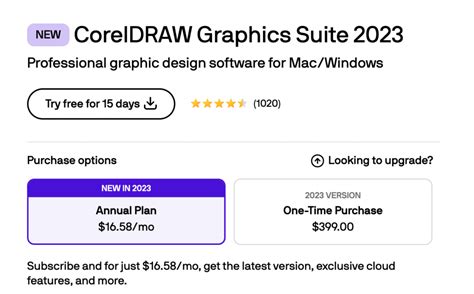
There is a caveat to the one-time purchase model. It includes an allotment of 2,000 AI credits. Once these credits are depleted, users will need to purchase additional credits if they wish to continue using the generative AI features extensively. While up to 100 images can be generated for free, heavy reliance on AI will likely necessitate further investment. Subscribers, on the other hand, receive a monthly allowance of 2,000 AI credits. This structure could be interpreted cynically as a means for Corel to encourage subscriptions by highlighting the long-term value for heavy AI users. However, the fundamental existence of a choice between perpetual ownership and subscription remains a significant point of distinction in a market that has largely shifted towards recurring payments.
A Solid, Yet Evolving, AI Integration
Having previewed Corel's AI tools, the integration appears solid, though it doesn't represent a complete overhaul of the software's existing functionality. It is noteworthy that Corel has opted to integrate established AI models like Stable Diffusion 3.5 and Flux Schnell rather than developing its own proprietary foundation model. This approach is likely safer and more stable, leveraging existing, well-tested technologies.
The true value of these AI models, as demonstrated, lies in their ability to facilitate the creation of client-pleasing mock-ups and generate draft images for inspiration. When combined with a pricing model that offers a genuine alternative to the prevailing subscription-only norm, this update presents a more compelling proposition than initially apparent. However, the feeling persists that Corel is integrating AI to remain relevant and competitive, rather than because vector artists have an inherent, immediate need for it within their traditional workflows.
Beyond AI: A Refreshed CorelDRAW Experience
The latest iteration of CorelDRAW Graphics Suite, often referred to as CorelDRAW Graphics Suite 2026, extends beyond AI enhancements to offer a more comprehensive upgrade. The suite introduces a refreshed user interface, designed to improve user experience and streamline workflows. Significant improvements in stability and performance are also highlighted, with app launch times reported to be approximately three times faster or more. This focus on foundational performance ensures a smoother and more efficient design process.
The suite provides dedicated web and print tools, catering to the needs of commerce professionals. Its versatility is recognized across various industries, with engineering, manufacturing, and construction firms relying on CorelDRAW for precise design work. Graphic novel creators, such as Bitsy & Company, utilize the software for character creation and layout, bringing their stories to life. Similarly, industry leaders in custom signage solutions leverage CorelDRAW Graphics Suite to serve major Fortune 100 and 200 companies, underscoring its capability in handling large-scale commercial printing needs.
CorelDRAW Graphics Suite boasts an all-in-one design and layout experience, a native operating system experience, and flexible purchasing options. It includes free, integrated Pantone Colors, a valuable resource for professional color matching. The software is designed to be easy to learn while packed with unique features, positioning it as a powerful alternative to other graphic design software options.
CorelDRAW Graphics Suite: A Comprehensive Design Toolkit
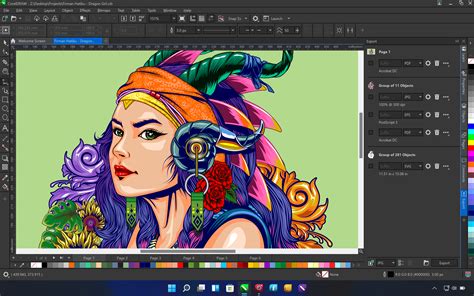
At its heart, CorelDRAW Graphics Suite is presented as a comprehensive toolkit for delivering professional vector illustration, layout, photo editing, and typography projects with exceptional efficiency. The suite is built to amplify artistry rather than replace it, with intelligent tools designed to accelerate ideation and enhance workflow efficiency.
For subscribers, the benefits extend to new creative tools, cloud-based templates, personalized practice project recommendations, and access to over 220 new Pantone colors. These cloud-based templates offer quick access to design inspiration and starting points, helping users build confidence faster.
The suite offers a native OS experience, supporting the latest technologies on Windows and Mac, including Windows 11, macOS Tahoe 26, and the high performance of Apple silicon. Users can expand their creative capabilities through a variety of free and premium content available in the CorelDRAW in-product Store.
Purchasing Options and Trial Availability
CorelDRAW Graphics Suite is available through flexible purchasing options, including both subscription and one-time purchase models, aiming to accommodate different designer needs and budgets. For those uncertain about committing, an obligation-free 15-day trial is available, requiring no credit card.
The one-time purchase option provides perpetual use of the software. However, it's important to note that this version may exclude certain features, applications, and workflows available to subscribers and those with maintenance plans. While a perpetual license grants long-term access, it does not guarantee ongoing support for future operating systems, devices, or technologies.
A subscription, conversely, offers a flexible way to stay current with access to exclusive new features, applications, and content, along with support for the latest technologies, all at a lower initial cost.
For perpetual license holders, a maintenance option is available as a low-cost annual payment. This ensures eligibility for the most up-to-date versions of CorelDRAW Graphics Suite. Active maintenance provides access to the latest software, exclusive features, applications, content, and monthly AI credits at no additional cost.
Understanding AI Credits
AI credits are the currency that powers the generative AI features within CorelDRAW Graphics Suite. Each credit enables prompt-based tasks, such as generating images from scratch, creating variations from reference images or existing content, and modifying images by adjusting colors, removing elements, or altering specific objects. Users can view their AI credit balance in their Corel Account.
Subscribers and maintenance customers receive a monthly allowance of AI credits. One-time purchase customers receive a fixed allotment of credits that do not expire but also do not renew. When AI credit balances run low, additional credits can be purchased through various add-on options, including monthly or annual credit subscriptions, or one-time credit packs in different volumes.
Privacy and Data Usage
Corel assures users that their creative work within CorelDRAW is never used to train its AI features or any third-party AI models. This commitment to user privacy is a critical aspect of building trust in the integration of AI technologies.
CorelDRAW Graphics Suite 2023 and Beyond
While the latest update is often discussed in the context of 2026, earlier versions like CorelDRAW Graphics Suite 2023 also introduced significant advancements. The 2023 version, for example, offered a new perpetual version alongside the established subscription option. Updates in CorelDRAW Graphics Suite are consistently aimed at maximizing creativity and enhancing designer productivity. Klaus Vossen, Senior Product Manager for CorelDRAW, has stated that the latest updates are designed to "maximize creativity and make it easier for designers to be more productive."
The suite continues to evolve, with features like non-destructive editing for bitmaps and vectors, allowing users to create block shadows, symmetrical illustrations, and perspective drawings without compromising the original artwork. A unified asset management view provides a centralized space for viewing, managing, and editing all project digital assets. Color management is enhanced with easy application of colors to fills and outlines using color swatches, and the ability to generate colors based on color harmonies.
For more in-depth information and to explore the capabilities of CorelDRAW Graphics Suite, users are encouraged to visit www.coreldraw.com and download a free trial. This allows potential users to experience firsthand how the suite can benefit their design workflow.