DaVinci Resolve has cemented its reputation as a powerhouse in video editing, appealing to both budding enthusiasts and seasoned professionals. With the advent of version 19, the software continues to evolve, presenting users with a choice between a robust free version and a feature-rich Studio counterpart. Understanding the distinctions between DaVinci Resolve free vs. Studio is crucial for users to determine which iteration best suits their workflow and project requirements. While the free version offers an impressive suite of tools, the Studio version unlocks a significant array of advanced functionalities and performance enhancements.
A Brief History of Resolve's Evolution
The journey of DaVinci Resolve from a high-cost, hardware-bundled system to its current accessible free and paid tiers is a remarkable story of innovation and business model transformation. Originally, acquiring a DaVinci Resolve system was an exclusive and substantial investment. The highest-priced configurations once commanded a staggering $800,000, reflecting a bundled hardware and software application. This was the only option available; there was no choice between different versions of DaVinci Resolve.
The landscape shifted significantly in 2009 when Blackmagic acquired DaVinci Resolve. CEO Grant Petty spearheaded a strategic pivot, fundamentally altering how the software was delivered. He noted, "When we bought that company the cheapest low-end system with hardware was $350,000 and the high-end system was $800,000. We went and changed the business model and made a Mac version and a Linux version. The software we sold for $1,000 and we sold more in the first month than had previously sold in the whole history of the business, which had been running since the early 80s." This move democratized access to powerful post-production tools.
Since then, the cost of Resolve has continued to decrease, further enhancing its accessibility. While many editing platforms have experimented with various pricing strategies, including one-time purchases with incremental upgrade costs and the prevalent subscription model, DaVinci Resolve has adopted a distinct approach. It offers a highly capable free version alongside a one-time purchase of the DaVinci Resolve Studio version for $299. This allows users to experience the core functionality without upfront commitment, with the option to unlock advanced features as their needs grow.
Understanding the Free Version of DaVinci Resolve
The free version of DaVinci Resolve is not a stripped-down or limited trial; rather, it is a fully functional, professional-grade editing suite. It provides an extensive range of tools that can comfortably handle the demands of most aspiring filmmakers and content creators. The generosity of the free version is evident in features like multi-user collaboration on projects, complete with an integrated chat function-a capability often reserved for paid software. This allows teams to work together seamlessly, even remotely.
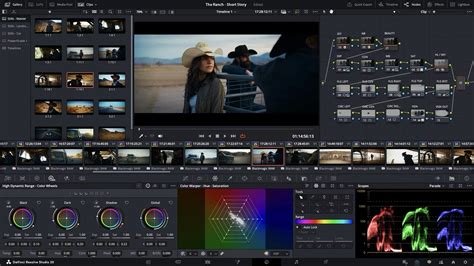
Unlike some software that introduces watermarks or severe feature restrictions in their free iterations, DaVinci Resolve's free version is designed to be a powerful and practical tool in its own right. It's no surprise that many creators have transitioned from other editing platforms to DaVinci Resolve, impressed by the sheer amount of functionality available without any cost. This makes it an ideal starting point for those new to video editing or for individuals working on projects that don't require the most cutting-edge, specialized features.
However, the free version does have limitations, primarily concerning resolution, frame rate, and access to certain advanced processing and AI-driven tools. While it allows for editing and grading of higher resolutions, the export capability is capped at 4K UHD at 60fps. This restriction ensures that professionals working with extremely high-resolution footage or requiring ultra-high frame rates for specific effects will need to consider the Studio version.
DaVinci Resolve (Free) vs. DaVinci Resolve Studio: Key Differentiating Features
The core differences between the free and Studio versions of DaVinci Resolve lie in their capabilities regarding resolution, frame rate, performance enhancements, and specialized tools. While the free version is incredibly capable, the Studio version unlocks a higher tier of professional functionality.
| Feature | DaVinci Resolve (Free) | DaVinci Resolve Studio |
|---|---|---|
| Resolution | Up to 4K UHD | Up to 32K |
| Frame Rate (FPS) | Up to 60fps | Up to 120fps |
| GPU Rendering | Yes, single GPU | Yes, multiple GPUs |
| HDR Support | Basic support | Full support (Dolby Vision, HDR10+) |
| Noise Reduction | No | Temporal and Spatial Noise Reduction |
| Stereoscopic 3D Tools | No | Yes |
| Fairlight Audio | Basic tools | Advanced tools (Dolby Atmos, Auro-3D) |
| Neural Engine Features | No | Yes (Magic Mask, Face Detection) |
| Remote Grading | No | Yes |
| Multi-user Collaboration | Yes | Yes |
| Frame.io Integration | No | Yes |
| External Scripting | No | Yes (Javascript, LUA, Python) |
| HEVC Decoding | Limited | Full support |
| IMF/DCP Playlist Renders | No | Yes |
Resolution and Frame Rate
A significant distinction lies in the maximum resolution and frame rate supported for export. The free version is limited to 4K UHD at 60 frames per second. In contrast, DaVinci Resolve Studio pushes these boundaries dramatically, supporting resolutions up to a staggering 32K and frame rates up to 120fps. This capability is essential for projects requiring extremely high detail or smooth, high-speed motion capture, such as those in visual effects or high-end cinematic productions.
Performance and GPU Utilization
Performance is a key area where the Studio version excels. While both versions leverage the GPU for processing, DaVinci Resolve Studio is optimized to utilize multiple GPUs simultaneously. This multi-GPU support significantly accelerates rendering times and can handle more complex, computationally intensive tasks with greater efficiency. For editors working with large projects, high-resolution footage, or demanding visual effects, the performance boost offered by multiple GPUs can be a game-changer, saving valuable time in the post-production pipeline.
Advanced Grading and HDR
Color grading is a cornerstone of DaVinci Resolve, and the Studio version offers advanced features that are crucial for professional colorists. This includes sophisticated temporal and spatial noise reduction tools, which are indispensable for cleaning up footage shot in low light or with high ISO. Furthermore, full HDR (High Dynamic Range) support, including Dolby Vision and HDR10+ mastering, is exclusive to the Studio version. This allows for the creation of content with a wider range of brightness and color, providing a more immersive viewing experience.
Neural Engine and AI Tools
The DaVinci Neural Engine, Resolve's proprietary AI engine, is a major draw for the Studio version. This powerful engine powers a suite of intelligent tools, including Magic Mask for object selection, Face Detection for automatic identification of individuals, and advanced de-aging or facial refinement capabilities. These AI-driven features automate complex tasks, dramatically speeding up workflows and enabling creative possibilities that would be incredibly time-consuming or even impossible to achieve manually. Other Neural Engine features include object removal, scene cut detection, and smart reframing.
10 BEST AI Updates in Davinci Resolve Studio
Fairlight Audio Enhancements
The Fairlight audio post-production module also sees significant upgrades in the Studio version. While the free version offers robust basic audio editing tools, the Studio version unlocks advanced features such as Dolby Atmos and Auro-3D immersive audio support, 96 kHz and 192 kHz project sample rates, and advanced mastering capabilities. This makes the Studio version essential for sound designers and audio engineers working on projects that require sophisticated spatial audio mixes for cinema or premium streaming platforms.
Resolve FX and Plugins
DaVinci Resolve Studio includes a vast library of exclusive Resolve FX plugins and advanced tools that are not available in the free version. These range from specialized visual effects like lens distortion correction, camera shake removal, and film grain emulation to advanced image processing tools. The sheer volume and power of these proprietary effects offer creative professionals a much broader palette for enhancing their visuals and achieving unique looks.
Collaboration and Workflow Features
While both versions offer multi-user collaboration, the Studio version enhances remote workflows. It includes features like Frame.io integration (or Dropbox Replay integration), remote grading, and the ability to create timelines from IMF or DCP Composition Playlists. External scripting capabilities (Javascript, LUA, and Python) are also exclusive to Studio, allowing for advanced automation and integration with other software and pipeline tools.
DaVinci Resolve Studio Exclusive Features in Detail
The list of features exclusive to DaVinci Resolve Studio is extensive, underscoring its position as the professional's choice. These features are designed to streamline complex workflows, enhance creative control, and push the boundaries of visual and audio production.
General Edit and Performance Features
- Clean Feed Viewer Mode on Additional Display: Allows for a clean, distraction-free playback on a secondary monitor, crucial for client reviews or detailed inspection.
- Frame.io Integration / Dropbox Replay Integration: Seamless integration with cloud-based collaboration platforms for streamlined review and approval processes.
- Create Timeline using IMF or DCP Composition Playlist (CPL): Facilitates the creation of timelines directly from industry-standard mastering formats, useful for mastering and distribution workflows.
- Camera LUT in a Node: Enables applying camera-specific LUTs directly within the node-based color grading system.
- Supports AVCHD: Improved support for AVCHD footage.
- Supports Encoding AVC Intra 50, 100, and 200: Enhanced encoding options for professional broadcast codecs.
- Supports External Scripting (Javascript, LUA, and Python): Opens up possibilities for automation, custom tools, and pipeline integration.
- Timeline and Render Resolution Higher than UHD: Supports resolutions beyond 4K UHD for advanced post-production needs.
- Timeline Frame Rates Greater than 60fps: Enables working with high-frame-rate footage for slow-motion effects or specific cinematic styles.
- Network, Remote, and Headless Rendering: Advanced rendering options for distributed workflows and automated rendering tasks.
- Multiple Image-Processing GPUs: Full utilization of multi-GPU systems for accelerated performance.
- Multiple Red Rockets: Support for dedicated Red Rocket hardware accelerators.
- CDL Export: Allows for the export of Color Decision Lists, facilitating color grading collaboration between different systems.
- HEVC Decoding: Full hardware-accelerated decoding of HEVC (H.265) footage.
- High 10 Profile H.264 Decoding: Support for higher bit-depth H.264 streams.
- IMF Based Renders: Ability to render content in the IMF format.
- Sony XAVC Renders: Enhanced support for rendering Sony's XAVC codecs.
Fusion FX
The Fusion page, DaVinci Resolve's node-based compositing environment, benefits from numerous exclusive effects in the Studio version:
- CCTV, Drone Overlay, Camera Tracker, Match Move: Tools for advanced motion tracking, compositing, and integrating CG elements.
- Lens Distortion Correction: Essential for correcting distortion introduced by camera lenses.
- Stereoscopic 3D Tools: A comprehensive suite for working with 3D footage, including convergence, depth adjustments, and format conversions.
- VR Tool: Dedicated tools for working with virtual reality content.
Color and HDR
- Dolby Vision Support: Full suite of tools for mastering Dolby Vision HDR content.
- HDR10+ Support: Tools for creating and mastering HDR10+ content.
- HDR Metadata and Mastering: Advanced control over HDR metadata for accurate display across different devices.
- HDR Scopes for ST.2084 and HLG: Specialized scopes for monitoring HDR signals.
- HDMI 2.0a Metadata: Support for HDR metadata transmission via HDMI.
- Node in HDR: Ability to perform HDR grading within the node structure.
- Gamut Mapping (Improved): Advanced tools for managing color gamuts in HDR workflows.
Neural Engine (Resolve’s AI Engine)
The Neural Engine powers several transformative AI features:
- Deinterlacing: Intelligent removal of interlacing artifacts.
- Face Detection: Automatic identification and tracking of faces.
- Magic Mask: AI-powered object selection and tracking for rotoscoping and masking.
- Object Removal: Tools to intelligently remove unwanted objects from footage.
- Scene Cut Detection: Automatically detects cuts within a clip.
- Smart Reframe: Automatically reframes footage for different aspect ratios (e.g., from 16:9 to 9:16 for social media).
- Retime - Speed Warp - Optical Flow: Advanced optical flow algorithms for smooth speed changes and time remapping, including the powerful Speed Warp.
ResolveFX
A vast collection of specialized effects are exclusive to the Studio version, catering to a wide range of creative and corrective needs:
- Abstraction, Alpha Matte Shrink and Grow, Analog Damage, Aperture Diffraction: Creative visual effects and image manipulation tools.
- Automatic Dirt Removal, Beauty, Camera Shake, Chromatic Aberration Removal, Chromatic Adaptation: Tools for cleaning up footage, enhancing aesthetics, and correcting optical issues.
- Color Compressor, Color Palette, Color Stabilizer, Contrast Pop, DCTL: Advanced color manipulation and correction tools.
- Dead Pixel Fixer (Improved), Deband, Deflicker, Dehaze, Detail Recovery, Dust Buster, Face Refinement: Essential tools for image cleanup, restoration, and enhancement.
- False Color, Film Grain, Halation, Lens Blur, Lens Distortion, Lens Flares, Lens Reflections: Tools for emulating film looks, adding cinematic effects, and correcting lens artifacts.
- Motion Trails, Patch Replacer, Pencil Sketch in DaVinci, Sharpen, Sharpen Edges, Smear, Soften and Sharpen, Stylize, Texture Pop, Tilt-Shift Blur, Warper, Watercolor: A diverse set of creative filters and effects for artistic manipulation.
Fairlight
Advanced audio processing and immersive audio capabilities are unlocked in the Studio version:
- Fairlight B-Chain Support for Audio Monitoring: Enhanced monitoring options for complex audio setups.
- Fairlight Format Support for Auro-3D: Integration with Auro-3D immersive audio formats.
- Fairlight Format Support for Dolby Atmos, MPEG-H, and SMPTE ST.2098: Full support for leading immersive audio standards.
- Supports 96 KHz and 192 KHz Sample Rates at a Project Level: High-resolution audio project support.
- Power Mastering: Advanced mastering tools for audio delivery.
Delivery and Performance Enhancements
- AMD-accelerated Decoding of H.264 and H.265: Leverages AMD hardware for faster decoding.
- Hardware Accelerated Decoding of H.264 and H.265: Utilizes system hardware for efficient decoding of popular codecs.
- HEIF Decoding on Windows 10 and Linux OS: Support for decoding High Efficiency Image File Format.
- IMF Based Renders: Capability to render in the Interopable Master Format.
- Kakadu JPEG 2000 Renders over 2Kx2K: High-quality JPEG 2000 rendering for professional mastering.
- Noise Reduction (Temporal and Spatial): Advanced algorithms for eliminating noise from footage.
- Remote Grading and Rendering: Facilitates remote collaboration and distributed rendering.
- Export of a Wide Range of Gallery Still Formats: More options for exporting still frames.
DaVinci Resolve 19 Beta Additions (Studio Exclusive)
As DaVinci Resolve 19 is in beta, some features are currently exclusive to the Studio version and may evolve upon official release. These additions highlight Blackmagic Design's continuous innovation:
- Cut & Edit:
- Text-Based Editing and Audio Transcription (aka auto-subtitles): A revolutionary feature that allows editing by manipulating the transcribed text of the audio, and automatic subtitle generation.
- IntelliTrack: Enhanced AI-powered tracking for various applications.
- Color:
- UltraNR Noise Reduction: A new, highly advanced noise reduction algorithm.
- Film Look Creator: Tools to emulate classic film stocks.
- IntelliTrack: Further integration of AI tracking within color grading.
- Face Refinement (Improved): Enhanced AI-powered tools for facial retouching.
- Fusion:
- Speed Warp (Faster in 19): Optimized and faster optical flow-based speed changes.
- Face Refinement: AI tools for facial adjustments within Fusion.
- Audio / Fairlight FX:
- Immersive 3D Audio with Ambisonic Surround Sound: Advanced tools for creating complex 3D audio environments.
- Auto Panning (IntelliTrack-powered): AI-assisted automated panning.
- Music Remixer FX: Tools for manipulating and remixing music.
- Dialog Separator (Improved in 19): Enhanced AI for isolating dialogue.
- Voice Isolation (Improved in 19): Further refinement of AI tools for isolating voices from background noise.
Which Version of DaVinci Resolve is Right for You?
The decision between DaVinci Resolve free and DaVinci Resolve Studio ultimately hinges on individual needs, project scope, and professional aspirations. Blackmagic Design has commendably designed their software so that users can start with the free version and upgrade only when necessary.
For individuals creating content for social media, personal projects, short films, YouTube vlogs, or music videos shot on consumer-grade cameras, the free version of DaVinci Resolve is likely more than sufficient. It provides a complete editing, color grading, audio mixing, and visual effects suite capable of producing professional-quality results. The ability to edit up to 4K resolution at 60fps covers the vast majority of content creation needs.
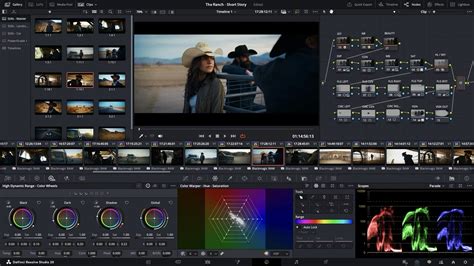
However, if you find yourself consistently encountering limitations, such as needing to export at resolutions higher than 4K, work with frame rates exceeding 60fps, require advanced noise reduction, or wish to leverage AI-powered tools like Magic Mask and advanced facial recognition, then the Studio version becomes a compelling investment. Professionals working in high-end film, television, commercial advertising, or complex visual effects will find the exclusive features of DaVinci Resolve Studio indispensable.
A good analogy is the constant temptation to upgrade camera gear. One should only upgrade when the current equipment genuinely hinders their ability to achieve their creative goals or meet project requirements. For instance, if a sports shoot demands slow-motion footage at 240fps, and your current camera is limited to 60fps, that's a clear signal to upgrade. Similarly, if DaVinci Resolve's free version consistently prompts you with "Ready to Upgrade?" messages because you're hitting a feature wall, it's time to consider the Studio version.
Furthermore, it's worth noting that the Studio version is often bundled with Blackmagic Design's hardware products, such as their professional cameras. If you are considering investing in Blackmagic hardware, you might already receive the Studio version, negating the need for a separate software purchase.
Leveraging Templates with the Free Version
Even without the Studio version, users can significantly enhance their creative output. With resources like Storyblocks, a vast collection of DaVinci Resolve templates is available. These templates allow users to implement a wide variety of transitions, effects, and titles without needing to own the Studio version, further extending the creative possibilities of the free DaVinci Resolve. This approach empowers users to achieve sophisticated looks and streamline their editing process, regardless of which version of Resolve they are using.