DaVinci Resolve stands as a singular powerhouse in the realm of post-production, uniquely integrating editing, color correction, visual effects, motion graphics, and audio post-production into a single, cohesive software tool. This elegant, modern interface is designed for both rapid learning by newcomers and robust capability for seasoned professionals. By consolidating diverse post-production tasks within one application, DaVinci Resolve significantly enhances workflow efficiency and output quality, eliminating the need to switch between multiple software programs. This streamlined approach ensures that you can maintain camera original quality images throughout the entire post-production pipeline, effectively providing a complete post-production studio within a single application. Its reputation for unparalleled quality and advanced creative tools has made it the preferred solution for high-end professionals working on feature films and television shows, surpassing many competitors. Furthermore, the integration of Fairlight's legendary audio processing capabilities ensures industry-leading sound design and mixing.
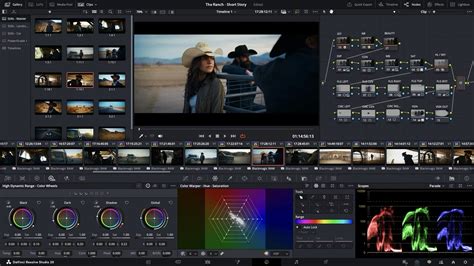
The latest iteration, DaVinci Resolve 20, introduces over 100 new features, with a particular emphasis on powerful AI tools designed to streamline and enhance every phase of the production workflow. Notable AI advancements include AI IntelliScript, which can automatically generate timelines from text scripts; AI Animated Subtitles, which animates words as they are spoken; and AI Multicam SmartSwitch, which intelligently assembles timelines using various camera angles based on speaker detection. The Cut and Edit pages have been enhanced with a dedicated keyframe editor and voiceover palettes, while the AI Audio Assistant intelligently analyzes audio to create professional mixes. In Fusion, users can explore advanced multi-layer compositing workflows, and the Color page sees significant updates to its Color Warper, now featuring Chroma Warp, alongside substantial enhancements to Magic Mask and Depth Map. DaVinci Resolve also uniquely supports the creation and expansion of multi-user post-production studios. Its project libraries are engineered for real-time local and remote collaboration, allowing editors, colorists, visual effects artists, and sound engineers to work concurrently on the same project. This eliminates the traditional hurdles of importing/exporting files, project translation, data loss, and change management, enabling true parallel workflow on a single project.
Navigating the DaVinci Resolve Workspace: The Power of Pages
DaVinci Resolve organizes its extensive functionality into distinct "pages," each providing a dedicated workspace tailored for specific tasks. This modular approach ensures that users have immediate access to the most relevant tools for each stage of post-production.
Media and Deliver Pages: Foundation of Organization and Output
The Media and Deliver pages form the bedrock of media management and final output. The Media page is a full-screen, dedicated workspace designed for preparing footage. Here, users can sync clips, organize media into bins, and add crucial metadata before commencing the editing process. It also features a clone palette to ensure secure data copying from camera media cards during backup. For real-time monitoring during editing or color grading, video outputs can be streamed to a remote client monitor via DeckLink. The Deliver page offers comprehensive control over all encoding options and formats, coupled with a render queue for managing multiple export jobs efficiently.
Cut and Edit Pages: The Heart of Non-Linear Editing
The Cut and Edit pages are where the primary video editing takes place.
The Edit Page: Advanced Professional Editing
The Edit page is recognized as the world's most advanced professional non-linear editor. Its familiar track layout, dual-monitor design, and traditional workflow make it accessible for new users while retaining the power required by professional editors. This page is ideal for large-scale projects such as feature films, television series, streaming content, commercials, and documentaries. Key features include drag-and-drop editing, context-sensitive automatic trimming tools, fully customizable keyboard shortcuts for accelerated workflows, and a vast library of hundreds of titles, transitions, and effects that can be easily added and animated. Comprehensive media management, organization, and timeline management tools are also integrated, empowering editors to turn around work with exceptional speed.
The Cut Page: Speed and Efficiency for Tight Deadlines
The Cut page is specifically engineered for projects with demanding deadlines, offering a streamlined interface designed for maximum speed and ease of learning. Features like Source Tape, dual timelines, fast review tools, and intelligent editing tools significantly accelerate the editing process. The Sync Bin and Source Overwrite tools are invaluable for quickly editing multicam programs, and it's also highly effective for documentaries, live broadcast editing, and replay scenarios. The Multi Source feature offers an exceptionally fast way to view and edit camera angles to the timeline even while cameras are still recording. Every interaction on the Cut page is action-based, ensuring that each click directly contributes to the editing process, allowing users to focus more on creative decisions and less on navigating commands.
Fusion Page: Visual Effects and Motion Graphics Mastery
The Fusion page is where cinematic visual effects and broadcast-quality motion graphics are brought to life directly within DaVinci Resolve. Fusion employs a node-based workflow, which is generally considered faster and more intuitive for creating sophisticated effects and animations compared to traditional layer-based approaches. It provides hundreds of 2D and 3D tools for visual effects and motion graphics, complemented by advanced animation curve and keyframe editors for crafting incredibly organic and realistic animations. The capabilities extend to point, planar, and 3D camera tracking, rotoscoping, keying tools for photorealistic composites, stunning animated titles, and advanced 3D particle systems.
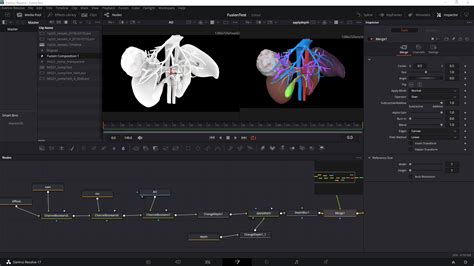
Version 20 enhances Fusion with advanced multi-layer compositing workflows. It now supports multi-layer images across all nodes, allowing users to read and manipulate layers from multi-layer EXRs or Photoshop files directly within the node editor. New nodes for vector warp, vector transform, and vector denoise leverage optical flow vectors for intricate temporal effects. Furthermore, Fusion's 3D tools, including PanoMap, spherical stabilizer, LatLong patcher, 3D VR camera, and 3D viewers, have been updated to support a 180-degree angle of view for immersive content creation. The enhanced Dome light tool simulates natural ambient lighting in 3D scenes using 360 HDRI images for realistic reflections and global illumination. Additionally, the new MultiPoly tool streamlines rotoscoping by displaying all masks in a single, easily manageable list.
Color Page: Hollywood's Premier Color Grading Solution
The DaVinci Resolve Color page is renowned as Hollywood's most advanced color corrector, having been instrumental in the color grading and finishing of countless high-end films and television shows. Despite its professional pedigree, it remains accessible to new users with features designed to facilitate great results while learning. Primary control sliders, familiar to users of image editing software, allow for intuitive adjustments to contrast, temperature, midtone detail, saturation, and more.
DaVinci Resolve 17 Color Training - Introduction to Color
Version 20 introduces significant enhancements to the Color page, including Chroma Warp within the Color Warper, offering intuitive color and saturation adjustments via a single motion in the viewer. The Color Warper now includes stroke control for directional color shifts and point-to-point mode for precise hue correction. The new depth map effect allows for the rapid generation of a 3D depth matte, enabling separate grading of foreground and background elements. UltraNR, a new DaVinci AI Neural Engine-driven denoise mode, is integrated into the spatial noise reduction palette, effectively reducing digital noise while preserving image clarity. The Film Look Creator allows users to apply cinematic looks that emulate film properties such as halation, bloom, grain, flicker, gate weave, and vignetting. The ColorSlice palette utilizes subtractive color processes for rich, filmic color density, saturation, and hue adjustments. The viewer now supports marker overlays and annotations, allowing for detailed written notes alongside visual feedback. Corrector nodes in the node editor now feature composite modes, offering greater flexibility in how node values blend within the pipeline without requiring a layer mixer.
Fairlight Page: Professional Audio Post-Production
The Fairlight page provides a comprehensive suite of professional tools for audio post-production, essentially integrating a full digital audio workstation (DAW) into the editing and color system. The Fairlight Audio Core engine is designed for low latency and intelligently manages workloads. It supports up to 2,000 tracks simultaneously with real-time effects, EQ, and dynamics processing. Users benefit from sample-accurate editing tools, advanced ADR and Foley capabilities, and a range of Fairlight FX, including reverb, de-esser, and hum remover, alongside AI-powered tools like Voice Isolation and Music Remixer. IntelliTrack AI tracking enables video-driven tracking of the Fairlight audio panner, and the system supports mixing and mastering for stereo, 5.1, 7.1, and immersive 3D audio formats, including 5th order ambisonics.
Version 20 brings further advancements to Fairlight, including Clip EQ with 6 bands on the Cut, Edit, and Fairlight pages for enhanced clip-level tonal control. New clip processing options allow users to match a target clip's audio to a reference clip's level or tonal spectrum, with dynamic EQ matching ensuring consistent tonality. Users can also build Chain FX to save and recall favorite plugin combinations with customized settings. Per-channel automation mode selection offers greater flexibility in mixing projects. The IntelliTrack AI point tracker can now automatically generate precision audio panning by tracking on-screen subjects in 2D and 3D spaces. The AI-based Dialogue Separator FX allows for rebalancing dialogue against background sound and room reverberation, offering controls for voice, background, and ambience. The ducker track FX enables one track to automatically adjust the level of another, simplifying side-chain compression setups. Full sphere Ambisonic surround sound mixing, monitoring, and delivery are now supported.
Advanced Features and AI Integration
DaVinci Resolve consistently pushes the boundaries of post-production with its integration of cutting-edge technologies, particularly artificial intelligence.
The DaVinci AI Neural Engine
The DaVinci AI Neural Engine is a sophisticated machine learning system that powers many of the software's most advanced features. It utilizes state-of-the-art deep neural networks and machine learning to drive functionalities such as facial recognition, object detection, smart reframing, speed warp retiming, super scale upscaling, auto color, and color matching. This cross-platform engine leverages the latest GPU innovations for AI and deep learning, delivering exceptional performance and quality. The AI Neural Engine is designed to simplify complex, repetitive, and time-consuming tasks, making advanced capabilities accessible to a wider range of users.
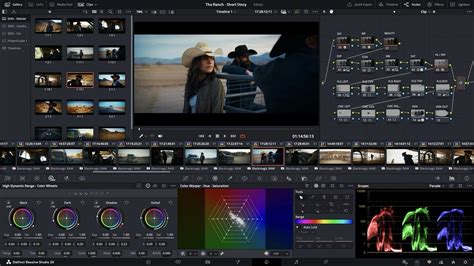
Version 20 introduces several new AI tools: AI IntelliScript for automatic timeline generation from scripts, AI Animated Subtitles for dynamic word animation, AI Multicam SmartSwitch for intelligent camera angle selection in multicam edits, and the AI Audio Assistant for one-click professional audio mix creation. AI Detect Music Beats analyzes music tracks to automatically place beat markers, aiding in syncing edits to music. The AI Set Extender can generate scene extensions based on text prompts, filling in missing regions and creating new backgrounds. Magic Mask, powered by the Neural Engine, requires just a single stroke to detect and track people, features, and objects, producing clean traveling mattes for secondary grades or effects. Smart Reframe repurposes footage for different aspect ratios by recognizing action and intelligently panning within the scene. Object removal and patch replacer tools allow for the effortless removal of unwanted elements. Dialogue Matcher automatically aligns the tone, level, and room environment of dialogue across different clips for audio consistency. The AI Music Remixer adjusts music tracks to fit a show's style, with controls for various elements like voice, drums, and bass.
DaVinci Resolve Studio: Unlocking the Full Potential
While a highly capable free version of DaVinci Resolve is available, the commercial DaVinci Resolve Studio unlocks a wealth of additional features and performance enhancements.
Resolution and Frame Rate Capabilities
The free version supports resolutions up to 4K UHD at 60 frames per second. In contrast, DaVinci Resolve Studio extends this capability to support resolutions up to 32K and frame rates exceeding 60 FPS, up to 120 FPS. This makes Studio essential for high-end productions demanding extreme resolutions and high frame rates.
Advanced Grading and Noise Reduction
DaVinci Resolve Studio offers full HDR support, including Dolby Vision and HDR10+. It also provides advanced features like temporal and spatial noise reduction, which are crucial for cleaning up noisy footage or footage shot in low light conditions without sacrificing image detail. The free version has basic HDR support and lacks these advanced noise reduction tools.
GPU Acceleration and Performance
While both versions utilize GPU acceleration, DaVinci Resolve Studio is optimized to harness multiple GPUs, leading to significantly faster rendering and processing times, especially for complex projects and effects.
Exclusive Resolve FX and Tools
The Studio version includes dozens of additional Resolve FX plugins, temporal and AI spatial noise reduction, text-based editing, Magic Mask, film grain, optical blur, and many more advanced creative tools. These exclusive effects and tools provide a broader palette for visual creativity and problem-solving. For instance, stereoscopic 3D tools and advanced HDR scopes for ST.2084 and HLG are exclusive to the Studio version.
Collaborative Features in Studio
While the free version offers robust multi-user collaboration, DaVinci Resolve Studio enhances this with features like remote grading, monitoring, and sync markers and comments via Dropbox. This is critical for distributed teams working on high-stakes projects.
Blackmagic Cloud and Collaboration
DaVinci Resolve fully supports Blackmagic Cloud, enabling users to host project libraries and sync media for seamless collaboration. Cloud folders facilitate easy sharing of project assets among collaborators, appearing as virtual clips until used, at which point they are synced locally. Client review is also streamlined through Presentations, allowing clients without Blackmagic Cloud accounts to access review links. The Organizations web app enables larger companies to define organizational structures, create teams, and share projects efficiently. This app also facilitates the rental and management of DaVinci Resolve Studio licenses for large groups.
Hardware Integration: Enhancing the Workflow
Blackmagic Design, a primary hardware manufacturer, has developed a suite of peripherals designed to integrate seamlessly with DaVinci Resolve, offering a tactile and efficient user experience.
Editing Keyboards
The DaVinci Speed Editor is designed for significantly faster editing than using a mouse, featuring dedicated edit function keys and a high-quality search dial with transport controls. The DaVinci Resolve Editor Keyboard offers a full QWERTY layout with color-coded shortcut keycaps, specifically for editors who spend extensive hours at their workstations. The DaVinci Resolve Replay Editor builds upon these controls, adding live camera selection and slow-motion replay capabilities with stingers, ideal for live production environments.
Color Control Panels
DaVinci Resolve color panels provide precise control over multiple parameters simultaneously, enabling the creation of unique looks that are difficult to achieve with a mouse and keyboard alone. The DaVinci Resolve Micro Color Panel is a compact option suitable for beginners or portable setups, featuring three high-quality trackballs and knobs for primary grading. The DaVinci Resolve Mini Panel offers more extensive controls and screens for accessing a wider range of palettes and tools. For ultimate precision, the DaVinci Resolve Advanced Panel provides high-end professionals with direct access to every feature and command.
Audio Consoles
Fairlight hardware consoles, designed in collaboration with professional sound engineers, act as natural extensions of the software, streamlining audio workflows. The intuitive, task-based design automatically adapts to put necessary controls at the user's fingertips. The Fairlight Desktop Console is a versatile mixing console suitable for home studios or small suites, while Fairlight Studio Console components can be integrated into custom desks or purchased as pre-configured units for dedicated audio suites and scoring stages.
Compatibility and Extensibility
DaVinci Resolve is designed to be compatible with a wide range of storage solutions, from direct-attached hard drives to NAS and SAN systems. Its extensibility is further enhanced through support for third-party Open FX and audio plugins, as well as third-party title and motion graphics templates. New workflow integration and encoding APIs allow developers to integrate asset management and workflow systems directly with DaVinci Resolve, fostering a flexible and open ecosystem.
DaVinci Resolve's Evolution and Accessibility
Originally developed by da Vinci Systems, DaVinci Resolve has a rich history, with Blackmagic Design acquiring the software in 2009 and revolutionizing its accessibility. Previously, high-end DaVinci Resolve systems cost upwards of $800,000 due to being bundled with proprietary hardware. Blackmagic Design shifted this model, releasing Mac and Linux versions and offering the software for a significantly lower price. This democratization of professional post-production tools has been a hallmark of the software's evolution.
Today, DaVinci Resolve is available in two primary versions:
DaVinci Resolve (Free Version)
The free version of DaVinci Resolve is remarkably powerful and provides a complete editing suite capable of handling most tasks for aspiring filmmakers. It supports virtually all 8-bit video formats at up to 60fps in resolutions as high as Ultra HD 3840 x 2160. It includes all the core functionalities for editing, color correction, visual effects, and audio post-production, making it an exceptional tool for learning and for many professional workflows. Multi-user collaboration, including a chat function, is also available in the free version.
DaVinci Resolve Studio
The Studio version is a one-time purchase that unlocks the full potential of the software. It includes everything in the free version, plus the DaVinci AI Neural Engine, dozens of additional Resolve FX, advanced temporal and AI spatial noise reduction, text-based editing, Magic Mask, film grain, optical blur, and significantly higher resolution and frame rate support (up to 32K at 120fps). It also provides access to advanced HDR features, multi-GPU acceleration for enhanced performance, and exclusive tools for advanced color grading and visual effects.
The decision between the free and Studio versions often depends on individual workflow needs. For those creating content for social media, YouTube, or independent films, the free version may suffice. However, as projects become more demanding, particularly in areas requiring advanced AI tools, higher resolutions, or faster rendering on multi-GPU systems, the Studio version becomes an invaluable investment. Blackmagic Design also frequently bundles the Studio version with their hardware purchases, offering a cost-effective way to acquire the full software.
The continuous development, marked by major releases like DaVinci Resolve 16, 17, 18, 19 (beta), and the recently announced DaVinci Resolve 20, consistently introduces groundbreaking features, particularly in AI and collaborative workflows, solidifying its position as a leading post-production solution for professionals and enthusiasts alike. The introduction of DaVinci Resolve for iPad further expands its accessibility, offering core editing and color functionalities on a portable platform.