DaVinci Resolve, a powerhouse of professional video editing, visual effects, color correction, and audio post-production, is now accessible for on-the-go creative endeavors with its iPhone application. This tutorial guide is meticulously crafted to equip both nascent editors and seasoned professionals with the essential skills to harness the full potential of DaVinci Resolve on their mobile devices. Blackmagic Design's commitment to comprehensive training is evident in its curriculum, designed to foster creativity, enhance workflow speed, and ensure project completion with unparalleled efficiency.
The Art of Editing on the Edit Page
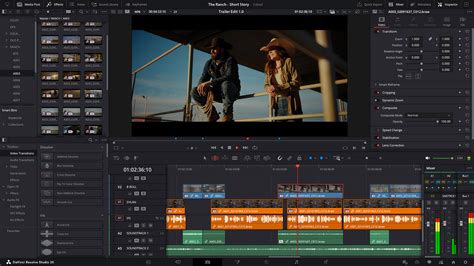
The Edit page in DaVinci Resolve is the central hub for constructing your narrative. This section expands upon the fundamental features, guiding users through the intricate process of piecing together footage. For new users, understanding the timeline, clip manipulation, and basic transitions is paramount. Established professionals will find value in exploring advanced techniques for efficient assembly, ripple editing, and precise trimming. The curriculum is designed to teach you how to cut interviews, dramatic scenes, documentary material, and music videos through a series of practical exercises. This hands-on approach ensures that users not only grasp the concepts but also develop the muscle memory for rapid editing.
Multicam Editing: Synchronizing Your Story
For projects involving multiple camera angles, multicam editing is an indispensable tool. DaVinci Resolve's Edit page offers robust features for synchronizing and cutting between different camera sources in real-time. This section delves into the process of setting up multicam clips, understanding the synchronization methods, and effectively switching between camera views during playback. The Editor Keyboard, specifically designed for multi-cam editing in news cutting and live sports replay, offers buttons to make camera selection and editing extremely fast, a concept that translates to the streamlined interface of the iPhone app. Learning to master multicam editing will significantly enhance the dynamism and professional polish of your video projects.
Enhancing Visuals with Edit Page Effects
While the Fusion page is dedicated to advanced VFX, the Edit page itself offers a range of tools to enhance your project's visual appeal. This includes basic color adjustments, transitions, and the application of simple effects. Discover how to apply these elements to refine your footage, add stylistic flair, and improve the overall aesthetic of your video. This module focuses on practical applications that can be implemented directly within the editing workflow, minimizing the need to jump between different pages for minor enhancements.
Exploring the Power of the Color Page
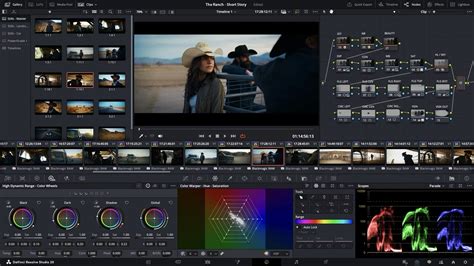
The Color page in DaVinci Resolve is where your footage transforms from raw material into cinematic art. This section introduces the powerful color page, unveiling the advanced features that Hollywood colorists utilize to achieve stunning visual results. Through detailed, hands-on training, you will learn how to perform meticulous color correction, grading, and matching. The official Blackmagic Design hands-on training guide takes you through a series of practical exercises that teach you how to use DaVinci Resolve’s color correction tools in detail.
Precision Grading with Dedicated Hardware
For those seeking unparalleled control, the DaVinci Resolve Mini Panel offers an intuitive and efficient way to work faster and achieve greater creative control. While the iPhone app provides touch-based controls, understanding the principles behind dedicated hardware like the Mini Panel can inform your approach to color grading on a mobile device. This section will touch upon the concepts of refined color grading, including the application of windows and masks, to isolate and manipulate specific areas of the image.
Mastering Audio Post-Production in Fairlight
The Fairlight page is DaVinci Resolve's integrated digital audio workstation, offering comprehensive tools for sound editing, mixing, and mastering. This section emphasizes the critical step of mixing audio, ensuring that your project's soundscape is as compelling as its visuals.
Voiceover Recording and Dialogue Replacement
Learn how to record a simple voiceover track directly within DaVinci Resolve for a scene. Furthermore, discover how to utilize the ADR (Automated Dialogue Replacement) tools to replace existing dialogue, ensuring pristine audio quality and seamless integration. This practical skill is crucial for documentaries, interviews, and any project requiring clean vocal recordings.
Advanced Audio Techniques: Channel Mapping and Linked Groups
Delve into the more advanced features of Fairlight, such as working with channel mapping and linked groups. Understanding these concepts allows for greater flexibility and control over complex audio setups, especially when dealing with multi-channel audio formats.
Immersive Sound with Dolby Atmos
Discover the world of Dolby Atmos with the powerful tools built into Fairlight. This section will guide you through the process of creating immersive, multi-dimensional audio experiences, bringing a new level of realism and impact to your projects.
DaVinci Resolve's Fairlight Page for COMPLETE NOOBS!
Crafting Cinematic Visuals with Fusion
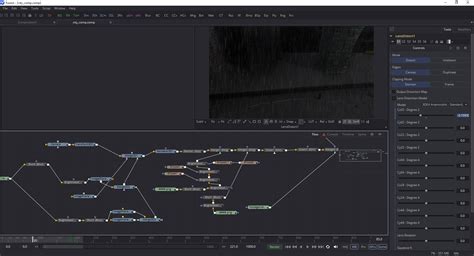
The Fusion page is where you can unleash your creativity and build stunning cinematic visual effects and motion graphics directly within DaVinci Resolve. This section introduces you to the powerful Fusion page and its capabilities.
Core Compositing Tasks on the Fusion Page
Learn how to perform common compositing tasks on the Fusion page. This includes combining multiple visual elements, rotoscoping, keying, and tracking. The official hands-on training guide introduces you to a core set of visual effects compositing tools in five easy lessons. You’ll learn how to create visual effects directly inside DaVinci Resolve, without importing or exporting large media files between applications.
The True 3D Workspace
Discover the true 3D workspace on the Fusion page. This section expands on the advanced 3D compositing tools, enabling you to create depth and dimension in your visual effects. With DaVinci Resolve Studio, powerful features like 3D camera tracking and Universal Scene Descriptor (USD) nodes make the transition from 2D to 3D easier than ever. This training guide gives you a practical introduction to advanced tools and techniques in the Fusion page.
Preparing Content for Delivery
The final stage of any video project is preparing it for distribution. This section covers the essential steps involved in exporting your finished work, ensuring compatibility with various platforms and maintaining optimal quality. Learn how to prepare your content for delivery, understanding codecs, resolutions, and bitrates to meet the requirements of broadcasters, web platforms, and other distribution channels.
Blackmagic Design Training Ecosystem
Blackmagic Design fosters a robust training ecosystem to support its users. All of their trainers are passionate about DaVinci Resolve and, as ambassadors, need to have direct contact with a wide range of customers. The training partner program is designed to attract the most skilled training organizations and educational institutions. Blackmagic Design collaborates with strategically chosen onsite training companies, online partners, and academic institutions. This ensures that high-quality, official training is accessible globally, both in person and online, catering to diverse learning preferences and professional development needs.
Professional Hardware for Enhanced Workflows
While this guide focuses on the iPhone, understanding Blackmagic Design's professional hardware can provide valuable insights into the full capabilities of DaVinci Resolve.
Editing Consoles
The Editor Keyboard offers a full-sized traditional QWERTY layout in a premium metal design, featuring a metal search dial with clutch and extra edit, trim, and timecode keys. The Editor Panel is specifically designed for multi-cam editing for news cutting and live sports replay, featuring buttons for extremely fast camera selection and editing.
Color Control Panels
The Powerful Color Panel provides comprehensive control for creating cinematic images, including controls for refined color grading and adding windows.
Audio Consoles
The Fairlight Studio Console offers incredibly fast audio editing for sound engineers working on tight deadlines. Used by Hollywood and broadcasters, these large consoles make it easy to mix large projects with a massive number of channels and tracks. The console is available with legs at a 0º angle for a flat working surface or at an 8º angle for a slightly inclined surface. Blank 1/3rd wide bays are available for building custom console configurations.
DaVinci Resolve on iPhone empowers you to edit, grade, and mix on the go. By mastering the core functionalities of the Edit, Color, and Fairlight pages, and understanding the principles of visual effects in Fusion, you can produce professional-grade content from anywhere. This tutorial serves as your gateway to unlocking the full creative potential of DaVinci Resolve on your mobile device.