In the realm of digital imaging, the concept of "bit depth" is a fundamental, yet often misunderstood, aspect of how images are represented and manipulated. It dictates the richness and subtlety of color within a digital photograph, influencing everything from the smoothness of gradients to the flexibility of post-processing. At its core, bit depth refers to the number of bits used to store information for each color channel of a pixel. This seemingly technical detail has profound implications for photographers, designers, and anyone working with digital images, particularly within software like Adobe Photoshop. Understanding the differences between 8-bit and 16-bit image modes is crucial for optimizing workflows and achieving professional-quality results.
Deconstructing Bit Depth: The Building Blocks of Color
At the most basic level, digital images are composed of pixels, and each pixel's color is constructed from three primary channels: red, green, and blue (RGB). The term "bit depth" can be likened to the number of colors available on a paint palette. Imagine trying to paint a vibrant sunset; with a limited palette of only 16 colors, capturing the nuanced transitions between hues would be a challenge. However, with a palette of 1,024 colors, the representation of reality becomes significantly more accurate. This analogy, while simplified, effectively illustrates the core concept of bit depth.
A "bit" is the smallest unit of data in computing, representing a binary value of either 0 or 1. A single bit can only represent two states, akin to pure black or pure white in an image. To describe more complex information, multiple bits are combined. Each additional bit doubles the number of possible combinations. For instance:
- 1 bit: 2¹ = 2 possible values (e.g., black or white)
- 2 bits: 2² = 4 possible values
- 3 bits: 2³ = 8 possible values
This exponential growth in potential values is key to understanding the difference between various bit depths.
8-bit Images: The Everyday Standard
An 8-bit image is the most common color mode encountered in digital photography and is the default for many file formats, most notably JPEG. In an 8-bit per channel image, each of the red, green, and blue channels can hold 2⁸, or 256, distinct tonal values. This means a standard 8-bit RGB image has a total of 24 bits per pixel (8 bits for red + 8 bits for green + 8 bits for blue), allowing for a palette of approximately 16.7 million colors (256 x 256 x 256).
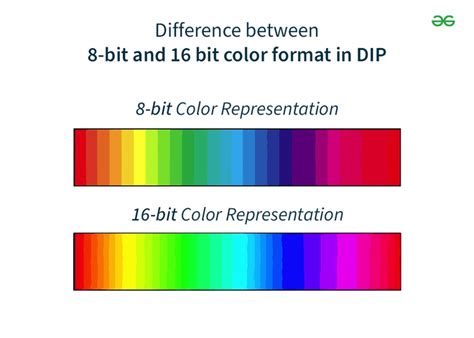
For most everyday tasks and casual photo editing, 8-bit color depth is more than sufficient. It offers a good balance between image quality and file size, making these images ideal for web display, general sharing, and basic edits. However, 8-bit images have a limited color depth. This limitation becomes apparent when working with smooth gradients, subtle tonal transitions, or when performing complex color adjustments. In these scenarios, the relatively coarse steps between available colors can lead to visible "banding," where distinct bands of color appear instead of a smooth blend. This is particularly noticeable in areas like clear skies or smooth transitions in sunsets.
16-bit Images: The Professional Advantage
16-bit per channel image mode represents a significant upgrade from 8-bit. In this mode, each color channel (red, green, and blue) can hold up to 2¹⁶, or 65,536, distinct tonal values. This results in an astronomical total color palette of over 281 trillion colors (65,536 x 65,536 x 65,536).
It's important to note a nuance with Adobe Photoshop's implementation of 16-bit. While it uses 16 bits per channel, it's sometimes described as a "15+1 bit" system. This means that instead of the full 65,536 values, it offers 32,769 possible values (2¹⁵ + 1). This slight reduction is a design choice by Adobe to optimize processing speed and provide an exact midpoint for tonal ranges, which aids in blend modes. While this "loss" of one bit might sound significant, from a practical quality perspective, Photoshop's 16-bit mode still provides a vastly superior range of tones compared to 8-bit. The Info panel in Photoshop, for instance, displays a scale of 0-32,768, confirming this range.
The primary advantage of 16-bit files lies in their vastly expanded tonal range and color depth. This offers greater "latitude" for editing. When photographers or designers perform aggressive adjustments, such as significantly brightening shadows, darkening highlights, or manipulating curves, the extra data in a 16-bit image allows for these changes without introducing the visible banding that plagues 8-bit files. This makes 16-bit the preferred mode for detailed image editing, color grading, and extensive post-processing.
The Trade-offs: File Size and Processing Power
While 16-bit offers superior image quality and editing flexibility, it comes with inherent trade-offs. 16-bit files are considerably larger than their 8-bit counterparts. For example, a typical 16-bit TIFF file can be roughly twice the size of an equivalent 8-bit TIFF file. This increased file size translates to greater storage requirements and necessitates more processing power from your computer. Editing 16-bit images can be slower and more demanding on system resources, especially on older or less powerful hardware.

32-bit Images: The Extreme End
Beyond 8-bit and 16-bit, Photoshop also offers a 32-bit image mode. This takes image data to an even more extreme level, providing an immense number of colors and tonal values. However, 32-bit images require substantial storage space and demand powerful hardware for processing. For everyday photo editing, or even most professional workflows, 32-bit is often considered overkill and is primarily used for specialized applications like HDR (High Dynamic Range) imaging or advanced scientific visualization.
When to Use Which Bit Depth
The choice between 8-bit and 16-bit largely depends on the intended use and the nature of the editing process.
8-bit is generally sufficient for:
- Casual users working with everyday photos.
- Basic edits such as cropping, resizing, and minor color corrections.
- Final output for web display or standard prints where extreme tonal accuracy is not paramount.
- When file size and processing speed are primary concerns.
16-bit is the preferred choice for:
- Photographers and designers working on detailed images.
- Extensive color grading and tonal manipulation.
- Scenes with smooth gradients, such as skies, water, or subtle studio lighting.
- When recovering details from extreme shadow or highlight areas.
- As an intermediate working format, even if the final output will be 8-bit.
The RAW Advantage and Bit Depth
The discussion of bit depth is closely tied to the RAW file format. Most modern cameras offer RAW capture at 12-bit or 14-bit, with some high-end medium format cameras potentially offering 16-bit RAW files. RAW files contain the unprocessed data directly from the camera's sensor. When these RAW files are opened in post-processing software like Adobe Lightroom or Photoshop, they are typically converted into a 16-bit (or higher) working environment.
This is a crucial point: even if your camera captures 12-bit or 14-bit RAW files, opening them in a 16-bit environment allows you to leverage the benefits of higher bit depth during editing. The flexibility offered by RAW files, combined with a 16-bit editing workflow, provides the maximum latitude for image manipulation without degrading image quality. While JPEGs are inherently 8-bit, RAW files provide the raw material for a more robust editing process.
IS RAW BETTER? You may be surprised!
Practical Considerations and Workflow
For photographers aiming for the highest quality, the conventional wisdom is to capture in RAW format (which provides a higher bit depth), edit in a 16-bit environment, and then convert to an 8-bit format (like JPEG) for final output. This approach ensures that the editing process is performed with the greatest possible tonal and color information, minimizing the risk of artifacts like banding.
When converting from 16-bit to 8-bit for output, it's advisable to enable dithering in Photoshop's color settings (Edit > Color Settings > Conversion Options > "Use dither (8-bit/channel images)"). Dithering adds a small amount of noise to smooth out gradients and further reduce the appearance of banding, especially in critical areas like skies.
Even though the final output for many applications might be an 8-bit JPEG, processing in 16-bits significantly mitigates issues that can arise during complex adjustments. The conversion to 8-bit is then performed as one of the final steps, when it can do the least harm. It is still recommended to archive your work in the original 16-bit TIFF or PSD format, in case further editing is required in the future.
Beyond Bit Depth: Color Gamut and Display Limitations
It's essential to differentiate bit depth from color gamut. While bit depth determines the number of increments or steps between colors, color gamut defines the range or spectrum of colors that a device can display or a printer can reproduce. A wider color gamut allows for more extreme or vibrant colors, but bit depth dictates how smoothly those colors can transition.
Furthermore, display and output limitations must be considered. Most computer monitors are effectively 8-bit (often referred to as "24-bit" color, meaning 8 bits per channel for RGB). Similarly, many printing processes have limitations in reproducing the full range of colors available in a 16-bit image. However, this does not diminish the importance of working in 16-bit during the editing phase. The extra data provides a buffer against degradation during manipulation, ensuring a higher quality final output, even if the display or print medium cannot represent every single nuance.
In conclusion, while 8-bit images are perfectly adequate for many common uses, understanding the benefits of 16-bit Photoshop processing is vital for anyone serious about achieving the highest quality in their digital images. The increased tonal range and color depth offered by 16-bit files provide essential flexibility and resilience during post-processing, safeguarding against artifacts and allowing for more creative control. The decision to use 8-bit or 16-bit ultimately hinges on the demands of the project, but for those who push their images through rigorous editing, the transition to 16-bit is not just an option, but a necessity.