In the dynamic world of professional video editing and post-production, DaVinci Resolve has emerged as a leading force, offering an exceptionally comprehensive and versatile suite of tools. Developed by Blackmagic Design, this software has rapidly ascended in popularity among filmmakers, editors, visual effects artists, and audio post-production professionals. Its ability to handle everything from initial editing and intricate color grading to complex visual effects and sophisticated audio mixing within a single application makes it a compelling choice for creators serious about their craft.
Understanding DaVinci Resolve: More Than Just Editing
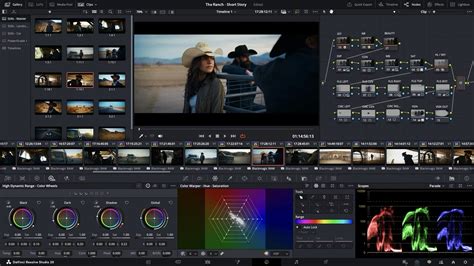
At its core, DaVinci Resolve is an all-in-one post-production solution, functioning as a robust video editor, an industry-leading color corrector and grader, a powerful visual effects compositor, and a professional audio editing suite. Originally celebrated for its unparalleled color grading capabilities, the software has evolved significantly, transforming into a comprehensive ecosystem that addresses virtually every stage of the post-production workflow. This integrated approach is a key differentiator, allowing creatives to maintain a fluid and consistent workflow without the need to constantly switch between disparate applications.
Why DaVinci Resolve Stands Out in the Post-Production Landscape
Several factors contribute to DaVinci Resolve's prominence and its preference over other software options in the professional arena.
A Generous Free Version with Professional Tools
One of DaVinci Resolve's most significant advantages is its remarkably capable free version. This free offering is packed with professional-grade tools that rival, and in some cases surpass, the paid versions of competing software. This accessibility makes it an incredibly appealing option for independent filmmakers, students, and professionals working with budget constraints, providing a powerful entry point into high-end post-production without an initial financial barrier. The extensive feature set available in the free version alone offers a competitive edge, enabling users to achieve professional results.
Unrivaled Color Grading Capabilities
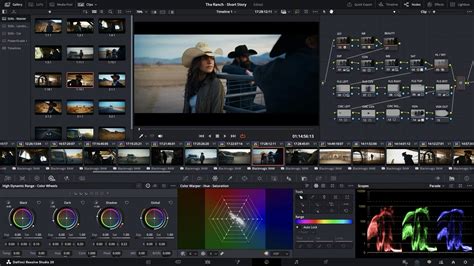
DaVinci Resolve's legacy is deeply rooted in its advanced color grading tools. For years, it was the industry standard for high-end color correction and grading, a reputation it still holds. Major Hollywood productions continue to rely on Resolve for their critical color work. The software supports a wide array of professional RAW formats, including Blackmagic RAW, RED RAW, and ARRI, alongside robust High Dynamic Range (HDR) workflows like Dolby Vision and HDR10+. This deep support for high-bit-depth camera files and advanced color science empowers colorists with an extraordinary level of control. Features such as Power Windows, qualifiers, advanced tracking, and sophisticated keyframing enable colorists to precisely isolate, modify, and animate color grades at a granular level, achieving nuanced and visually stunning results.
A Unified Ecosystem for Seamless Workflows
A standout strength of DaVinci Resolve is its unified workflow. Unlike many other post-production suites that necessitate jumping between separate programs for editing, visual effects, color grading, and audio mixing, Resolve consolidates all these functions within a single, cohesive interface. This integrated approach is a significant workflow accelerator. Editors, colorists, and sound designers can collaborate on the same project file simultaneously, eliminating the time-consuming and often problematic process of "round-tripping" media between different applications. This seamless integration ensures that assets and timelines are consistent across all departments, streamlining the entire post-production pipeline, whether working on live-action, animation, or mixed-media projects.
The Power of Dedicated Workspaces (Pages)
DaVinci Resolve is meticulously structured around task-specific workspaces, referred to as "pages." Each page is optimized for a distinct phase of the post-production process:
- Media Page: For importing, organizing, and managing footage.
- Cut Page: Designed for rapid, efficient editing, particularly for fast-paced projects and social media content.
- Edit Page: A traditional, full-featured non-linear editing environment for precise timeline control.
- Fusion Page: A powerful node-based compositor for creating sophisticated visual effects and motion graphics.
- Color Page: The heart of Resolve, offering industry-leading color correction and grading tools.
- Fairlight Page: A complete digital audio workstation (DAW) for professional audio editing, mixing, and mastering.
- Deliver Page: For rendering and exporting projects in various formats and codecs.
This page-based architecture allows users to focus on specific tasks without being overwhelmed by unrelated tools, promoting efficiency and precision.
Fusion: Integrated Visual Effects and Motion Graphics
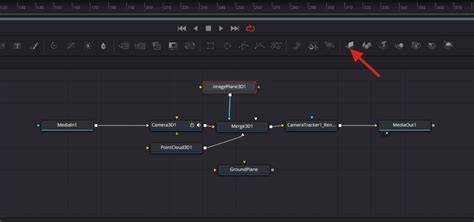
Since version 15, DaVinci Resolve has included an integrated version of Fusion, Blackmagic Design's own powerful node-based compositing and visual effects application. This integration means that VFX artists can work directly within the Resolve project, leveraging the same media, timelines, and cache system as the editing and color departments. Fusion's node-based architecture is highly regarded for its ability to visualize complex compositing workflows, making it ideal for tasks such as adding motion graphics to explainer videos, designing animated logos, creating intricate VFX for films, or enhancing product demonstrations.
Fairlight: Professional Audio Post-Production
The inclusion of the Fairlight audio workstation within DaVinci Resolve further solidifies its all-in-one status. Fairlight is a fully featured DAW capable of handling complex audio post-production tasks, from dialogue editing and sound design to intricate mixing and mastering. For high-end video production, whether for narrative films, corporate branding, or commercials, having Fairlight integrated means there's no longer a need to export audio to a separate application. This integration streamlines the audio post-production process, ensuring sound editors and mixers work within the same project environment as the video editors and colorists, leading to greater efficiency and consistency.
Scalability for High-Resolution Workflows
DaVinci Resolve is engineered to handle demanding, high-resolution workflows. Whether dealing with 4K, 6K, 8K footage, or high-bit-depth RAW files, Resolve's playback engine is optimized for scalability. The commercial version, DaVinci Resolve Studio, further enhances this capability by supporting resolutions beyond ultra-high-definition (up to 32K) and frame rates exceeding 60 FPS (up to 120 FPS). This makes it suitable for the most ambitious cinematic and broadcast projects.
Built for Collaboration
In professional post-production environments, collaboration is often crucial. DaVinci Resolve supports multi-user collaboration, allowing multiple team members to work on the same project simultaneously without conflict. Features like built-in project versioning, chat functionalities within the project manager, and automatic backup options facilitate a smooth and efficient collaborative workflow, ensuring that everyone is working from the latest information and that project integrity is maintained.
Getting Started - Blackmagic Cloud, DaVinci Resolve - How to COLLABORATE with yourself (and others)
The Learning Curve and Accessibility
While DaVinci Resolve is an incredibly powerful tool, its extensive feature set can present a learning curve, particularly for individuals new to video editing software. However, Blackmagic Design has made significant strides in making the software more accessible. The interface, while feature-rich, is logically organized into dedicated pages, allowing users to gradually explore its capabilities. Furthermore, the availability of extensive online tutorials, comprehensive documentation, and a vibrant user community provides ample resources for learning and support. Engaging with the software through consistent practice and experimentation is key to mastering its many tools and functionalities. Blackmagic Design also offers certified training programs, further aiding users in their learning journey.
System Requirements and Adaptability
DaVinci Resolve is designed to run on a variety of operating systems, including macOS, Windows, Linux, and even iPadOS. While higher-end computer configurations with powerful GPUs and ample RAM will naturally provide smoother performance, especially when working with high-resolution footage or complex effects, the software is remarkably adaptable. It can function on many laptops, making it a viable option for editors who need flexibility in their working environment. However, for demanding professional tasks, investing in a robust system configuration is highly recommended to maximize performance and minimize rendering times.
Evolution and Future of DaVinci Resolve
DaVinci Resolve has a rich history of continuous development and innovation. Since its acquisition by Blackmagic Design in 2009, the software has seen regular updates that introduce new features, refine existing tools, and respond to user feedback and evolving industry demands. Notable milestones include the integration of Fusion for VFX in version 15, the addition of Fairlight for audio in version 14, and the introduction of the dedicated "Cut" page for faster editing in version 16. The release of DaVinci Resolve for iPadOS further expands its accessibility. Future versions, such as the announced DaVinci Resolve 20, continue to push boundaries with advanced AI tools, enhanced keyframe editing, and significant updates to compositing and optical flow capabilities, underscoring Blackmagic Design's commitment to maintaining Resolve at the forefront of post-production technology.
The software's development trajectory, marked by significant updates like version 17 with hundreds of new features and AI tools, and ongoing advancements in versions 18 and beyond, demonstrates a proactive approach to integrating cutting-edge technology. The recent announcement of DaVinci Resolve 19 with features like AI IntelliScript, AI Animated Subtitles, and AI Multicam SmartSwitch highlights a commitment to leveraging artificial intelligence to further streamline and enhance the creative process.
Conclusion: A Creative Powerhouse for Storytellers
In summary, DaVinci Resolve stands as a formidable and indispensable tool in the realm of video editing and post-production. Its comprehensive suite of integrated tools, advanced features, and remarkable flexibility cater to the diverse and demanding needs of modern filmmakers, editors, and content creators. From its industry-leading color grading capabilities and powerful visual effects engine to its professional audio mixing tools and efficient editing workflows, Resolve offers a cohesive and powerful platform. The availability of a robust free version, coupled with continuous updates and a supportive community, makes it an exceptionally compelling choice for anyone serious about crafting high-quality video content. It is a creative powerhouse built for storytellers who value craft, control, and a unified post-production experience.
tags: #davinci #resolve #professional