In the dynamic world of modern video production, where elaborate camera setups, star-studded casts, and expansive film sets often steal the spotlight, it's easy to underestimate the pivotal role of a skilled video editor. This individual wields ultimate control over the film's pacing and shapes the audience's entire perspective. However, for a video editor, being "unnoticed" can be a sign of exceptional work. As veteran editor Billy Fox aptly puts it, the hallmark of a good edit is when "the audience is totally in the moment and totally in the story, and never notices your work at all."
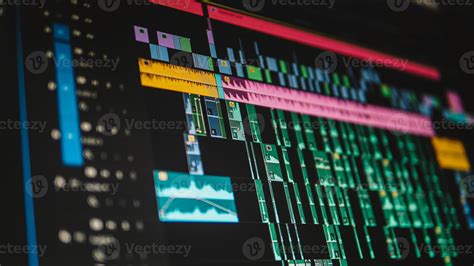
The journey of video editing has been a transformative one, evolving from the cumbersome linear editing methods of the past - where footage from various sources was painstakingly recorded onto a single master tape - to the sophisticated non-linear editing (NLE) systems prevalent today. These digital software platforms grant instant access to video clips, enabling random-access editing and non-destructive workflows. While industry giants like Avid Media Composer, Adobe Premiere Pro, and Apple Final Cut Pro are well-established NLE systems, many professionals, including those at Big 3 Media, have gravitated towards Blackmagic Design's DaVinci Resolve (DVR) as their preferred tool. This article aims to demystify the world of video editing and explore the compelling reasons behind DVR's popularity, even when compared to other leading NLE software.
The Unbeatable Value Proposition: Bang for Your Buck
Let's be frank: video production is an inherently expensive undertaking. For video editors operating on a tight budget, cost-saving measures are paramount. This is precisely where DaVinci Resolve 17 shines. Its free version is remarkably generous, offering a comprehensive suite of features that encompass editing, visual effects, and motion graphics - more on these capabilities later. For those with a larger budget, the "premium" DaVinci Resolve Studio 17 is available for S$425. This enhanced version unlocks more advanced functionalities, including stereoscopic 3D support, frame rates up to 120 frames per second (fps), and the ability to work with resolutions up to a staggering 32K. This tiered approach makes powerful post-production tools accessible to a wide spectrum of users, from aspiring filmmakers to established studios.
Core Functionality: What Makes DaVinci Resolve Stand Out?
For the "starving artist" striving to make a mark in the film industry, DVR's free version presents an almost irresistible choice. Yet, its appeal extends far beyond budget constraints; numerous seasoned professional video editors in the film industry continue to rely on DVR, even for the most demanding, large-scale video productions. What is it that consistently draws these professionals back to DaVinci Resolve?
One of the most lauded aspects of DaVinci Resolve is its integrated approach to post-production. Instead of juggling multiple applications for different tasks, DVR consolidates various stages into a single, cohesive software environment. Beyond the traditional "Edit" page, DVR has introduced a new "Cut" page, which significantly streamlines the editing workflow, proving exceptionally beneficial for rapidly assembling edits under tight deadlines. Furthermore, DVR 17 boasts new "Viewer Wipe Modes" and split-screen functionalities, providing enhanced flexibility for comparing multiple clips side-by-side or examining different frames within the same clip.
The Powerhouse of Visual Effects: Fusion
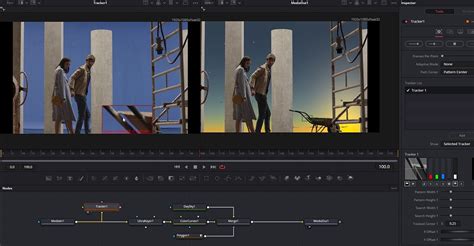
The "Fusion" page within DaVinci Resolve is a veritable playground for visual effects artists. It houses a diverse array of powerful tools, including those for compositing, digital painting, creating intricate particle effects, advanced keying techniques, rotoscoping, precise text animation, sophisticated tracking, and robust stabilization. This integrated VFX suite means editors can seamlessly transition from cutting footage to crafting complex visual sequences without ever leaving the application.
Mastering Audio: The Fairlight Advantage
DaVinci Resolve also excels as a tool for audio post-production. The "Fairlight" page is designed to handle an impressive volume of audio, supporting up to an astounding 2,000 audio tracks. Its user-friendly interface allows for comprehensive control using just a keyboard and mouse, simplifying complex audio mixing tasks. A standout feature of Fairlight is its transient detection tool. This intelligent function automatically identifies speech and music cues within audio clips and generates corresponding markers. This capability significantly simplifies the process of locating specific segments for editing, such as isolating dialogue or removing unwanted background noise, thereby streamlining the audio clean-up and mixing process.
The Art of Color: DaVinci's Renowned Color Grading
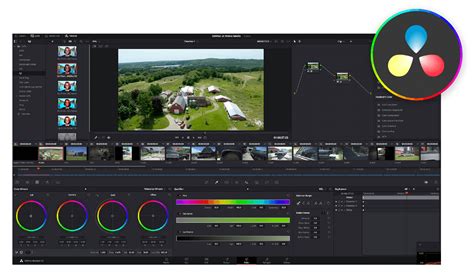
Historically, DaVinci Resolve gained its initial fame and industry respect for its unparalleled color grading capabilities. While it has since evolved into a full-fledged NLE, its "Color" page remains a benchmark for professional color correction and grading. Beyond standard color adjustments, DVR offers innovative features. The Magic Mask, available in the paid version of DVR, is a prime example. This tool allows editors to precisely isolate specific subjects within a video clip, enabling targeted color adjustments and enhancements without affecting the background. This level of control is crucial for achieving a polished, cinematic look and for creative storytelling through color.
Navigating the Interface: A Learning Curve
Despite its extensive feature set and powerful capabilities, one area where DaVinci Resolve sometimes presents a challenge is its user interface (UI). For newcomers, the sheer abundance of tools and features, coupled with the software's integrated nature, can lead to an initial learning curve. It's not uncommon for new users to spend time searching for specific functionalities, often resorting to online tutorials or Google searches to fully familiarize themselves with DVR's layout and workflows. While this can be a minor hurdle, the depth of functionality and the quality of the results often make the investment in learning worthwhile.
Adaptability and Alternatives: What If DaVinci Resolve Wasn't an Option?
In the hypothetical scenario where DaVinci Resolve were to cease to exist, many professional editors would likely revert to software they have prior experience with. For instance, one might return to Adobe Premiere Pro, as it was the initial video editing software they learned on, before potentially transitioning to Final Cut Pro, especially if they were working within the Apple ecosystem (e.g., on a MacBook). The choice of alternative software often hinges on familiarity, existing project pipelines, and specific workflow requirements. However, the comprehensive, all-in-one nature of DaVinci Resolve has set a high standard for integrated post-production workflows, making its absence keenly felt by its dedicated user base.
DaVinci Resolve for COMPLETE NOOBS!
Ultimately, while the advanced features, integrated workflow, and exceptional value proposition of DaVinci Resolve make it a compelling choice for a vast array of video editing tasks, the "best" video editing software remains a subjective matter. It is, in essence, the tool that the individual editor is most familiar with and proficient in using. The mastery of any software, including DVR, leads to the most efficient and effective results, allowing editors to truly let their creative vision shine through without the technology itself becoming a barrier. The journey from raw footage to a compelling narrative is a complex dance between technical skill and artistic intent, and DaVinci Resolve offers a powerful, versatile partner for that dance. Its continued development and the ongoing expansion of its feature set, particularly in areas like AI-powered tools and collaborative workflows, suggest that DVR will remain a dominant force in the video editing landscape for years to come. The integration of editing, color, VFX, and audio into a single application fosters a seamless creative flow, reducing the friction often encountered when moving between disparate software packages. This holistic approach not only saves time but also encourages experimentation, as editors can more readily explore different creative avenues within a unified environment. Furthermore, the ongoing commitment from Blackmagic Design to regularly update DaVinci Resolve with new features and improvements, often driven by user feedback, reinforces its position as a forward-thinking and adaptable solution for the ever-evolving demands of the film and video production industries.