DaVinci Resolve has long been a powerhouse in the realm of video editing, visual effects, motion graphics, color correction, and audio post-production. The free version itself is remarkably feature-rich, offering capabilities that rival many paid professional applications. It supports editing and finishing up to 60 frames per second (fps) in resolutions as high as Ultra HD 3840 x 2160, and includes extensive color grading tools such as luma, HSL, and 3D keyers, a color warper, HDR tools, video collage, and elastic wave audio retiming. The free version also enables collaboration, allowing multiple users to work on the same project simultaneously. However, for those seeking the pinnacle of performance, advanced features, and expanded capabilities, DaVinci Resolve Studio stands as the ultimate solution. The recent release of DaVinci Resolve 20, particularly its Studio version, represents a significant evolution, introducing over 100 new features, many of which are powered by cutting-edge artificial intelligence (AI).
Unlocking Professional Workflows with DaVinci Resolve Studio
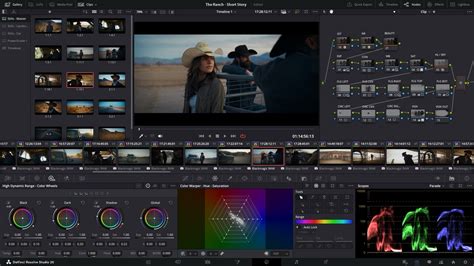
Moving up to DaVinci Resolve Studio unlocks a new tier of professional capabilities. It supports a staggering 120fps at a massive 32K resolution, a crucial feature for high-end productions and archival work. Furthermore, it offers support for multiple GPUs, enabling real-time playback of professional 10-bit formats, and accelerated H.264 and H.265 hardware decoding and encoding. This hardware acceleration is vital for smooth playback and faster rendering of complex codecs.
The Studio version boasts a full suite of immersive audio tools, enhanced by AI-powered features like voice isolation, music remixer, and dialogue separator. It also includes advanced grading and rendering capabilities for Dolby Vision and HDR10+, along with over 40 extra Resolve FX. These GPU and CPU accelerated effects encompass a wide range of creative and corrective tools, including AI UltraNR noise reduction, SuperScale for high-quality image uprezzing, and sophisticated de-interlacing. Beyond effects, DaVinci Resolve Studio integrates workflow and media asset management, a remote scripting API, and rendering and encoder plug-in support, allowing for seamless integration into larger post-production pipelines.
AI-Powered Innovations in DaVinci Resolve 20 Studio
The defining characteristic of DaVinci Resolve 20 Studio is its extensive integration of artificial intelligence. The DaVinci Neural Engine, powered by state-of-the-art deep neural networks and machine learning, is the driving force behind many of these exclusive Studio features.
AI IntelliScript and Automated Storytelling
A groundbreaking AI feature is AI IntelliScript, which can create entire timelines based on a text script. This dramatically accelerates the initial assembly of projects, allowing editors to quickly generate a foundational edit from written material. This capability moves beyond simple transcription to intelligent scene interpretation and arrangement.
Enhanced Multicam Editing with AI Multicam SmartSwitch
For projects involving multiple camera angles, AI Multicam SmartSwitch intelligently assembles a timeline by analyzing speaker detection. This means the AI can automatically switch between camera angles based on who is speaking, creating a more dynamic and engaging multicam edit with minimal manual intervention. This is particularly useful for interviews, presentations, and live event coverage.
Professional Audio Mixes in a Click with AI Audio Assistant
The AI Audio Assistant is another significant time-saver. It analyzes your audio and intelligently creates a professional audio mix in a single click. This feature aims to democratize high-quality audio mixing, making it accessible even to those without extensive audio engineering experience. Within this AI audio suite, AI Detect Music Beats analyzes audio clips with "beat-driven" music to automatically place markers that indicate beats. This makes it significantly easier for editors to synchronize visual actions with the rhythm of background music, a crucial element in creating impactful videos.
Expanding Scenes with AI Set Extender
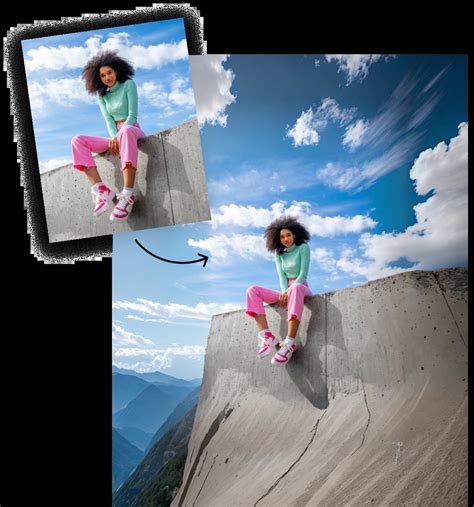
The AI Set Extender is a visually transformative AI tool. It allows users to extend a scene to fill an entire frame based on a text prompt. By highlighting the area customers want to extend, missing regions caused by limited clip angles, blanking, and cropping are auto-generated. This means new backgrounds can be created behind foreground objects, offering immense creative freedom for set extension and background manipulation without the need for complex 3D environments or extensive matte painting.
Beyond AI: Core Editing and Color Enhancements
While AI takes center stage, DaVinci Resolve 20 Studio also introduces substantial improvements to core editing and color grading functionalities.
Streamlined Cut and Edit Pages
The Cut and Edit pages have seen significant updates. A dedicated keyframe editor has been introduced, providing more granular control over animations and effects. Voiceover palettes have also been added, allowing for direct recording of narration onto the timeline. The Cut page now features a new safe trimming mode to prevent crucial edits from being accidentally overwritten, a vital safeguard for fast-paced editing. Additionally, a full audio mixer with pro-level loudness controls has been integrated into the Cut page, offering more comprehensive audio control directly within the assembly timeline.
Advanced Color Grading with Chroma Warp and Stroke Control
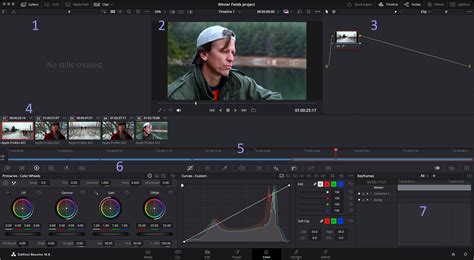
The Color page benefits from a new chroma warp function, enabling editors to adjust color and saturation with a single motion in the viewer. This offers a more intuitive and fluid way to manipulate color. Stroke control allows colors to be moved in one direction, while point mode isolates specific regions for more precise hue correction. This functionality extends to collaboration, allowing clients to add pin points to specific regions they do not want an editor to adjust, thereby streamlining feedback and revision processes.
Enhanced 3D and VR Tools
DaVinci Resolve 20 Studio includes new tools designed for editing 3D and virtual reality content. A 3D Dome light tool is introduced to simulate natural ambient light within a three-dimensional scene. This tool works with 360 HDRI images to deliver accurate reflections and global illumination, crucial for creating realistic virtual environments.
Immersive Audio Capabilities in Fairlight
The Fairlight audio post-production suite receives significant upgrades, focusing on advanced audio matching and mixing. Editors can now process clips with two new options: Dynamic EQ Match and Level Matcher. Dynamic EQ Match ensures consistent tonality throughout an entire clip by matching it to a reference clip or tonal spectrum. Level Matcher seamlessly blends intercut clip sections without requiring manual tweaks, ensuring smooth audio transitions between different takes or sources.
How to MIX Dialogue, Music & SFX in Davinci Resolve for PERFECT AUDIO
Workflow Integration and Hardware Control
DaVinci Resolve Studio has always emphasized workflow integration, and version 20 continues this trend.
Blackmagic Cloud Collaboration Enhancements
New Blackmagic Cloud support offers improved collaboration tools, allowing teams to work together more efficiently, regardless of their geographical location. These enhancements streamline project sharing, version control, and real-time co-editing.
Physical Control Surfaces
For professionals who prefer tactile control, Blackmagic Design offers specialized hardware. The Editor Keyboard features a large search dial and dedicated editing keys for efficient multi-cam editing, particularly for news and live sports. The Advanced Control Surface provides a powerful color panel with refined controls for cinematic image creation, including windows for precise grading. For audio engineers, the Fairlight Desktop Console offers quick access to virtually every Fairlight feature, facilitating the mixing of large projects with a massive number of channels and tracks. These consoles can be configured with optional blank bays for custom layouts.
Scripting and API Access
DaVinci Resolve Studio supports both Python and LUA scripting, along with developer APIs. This allows users to create custom workflow integrations and encoding options, and connect to asset management systems and automation tools. This level of customization is essential for large post-production facilities with unique pipeline requirements.
Resolution, Frame Rate, and Codec Support
DaVinci Resolve Studio pushes the boundaries of resolution and frame rate support. It handles up to 120fps at a massive 32K resolution, catering to the most demanding visual requirements. In terms of codecs, it supports professional 10-bit formats and offers accelerated H.264 and H.265 hardware decoding and encoding. Beyond the 8-bit formats supported by the free version, Studio allows users to work with most professional formats, including advanced AVCHD, AVC-Intra, and popular H.264 camera formats that utilize "all-I" intraframe encoding, as well as 10-bit encoding.
Dolby Vision and HDR Mastering
For high dynamic range content, DaVinci Resolve Studio provides comprehensive Dolby Vision support. This includes a GPU-accelerated version of the Dolby Vision CMU (Content Mapping Unit) and free Dolby Vision grading controls. It also enables the creation of SMPTE ST.2067 compliant Interoperable Master Format (IMF) files for tapeless delivery to networks and distributors using Kakadu or Easy DCP. Native support for unencrypted DCP files allows for testing and validation of digital cinema packages. The HDR scopes in DaVinci Resolve Studio are capable of measuring and providing detailed information about ST.2084 and HLG images, crucial for accurate HDR mastering.
Advanced Noise Reduction and Image Restoration
DaVinci Resolve Studio includes some of the most powerful and sophisticated noise reduction tools available. The AI UltraNR noise reduction leverages artificial intelligence to deliver exceptionally clean images. Beyond noise reduction, the Studio version offers a suite of image restoration tools for tasks like dirt removal, dust busting, and de-flickering. The Film Look Creator allows for the addition of filmic color looks, film stocks, halation, grain, gate weave, and split toning, emulating the aesthetic of traditional film.
Lens Correction and Stereoscopic 3D
The lens correction feature allows users to analyze a clip and correct for spherical lens distortion or other aberrations, ensuring geometrically accurate footage. For productions requiring depth, DaVinci Resolve Studio features a complete set of tools for editing and grading stereoscopic 3D projects, offering a comprehensive solution for 3D post-production.
Remote Monitoring
Remote monitoring allows clients to view a real-time feed of the project via computer, iPad, or iPhone with extreme high quality. This feature facilitates remote collaboration and client approvals, eliminating the need for physical presence on-site.
Conclusion of Features
DaVinci Resolve 20 Studio represents a monumental leap in video post-production capabilities. The integration of over 100 new features, with a strong emphasis on AI-driven tools, significantly accelerates workflows, enhances creative possibilities, and democratizes professional-level results. From AI-powered editing and audio mixing to advanced color grading, immersive audio, and robust HDR support, DaVinci Resolve 20 Studio empowers creators to achieve unparalleled results. As Blackmagic Design CEO Grant Petty states, "By automating tasks that take a long time manually or are tedious, with features such as keyframe editing, voice over palettes, live overwrite and multi-layer compositing tools, our customers are free to spend more time than ever being creative." This focus on freeing up creative energy is at the heart of DaVinci Resolve 20 Studio's transformative impact.