DaVinci Resolve stands as a unique entity in the realm of post-production applications, primarily due to its remarkably accessible free version. This free offering is particularly astonishing when one considers that before its acquisition by Blackmagic Design, the software, then known as DaVinci, commanded a price tag exceeding $250,000. The question then arises: what specific enhancements does the Studio version offer, how do they function, and is the upgrade truly worth the investment?
The Cost of Enhanced Capabilities
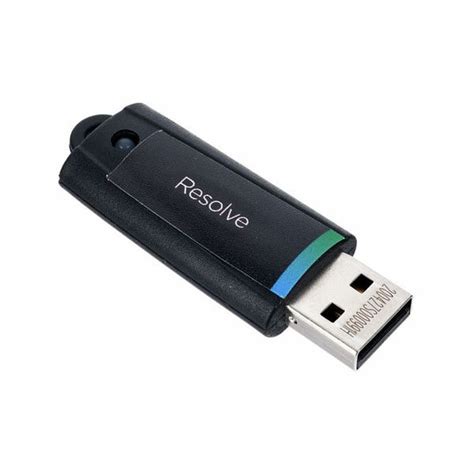
The DaVinci Resolve Studio version is available for a one-time purchase of $299 USD. This price point grants users a lifetime license, meaning all future upgrades within the same major version series are included, eliminating the need for recurring payments. The software can be acquired as a standalone application directly from the Apple Store, allowing for installation on a single machine. Alternatively, a dongle version is available, which includes a USB key fob. The primary advantage of the dongle is the portability it offers, enabling users to carry their DaVinci Resolve Studio license from one location to another. This perpetual license model stands in stark contrast to subscription-based software, offering a clear cost advantage over time.
Core Differentiators: Noise Reduction and Performance
One of the most immediately apparent and frequently utilized features exclusive to DaVinci Resolve Studio is its advanced noise reduction. In scenarios involving low-light shooting, such as at night or in dimly lit environments, it can be challenging to mitigate in-camera noise. The Studio version provides powerful tools to address this, allowing for the reduction of unwanted noise during post-production, thereby rendering otherwise unusable footage salvageable. This is particularly beneficial for footage shot with micro four-thirds cameras or in challenging lighting conditions.
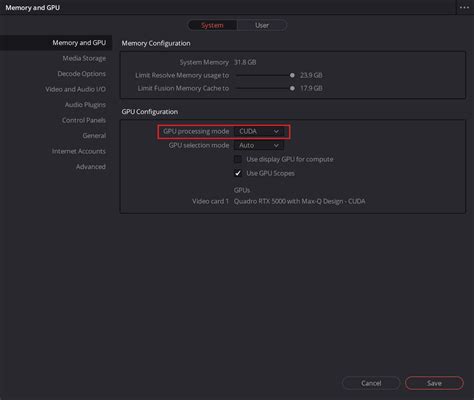
Beyond visual enhancements, a significant "bang for your buck" reason to upgrade to Studio lies in its computational performance. The paid version is engineered to leverage the power of your graphics card (GPU) for video processing. In contrast, the free version relies almost exclusively on the CPU. For instance, on a 2019 iMac equipped with a Radeon Pro Vega 48 graphics card and DaVinci Resolve Studio, users can achieve render speeds of 4K raw footage at approximately 60 frames per second. This is a dramatic improvement compared to the mere 14 frames per second achievable in the free version under similar conditions. This GPU acceleration extends to numerous other aspects of the software, significantly enhancing rendering and export speeds.
Unlocking Collaboration and Advanced Tools
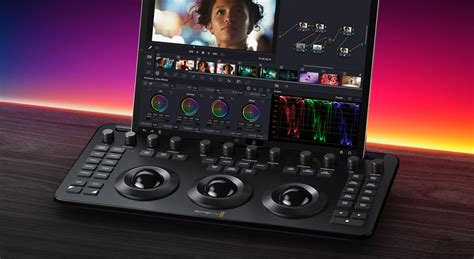
Upgrading to DaVinci Resolve Studio unlocks a suite of powerful collaboration tools. The ability to work as a team on a single project is a significant advantage for larger productions. Furthermore, the Studio version facilitates remote grading, where a client can observe the grading process in real-time via a computer, iPad, or iPhone with exceptional quality. This remote monitoring capability ensures clients can provide feedback and approve color grades from any location.
The Studio version also introduces several sophisticated, less obvious, yet highly valuable features. The Face Refinement tool, for example, is an OFX plugin capable of tracking faces throughout a shot. This allows editors to selectively adjust brightness, color, and even reduce shine on specific individuals without affecting the rest of the frame. OFX (Open Effects) plugins are a format that permits third-party developers to extend Resolve's functionality. While the free version includes some basic OFX plugins, the most advanced and powerful ones are reserved for the Studio version.
Another exclusive OFX plugin found only in the paid version is Color Space Convert. This tool is immensely useful for converting between different LOG formats and color spaces like Rec. 709, simplifying complex color workflows.
Expanded Format and Resolution Support
DaVinci Resolve Studio boasts support for a wider array of compression formats that are not available in the free version. This includes advanced codecs such as H.265 (also known as HEVC), which is crucial for efficient handling of high-resolution footage. Additionally, the Studio version supports timeline resolutions exceeding 4K, extending up to a massive 32K at 120 frames per second. While few users may require such extreme resolutions, this capability ensures future-proofing for the most demanding projects.
The Studio version also offers enhanced support for stereoscopic filmmaking, enabling independent manipulation of the left and right images within a 3D sequence. Furthermore, it provides robust tools for working in HDR (High Dynamic Range). Users can define maximum bit depth and color depth settings before grading and outputting an HDR version of their project. This includes advanced HDR grading and rendering capabilities for formats like Dolby Vision and HDR10+.
Fusion: Cinematic VFX Composting
Fusion, DaVinci Resolve's integrated visual effects and motion graphics compositing application, sees significant enhancements in the Studio version. While the free version offers a substantial portion of Fusion's capabilities, allowing users to create cinematic quality VFX, the Studio version unlocks further potential. This includes a broader range of GPU-accelerated Resolve FX, which are effects that can be applied to enhance visual elements.
DaVinci Resolve 17 Fusion Training - Introduction to Fusion
The DaVinci Neural Engine: AI-Powered Advancements
A cornerstone of DaVinci Resolve Studio's exclusive feature set is the DaVinci Neural Engine. This advanced AI technology utilizes state-of-the-art deep neural networks and machine learning to power numerous sophisticated tools. These include:
- Facial Recognition: Automatically identifies and organizes footage based on the people present in each shot, creating smart bins for easy access to specific actors or individuals.
- Super Scale: An intelligent up-rezzing tool that allows users to create high-quality 4K and even 8K images from HD sources, significantly enhancing the usability of lower-resolution footage.
- Speed Warp Retiming: Employs advanced optical flow algorithms to achieve crystal-clear and smooth speed changes, even in complex motion sequences.
- Magic Mask: An AI-powered tool for precise object isolation and tracking, allowing for targeted adjustments to specific elements within a frame.
- Smart Reframe: Automatically reframes footage to maintain the most important subject in the frame when changing aspect ratios or zooming, ideal for adapting content for different platforms.
- Object Removal: Enables the removal of unwanted objects from a scene with remarkable accuracy.
- Scene Cut Detection: Automatically identifies cuts within a video, streamlining the editing process.
These AI-driven features represent a significant leap in post-production efficiency and creative possibility, offering capabilities that would typically require expensive third-party plugins or specialized software.
Enhanced Audio Post-Production
While the free version of DaVinci Resolve includes the powerful Fairlight audio workstation, the Studio version expands its capabilities, particularly in the realm of immersive and high-resolution audio. It supports advanced features for working with spatial audio formats, including import and export of the latest IAB (Immersive Audio Bitstream) and ADM (Audio Definition Model) files.
Object-based audio formats like Dolby Atmos and MPEG-H, which use panning automation to move audio objects and create a realistic aural experience that scales with the size of the playback environment, are fully supported. Ambisonics, a technique for capturing and reproducing a full spherical sound field, is also supported up to 5th order. For Dolby Atmos, the Studio version allows for master production import from immersive .damf, .wav, and .mxf files, with the ability to decompose these into their original elements. It also supports adding audio to video via IMF (Interoperable Master Format) containers, facilitating multiple simultaneous audio deliverables.
Additional Resolve FX and Workflow Integrations
DaVinci Resolve Studio includes over 40 additional GPU and CPU accelerated Resolve FX. These plugins offer a wide range of creative and corrective tools, such as:
- Lens Flares and Reflections: For adding realistic lighting effects.
- Analog Damage: To simulate the look of vintage film or tape.
- Sharpening: For enhancing image detail.
- Face and Beauty Tools: For professional retouching and enhancement.
- Image Restoration Tools: Including dirt removal, dust busting, and de-flickering for repairing damaged footage.
- Film Look Creator: To apply cinematic color looks, film stocks, halation, grain, gate weave, and split toning.
- Patch Replacer: For cloning and painting out unwanted spots.
- Object Removal Plug-in: To seamlessly remove entire objects from a scene.
Furthermore, the Studio version provides enhanced workflow integrations. It supports both Python and LUA scripting, along with developer APIs that enable the creation of custom workflow integrations and encoding options. This includes plug-in support for connecting to local and remote asset management and automation systems.
Comparing Free vs. Studio: A Practical Decision Guide
The free version of DaVinci Resolve is an exceptionally capable post-production suite. It offers essential tools for video editing, robust color grading capabilities (including luma, HSL, and 3D keyers, color warper, and HDR tools), basic Fusion effects, and comprehensive Fairlight audio tools. It also supports multi-user collaboration and allows for editing and finishing up to 60 frames per second at Ultra HD 3840 x 2160 resolution. For many individual editors, hobbyists, or those working on smaller projects, this free version provides more than enough functionality.
However, DaVinci Resolve Studio elevates the experience significantly. The key advantages, as outlined above, include:
- GPU Acceleration: Significantly faster rendering and playback, especially with 4K and higher resolutions.
- Advanced Noise Reduction: Essential for low-light footage.
- DaVinci Neural Engine: AI-powered tools like Magic Mask, Smart Reframe, and Object Removal.
- Expanded Format Support: Including 10-bit footage, higher resolutions (up to 32K), and advanced HDR workflows (Dolby Vision, HDR10+).
- Additional Resolve FX: Over 40 premium effects for visual enhancement and correction.
- Stereoscopic 3D Tools: For 3D filmmaking.
- Advanced Scripting and Workflow Integrations: For custom solutions and automation.
- Support for Multiple GPUs: Further enhancing performance.
The decision to upgrade hinges on individual workflow requirements and budget. If your projects routinely involve challenging low-light footage, require advanced AI-driven tools, necessitate higher resolutions or specific professional codecs, or if you simply want to maximize performance through GPU utilization, then the $295 Studio upgrade is a worthwhile investment. The one-time purchase for a lifetime license, which includes all future updates within the same major version, offers exceptional long-term value compared to subscription models.
For beginners or those whose needs are met by the extensive feature set of the free version, sticking with it is a perfectly viable option. As professional skills grow and project demands increase, the path to DaVinci Resolve Studio becomes a natural progression. Blackmagic Design's tiered approach, offering a powerful free version alongside an enhanced paid option, makes advanced post-production tools accessible to a broad spectrum of creators.