DaVinci Resolve has undergone a remarkable transformation, evolving from a specialized, high-end color grading tool to a comprehensive, all-in-one video editing suite. This evolution has democratized professional-level post-production, making powerful tools accessible to a wider audience. A significant part of this accessibility is the availability of a robust free version, which stands in contrast to the feature-rich DaVinci Resolve Studio. Understanding the distinctions between these two offerings is crucial for any video editor, from aspiring content creators to seasoned Hollywood professionals.
The Genesis of DaVinci Resolve: From Hollywood Elite to Accessible Powerhouse
The history of DaVinci Resolve is a testament to innovation and strategic acquisition. Initially conceived as a proprietary solution for Hollywood's elite, DaVinci Resolve was synonymous with cutting-edge color grading and commanded a premium price. Its acquisition by Blackmagic Design in 2009 marked a pivotal moment, initiating a period of rapid development and expansion. Under Blackmagic Design's stewardship, DaVinci Resolve was meticulously transformed into a fully integrated video editing software. This transformation was not merely an enhancement of existing capabilities but a fundamental reimagining of its accessibility and scope.
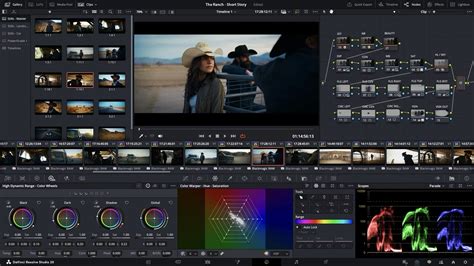
The introduction of the DaVinci Resolve free version was a watershed moment. Previously, access to such advanced software necessitated a substantial financial investment. However, with the free version, Blackmagic Design opened the doors for virtually anyone to engage with professional video editing. This free offering provides users with access to "lite" versions of powerful modules like Fusion for special effects and Fairlight for audio editing. Crucially, there are no time limitations or watermarks on exported projects, allowing for unhindered creative output.
The ongoing evolution of DaVinci Resolve has seen the continuous addition of new features. The introduction of the Cut Page specifically addresses the need for faster editing workflows, while the integration of AI-powered tools and enhanced support for emerging hardware has further solidified its position as a leading post-production solution. The suite now encompasses sophisticated special effects tools, enabling the creation of intricate visual effects and dynamic motion graphics. Furthermore, the Fairlight audio editing module offers professional-grade capabilities for sound design and mixing.
DaVinci Resolve Free vs. Studio: A Feature-by-Feature Breakdown
The core of the DaVinci Resolve experience lies in its two distinct versions: the free and the Studio. While the free version is remarkably capable, the Studio version unlocks a deeper level of functionality and performance.
Resolution and Frame Rate Capabilities
A primary distinction lies in the export capabilities. The free version of DaVinci Resolve allows users to export videos in resolutions up to 4K Ultra HD (3840 x 2160) at a maximum of 60 frames per second. This resolution and frame rate are more than sufficient for the vast majority of content creators, including those producing for platforms like YouTube and social media.

However, for high-end production work, particularly in cinematic endeavors or specialized broadcasts, the DaVinci Resolve Studio version elevates these limits significantly. It supports higher resolution exports, extending up to a massive 32K resolution, and can handle frame rates up to 120 frames per second. This expanded capability is essential for professionals working with the highest fidelity footage and demanding visual specifications.
Advanced Tools and AI Integration
DaVinci Resolve Studio distinguishes itself through the inclusion of advanced, often AI-powered, tools that streamline complex tasks and enhance creative possibilities. One such feature is IntelliTrack AI, a sophisticated motion tracking tool that can automatically follow subjects within a video and even adjust audio panning in sync. Another powerful AI-driven tool is Face Refinement, which intelligently smooths skin tones and enhances facial features, offering subtle yet impactful improvements for character work.
How to EDIT Videos 10x FASTER Using AI (Descript Overview)
The DaVinci Neural Engine, a core component of the Studio version, powers many of these exclusive features. This engine leverages state-of-the-art deep neural networks and machine learning to perform complex operations in real-time. Features like facial recognition, which automatically categorizes footage based on the people present, are exclusive to the Studio version. Similarly, Super Scale provides high-quality upscaling, allowing HD sources to be transformed into 4K and even 8K images. Speed Warp retiming, utilizing advanced optical flow, enables crystal-clear and smooth speed changes, a crucial tool for dynamic editing. Other Neural Engine-powered features include incredibly high-quality de-interlacing, Magic Mask for precise object isolation and tracking, Smart Reframe for automatic reframing of footage, object removal, and scene cut detection.
Performance and Hardware Acceleration
Performance is a critical differentiator, especially for demanding projects. While both versions utilize the Graphics Processing Unit (GPU) for processing, DaVinci Resolve Studio unlocks the power of multiple GPUs. This multi-GPU support significantly accelerates rendering and playback, particularly for complex projects with numerous effects and high-resolution media.
Furthermore, DaVinci Resolve Studio offers hardware-accelerated encoding and decoding for popular codecs like H.264 and H.265. This hardware acceleration drastically speeds up the working process when handling these file types and significantly reduces rendering times during export.
Color Grading and Visual Effects
While the free version of DaVinci Resolve boasts an impressive array of color grading tools, including luma, HSL, and 3D keyers, the color warper, and HDR tools, the Studio version offers a more advanced set of capabilities in this arena.
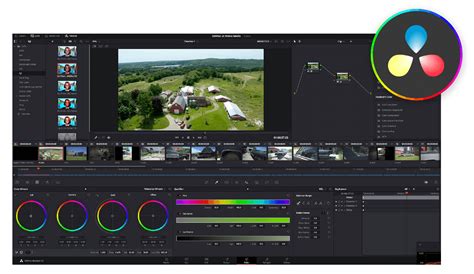
Key exclusive features on the Color page in DaVinci Resolve Studio include:
- Magic Mask: An AI-powered tool that simplifies the process of isolating and tracking specific objects or people, dramatically reducing the need for manual rotoscoping.
- Face Refinement: Dedicated tools for enhancing facial features and smoothing skin tones, offering professional retouching capabilities.
- HDR Scopes: Advanced scopes that provide detailed information for mastering HDR content, including Dolby Vision and HDR10+ standards (ST.2084 and HLG).
- Stereoscopic 3D Tools: A complete suite of tools for editing and grading stereoscopic 3D projects.
- Advanced Noise Reduction: Studio offers sophisticated temporal and spatial noise reduction algorithms, crucial for cleaning up footage shot in challenging lighting conditions. The free version has limited noise reduction capabilities.
- Resolve FX and OpenFX Plugins: While many Resolve FX are available in both versions, some of the more advanced plugins, particularly those related to lens effects, are exclusive to Studio. Additionally, the ability to use third-party OFX plugins requires the Studio version.
The Studio version also includes a vast collection of over 40 additional GPU and CPU accelerated Resolve FX. These effects cover a wide range of creative needs, from adding cinematic lens flares and reflections to simulating analog damage for vintage looks. The Film Look Creator allows for the application of filmic color palettes, grain, halation, and gate weave. Tools for image restoration, such as dirt removal and de-flickering, are also present. For object manipulation, the Patch Replacer enables cloning and painting out unwanted elements, and the Object Removal plug-in can eliminate entire objects from a scene.
Fusion and Fairlight: Special Effects and Audio Post-Production
The powerful visual effects and motion graphics module, Fusion, sees only minor differences between the free and Studio versions. Features exclusive to Fusion Studio include the Fusion Camera Tracker, the Fusion VR Toolset, and the ability to control scripts from local or remote machines. However, the core node-based compositing capabilities, which form the foundation of Fusion's power, are largely available in the free version, making it a potent tool for many VFX tasks.
The Fairlight audio post-production module also offers substantial functionality in its free iteration. However, DaVinci Resolve Studio expands upon this with advanced features and higher export capabilities. While the free version allows exports up to 4K at 60fps, Studio supports up to 32K at 120fps with advanced HDR delivery, crucial for high-end cinematic releases. Studio also provides support for professional audio formats like Dolby Atmos and Auro-3D, as well as higher sample rates (96 KHz and 192 KHz) at a project level.
The Role of Video Templates in DaVinci Resolve
Regardless of whether you use the free or Studio version, DaVinci Resolve's ability to incorporate video templates can significantly accelerate your editing workflow and enhance the polish of your projects. Video templates are pre-designed files that provide ready-made elements such as titles, lower thirds, transitions, and full-screen graphics.
Using templates can save a considerable amount of time, especially for common editing tasks. Instead of building complex title animations or transitions from scratch, you can simply drag and drop a template into your timeline and customize the text, colors, and other parameters. This is particularly beneficial for content creators who need to produce a high volume of videos efficiently.
An exciting development for DaVinci Resolve users is the Autograph 2025 live link feature, which allows animators to create templates directly within DaVinci Resolve. This integration streamlines the template creation process and opens up new possibilities for custom asset development.
A vast array of video templates is available from various sources, including platforms like Artlist, where top international designers offer a wide selection. These templates can range from cinematic title sequences with intricate animations and text treatments to dynamic logo reveals and social media assets designed to elevate your online presence. Transition templates are also invaluable for adding smooth and stylish animations between shots, enhancing the visual flow of your video.
Who is DaVinci Resolve For?
DaVinci Resolve, in both its free and Studio iterations, caters to a broad spectrum of users.
- Beginners and Hobbyists: The free version is an exceptional starting point. It provides a comprehensive set of tools for learning the fundamentals of video editing, color grading, and basic effects without any financial commitment. The absence of watermarks and export limitations up to 4K makes it a fully functional editing suite for personal projects, YouTube channels, and small-scale productions.
- Content Creators and YouTubers: For many online content creators, the free version of DaVinci Resolve is more than adequate. The ability to export in 4K at 60fps, coupled with robust editing and color correction tools, allows for the creation of professional-looking videos that can compete with content produced using paid software.
- Professional Filmmakers and Studios: While the free version is powerful, professionals working on feature films, high-end commercials, or broadcast television often require the advanced features and performance enhancements offered by DaVinci Resolve Studio. This includes higher resolution and frame rate support, advanced AI tools, superior noise reduction, multi-GPU acceleration, and specialized color grading and audio features.
The decision to upgrade to DaVinci Resolve Studio often hinges on specific workflow needs. If you frequently encounter "upgrade required" prompts for certain features, or if your projects demand the highest resolutions, frame rates, or advanced AI-driven tools, then the Studio version becomes a compelling investment. Blackmagic Design's licensing model, a one-time purchase for a lifetime license with free updates, offers significant value compared to subscription-based alternatives.
In essence, DaVinci Resolve offers a tiered approach to professional video editing. The free version is a remarkably generous offering that empowers a vast audience to create high-quality content. For those who push the boundaries of resolution, demand peak performance, or require the most advanced creative tools, DaVinci Resolve Studio provides the ultimate solution.