Choosing the right technical illustration solution that supports a seamless workflow when working with multiple 2D and 3D file sources and data, can scale, and makes the production process more cost-efficient, is imperative to growth. CorelDRAW Technical Suite stands as a comprehensive collection of applications designed for technical communication professionals and technical graphics users. It provides a powerful platform for transforming product information into professional visual documentation, empowering teams, customers, and suppliers, and accelerating current workflows. This suite is engineered to deliver exceptional control and precision for flawless technical documentation and design, catering to a wide array of industries from manufacturing and engineering to architecture and high tech.
Unveiling the Core of CorelDRAW Technical Suite
At its heart, CorelDRAW Technical Suite is built upon a foundation of robust applications, each contributing to a holistic approach to technical design and documentation. The suite seamlessly integrates these tools, allowing users to transition effortlessly between different stages of the creative process. The main applications within CorelDRAW Technical Suite 2021 include:
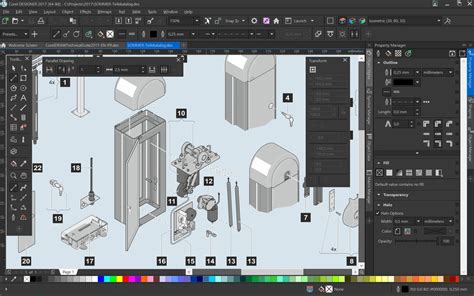
- Corel Designer 2021: This is the cornerstone for precision illustration and technical design. It offers dedicated illustration and design tools that ensure accuracy for isometric drawing, detailed callouts, advanced dimensioning, and much more. It provides the control and precision necessary for creating intricate technical visuals with total precision.
- CorelDRAW 2021: This application excels in vector illustration and page layout, enabling users to create stand-out marketing collateral alongside technical illustrations. It offers advanced illustration features that deliver stunning results in record time, including the new Draw in Perspective feature for creating 1, 2, or 3-point perspective drawings.
- Corel PHOTO-PAINT 2021: For professional image editing, this application allows users to make the most of their photos. It provides advanced photo editing features that deliver a faster, easier route to flawless images, including a new Adjustments docker for instant access to critical filters and a Local Adjustments Mode for isolating objects and areas.
- XVL Studio Corel Edition: This application is crucial for 3D visualization and authoring. It enables users to reuse 3D models and transform complex 3D CAD parts and assemblies into comprehensible visualizations. Creating vector fills with XVL Studio saves a great deal of time when visualizing and highlighting individual components.
- CorelDRAW.app: This browser-based application offers vector illustration and graphic design capabilities, allowing for on-the-go design. Projects can be saved to the cloud and accessed online from any web browser, complementing the desktop application for a truly flexible workflow.
- CorelDRAW.app for iPad: A dedicated iPad app that brings vector illustration and graphic design tools to a mobile platform, further enhancing accessibility and on-the-go creativity.
- PowerTRACE: An AI-powered tool that facilitates bitmap-to-vector tracing, allowing for the conversion of raster images into editable vector graphics.
- Capture: A screen capture tool for easily acquiring and incorporating screenshots into documentation.
- AfterShot 3 HDR: A RAW photo editor that provides robust capabilities for processing and enhancing photographic source material.

Bridging 2D and 3D: The Power of XVL Studio
A significant strength of CorelDRAW Technical Suite lies in its ability to seamlessly integrate 2D and 3D data. The optional XVL Studio Corel Edition add-on, and the more advanced XVL Studio 3D CAD Corel Edition, play a pivotal role in this capability. These tools are essential for working with 3D CAD engineering files, transforming complex 3D CAD parts and assemblies into comprehensible visualizations.
The integration of XVL Studio facilitates a seamless transition from 3D design to illustration. Users can easily turn repurposed 3D engineering data into detailed technical illustrations. A new thread workflow simplifies working with bolts imported from XVL Studio Corel Edition, featuring a new 3-Point Thread tool that accurately snaps to the sides of a bolt. The new Remove Border tool further enhances efficiency by quickly removing redundant outer lines of a projected shape with a single click. This capability is particularly valuable for industries relying heavily on detailed engineering models.
For those working with high-end 3D CAD systems such as CATIA, SolidWorks, NX, Inventor, and PTC Creo, the optional Lattice3D Studio CAD Corel Edition add-on is indispensable. It supports native assembly and part file formats from these leading CAD systems, ensuring a smooth import and utilization of complex 3D data within the CorelDRAW Technical Suite environment.
Streamlining Technical Illustration Workflows
CorelDRAW Technical Suite 2021 introduces a reimagined approach to technical illustration, designed to boost productivity and enhance user experience. The reconfigured Projected Axes docker brings commonly used technical drawing tools and settings to the forefront of the illustration workspace. This eliminates the need to switch between different dockers or UI controls to move objects on a plane, making the process of moving elements along the projected axis more intuitive. A new Projection Shortcut allows for instantaneous projecting of shapes in and out of parallel perspective, saving valuable time. Furthermore, new Projection Bookmarks and the ability to pin custom perspective settings on an illustration provide easy access to frequently used configurations.
The suite also offers advanced illustration features that deliver stunning results in record time. The Draw in Perspective feature, available in both Corel Designer and CorelDRAW, allows users to draw objects or illustrated scenes in perspective, choosing from 1, 2, or 3-point perspective. Objects can be drawn or added to a shared perspective plane and edited freely without losing perspective. Creating isometric or other parallel projected technical illustrations for assembly and maintenance instructions is made dynamic by drawing on a projected plane. Dimension tools eliminate the need for multi-step drawing and projection of dimension objects, displaying precise measurement values in building plans and other contexts. Sticky callouts ensure that essential design details are tracked and that callouts dynamically update and change when based on object metadata, sticking to source objects as they are modified. Illustrations and diagrams can be created to scale with the drawing scale control, allowing users to view the active drawing scale, switch to presets, or set custom scales.
Enhancing Documentation and Manufacturing Processes
The suite is purpose-built to power discrete manufacturing workflows, offering impressive new functionality for creating complete spare parts pages. Users can import .DES, .CDR, and spreadsheet files into Corel Designer’s Sources docker to couple technical illustrations with specifications in tables. Working with linked assets becomes more streamlined, with the ability to sync changes to designs and data when files are edited elsewhere. The suite also provides new support for interactive SVG files, which convey parts information with greater clarity and simplify the online publishing of fully interactive documentation.
Ensuring compliance with various standards-based systems is crucial in technical publications. CorelDRAW Technical Suite offers support for technical publication standards, including S1000D. Technical graphics professionals can access critical data from various sources and deliver technical files in a readable format with support for widely used file formats, including CGM, WebCGM, 3D PDF, and SVG with interactive possibilities. The ability to publish to 3D PDF with interactive viewing of 3D content, combined with other visual and text elements, further enhances cross-media publishing capabilities.
Collaboration and Asset Management for Modern Workflows
In today's collaborative and often remote work environments, CorelDRAW Technical Suite provides robust enhancements to collaboration workflows. An enhanced collaboration workflow makes working with colleagues and clients more efficient than ever. Users can gather live comments and annotations from one or many contributors directly within their shared CorelDRAW file and reply to and resolve feedback simultaneously. An updated project dashboard simplifies storing, organizing, and sharing cloud files, while an enhanced Comments docker streamlines filtering through feedback. A streamlined sign-in process and performance enhancements contribute to faster saving, opening, and sharing of Cloud designs.
Productivity is further boosted by dynamic asset management. Users can access and manage all assets from one central location and share symbols across teams. This ensures that everyone is always working with the most current assets, thanks to an impressive new asset management workflow that easily syncs updates.

Typographic Power and Creative Design
Beyond its core technical capabilities, CorelDRAW Technical Suite integrates features to boost creativity. New time-saving typography tools allow users to create stunning typography faster than before, with new integrated access to the Google Fonts library within Corel Font Manager. This feature enables effortless browsing, searching, and previewing of over 1,000 font families without the need to install them first.
The suite also grants access to the latest CorelDRAW Graphics Suite 2021 applications, including professional image editing, page layout, and font management tools. This allows users to transform technical designs into compelling marketing assets, extending the reach and impact of their work beyond purely technical documentation. Features like Object Styles, Color Styles, and Color Harmonies ensure a consistent look, style, and layout throughout design projects. The integrated Equation Editor allows mathematical equations to be managed as editable elements, with mathematical and scientific formulas insertable and modifiable within drawings.
Accessibility and Licensing Options
CorelDRAW Technical Suite 2021 is available on Windows 10 and Windows 11. It offers flexible licensing options to suit various needs. Subscription licenses are priced competitively, providing access to the latest software, exclusive features, and content. For those preferring a perpetual license, an option with included one-year maintenance is available, ensuring eligibility for the most up-to-date versions. Maintenance plans offer a low-cost annual payment that guarantees access to the latest software, features, and content at no additional cost as long as the plan remains active.
The suite supports a wide range of languages, including English, German, Italian, French, Spanish, Brazilian Portuguese, Dutch, Polish, Czech, Russian, Simplified Chinese, Traditional Chinese, Turkish, Swedish, and Japanese, making it accessible to a global user base. Corporate licenses are also available, catering to larger organizations.
Addressing Technical Considerations
To ensure optimal performance, users should be aware of certain technical prerequisites. Internet connectivity is required to access certain tools and features. Web browser security settings on servers may need adjustment to allow the use of the Welcome screen. In virtualized environments, hardware acceleration may need to be disabled. WebView2, the Microsoft Edge web control, is required for Corel Cloud and the Comments docker.
CorelDRAW Technical Suite is designed to open a vast array of file formats, including DWG files, which represent binary file formats used for CAD drawings. This broad compatibility ensures that users can import and work with a wide variety of source materials. The suite also includes support for exporting to formats like 3D PDF and interactive SVG, facilitating broad distribution and usability of technical documentation.
The inclusion of generative AI features, such as AI Generate, further enhances efficiency by allowing users to create visuals from text prompts, reference files, or sketches. AI credits are used for these prompt-based image generation tasks, providing a modern approach to visual content creation.
CorelDRAW Technical Suite 2021 represents a significant evolution in technical illustration software, offering a comprehensive, integrated, and powerful solution for professionals seeking to create precise, impactful, and efficient visual documentation.