In the vast landscape of digital art software, Clip Studio Paint (CSP) stands out as a powerful and popular choice, utilized by over 30 million creators worldwide. For many artists, especially those newer to the digital realm, understanding the distinctions between its two primary versions, Pro and EX, can be a crucial step in optimizing their workflow. These differences, while sometimes subtle, significantly impact how artists approach and manage their creative projects, from single illustrations to extensive comic series and animations. This comparison aims to illuminate these key distinctions, empowering you to select the version that most harmoniously aligns with your artistic aspirations and current skill level.
At its fundamental level, Clip Studio Paint Pro is engineered with illustrators and hobbyists in mind, primarily focusing on single-page projects. It boasts a robust suite of versatile drawing tools, highly customizable brushes that respond to pen pressure sensitivity, and advanced layer management capabilities, making the creation of detailed artwork both straightforward and efficient. Pro prioritizes simplicity and the core workflows essential for individual illustration. While it does offer basic animation features, it does not natively support multi-page comics or the sophisticated project management often required for larger endeavors.
Conversely, Clip Studio Paint EX is meticulously crafted for professional comic artists, manga creators, and animators who frequently engage with multi-page projects. It extends beyond the capabilities of Pro, offering enhanced features for those who require comprehensive support for serialized works and a higher degree of control over complex projects. EX truly excels in managing the intricate demands of comic creation, animation, and even collaborative projects.
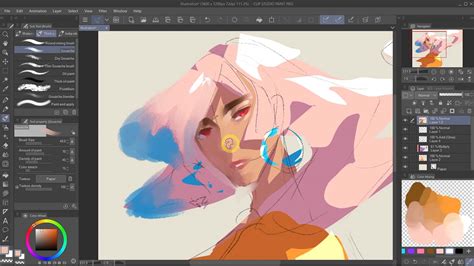
Before making an informed decision between Clip Studio Paint Pro and EX, a thorough understanding of their feature sets and tool variations is paramount.
Core Illustration and Editing Capabilities
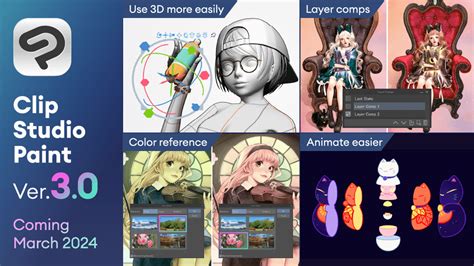
Both Pro and EX versions of Clip Studio Paint provide a comprehensive array of illustration tools. This includes highly customizable brushes that can be tailored to an artist's specific needs, precise pen pressure sensitivity for nuanced line work, and advanced layer management systems that allow for intricate compositional control. However, the EX version distinguishes itself by offering exclusive features that can significantly enhance certain workflows. Among these are the advanced capabilities for converting 3D models into detailed line diagrams, a process that can drastically speed up the creation of backgrounds or complex objects. Furthermore, EX includes enhanced image filters that offer more sophisticated options for manipulating and refining artwork, providing greater creative flexibility.
Multi-Page Project Management
One of the most significant distinctions between Clip Studio Paint EX and Pro lies in their approach to multi-page project management. While Pro is primarily designed for single-page creations, EX is built from the ground up to handle entire comic books, manga series, or storyboards. EX allows for full multi-page comic creation, encompassing essential features like storyboarding tools that enable visual planning of narrative flow, and intuitive page rearrangement functionalities. This means artists can easily organize, edit, and manage their entire project within a single, cohesive file structure. The [Story] menu, exclusive to EX, is a testament to this capability, allowing users to manage comic or manga files made of multiple pages, control page display order, add new pages seamlessly, and organize the overall story information.
Animation Features and Workflow
When it comes to animation, both Pro and EX offer valuable tools, but with differing levels of depth and complexity. The PRO version supports frame-by-frame animation, a fundamental technique for creating animated sequences. It allows for a 24-frame limit per animation, which is perfectly adequate for generating short clips, animated GIFs, or basic motion graphics. This makes it a viable option for artists experimenting with animation or those creating brief animated elements.
However, EX takes animation capabilities to a significantly higher level. It includes more advanced timeline controls, offering greater precision in timing and sequencing. Extended export options are also a key advantage, allowing for more versatile output formats and resolutions suitable for professional animation projects. Crucially, EX provides more precise keyframe management, which is essential for creating fluid and complex character movements or visual effects. EX also allows for the use of an extended exposure sheet, such as the Toei Animation Digital Exposure Sheet, enabling more detailed editing of animation frames within the [Timeline] palette. This level of control is vital for professional animators working on longer or more intricate projects.
Project Management and Collaboration
The differing design philosophies of Pro and EX are also evident in their project management capabilities. Pro is recognized for its simplicity and efficiency, excelling in managing single files and basic project templates. This makes it an ideal tool for individual illustrators who focus on standalone pieces.
EX, on the other hand, elevates project management to a professional standard, particularly for teams or individuals working on extensive projects. It incorporates advanced features such as story editors, which facilitate the organization of narrative elements, and multi-page version tracking, crucial for maintaining project integrity and history. Furthermore, EX includes collaborative features that can streamline teamwork, allowing multiple artists to potentially work on different aspects of a project or provide feedback within a shared environment. This makes EX a powerful solution for studios or groups of artists collaborating on a single comic or animation.
How to animate in Clip Studio Paint 2025: Japan's favorite animation software
Pricing and Value Proposition
The financial aspect is often a significant consideration for artists choosing between software versions. Clip Studio Paint Pro is positioned as an affordable option, typically available for a one-time purchase of around $58.50 (or $49.99 depending on sales and regional pricing). This price point makes it highly accessible for beginners, hobbyists, and illustrators on a budget, offering substantial value for its core illustration and basic animation features.
Clip Studio Paint EX, while more expensive, represents a significant investment for professional-tier features. Its one-time purchase price is approximately $258 (or $219 depending on sales and regional pricing). This higher cost is justified by the inclusion of comprehensive multi-page comic support, advanced animation tools with unlimited frames, dedicated storyboarding features, enhanced project management capabilities, and the integrated 3D model conversion tools. For artists whose work inherently involves these advanced functionalities, the EX version offers a more cost-effective and integrated solution compared to trying to replicate these features with plugins or separate software. Both versions offer a one-time payment deal, allowing users to own the software outright and save money in the long run.
File Export and Publishing Capabilities
The ability to export artwork in various formats is crucial for different publishing and sharing needs. The PRO version of Clip Studio Paint supports standard file exports commonly used for digital illustration and basic animation. This includes essential formats like JPEG, PNG, and TIFF for static images, as well as GIF and MP4 for animations. These formats cover the vast majority of basic illustration and short animation requirements for web use or general sharing.
EX, however, expands these export capabilities significantly to cater to professional publishing workflows, especially for comics and e-books. EX allows for the export of multi-page PDFs, which are essential for print-ready comic books or portfolios. It also supports EPUB and Kindle-ready formats, enabling artists to directly publish their works as e-books. This means that works created in Clip Studio Paint, particularly those intended for digital distribution, can be seamlessly prepared for platforms like Amazon Kindle or other e-book retailers. Furthermore, works created as fanzines can be output to printing vendors for professional printing, leveraging EX's advanced print preparation features.
Specific Advanced Features in EX
Beyond the general distinctions, EX offers several specialized features that cater to professional workflows:
- 3D Model to Line Art Conversion: This exclusive EX feature allows artists to import 3D models and convert them into line drawings. This is incredibly useful for generating detailed backgrounds, character poses, or complex objects efficiently, saving significant drawing time. The [All Sides View] palette is also available when editing a 3D layer, allowing users to view a 3D material from four directions simultaneously.
- Outline Extraction: EX provides the ability to extract outlines from a selected layer, which can be a powerful tool for various art styles or for creating clean linework for further refinement.
- Advanced Timeline Controls: As mentioned, EX offers more granular control over animation timelines, including the ability to set frame values below zero, indicated by "[Start frame]". This allows for more complex animation timing and pre-roll sequences.
- Version Tracking and Management: The EX version's robust project management tools include features for managing different versions of a project, which is invaluable for larger, ongoing works or collaborative efforts.
Who is the Winner? Clip Studio Paint Pro vs. EX
Ultimately, the "winner" between Clip Studio Paint Pro and EX is entirely dependent on the individual artist's needs, project scope, and future aspirations.
Clip Studio Paint Pro is an excellent choice for beginners, hobbyists, and illustrators who primarily focus on single-page artwork, character design, concept art, or standalone illustrations. Its user-friendly interface, robust drawing tools, and affordable price point make it an accessible entry into professional-grade digital art software. It provides all the worthy features for digital painting and art creation at a budget-friendly cost.
Clip Studio Paint EX is the superior option for professional comic artists, manga creators, Webtoon artists, and animators. If you have plans to draw manga, comics, or Webtoons, or to create animated series, EX is the better choice. Its comprehensive multi-page support, advanced animation tools, storyboarding features, and professional export options are designed to handle the complexities of serialized or long-form projects. The teamwork functionality in EX is particularly beneficial for artists who collaborate with others. Furthermore, the ability to create 3D book previews before printing offers a significant advantage for production planning.
For new users of CSP, the biggest query is indeed which version to prefer. Both versions are excellent and enriched software for creating paintings, illustrations, manga, and comics. However, the fundamental difference lies in the scale and complexity of projects they are best suited for. While Pro offers a fantastic foundation for individual artistic endeavors, EX provides the specialized tools and workflow management necessary for professionals tackling larger, multi-faceted creative outputs.