Adobe Photoshop, a cornerstone of digital art and design, offers an expansive toolkit for creators. Among its most versatile features are custom brushes, which can dramatically alter the look and feel of a digital canvas. This article delves into the world of dirt brushes in Photoshop, exploring their applications, benefits, and how to effectively integrate them into your creative workflow. We will begin by understanding the fundamental nature of these brushes, then move to specific techniques and applications, and finally, touch upon the broader context of brush customization and library management.
Understanding the Essence of Dirt Brushes
Dirt brushes in Photoshop are digital tools designed to simulate the appearance of natural imperfections, textures, and organic elements. Unlike basic round brushes, dirt brushes are pre-designed with complex textures, edges, and opacities that mimic real-world materials such as mud, dust, grime, and various forms of distressed surfaces. They are invaluable for adding a sense of realism, age, or a specific stylistic aesthetic to digital artwork, graphic designs, and photo manipulations.
The core concept behind these brushes is the replication of organic, often irregular, patterns. This is achieved through the brush's shape dynamics, scattering, texture, and dual brush settings within Photoshop. For instance, a "dirt" brush might be composed of a cluster of irregularly shaped particles, with varying sizes and rotations, scattered across the canvas to create a believable layer of accumulated debris. Similarly, a "mud" brush could be designed with softer, blended edges and a more cohesive, viscous appearance.
The user experience with dirt brushes often revolves around the idea of "getting grungy." This phrase encapsulates the desire to introduce an element of rawness, imperfection, and a lived-in quality to a digital creation. This can range from subtle, almost imperceptible textures to overt, heavily distressed effects. The versatility lies in the ability to control the intensity and scale of these effects, making them adaptable to a wide array of artistic intentions.
Unlocking the Potential: Grunge Brushes in Action
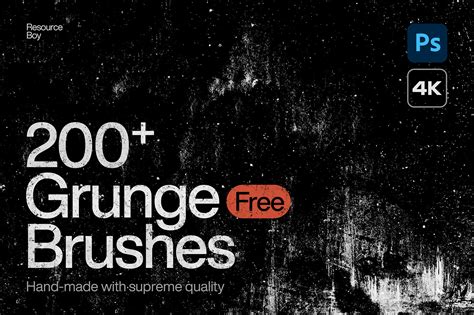
Grunge brushes are a prominent category within the realm of dirt brushes, specifically designed to impart a distressed, aged, or weathered look. They are excellent for creating a sense of history, decay, or a rebellious, edgy aesthetic.
One of the most effective ways to utilize grunge brushes is through strategic sizing. For example, "Size the flat edged brushes down to achieve a permanent marker effect." This technique allows for the creation of sharp, distinct lines that mimic hand-drawn scribbles or markings often found on distressed surfaces. The controlled application of these smaller brushes can add a layer of authenticity to otherwise clean digital elements.
Conversely, "Size the same brush up and you can use it as a stamp to build up large swaths of texture." When scaled up, the inherent characteristics of the brush become more pronounced. "Sizing the brushes up exposes the grain of the brush as well as blank space." This means that the finer details of the brush's texture, along with areas of transparency or less dense application, become more apparent. This can be leveraged to create broad areas of textured coverage, acting as a foundation for further manipulation or as a standalone textural element. For instance, a large, up-sized grunge brush could be used to simulate the worn surface of a concrete wall or the textured background of a vintage poster.
The Nuances of Dust and Decay: Experimenting with Dust Brushes
Dust brushes offer a distinct set of characteristics compared to their grunge counterparts. While grunge often implies a more solid, layered form of decay, dust typically suggests lighter, more dispersed particles.
"Try the same experiments with the dust brushes as you did with the grunge." This highlights a fundamental principle of brush usage: experimenting with scale and application is key to discovering their full potential. "Sized down you can create interesting streaks and smoky, chalk-like effects." When reduced in size, dust particles can be dragged across the canvas to create wispy trails, emulate the appearance of smudged chalk, or suggest subtle atmospheric effects like smoke or mist. These delicate applications are perfect for adding subtle depth and realism to portraits, landscapes, or any scene requiring a touch of atmospheric nuance.
When dust brushes are "sized up you’ll produce spaced out shapes resembling ink splatters or the grain of a handmade paper." In this larger scale, the individual particles become more distinct, and the overall pattern can resemble random splatters of ink, the subtle texture of handmade paper, or even the fine grain of photographic film. This can be incredibly useful for adding unique backgrounds, creating distressed overlays, or simulating the texture of physical media.
Dispersion Effect - Photoshop Tutorial
A Sophisticated Collection: The 16 Photoshop Brushes Product Deep Dive
The availability of high-quality, specialized brush sets significantly enhances a designer's capabilities. One such offering is a sophisticated set of "16 Photoshop brushes" designed to bridge the gap between rough and subtle grunge. These brushes aim to provide creators with a refined toolset for achieving nuanced textural effects.
The product description emphasizes "superb quality and perfection of performance," suggesting that these brushes have been meticulously crafted to deliver consistent and professional results. They are intended to answer "all your possible questions" regarding texture and distressing, implying a comprehensive solution for various design needs.
The set includes a thoughtful categorization of brushes: "We've embraced texture brushes and border brushes." Texture brushes are designed for general application of surface detail, while border brushes are specifically shaped to frame or edge elements, adding decorative or distressed borders. This dual approach allows for both background enhancement and compositional framing.
"Care about quality? The assets are available in two versions: 1000 and 5000 px." The resolution of a brush tip directly impacts the detail it can render, especially when scaled up. Offering brushes at both 1000 pixels and 5000 pixels ensures that they are suitable for a wide range of projects, from web graphics to high-resolution print work. Larger brushes retain their detail when scaled significantly, preventing pixelation and maintaining a clean aesthetic.
For those new to Photoshop brushes, the inclusion of a "help file with clear instructions is included, cheers!" is a significant advantage. This ensures that even beginners can confidently explore and utilize the full potential of the brush set, demystifying the process and encouraging experimentation.
Expanding Your Arsenal: Relevant Brush Set Recommendations
Beyond the specific 16-brush set, a vast array of specialized brushes are available to cater to every imaginable textural need. Exploring these can significantly broaden your creative palette.
For those seeking to simulate natural, earthy textures, "A terrific set of brushes that are perfect for mud and dirt" provides direct solutions. These are likely designed with the specific characteristics of wet earth, dried mud, and soil in mind.
To add decorative or stylistic framing elements, "A great useful set of grunge corners, perfect for adding effects to images" can be invaluable. These brushes are specifically shaped to adorn the corners of an image, imparting a distressed or vintage feel.
For a more direct approach to applying textures, "This brush set features a collection of grunge stamp brushes." Stamp brushes are typically designed for single-click application, making it easy to quickly add pre-defined textures to an image.
Nature-inspired textures are also well-represented. "This texture set is a collection of moss and grass textures" would be ideal for environmental design, fantasy art, or adding organic detail to various scenes.
For character artists and those working with realistic human forms, "A unique set of 10 brushes just perfect for adding texture and scars to skin" offers specialized tools for creating believable imperfections on skin surfaces, enhancing realism in portraits and character designs.
The realm of atmospheric effects is also covered with "Dust particle brush pack for your creative compositions." These are likely designed to create realistic dust motes, airborne particles, or subtle atmospheric haze.
For a bolder, more painterly feel, "A set of 6 heavy paint brush strokes" can be employed. These brushes mimic the impasto or thick application of physical paint, adding a tactile quality to digital work.
A more refined distressed aesthetic can be achieved with "A very nice set of 16 light grunge brushes." These offer a subtler form of grunge, ideal for adding gentle wear and tear without overpowering the primary subject.
Finally, for dynamic and energetic effects, "A super useful set of 3 brushes that are perfect for motion trails" can be used to simulate speed, movement, or the visual residue of fast-moving objects.
Integrating Brushes into Your Photoshop Workflow
The effective use of dirt brushes in Photoshop goes beyond simply selecting and clicking. It involves understanding how to integrate them seamlessly into your existing workflow and leveraging Photoshop's advanced features.
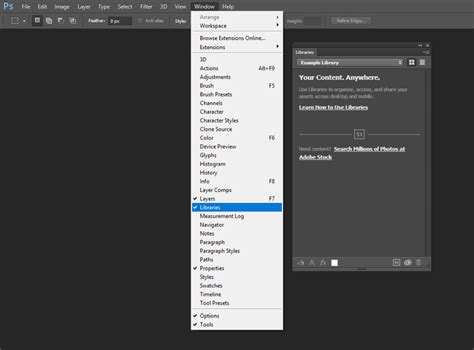
Library Management:To streamline access to your favorite brushes, "Add the brush set to your library. Add the library using the link at the top of the story. In Photoshop, open the Libraries panel (Window > Libraries)." Photoshop's Creative Cloud Libraries allow you to store and organize brushes, swatches, colors, and other assets, making them accessible across different projects and even different Adobe applications. This is a crucial step for maintaining an efficient workflow and ensuring that your go-to textures are always at your fingertips.
Experimentation and Customization:The key to mastering any brush set, especially dirt brushes, is experimentation. "Start experimenting with the grunge brushes." Don't be afraid to try different brush settings, opacities, flow rates, and blend modes. Combine different brushes, layer them, and use them in conjunction with other Photoshop tools like layer masks and adjustment layers.
Consider the brush dynamics:
- Size Jitter: Varies the size of brush marks.
- Angle Jitter: Varies the angle of brush marks.
- Roundness Jitter: Varies the roundness of brush marks.
- Scattering: Spreads brush marks further apart.
- Texture: Applies a secondary texture to the brush stroke.
- Dual Brush: Combines two brush tips for more complex results.
These settings allow for fine-tuning the behavior of dirt brushes to achieve very specific effects, moving beyond their default appearance.
Application Techniques:
- Building Texture: Use larger, stamp-like applications of grunge or dust brushes to create base textures for backgrounds, walls, or distressed surfaces.
- Adding Detail: Use smaller, carefully placed strokes of dirt brushes to add subtle grime, smudges, or wear to specific areas of an object or character.
- Creating Atmospheric Effects: Employ dust brushes with low opacity and scattering to simulate smoke, fog, or airborne particles.
- Distressing Edges: Use grunge border brushes or carefully applied grunge stamps to create worn, chipped, or aged edges on objects or images.
- Simulating Imperfections: Apply subtle dirt or grime brushes to areas that would naturally accumulate dirt, such as the soles of shoes, the bottom of clothing, or the crevices of machinery.
By understanding the fundamental nature of dirt brushes, experimenting with their various settings, and utilizing organizational tools like Photoshop Libraries, creators can significantly enhance the realism, depth, and stylistic appeal of their digital artwork. The wide array of specialized brush sets available ensures that there is a tool for virtually every textural need, empowering artists to achieve sophisticated and unique results.