In the ever-evolving landscape of digital media, the HEIC file format has emerged as a significant advancement in image storage and compression. Short for High-Efficiency Image Coding, HEIC is a variant of the High-Efficiency Image File Format (HEIF) and represents a modern approach to capturing and storing visual data, offering substantial benefits over older formats like JPEG. While its adoption has been most prominent on Apple devices, its underlying technology and advantages are gaining traction across the broader digital ecosystem.
Understanding HEIC: The Core Technology
HEIC stands for High-Efficiency Image Coding, and it is a digital container format designed to store images and image sequences more efficiently than traditional formats. It is built upon the High-Efficiency Image File Format (HEIF), which itself is a special case of the ISO base media file format (ISOBMFF). HEIF was standardized by the Moving Picture Experts Group (MPEG) in 2015, with the aim of addressing the limitations of older image formats like JPEG and PNG.
The efficiency of an image format refers to how much space is required to store a file while maintaining high quality and visual accuracy. HEIC, by leveraging advanced compression techniques, achieves this balance remarkably well. Each HEIC file is essentially an HEIF image, but not all HEIF files are HEIC. HEIC is specifically the implementation that focuses on storing still images.
The Genesis of HEIC: Addressing JPEG's Limitations
The development of HEIF and HEIC was a direct response to the growing need for more efficient image compression. The Joint Photographic Experts Group (JPEG) format, while revolutionary in its time, has inherent limitations. JPEG uses a lossy compression method, meaning that each time an image is edited and resaved, some data is lost. This degradation can become noticeable over multiple editing cycles. Furthermore, while JPEG is widely compatible, it does not support image transparency, a feature crucial for many design applications.
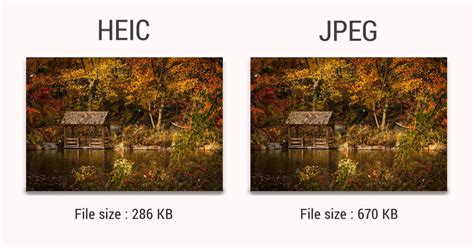
HEIC, on the other hand, offers a much more efficient, modern compression method. Its innovative compression process, which is derived from High-Efficiency Video Coding (HEVC), allows HEIC files to use significantly less space than JPEG files. This can ease the strain on device storage while enabling users to store a larger number of high-quality images. When it comes to both compression efficiency and the preservation of image quality, HEIC files generally win out over JPEG.
Key Advantages of the HEIC Format
HEIC files offer several compelling benefits that make them an attractive alternative to older image formats:
Superior Compression and Space Savings
One of the most significant advantages of HEIC is its remarkable compression efficiency. HEIC files can be up to half the size of equivalent JPEG files, without a discernible loss in visual quality. This means that a device with limited storage can hold many more HEIC photos than JPEGs. For example, an image saved as a 4-megabyte HEIC file might require 8 megabytes to achieve a similar visual fidelity when using JPEG compression. Across a library of thousands of photos, these savings can amount to gigabytes, leading to faster file transfers and quicker uploads, even over cellular networks.
Enhanced Image Quality and Color Depth
HEIC utilizes advanced compression techniques that allow it to store more color information than JPEG. This results in richer, more vibrant images with better detail, especially in challenging lighting conditions. HEIC also supports a wider range of image data, including High Dynamic Range (HDR) images, which can capture a greater spectrum of light and dark tones, leading to more realistic and visually striking photographs.
Support for Transparency and Alpha Channels
Similar to PNG files, HEIC files can support image transparency through an alpha channel. This is a feature that the JPEG format lacks. The ability to store images with transparency makes HEIC a more versatile format for graphic design and web development.
Storage of Multiple Images and Animations
A powerful feature of the HEIF container, which HEIC utilizes, is its ability to store multiple images within a single file. This capability is particularly useful for features like Live Photos on Apple devices, or for burst mode photography. A single HEIC file can contain a sequence of images that can be played back as a short animation or slideshow. This also extends to cinematographic animations, allowing for dynamic visual content within a single file.
Rich Metadata Capabilities
HEIC files can store a wealth of metadata, including not only technical details like camera settings, time, and location, but also editing instructions. This enables non-destructive image editing, where edits are stored as instructions within the file, allowing the original image data to be preserved. This means you can crop, rotate, or apply other edits to an HEIC file without permanently altering the original image data, and these edits can be undone or modified later.
Derived Images and Non-Destructive Editing
HEIC's structure allows for the creation of "derived images." These are essentially new images generated on-the-fly based on editing instructions stored separately within the HEIF file. This means that when you edit an HEIC image, the original data remains untouched, and the edits are applied as a layer of instructions. This provides a significant advantage for photographers and editors who want to experiment with different edits without compromising the original capture.
HEIC vs. JPEG: A Comparative Look
While JPEG has been the de facto standard for digital photography for decades, HEIC presents a compelling case for its replacement.
| Feature | HEIC | JPEG |
|---|---|---|
| Compression | Highly efficient, lossy and potentially lossless | Lossy compression |
| File Size | Approximately 50% smaller than JPEG for comparable quality | Larger file sizes |
| Image Quality | Superior color depth, HDR support, better detail retention | Good quality, but degrades with repeated editing |
| Transparency | Supported (via alpha channel) | Not supported |
| Multiple Images | Can store image sequences, animations, burst photos | Stores single images |
| Metadata | Rich metadata support, including editing instructions | Standard EXIF metadata, no editing instructions |
| Compatibility | Growing, but primarily on Apple devices; requires extensions on Windows | Universal compatibility across most devices and software |
| Editing | Supports non-destructive editing | Destructive editing (data loss on resave) |
How are Images Compressed? [46MB ↘↘ 4.07MB] JPEG In Depth
Compatibility and Accessibility
One of the primary challenges for HEIC adoption has been its compatibility. While HEIC files are the default format for images on Apple devices (iPhones and iPads running iOS 11 or later, and Macs), their support on other operating systems and software has been slower to develop.
Apple Ecosystem
Within the Apple ecosystem, HEIC files are seamlessly integrated. On an iPhone or iPad, photos taken in HEIC format can be easily viewed, edited, and shared. Macs can open HEIC files natively using the Preview app or import them into the Photos app. For users who need to share HEIC files with devices or software that do not support them, Apple provides options to transfer photos as JPEGs. When transferring photos from an iPhone to a Mac or PC, there's a setting to "Keep Originals" (which transfers as HEIC/HEVC) or to convert them to JPEG/H.264.
Windows and Other Platforms
On Windows, support for HEIC files has been added through extensions. Windows 10 version 1803 and later requires the HEIF Image Extensions from the Microsoft Store to read and write HEIF files. For full functionality, including animated HEIC files, the HEVC Video Extensions may also need to be purchased. Linux users can often install third-party extensions or use conversion tools.
Many popular third-party applications and cloud services, such as Adobe Photoshop, Google Photos, OneDrive, and Dropbox, have also added support for HEIC files, further enhancing their accessibility.
Converting HEIC Files
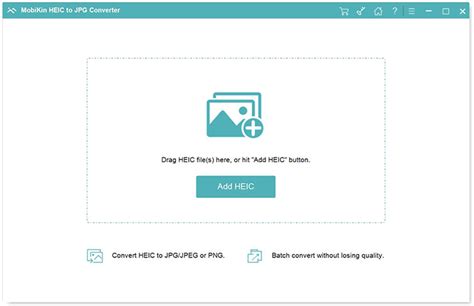
Despite increasing support, there are still instances where converting HEIC files to more widely compatible formats like JPEG or PNG is necessary. This can be done through various methods:
- Built-in OS Features: macOS offers a simple conversion process via the Preview app. On Windows, the Microsoft Store extensions facilitate this.
- Online Converters: Numerous websites offer free HEIC to JPEG conversion services. Users can upload their HEIC files and download them in the desired format. However, it's important to be mindful of privacy and security when using online tools for sensitive images.
- Dedicated Software: Many image editing applications, including Adobe Photoshop, Lightroom, and GIMP, can open and convert HEIC files. There are also specialized desktop applications designed for HEIC conversion.
It's important to note that converting from HEIC to JPEG will generally result in a loss of the HEIC format's advantages, such as smaller file size and the ability to store multiple images. Converting a JPEG to HEIC will not magically improve its quality or compression.
Privacy Considerations
HEIC files, like many digital image formats, can contain significant metadata. This metadata can include information about the camera used, settings, date, time, and even location data. While this can be useful for organizing and understanding your photos, it also raises privacy concerns, especially when sharing images online. Users should be aware of the metadata embedded in their HEIC files and consider removing or adjusting it if privacy is a concern, using the same tools and methods used for other image formats.
The Future of HEIC and Image Formats
The HEIC format represents a significant step forward in image compression and storage technology. Its ability to deliver high-quality images in smaller file sizes makes it an ideal choice for modern devices with increasing camera capabilities and storage demands. While compatibility remains a hurdle, the ongoing adoption by software developers and operating system providers suggests a future where HEIC becomes as ubiquitous as JPEG.
However, the landscape of image formats is dynamic. Newer formats like AVIF (AV1 Image File Format) are emerging, offering even greater compression efficiency and royalty-free licensing, potentially challenging HEIC's dominance in the long run. For now, HEIC stands as a powerful and efficient format that bridges the gap between image quality and storage economy, particularly for users within the Apple ecosystem and for those who embrace its advanced capabilities.
HEIC vs. Other Formats: A Broader Perspective
While the comparison with JPEG is the most common, it's worth noting other image formats and how HEIC fits into the broader spectrum:
- PNG: Primarily used for web graphics and images requiring transparency or lossless compression. PNG files are generally larger than JPEGs and HEICs but preserve all image data. HEIC can offer transparency, making it a potential competitor in some use cases.
- RAW: This format captures unprocessed sensor data directly from the camera. RAW files offer the highest possible image quality and maximum flexibility for editing, but they are significantly larger than HEIC and require specialized software to view and process. Apple's ProRAW format is an example of a hybrid approach, combining RAW data with computational photography enhancements.
- WebP: Developed by Google, WebP is another modern image format that offers both lossy and lossless compression, often achieving better compression than JPEG at comparable quality. It also supports transparency and animation. WebP has seen wider adoption on the web than HEIC.
The choice between HEIC and other formats often depends on the specific use case, desired quality, storage constraints, and compatibility requirements. HEIC excels in providing a balance of high quality, efficient compression, and advanced features, making it a strong contender for the future of digital image storage.