In the realm of digital imagery, the ability to refine and perfect a photograph is an essential skill, regardless of one's experience level. Often, the pursuit of a flawless image necessitates the removal of unwanted elements, and text is a common culprit. Whether it's a distracting watermark, a misplaced caption, or simply an element that detracts from the artistic vision, knowing how to remove text from images is a valuable asset. Fortunately, platforms like Picsart offer intuitive and powerful tools designed to tackle this very challenge, making the process accessible to everyone from novice users to seasoned professionals.
The Challenge of Unwanted Text in Images
Photographs capture moments, but they can also inadvertently capture imperfections. Text, in particular, can be a persistent distraction. It might be an accidental inclusion in a candid shot, a branded element on a product image, or even graffiti that mars an otherwise scenic background. The presence of such text can divert the viewer's attention from the intended subject, disrupt the aesthetic harmony of the composition, or even alter the overall message of the photograph. The goal of post-production editing is often to enhance the subject and convey a clear message, and unwanted text stands directly in the way of this objective.
When considering the removal of any element from an image, it's important to approach the task with a critical eye. Does the text truly detract from the image, or is it an integral part of the scene? Removing something that draws attention to its own removal can create a more noticeable flaw than the original element. This is especially true when considering portraits. Are minor blemishes actually ruining the portrait, or are they part of its natural character? Similarly, when editing people out of an image, one must consider whether such an action might cause offense or misrepresent a situation. The same ethical considerations apply to text removal: does removing text from an image change the context and interpretation of the image in a way that is misleading or inappropriate? It's often beneficial to have a fresh set of eyes review the image after special effects have been applied, providing an objective perspective on the final result.
Picsart: Your Solution for Text Removal
Picsart stands out as a leading platform offering a streamlined and effective method for removing text from images. Its user-friendly interface and powerful editing tools make it an ideal choice for achieving professional-looking results with ease. The platform's commitment to empowering creators is evident in its vast ecosystem of free-to-use content, robust editing capabilities, and a constant stream of inspiration. With a staggering billion downloads and a monthly active user base exceeding 150 million, Picsart has solidified its position as the world's largest creative platform, fostering a vibrant community of artists and designers.
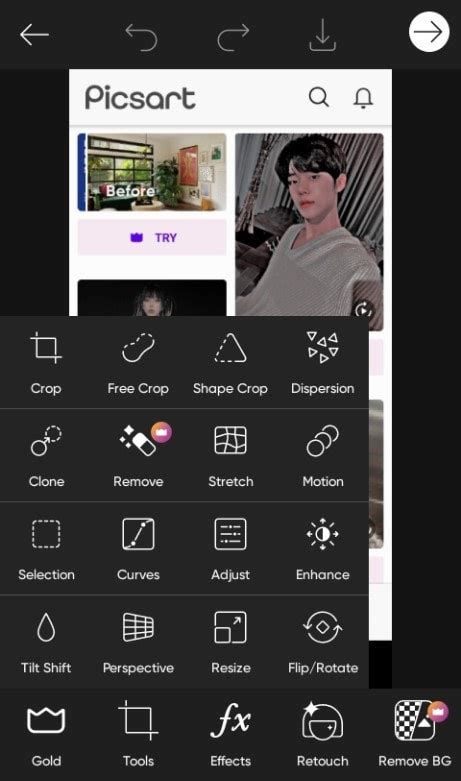
The process of removing text within Picsart is remarkably straightforward. Users begin by selecting the "Remove" tool from the toolbar. This tool functions as a sophisticated content-aware fill, intelligently analyzing the surrounding pixels to seamlessly replace the selected area. To utilize it, one simply brushes over the text they wish to eliminate. The precision of the tool can be further refined using the "Size" slider, allowing users to adjust the brush size to perfectly match the dimensions of the text, ensuring a clean and accurate selection. Once the text is highlighted, a simple tap of the "Remove" button initiates the editing process, and Picsart's AI works its magic to erase the unwanted text, often leaving no trace of its original presence.
Advanced Editing Capabilities for Complex Scenarios
While removing small pieces of text is often a simple brush-and-remove operation, Picsart also provides solutions for more complex editing needs. For instance, if an image contains a significant amount of text, such as extensive graffiti or a cluttered background filled with signage, it might be more efficient to remove the entire background. This is where Picsart's specialized background editing tools come into play.
The Background Remover Tool
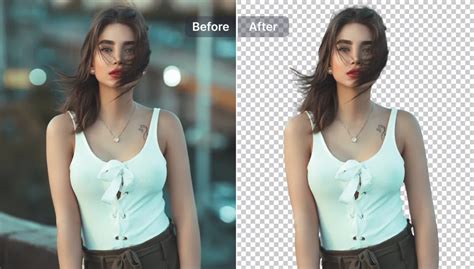
The "Background Remover" tool is an AI-powered feature that automatically detects and removes the background from an image. This is incredibly useful when the text is part of a larger, distracting background. By uploading an image to this tool, users can leverage artificial intelligence to isolate the subject and eliminate the background. The result can be a transparent background, allowing for complete creative freedom to add new backgrounds or elements. Alternatively, users can choose to leave the background as is, with the unwanted text now gone.
The Background Changer Tool
For situations where not only is there unwanted text, but the entire background needs a complete overhaul, the "Background Changer" tool is the perfect solution. This tool allows users to upload their image and then choose a new background. The options are vast: users can select from Picsart's extensive library of stock backgrounds, or they can upload their own images to serve as the new backdrop. This provides an unparalleled level of flexibility, enabling users to completely transform the context and aesthetic of their photographs. The ability to experiment with numerous backgrounds until the perfect one is found ensures that the final image meets the user's creative vision.
How to Use PicsArt App - PicsArt Editing Tutorial
Beyond Text Removal: A Comprehensive Editing Suite
Picsart's utility extends far beyond just removing text. The platform is designed as a comprehensive creative suite, equipping users with an arsenal of tools to enhance their photos and videos. Knowing how to edit people out of pictures, for example, is another incredibly handy skill that Picsart facilitates. This can be for various reasons, from removing an ex-partner from a memory - the modern digital equivalent of physically cutting someone out of a photograph - to clearing out distracting crowds from a tourist snapshot. The principles of removing people often mirror those of removing text: careful selection, utilizing brushes and erasers, and leveraging AI to intelligently fill in the gaps.
The ability to remove unwanted elements, whether they are people, objects, or text, is a testament to the power of modern photo editing software. It allows for the preservation of cherished moments, the refinement of professional work, and the realization of creative ideas that might otherwise be hindered by minor imperfections in the original capture. The Picsart "Remove" tool, in particular, simplifies this process, making it accessible even for those who are new to photo editing.
Considerations for Effective Editing
When embarking on any photo editing task, especially element removal, a thoughtful approach is crucial. It's important to consider the context of the image. For instance, if you're removing a person from a photo, is it for personal reasons, or is it to create a misleading representation? The implications of editing can extend beyond the visual. Similarly, when removing text, ask yourself if the text adds to the story or meaning of the image. Removing a historical marker's inscription, for example, might alter the historical accuracy of a photograph.
The ease of use of tools like Picsart's "Remove" tool can sometimes lead to over-editing. It's a good practice to step away from the image after making edits and return with a fresh perspective. This allows for a more objective assessment of the results. Does the edited area blend seamlessly with the rest of the image? Are there any unnatural artifacts or smudges that indicate manipulation? A critical review can help catch subtle errors and ensure the final output is as natural as possible.
Picsart's extensive reach and influence in the creative world are further amplified by its collaborations with major artists and global brands. Partnerships with entities like BLACKPINK, Taylor Swift, the Jonas Brothers, Lizzo, Ariana Grande, Jennifer Lopez, One Direction, Sanrio (Hello Kitty), Warner Bros. Entertainment, iHeartMedia, and Condé Nast underscore Picsart's position as a central hub for digital creativity. This broad appeal and integration across various cultural spheres highlight the platform's versatility and its ability to cater to a diverse range of creative needs.
Whether you're looking to enhance personal photos, refine professional product shots, or create entirely new artistic compositions, Picsart offers a comprehensive and accessible solution. The platform's continuous development and dedication to user experience ensure that even complex editing tasks, such as removing text from images, can be accomplished with remarkable ease and efficiency. By downloading the app or utilizing the web editor, creators gain access to thousands of editing tools, trendy filters, engaging stickers, and a vast library of backgrounds, all designed to elevate their visual content. The journey to a flawless image is now more accessible than ever, thanks to the innovative tools provided by Picsart.