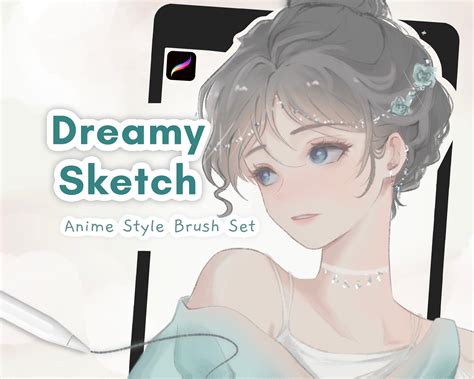
Achieving a soft, ethereal, and aesthetically pleasing finish in digital art can be a delightful pursuit, and the Dreamy Sketch Brush Pack for Procreate is meticulously crafted to facilitate precisely this. This collection of six essential digital art brushes is not merely a set of tools; it's an invitation to effortlessly translate your artistic visions into tangible, dream-like masterpieces. Each brush has been thoughtfully designed to elevate your sketching experience, offering unparalleled control and precision that allows for the seamless integration of sketchy yet profoundly dream-like elements into your artwork.
Understanding the Dreamy Sketch Brush Pack
The core of the Dreamy Sketch Brush Pack lies in its ability to imbue your digital creations with a unique, soft aesthetic. These brushes are engineered to produce results that are both sketchy and imbued with a sense of wonder, making them ideal for artists seeking to capture a specific mood or atmosphere. Whether you're aiming for delicate linework, subtle shading, or textured backgrounds, this pack provides the foundational tools to achieve that desired dreamy quality.
The brushes are optimized for Procreate and are designed to work best with the Apple Pencil. While other styluses or "dupes" might function, they may not yield the same nuanced and desired brush strokes that the Apple Pencil, in conjunction with these brushes, can produce. This is due to the advanced pressure sensitivity and tilt recognition capabilities of the Apple Pencil, which these brushes are specifically tuned to leverage. The pack is intended for personal use only, encouraging artists to explore and experiment within their own creative endeavors.
Navigating Procreate's Brush Interface for Dreamy Effects
To fully harness the potential of the Dreamy Sketch Brush Pack, understanding Procreate's brush interface is key. Within Procreate, you can sketch, ink, paint, smudge, and erase with hundreds of versatile brushes, and this pack adds a specialized set to that repertoire.
To begin creating a new drawing or flipbook, you'll tap the plus button on the far right of the main toolbar, which enters the Create menu. Once you've selected a brush from the Dreamy Sketch Brush Pack (or any other brush set), you can further refine your strokes. Tapping the Paint tool again allows you to select a brush from your Brushes library. Similarly, tapping the Smudge tool or Erase tool again will let you choose a brush from the Brushes library for those specific functions.
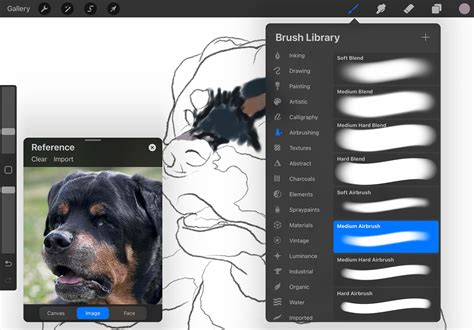
To manage your brush libraries, you can tap on the chevron next to your current brush library and select 'Back to libraries' to view all your brush sets. Alternatively, a quick pinch inwards with two fingers on the Brushes interface will also reveal your brush libraries.
Fine-Tuning Your Dreamy Strokes
Precision and control are paramount when aiming for a specific aesthetic, and Procreate offers robust tools for this. In the left sidebar of the brush interface, you'll find two sliders: one for brush size and one for opacity. These allow you to adjust the characteristics of your brushstrokes in real-time.
Tapping either slider will bring up a brush preview, allowing you to see how your adjustments will affect the stroke. A particularly useful feature is the memory point system. By tapping the plus button in the top right of the preview, you can set a memory point for your current brush size or opacity. This is incredibly helpful for quickly switching between different stroke weights or opacities that you frequently use. Later, tapping on any saved point in the sidebar will instantly jump your brush to that saved size or opacity. To remove a memory point, simply tap the minus icon in the top right of the preview.
For artists using the Apple Pencil, Procreate offers enhanced functionality. Double-tapping your Apple Pencil can be customized to switch between tools, such as the Paint and Draw tools, streamlining your workflow. Furthermore, painting with the Apple Pencil Pro unlocks the ability to rotate your brush as you make strokes, utilizing the barrel roll feature. This feature rotates the stamp of the brush as you paint, adding a dynamic and organic quality to your lines and textures, which can be particularly effective when aiming for a dreamy, painterly feel.
What's New in Procreate 5.4
Organizing and Importing Your Dreamy Brushes
The Dreamy Sketch Brush Pack, like other custom brushes, integrates seamlessly into your Procreate workflow. You can find your most recently used brushes conveniently located in the 'Recent' set within your brush library.
The right-hand panel of the Brushes interface displays all the available brushes within a selected brush set. Each brush is listed with its name and a visual preview of the stroke it produces, making it easy to identify and select the perfect brush for your needs. Brush sets are organized by medium and style in the left panel, allowing for intuitive navigation. You can scroll through this list to explore all available brush sets.
Importing new brush sets, such as the Dreamy Sketch Brush Pack, is straightforward. You can import .brushset files by dragging and dropping them directly into Procreate, or by using the '+' button in the top right of the Brushes interface and selecting 'Import from Files'. Brush libraries, which contain all your brush sets, can also be expanded by dragging in .brushlib files from Procreate or the Files app.
If you're looking to expand your toolkit even further, Procreate allows you to import custom-made brushes and brush sets. You can drag and drop brush files from other applications directly onto the Stage or into the brush library. The default brush sets within Procreate cover a wide range of artistic styles for drawing and painting. For animation enthusiasts, the Animation Brushes library offers a variety of brushes designed to make animating in different styles both fun and practical. Procreate Dreams, a related application, also features a range of abstract and textured brushes that go beyond traditional art mediums. Within the Brush Library, you can discover specialized sets like Weather Elements, Material textures, and lighting Luminance Brush Sets, among others.
Unleashing the Dreamy Aesthetic
The Dreamy Sketch Brush Pack is designed to be versatile. You can sketch with them to lay down initial ideas with a soft, ethereal quality. They are excellent for inking, providing a slightly imperfect, hand-drawn feel that contributes to the dreamy aesthetic. Painting with these brushes allows for soft blending and subtle color transitions, perfect for creating atmospheric scenes. The smudge tool, when used with these brushes, can further enhance the soft, blended look, creating painterly effects. Even the erase tool can be used creatively to reveal underlying textures or create soft edges.
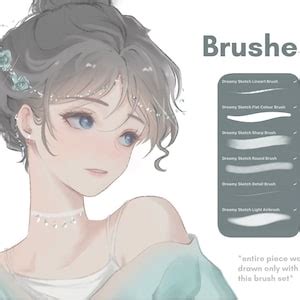
The combination of precise control offered by Procreate's sliders and the unique stroke dynamics of the Dreamy Sketch brushes allows for an incredible range of creative expression. The ability to adjust size and opacity on the fly, coupled with the Apple Pencil's responsiveness, means that even subtle variations in pressure and tilt can lead to dramatically different artistic outcomes. This level of control is crucial for achieving the nuanced, dreamy finish that this brush pack promises.
Consider how the "sketchy" aspect of the brushes can be used not just for outlines, but for adding texture and depth. A light, rapid sketch stroke can create a sense of movement or a wispy cloud, while a firmer, more deliberate stroke can define a form with a soft edge. The "dream-like" quality comes from the way these brushes handle color and blend, often producing organic, watercolor-like effects even with opaque colors.
For instance, when painting skies, using a soft, low-opacity brush from the Dreamy Sketch Pack with a subtle smudge can create beautiful, gradient-like transitions that evoke a sunset or a twilight atmosphere. For character art, these brushes can be used to create soft hair textures, gentle shading on skin, or dreamy, luminous eyes. The versatility extends to still life and landscape art, where they can render foliage with a soft focus, add atmospheric perspective to distant objects, or create the gentle diffusion of light through mist or fog.
The true power of the Dreamy Sketch Brush Pack lies in its ability to encourage experimentation. Don't be afraid to layer brushes, experiment with different blend modes in Procreate, and combine the sketching, inking, and painting capabilities of these tools. The goal is to move beyond simply applying a brush and instead to understand how each brush's unique characteristics can be manipulated to serve your artistic intent, ultimately leading to those coveted dreamy, soft, and aesthetically pleasing results.