Embarking on a video editing journey can be a daunting prospect, especially when grappling with the technical intricacies of software. However, with tools like Filmora, the path to high-quality video creation has become significantly more accessible. Filmora aims to empower creators, from beginners to seasoned professionals, by offering a blend of simplicity and powerful features. This article will delve into the system requirements necessary to run Filmora effectively across various operating systems, ensuring a smooth and rewarding editing experience. Whether you're a freelancer looking to streamline your workflow, a content creator aiming to grow your audience, or an enthusiast eager to bring your visions to life, understanding the hardware and software prerequisites is the crucial first step.
Filmora: A Creator's Choice for Seamless Video Editing
Millions of creators have chosen Filmora as their video editor, a testament to its user-friendly interface and robust capabilities. The software is designed to make the filmmaking journey smoother and more rewarding, allowing users to enhance their creativity while making the video-making process more efficient. This is achieved through an intuitive design that allows for high-quality results in just a few clicks. Users can easily cut, crop, and trim their videos, laying the foundation for compelling visual stories.
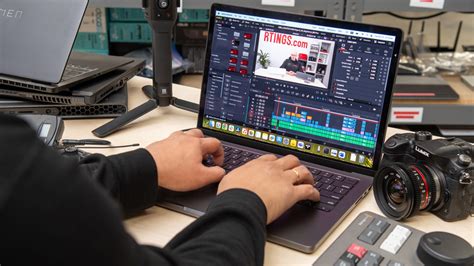
The appeal of Filmora extends beyond its ease of use. The platform boasts over 15 million built-in stock media assets, providing a vast library of resources to elevate content. Furthermore, an assortment of professional-level video effects is available, enabling creators to add polish and dynamism to their projects. Filmora's comprehensive suite of features is thoughtfully designed for both professionals and enthusiasts alike, bridging the gap between advanced editing capabilities and accessible user experience. This commitment to empowering creators has made Filmora a favored tool for those looking to achieve professional-looking results without an overwhelming learning curve.
Cross-Platform Compatibility: Filmora's Reach
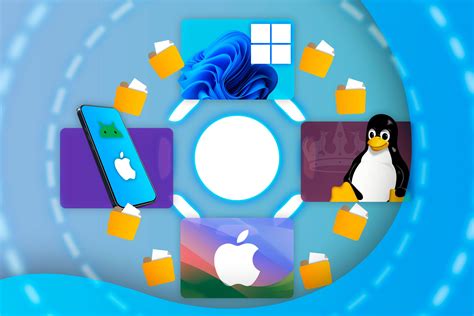
A significant advantage of Filmora is its broad operating system support, making it accessible to a wide range of users regardless of their preferred device. Filmora is available for Windows, macOS, Android, iOS, and iPadOS operating systems. This cross-platform availability ensures that creators can seamlessly transition between their desktop and mobile devices, maintaining workflow continuity and flexibility. Whether you're editing on a powerful desktop, a portable laptop, or on the go with a tablet or smartphone, Filmora offers a consistent and powerful editing experience. This wide compatibility is a key factor in why millions of creators have adopted Filmora for their diverse content creation needs, from personal projects to professional endeavors.
Filmora 15 — The Future of Effortless Video Editing | Powered by AI
Filmora for Windows: System Requirements Unveiled
For users operating on the Windows platform, Filmora offers robust performance with specific hardware and software recommendations. Filmora for Windows supports Windows 11 and all previous versions. To ensure a fluid editing experience, particularly for high-definition and 4K content, certain specifications are recommended.
Central Processing Unit (CPU)
The Central Processing Unit (CPU) is the brain of your computer, and for video editing, a powerful processor is essential. Filmora for Windows requires a CPU of Intel i5 or better, with a clock speed of 2GHz or higher. For optimal performance, especially when dealing with complex edits, high-resolution footage, and demanding effects, an Intel 6th Gen processor or newer is strongly recommended. A faster CPU will significantly reduce rendering times and improve the responsiveness of the software during playback and editing.
Random Access Memory (RAM)
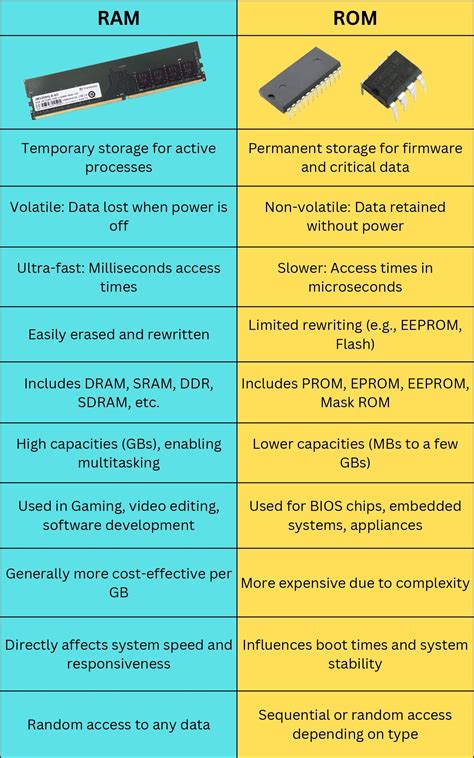
RAM, or Random Access Memory, plays a critical role in how smoothly your software runs, especially when handling large video files and multiple applications simultaneously. Filmora requires a minimum of 8GB of RAM for basic editing tasks. However, to effectively edit HD and 4K videos, which are far more resource-intensive, 16GB of RAM is required. Insufficient RAM can lead to stuttering playback, slow rendering, and application crashes, so investing in adequate RAM is crucial for a positive editing experience.
Graphics Processing Unit (GPU)
The Graphics Processing Unit (GPU), also known as the graphics card or video card, is responsible for rendering visuals on your screen. For video editing software like Filmora, a capable GPU is vital for smooth playback, real-time effects rendering, and efficient export. Filmora for Windows requires a GPU that is Intel HD Graphics 5000 or later. Alternatively, NVIDIA GeForce GTX 1050 Ti or later, or AMD Radeon RX R5 or later, are also supported. It is highly recommended to keep your graphics driver updated to the latest version, as manufacturers frequently release updates that improve performance and compatibility with video editing software. Outdated drivers can be a common cause of performance issues and visual glitches.
Storage Space and Drive Type
Video editing involves working with large files, so sufficient storage space is a must. Filmora requires a minimum of 10GB of free hard-disk space for installation and basic operation. However, this is a bare minimum, and for editing HD and 4K videos, which generate substantial project files and cache data, a significantly larger amount of storage is recommended. Furthermore, the type of storage drive greatly impacts editing performance. A Solid State Drive (SSD) is strongly recommended for editing HD and 4K videos. SSDs offer dramatically faster read and write speeds compared to traditional Hard Disk Drives (HDDs), leading to quicker project loading, faster media import and export, and smoother scrubbing through footage.
Supported Import and Export Formats
Filmora supports a wide array of video, audio, and image formats, ensuring compatibility with most footage you'll encounter.
Supported Import Formats:
- Video: MP4, MOV, TS, WebM, MPEG-2, 3GP, MTS, FLV, MKV, WMV, AVI
- Audio: MP3, WAV, AAC, FLAC, M4A, OGG
- Image: JPG, PNG, GIF, BMP, TIFF, HEIC
Supported Export Formats:
- Video: MP4, MPEG2, WebM, 3GP, TS, FLV, MKV, WMV, AVI, MOV
- Audio: MP3, WAV, M4A
This extensive format support means you can import footage from a variety of cameras, smartphones, and screen recording software without needing to convert files beforehand, streamlining your workflow from the outset.
Filmora for macOS: System Requirements
While the core functionality of Filmora remains consistent across platforms, macOS users will have slightly different hardware considerations. Filmora is designed to run efficiently on Apple's operating systems, leveraging the unique architecture of Mac hardware.
CPU and RAM on macOS
Similar to the Windows version, macOS users will benefit from a powerful CPU and ample RAM. While specific Intel generations might differ, generally, a modern multi-core processor (e.g., Intel Core i5 or higher, or Apple's M-series chips) is recommended for smooth performance. For RAM, 8GB is the baseline, but 16GB or more is highly advisable for editing HD and 4K footage. Apple's M-series chips, with their integrated memory, often provide excellent performance for creative applications.
Graphics and Storage on macOS
macOS devices often come with integrated graphics that are well-optimized for creative tasks. However, for demanding video editing, especially with complex visual effects or higher resolutions, a Mac with a dedicated graphics card or a higher-end Apple Silicon chip with more GPU cores will offer superior performance. As with Windows, an SSD is essential for fast video editing on macOS. Ensure you have sufficient free space, as video projects can consume a lot of storage.
Filmora on Mobile: Android and iOS Requirements
Filmora's commitment to accessibility extends to mobile devices with Filmora for Android, iOS, and iPadOS. These mobile versions allow for on-the-go editing, making it convenient for creators who capture content with their phones or tablets.
Android Requirements
To run Filmora on an Android device, a reasonably modern smartphone or tablet is generally required. While specific minimum requirements can vary with app updates, a device running a recent version of Android (e.g., Android 8.0 or later) with at least 3GB of RAM is typically recommended. A device with a capable processor will ensure smoother playback and faster rendering of edits made on the go. Storage space is also a consideration, as video files can quickly fill up a mobile device's internal storage.
iOS and iPadOS Requirements
For iOS and iPadOS users, Filmora is compatible with a wide range of iPhones and iPads. Generally, devices running iOS 12.0 or later will support the application. Similar to Android, having a device with sufficient RAM (ideally 4GB or more) and a powerful processor will contribute to a better editing experience, especially when working with high-resolution video recorded on the device itself. The storage capacity of your iPhone or iPad will also be a factor, as editing and exporting videos can consume significant space.
Optimizing Your System for Filmora
Beyond meeting the minimum requirements, several practices can further optimize your system for a superior Filmora experience. Keeping your operating system and graphics drivers updated is paramount, as these updates often include performance enhancements and bug fixes relevant to video editing software.
File Management and Workflow
Organizing your project files efficiently is crucial. Storing your media files on a fast SSD, ideally separate from your operating system drive, can significantly boost performance. Consider using a dedicated drive for your video footage and another for your project files and exports. Regularly clearing your cache within Filmora can also help maintain smooth performance, especially on systems with limited storage or RAM.
Understanding the Impact of Resolution and Effects
The demands placed on your system by Filmora are directly proportional to the resolution of your footage and the complexity of the effects you use. Editing 4K footage with numerous visual effects, color grading, and multiple layers of video will naturally require more processing power, RAM, and a faster GPU than editing standard HD footage with basic cuts and transitions. Understanding these implications can help you manage your project expectations and hardware capabilities.
Conclusion: Empowering Your Creative Vision with Filmora
Filmora stands out as a versatile and powerful video editing solution, catering to a broad spectrum of users. By understanding and meeting the system requirements for your specific operating system â be it Windows, macOS, Android, or iOS â you can unlock the full potential of this intuitive software. Whether you're a freelance content creator aiming to expand your reach, or an individual looking to refine your filmmaking skills, Filmora provides the tools and accessibility to bring your creative visions to life. The journey from raw footage to a polished final product is made significantly more efficient and rewarding when your system is adequately prepared to handle the demands of modern video editing.
tags: #filmora #system #requirements