In the dynamic landscape of content creation and publishing, efficiency, scalability, and precision are no longer optional but essential. Adobe InDesign, a cornerstone of professional design and layout, offers a robust foundation for producing high-quality marketing materials, publications, and diverse content outputs. However, the inherent demands of modern publishing-such as growing product ranges, frequent content updates, and the necessity of multi-channel distribution-can quickly overwhelm manual processes. This is where the transformative power of Adobe InDesign automation comes into play, bridging the gap between raw data and polished, professional documents. By leveraging InDesign's flexible XML options, InDesign® Markup Language (IDML), and extensive scripting support, organizations can forge powerful automated workflows. These workflows are designed to publish content seamlessly across various systems and output media, fundamentally changing how content is created and managed.
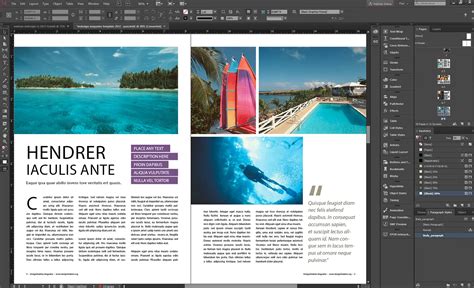
For those serious about harnessing the full potential of InDesign for large-scale or complex publishing needs, Adobe InDesign Server emerges as a critical consideration. It represents a robust, flexible, and highly scalable version of the core InDesign application, specifically engineered for server-based automation.
The Foundation: IDML and XML-Driven Workflows
At the heart of InDesign automation lies the InDesign® Markup Language (IDML). IDML is an open, XML-based file format that liberates InDesign documents from the confines of the desktop application. This format empowers third-party developers and systems integrators to programmatically create, modify, and deconstruct InDesign documents outside the typical InDesign environment. The beauty of IDML is its compatibility with standard XML editing tools, making it an accessible and powerful component of automated workflows.
The genesis of IDML can be traced back to the InDesign Interchange (INX) format, introduced in InDesign CS2. INX was initially designed to facilitate saving documents for use in previous InDesign versions. However, its structure, intended primarily for InDesign's internal use, made it challenging to read and manipulate programmatically. IDML addresses these limitations by providing an XML representation of InDesign documents that developers can readily change, assemble, and reassemble. This capability is foundational for creating and manipulating InDesign files without direct user intervention within the InDesign application itself, offering a more flexible and accessible pathway to building diverse publishing solutions.
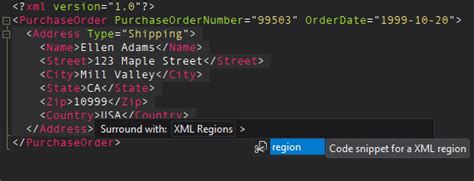
Because IDML is fundamentally an XML format, its potential applications are vast. One significant application is "roundtripping," where a solution can convert InDesign binary files to IDML and back again. This bidirectional conversion is crucial for workflows that involve both manual design adjustments and automated content population. Adobe's Extensible Metadata Platform (XMP) also plays a vital role, acting as a labeling technology that allows for the embedding of rich metadata-data about the file itself-directly into InDesign documents. The XMP Toolkit further enables developers to integrate this metadata functionality into their custom solutions, supporting major operating systems like macOS, Windows®, and UNIX®.
Scripting and Data Merge: Stepping Stones to Automation
InDesign offers built-in features that serve as accessible entry points into automation, catering to varying levels of complexity and technical expertise.
Data Merge: Simple Template Variations
Data Merge is a powerful, yet straightforward, feature that allows users to connect a CSV or text file to an InDesign layout. This enables the creation of multiple variations of a single design. It is particularly useful for generating documents like business cards, labels, or simple product sheets where each record from the data source populates the same template structure. This method automates the repetitive task of manually populating identical layouts with different information, significantly speeding up the production of personalized or batch-generated materials.
Scripting: Enhanced Control and Logic
For more sophisticated automation needs, InDesign provides rich scripting support. Scripting languages such as JavaScript, AppleScript, and VBScript grant users greater control over the InDesign environment than Data Merge. Scripts can automate complex production tasks, including placing and replacing images, correcting errors in text, preparing files for printing, and orchestrating intricate layout adjustments. Scripts are integral to XML and IDML-based workflows, acting as the engine that drives automated content assembly and manipulation. However, the challenge with extensive scripting lies in maintenance. As requirements evolve and scripts become more complex, managing and updating them can become a significant undertaking, especially in team environments where code comprehension might be limited to a few individuals.
The Scalability Challenge and Enterprise Solutions
As product lines expand, content demands increase, and the need to publish across multiple channels grows, the limitations of manual processes and even complex scripting become apparent. This is the critical juncture where true InDesign automation, often facilitated by specialized platforms and plugins, demonstrates its unparalleled value.
XML Importing: Advanced Data Integration
XML Importing extends the capabilities offered by Data Merge, introducing an additional layer of flexibility. This feature allows for the direct importation of XML data into InDesign. It enables the application of complex XML structures to layouts without the strict constraints often associated with CSV formats. This is particularly beneficial when dealing with structured data that contains hierarchical relationships or diverse content types, allowing for more dynamic and sophisticated document generation.
Purpose-Built Platforms for Scalability
When the complexity and volume of publishing tasks exceed the scope of individual scripts or basic data merging, purpose-built platforms become indispensable. These cloud-based solutions are designed to work harmoniously with existing InDesign templates, meaning design work is not abandoned, nor are existing assets rebuilt from scratch.
Key characteristics of these platforms include:
- Direct Data Connectivity: Seamless integration with diverse data sources such as Excel spreadsheets, Enterprise Resource Planning (ERP) systems, Product Information Management (PIM) systems, and Digital Asset Management (DAM) systems. This ensures that layouts are populated with accurate, up-to-date information directly from the source of truth.
- Guided User Interfaces: Intuitive interfaces designed for non-designers, empowering marketing and product teams to generate documents without requiring in-depth knowledge of InDesign. This democratizes content creation and accelerates production cycles.
- Scalable Batch Processing: The ability to handle thousands of pages and manage frequent content updates without manual intervention. This is crucial for large catalogs, extensive product documentation, and time-sensitive promotional materials.
- Multi-Format Output: Automated exports to various formats, including editable InDesign files for design teams, high-resolution PDFs for print, and optimized PDFs for web delivery. This ensures content is ready for every channel.
Automating catalog creation with EasyCatalog for Adobe InDesign (part 2)
Common Use Cases for Scalable Automation
The power of InDesign automation truly shines in scenarios demanding high volume, customization, and consistency:
- Product Catalogs and Price Lists: Generating comprehensive product catalogs and dynamic price lists is a primary use case. Imagine needing the same catalog in ten different languages, with prices adjusted for regional currencies and product selections tailored to each market. Manual production would involve opening and updating ten separate InDesign files, a process fraught with potential errors and immense time expenditure.
- Technical and Product Sheets: These documents often adhere to standardized layouts but need to be produced for hundreds or even thousands of Stock Keeping Units (SKUs). Automation ensures consistency in formatting and data accuracy across all sheets.
- Retail Leaflets and Circulars: The fast-paced nature of retail promotions, with weekly or seasonal updates, requires rapid turnaround. Automated workflows can quickly generate and update promotional materials, ensuring timely delivery to market.
The InDesign Automation Plugin Ecosystem
Beyond the core features of InDesign and dedicated server versions, a rich ecosystem of plugins has emerged to further enhance automation capabilities. These plugins act as bridges, connecting InDesign to external data sources and automating specific tasks, allowing designers to focus on crafting exceptional designs rather than wrestling with manual data updates.
The InBetween InDesign Plugin
The InBetween InDesign Plugin exemplifies a solution designed to streamline database publishing processes. It facilitates the creation of professional catalogs, datasheets, price lists, leaflets, and brochures. Key features include:
- Automated Page Sequence Creation: Enables the automation of entire databased content publications, specific chapters, or page sequences without compromising the original input.
- Dynamic Content Integration: Allows for the simple integration of products into InDesign layouts, ensuring precision and adherence to corporate design standards.
- Enrichment with Editorial Content: Facilitates the integration of editorial content, offering full control over page planning and layout customization.
- Dynamic Data Connection: Maintains a dynamic link between publication content and product data via templates, making updates effortless and ensuring content remains current and accurate.
- PIM and Omnichannel Support: Offers flawless connection with Product Information Management (PIM) systems, supporting omnichannel marketing and Product Experience Management (PXM) strategies. It also integrates external agencies into the workflow.
- Online Distribution: Enables automated documents to be sent online in seconds, providing partners with on-demand access to individually generated, personalized publications.
The InStudio Plugin US
The InStudio Plugin US is another advanced tool specifically designed to address challenges in catalog creation, particularly for companies in the US that struggle with maintaining accurate product information. It works directly with Adobe InDesign to automate the catalog publishing process, enabling businesses to create both print and digital catalogs with remarkable speed and efficiency.
Key advantages of the InStudio Plugin US include:
- Efficiency and Speed: Significantly reduces the time required for product catalog creation, allowing teams to complete projects faster.
- Consistency and Accuracy: Ensures that all catalogs are consistent in design and accurate in their product information.
- Direct Database Integration: Integrates directly with product databases, automatically importing all necessary product information, including images, descriptions, and prices, into InDesign.
- Designer Focus: Frees up designers to concentrate on layout and visual appeal rather than manual data entry and updates.
- Rule-Based Automation: Allows for the setting of specific rules for product placement, font styles, and image sizes, ensuring adherence to design standards across all pages.
- Batch Processing and Template Management: Features include batch processing of images and text, robust template management, and support for multi-channel output.
- eCommerce and PIM Integration: Seamlessly connects with Product Information Management (PIM) systems, syncing all product details like pricing, descriptions, and images. It also aids in eCommerce content management by ensuring accuracy of product content for online stores.
- Print and Digital Catalog Capabilities: Acts as sophisticated print catalog software, simplifying the process, automating layout, and generating high-quality print-ready files. It also supports exporting digital catalogs in various formats for online use.
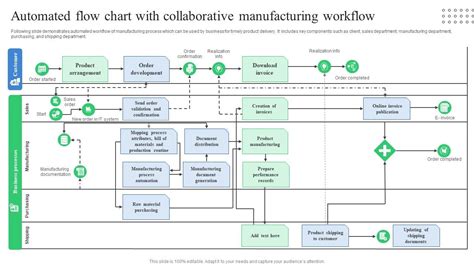
The InStudio Plugin US combines the power of InDesign with automation, PIM integration, and digital catalog capabilities, making it a transformative tool for creating accurate, professional, and visually appealing catalogs for both print and online distribution.
Integrating Artificial Intelligence and Machine Learning
The evolution of InDesign automation is further accelerated by the integration of Artificial Intelligence (AI) and Machine Learning (ML). These technologies are revolutionizing the design industry by automating repetitive tasks, enhancing design accuracy, and enabling data-driven decision-making.
Benefits of AI in InDesign
- Faster Layout Generation: AI can automatically arrange text, images, and graphics based on predefined templates, significantly reducing manual layout work.
- Smart Content Placement: Machine Learning algorithms can analyze images and text to determine the most visually appealing placement within a layout, optimizing aesthetics.
- Automated Formatting: AI can dynamically apply styles, fonts, and colors, minimizing the need for manual formatting tasks.
- Personalized Design: AI-powered plugins can generate customized layouts tailored to specific user preferences or data analytics, enabling highly personalized content.
- Content Recognition: AI can efficiently recognize, categorize, and process text, images, and patterns within documents, aiding in content management and organization.
According to Adobe, a significant majority of designers anticipate AI playing a crucial role in automating graphic design and publishing in the coming years.
AI Implementation in InDesign
AI integration can be achieved through various methods, including:
- InDesign Plugin Development: Creating custom plugins that embed AI functionalities directly into the InDesign environment.
- JavaScript Automation: Utilizing scripts to interact with AI services and automate tasks.
- Third-Party AI Services: Integrating with external AI platforms such as Adobe Sensei, Google Vision, or OpenAI to leverage their advanced capabilities.
Relayter design automation software, for instance, centralizes digital assets, layout templates, and tasks, enabling all stakeholders-from buyers and category managers to creative staff and external agencies-to collaborate efficiently. Its user-friendly interface allows for easy integration into existing marketing production workflows, supporting the creation of everything from ad folders and brochures to social media posts and POS advertising material from a single campaign data set. Relayter's SaaS solution is designed to reduce time-to-market and achieve significant cost savings in marketing production.
Streamlining Workflows with Integration Platforms
For businesses seeking to connect InDesign with a multitude of other applications and automate data flows, integration platforms are invaluable. Services like ApiX-Drive provide a universal tool for streamlining workflows, freeing users from routine tasks, and preventing potential financial losses.
ApiX-Drive offers:
- Extensive Integrations: Access to over 350 ready-made integrations, allowing for seamless connections between InDesign and various other platforms.
- Workflow Automation: Enables independent automation of connections between different systems, from online stores and landing pages to CRM and marketing automation tools.
- Cost and Time Savings: Eliminates the need for expensive programmers and integrators, saving time by automating routine tasks.
- Free Trial: Allows users to test the service and experience its benefits firsthand.
By leveraging such integration platforms, companies can automate the work of online stores, empower their marketing efforts through seamless data exchange, and significantly optimize their overall operational efficiency. This allows teams to redirect their freed-up time and resources towards more strategic and creative endeavors, ultimately driving business growth and innovation.
tags: #enterprise #indesign #automation #software #features