As a photographer, the sheer volume of high-resolution images captured means that a robust, long-term storage solution isn't just a convenience-it's a necessity. The frustration of a computer's internal drive filling up rapidly is a familiar one, prompting many to seek external hard drives for backing up and organizing their precious photographic work. This article delves into the critical considerations for photographers looking to enhance their workflow and secure their digital assets, with a particular focus on external SSDs and their role in demanding applications like Adobe Photoshop.
SSD vs. HDD: A Fundamental Choice for Photographers
When selecting a new external drive for image storage, a key decision point arises: should you opt for an SSD (Solid-State Drive) or an HDD (Hard Disk Drive)? Understanding these acronyms is the first step. Both are storage devices capable of holding data, but they differ significantly in performance, durability, and cost.
Generally, if sheer storage capacity at a lower price point is your primary concern, an HDD presents a viable option. However, for those who prioritize speed and resilience, even at a higher cost, an SSD emerges as the superior choice. Let's dissect their differences to determine which best aligns with your photographic needs.
Performance: The Speed Advantage of SSDs
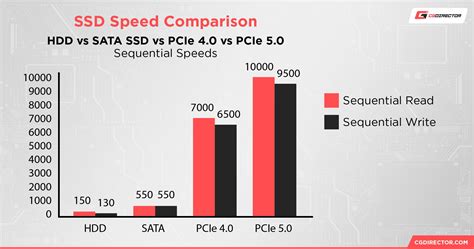
The most striking distinction between SSDs and HDDs lies in their data read and write speeds. SSDs are demonstrably faster, translating to quicker loading times for applications, swifter file transfers, and more responsive overall performance. Consider this: an SSD can boot a computer in mere seconds, while an HDD might take minutes.
When dealing with large files, HDDs typically manage copying rates between 30 to 200 MB per second (MB/s). In contrast, standard SATA SSDs achieve speeds of 500 MB/s. Pushing the boundaries even further, the latest NVMe SSDs boast astonishing speeds ranging from 3,000 to 3,500 MB/s. To illustrate, copying a substantial 20 GB movie file with an SSD can take under 10 seconds, a task that would consume at least two minutes on a traditional hard disk.
This performance gap is profoundly impactful for photographers working with extensive files who require rapid editing capabilities. An SSD can significantly reduce editing times and optimize your workflow by enabling faster access to your photos and smoother operation of editing software. It's no surprise that nearly all modern computers utilize SSDs as their internal drives for running applications and saving files.
Durability: Withstanding the Demands of the Field
Another crucial divergence between SSDs and HDDs is their durability. SSDs, lacking any moving parts, exhibit greater resistance to physical damage. They are more adept at withstanding shocks, vibrations, drops, and extreme temperatures compared to their HDD counterparts.
HDDs, with their mechanical components, are inherently more susceptible to physical failure. These moving parts can wear out or break, leading to data loss. This is a critical consideration for photographers who frequently travel or operate in challenging environments. An SSD offers a more reliable and stable solution, better safeguarding your photos from accidental damage or loss. As one photographer notes, "When I travel I always bring with me two SSD external hard drives. They’re lighter, faster, smaller in size, and definitely more reliable."
Price: Balancing Cost and Capability
The final significant difference lies in cost. SSDs are generally more expensive than HDDs, a factor attributed to their more advanced technology, higher performance, and enhanced durability. The precise price disparity varies based on capacity and quality. For instance, a 1TB SSD might range from €100-€200, while a 1TB HDD could cost between €50-€100. However, the cost of SSDs has seen a steady decline as the technology becomes more widespread and affordable.
This price consideration is vital for photographers operating on a budget or requiring substantial storage. While a conventional portable hard disk drive remains a cost-effective method for maximizing storage capacity, a solid-state drive (SSD) becomes indispensable if you prioritize top transfer speeds, reliability, and portability. For professional photographers and enthusiasts who value speed, performance, and durability, investing in an SSD external hard drive is often the most prudent choice. The enhanced efficiency in data access and transfer, coupled with improved resilience, can dramatically streamline photo editing and storage processes. Conversely, if capacity, affordability, and widespread availability are your main drivers, then an HDD might be more suitable.
Ultimately, the ideal external hard drive for photography is the one that best meets your specific requirements and expectations. A hybrid approach is also highly effective: utilizing an SSD as your primary drive for active catalogs and editing (e.g., for Lightroom or Capture One), and an HDD as a secondary drive for archiving and bulk storage. Regardless of your choice, consistent and regular backups are paramount to ensuring your photos remain safe from damage or loss.
Understanding Connectivity: USB Standards and Beyond
The interface through which your external drive connects to your computer plays a vital role in its performance. Older interfaces can become a bottleneck, hindering your workflow.
The Limitations of USB 2.0
USB 2.0 hard drives are generally not recommended for photographers who need to store and back up high-resolution images. Their slow and outdated interface significantly limits data transfer speeds. This can lead to frustratingly long delays when backing up or accessing large image files, consuming valuable time. To circumvent these issues, it is always advisable to opt for faster, more modern interfaces such as USB 3.0, USB 3.1 Gen 1, USB 3.1 Gen 2, or Thunderbolt. These interfaces provide a much smoother and more efficient experience for image storage and backup, enabling photographers to work more productively without being hampered by obsolete technology.
Modern Connectivity Options
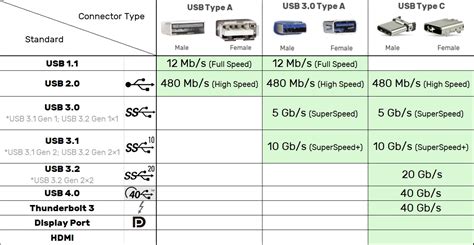
USB 3.0 (also known as USB 3.1 Gen 1): This standard offers a significant improvement over USB 2.0, with data transfer speeds of up to 5 Gbps (gigabits per second). It uses the familiar rectangular USB-A connector and is backward compatible with USB 2.0 devices, making it a solid entry-level choice for faster file transfers.
USB 3.1 Gen 2: This iteration doubles the speed of USB 3.0, reaching up to 10 Gbps. It can utilize either the USB-A connector or the reversible USB-C connector, providing a more substantial boost for backups and image transfers.
USB 3.2: This is a broader designation encompassing various generations, including USB 3.2 Gen 1 (5 Gbps), USB 3.2 Gen 2 (10 Gbps), and the highly capable USB 3.2 Gen 2x2, which offers speeds up to 20 Gbps. These generations often leverage the versatile USB-C connector.
Thunderbolt 3: Utilizing the USB-C connector, Thunderbolt 3 is a powerhouse interface, delivering blistering data transfer speeds of up to 40 Gbps. This makes it an exceptional choice for professional photographers and content creators who demand the utmost in performance. Thunderbolt 3 ports also support video signals (DisplayPort) and can deliver substantial power, allowing for simultaneous connection of external displays and device charging.
Thunderbolt 5: The latest advancements in Thunderbolt technology, such as Thunderbolt 5, are pushing data transfer speeds even further. For example, drives like the LaCie Rugged SSD Pro5 are capable of read speeds up to 6,700MB/s and write speeds up to 5,300MB/s, representing a significant leap for professionals handling massive datasets.
Addressing Common Concerns: SSD Write Endurance and Capacity
Two frequent questions arise when considering SSDs for photography: their write endurance and whether a specific capacity is sufficient.
Do SSDs Have Limited Writes?
It's true that SSDs have a finite number of write/erase cycles, often referred to as write endurance. However, for the typical use case of photography storage, this is largely a misconception. Modern SSDs often boast write endurance figures around 1000 TBW (terabytes written) or even higher, which is more than adequate for the vast majority of photographers. In practical terms, photographers rarely approach these limits with regular photo storage, editing, and transfers. Unless you are engaged in an unusual workflow of constantly rewriting massive datasets, you are unlikely to exhaust an SSD's write cycles.
Is 1TB Enough for Photography?
The question of whether a 1TB SSD is sufficient for photography doesn't have a simple, universal answer. The required storage capacity is highly dependent on individual workflows, preferences, and storage habits. Several factors influence this decision:
Resolution and File Format: The size of your photos is a primary determinant. Depending on resolution, format, and compression, images can range from a few megabytes to several gigabytes. For instance, a 24-megapixel RAW file can be around 30 MB, while a JPEG of the same resolution might be about 10 MB. Shooting in RAW, which preserves maximum detail and dynamic range, necessitates more storage than shooting in JPEG, which uses compression and discards some information. Furthermore, Photoshop files can expand significantly, especially with extensive editing and numerous layers, potentially reaching several gigabytes per file.
Number of Photos Captured: Your shooting frequency and style directly impact storage needs. Some photographers take a few hundred photos monthly, while others capture thousands weekly. Project-based or client work may also require multiple versions or backups of your photos for different purposes.
Multiple Versions and Edits: When using Photoshop, you'll often create layered PSD or TIFF files, which are considerably larger than original RAW files due to the embedded editing information. You might also generate various edited versions of the same photograph (e.g., cropped, resized, color-graded) that are stored as separate files, further consuming space.
Storage Duration: The length of time you intend to keep your photos is another critical factor. Do you delete older files, archive them indefinitely, or rely on cloud storage and external drives for backups? Estimating your monthly or yearly storage needs based on these considerations is crucial. For example, 500 RAW photos per month (30 MB each) would require approximately 15 GB monthly, or 180 GB annually. Similarly, 2000 JPEG photos per month (10 MB each) would necessitate around 20 GB monthly, or 240 GB annually. These are rough estimates and don't account for other data on your drive.
Given these variables, here are some general recommendations for storage capacity:
Enthusiast Photographers: For hobbyists or occasional shooters, a 1TB or 2TB external hard drive typically offers ample space for thousands of images without immediate storage concerns.
Professional Photographers: Professionals and serious enthusiasts dealing with large volumes of high-resolution images should consider a minimum of 4TB. A 6TB or 8TB drive often provides a good balance between capacity and cost, accommodating substantial collections and allowing for future growth.
Videographers: Those involved in high-resolution video capture, where file sizes are immense, may require even larger capacities, such as 10TB or more.
It is always prudent to err on the side of caution and acquire more storage than you initially believe you'll need. Your image library will likely expand over time, and having extra space prevents unexpected limitations. Some photographers also find value in using multiple smaller drives for better organization and redundancy, rather than relying on a single large drive.

Do SSDs Need to Be Powered On Regularly?
While SSDs do benefit from occasional power-up cycles, this is more of a concern for systems where the drive is constantly powered on (like laptops or desktops). For external hard drives used for photo storage, which are typically powered only when connected, this is not a significant issue. Modern SSDs also employ sophisticated wear-leveling algorithms to distribute data writes evenly, further extending their lifespan.
The Search for the Best External Drive for Photo Storage
While specific model recommendations can become outdated quickly, certain brands have consistently offered reliable solutions for photographers. For instance, the Toshiba Canvio series has been a popular choice for external storage. However, the ultimate "best" drive depends on the confluence of your specific needs-speed, capacity, durability, and budget.
How To Save Your Footage & Photos Forever | External Hard Drives 101
When making your final decision, prioritize drives with modern USB interfaces (3.0 or higher) or Thunderbolt for optimal performance. Consider the capacity needs outlined above, and remember that for critical archives, a multi-drive backup strategy is always recommended. Investing in a quality external SSD for your Photoshop workflow is an investment in efficiency, speed, and the long-term security of your photographic endeavors.