Filmora offers a comprehensive suite of creative assets designed to empower users in enhancing their video projects with both ease and a flourish of creativity. These invaluable resources encompass a wide spectrum, including Stock Media, Audio, Titles, Transitions, Effects, Filters, Stickers, and Templates. By leveraging these assets, creators can elevate their videos, making them significantly more engaging and polished, irrespective of their prior experience level. This exploration will systematically introduce each category of resource, providing insights into their effective utilization and integration into your video editing workflow.
The Foundation of Visuals: Filmora's Stock Media
At the core of Filmora's asset library lies Stock Media, a vast repository offering a diverse collection of high-quality images and video clips. These assets serve as the foundational visual elements for your projects, allowing you to find precisely what you need to illustrate your narrative or enhance your aesthetic. Whether you require B-roll footage to enrich a scene, compelling photographs to introduce a concept, or background visuals to set a mood, Filmora's Stock Media library provides a readily accessible solution. The ability to seamlessly integrate these professional-grade visuals into your timeline without leaving the editing software streamlines the entire creative process.

Setting the Mood: Filmora's Audio Assets
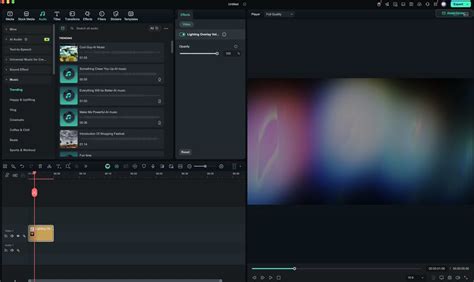
Beyond the visual, the auditory experience of a video is paramount in shaping audience perception and emotional connection. Filmora's Audio library is meticulously curated to cater to a wide array of moods and scenes, offering a diverse selection of music tracks and sound effects. From energetic background scores that drive action sequences to subtle ambient sounds that enhance realism, the audio assets available can transform the overall impact of your video. This library includes not only music but also a rich assortment of sound effects, enabling you to add auditory cues that emphasize key moments, punctuate actions, or simply create a more immersive soundscape.
How to Use Sound Effects to Take Your Videos to the Next Level | Wondershare Filmora 12
Crafting Compelling Narratives: Titles and Text Overlays
The way information is presented visually through text can significantly influence comprehension and engagement. Filmora provides a diverse selection of Fonts, empowering users to customize their titles and text overlays. This level of control ensures that your on-screen text not only conveys information clearly but also harmonizes with the overall visual style and tone of your video. Whether you're opting for bold, impactful headlines, elegant subtitles, or creative call-to-action messages, Filmora's font library and text editing tools offer the flexibility to achieve your desired aesthetic.
Seamless Storytelling: The Power of Transitions
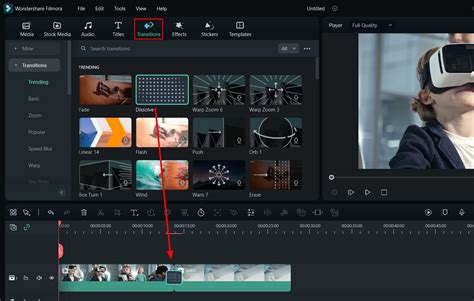
Transitions are the connective tissue of any video, guiding the viewer smoothly from one shot or scene to the next. Filmora provides a rich collection of Transitions designed to facilitate these shifts, ranging from classic fades and wipes to more dynamic and visually engaging effects. These tools are crucial for maintaining narrative flow and preventing jarring cuts that can disrupt the viewer's immersion. By strategically employing appropriate transitions, you can create a sense of continuity, build momentum, or signal a change in time or location, all contributing to a more polished and professional final product.
Adding Visual Flair: Filmora's Extensive Effects
To truly make your videos stand out, Filmora offers a rich collection of Effects that can add significant visual flair and creative expression. These effects range from subtle enhancements like color grading adjustments to more dramatic visual manipulations. You can introduce motion blur to convey speed, apply stylized distortions to create artistic impact, or experiment with particle effects to add depth and dynamism. The judicious use of these effects can elevate the production value of your videos, making them more captivating and memorable for your audience.
Setting the Tone: The Impact of Filters
Filters in Filmora provide a quick and effective way to alter the color tone and mood of your video. Similar to their application in photography, these filters can instantly transform the visual atmosphere of a scene, evoking specific emotions or stylistic preferences. Whether you aim for a warm, nostalgic feel, a cool, modern aesthetic, or a dramatic, high-contrast look, Filmora's filter library offers a diverse range of options. This feature is particularly useful for achieving a consistent visual style across multiple clips or for quickly experimenting with different looks before committing to more complex color correction.
Injecting Personality: The Fun of Stickers
Stickers are a dynamic and often playful way to add personality, emphasis, and visual interest to your videos. Filmora's collection of Stickers includes a variety of animated and static elements that can be overlaid onto your footage. These can be used to highlight key information, add humorous annotations, convey emotions, or simply inject a dose of fun into your content. Their ease of application makes them an accessible tool for creators looking to quickly enhance the expressiveness of their videos.
Pre-Designed Brilliance: Leveraging Filmora Templates
For those who are new to video editing or are looking to expedite their workflow, Filmora's Templates offer a powerful solution. These templates provide ready-made video layouts and designs, complete with pre-arranged media placeholders, titles, and effects. By simply dropping your own content into these templates, you can create professional-looking videos with minimal effort. This feature is particularly beneficial for common video formats like intros, outros, social media posts, or promotional videos, allowing beginners to achieve impressive results without a steep learning curve.
The Filmora Ecosystem: Desktop, Mobile, and Cloud Integration
Wondershare Filmora, launched in 2015, has evolved into a robust video editing solution available for both Mac and PC. Unlike purely cloud-based alternatives, Filmora is a downloadable desktop application, which necessitates certain system requirements for optimal performance: at least 8 GB of RAM, 10 GB of storage space, and an Intel i3 (PC) or i5 (Mac) processor. This desktop foundation is complemented by a powerful mobile presence through the Filmora app for Android and iOS. This mobile iteration allows for on-the-go editing, retouching selfies, applying augmented reality (AR) effects, and incorporating music and stickers.
Further enhancing its accessibility and collaborative potential is Filmora Workspace. This cloud-based service enables users to manage, share, and store their projects remotely. The synergy between the Workspace and the mobile app means creators can seamlessly pick up where they left off on a project, regardless of the device they are using. This multi-platform approach ensures that Filmora remains a flexible and adaptable tool for a wide range of creative workflows.
Advanced Features for Enhanced Editing
Filmora is continually updated with features designed to streamline and elevate the video editing process. Standard features like 3D titles, motion blur, and speed ramping-the ability to quickly adjust the playback speed of clips-are readily available. A notable innovation is the "Instant Mode," which allows users to generate videos with titles, effects, and highlights in a matter of minutes, ideal for rapid content creation.
The latest iteration, Filmora 12, introduces significant advancements, including enhanced multi-platform support. This allows for a fluid workflow where a project initiated on the desktop can be completed on a mobile device, and vice versa. The software is also packed with AI-powered tools. ChatGPT integration assists in generating scripts, YouTube titles and descriptions, and video copy through simple text prompts. The text-to-image tool, another AI marvel, allows users to generate custom images for their projects based on textual descriptions, offering styles like hand-drawn, CGI, cyberpunk, Van Gogh, and watercolor.
The Auto Reframe tool is a godsend for creators producing content for multiple platforms. With a single click, this AI-powered feature automatically adjusts the video's orientation from landscape to portrait or vice versa, eliminating the need to create separate versions for different social media channels. Furthermore, the AI Avatar Presentation tool enables the creation of animated, virtual avatars that can speak, mimic facial expressions, and move in real time, adding a unique dimension to presentations and explainer videos.
How to Use Sound Effects to Take Your Videos to the Next Level | Wondershare Filmora 12
Comprehensive Toolset for Professional Results
Beyond these cutting-edge AI features, Filmora boasts a robust suite of traditional yet powerful video editing tools. The asset backup and sync tool ensures that your projects are accessible across desktop and mobile devices and facilitates easy sharing with collaborators. Adjustment layers allow for the application of effects across multiple clips, streamlining repetitive tasks.
For visual effects, Filmora offers a plethora of options. Engaging transitions, filters, 3D titles, and motion elements can be applied to enhance visual appeal. Advanced techniques such as green screen effects for background replacement, and the pen tool for drawing, masking, and animating elements within a video, provide granular control for more complex edits.
Filmora's audio editing capabilities are equally impressive. The AI Audio Denoise tool effectively removes unwanted background noise, ensuring clear audio. The AI Audio Stretch tool uses generative AI to adjust the duration of audio clips to match video length. Other audio tools include text-to-speech for creating voiceovers, audio synchronization for clearer sound, the ducking tool for fading audio, and silent detection for automatically removing quiet segments.
Color correction is another area where Filmora excels, offering 3D LUTs with a library of over 100 lookup tables to transform video aesthetics. Users can also import custom LUTs created in other software like Photoshop. The color match tool allows for precise color replication from one frame to another, ensuring color consistency across clips.
Getting Started with Filmora: A User-Friendly Approach
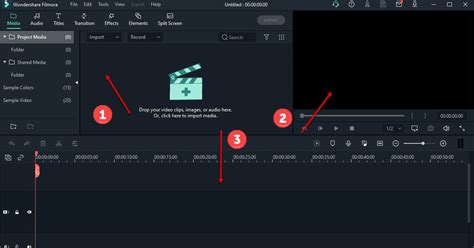
Wondershare Filmora makes the entry into video editing remarkably accessible, offering a free version that provides access to most of its tools, with the exception of certain premium features like the AI Avatar Presentation. The process begins with downloading and installing the software onto your computer. Upon launching, users are greeted with a quick-start dashboard, offering options to create a new project, open a cloud project, set the aspect ratio, or launch specific tools like the Instant Mode or screen recorder.
For those new to the interface, Filmora provides a clear layout. Adding assets is straightforward. Navigating to the "Stock Media" tab allows users to search for video and photo assets. Once a desired asset is found, a double-click initiates its download, after which it can be dragged directly onto the timeline. Filmora intelligently handles the placement of video clips, automatically snapping them to the end of the previous one, thus preventing gaps. The preview window allows for full-screen playback, and clips can be easily rearranged on the timeline or their duration adjusted by dragging their edges.
The process for adding audio is similar. By navigating to the "Audio" tab, users can search, download, and drag music tracks or sound effects onto the timeline, where they are typically placed in a dedicated music track. These audio clips can then be stretched to match the video's duration. Adding special effects, text, transitions, and stickers follows the same intuitive search-and-drag methodology. For videos with multiple clips, incorporating transitions is a crucial step, and Filmora offers a wide variety, including fades, fly eye, and evaporate effects. Scene titles, ranging from 3D to news styles, are also readily available. Animated stickers can further enhance visual appeal, such as overlaying a smoke effect on a title.
Exporting Your Masterpiece
Before finalizing your project, previewing it in full screen is essential. This is achieved by clicking the expand icon in the playback settings of the preview window. The export settings dialog will then appear, allowing you to select the desired export format. The "Local" option exports the video directly to your computer's hard drive. Here, you can customize various settings, including adding a thumbnail (either uploaded or generated by Filmora), naming your video, choosing the destination folder, selecting an export preset, format, quality, resolution, and frame rate. You can also opt to upload to the cloud and enable hardware acceleration. The "Device" export option allows for format selection tailored to specific devices. It's important to note that the free version of Filmora will export videos with a watermark, and any elements requiring a premium license will be absent.
Navigating Filmora's Pricing and Asset Subscription
Wondershare Filmora offers various licensing options, including individual, team, and education plans, as well as bundled packages at different price points. The Cross-Platform Annual plan is a popular choice at $49.99. However, to unlock the full potential of Filmora's extensive sound and video effects library, an additional monthly subscription to Filmstock is required, costing $20.99 per month. This subscription grants access to a vast collection of royalty-free stock media, music, sound effects, and templates.
For creatives seeking a video editing software that provides an intuitive way to create, edit, and publish videos, Wondershare Filmora is a compelling option. It offers millions of video, audio, and creative assets, a streamlined process for uploading creations to social media, and a minimal learning curve. However, the cumulative cost of assets, particularly with the Filmstock subscription, might be a consideration for budget-conscious individuals.
The Filmora Asset Center: Direct Access to Creative Resources
For users who wish to leverage Filmora's creative assets without necessarily committing to a full Filmstock subscription, the Filmora Asset Center serves as a direct gateway. This curated marketplace is integrated within Filmora, offering themed packs, trending elements, effects, titles, stickers, and more. Locating the Asset Center is as simple as looking for the primary asset category tabs (Media, Stock Media, Audio, Titles, Transitions, Effects, Filters, Stickers, Templates) at the top of the main interface. Clicking the "Asset Center" button opens a dedicated window, often defaulting to a "Discover" tab. This area showcases promotional banners highlighting featured themes or collections, such as "Pixel Style Takes Over." Users can then browse assets by specific themes or types, like "Game," "Vlog," "Spring," or "Birthday." If an asset is not already downloaded, Filmora will automatically initiate the download process.
Conclusion: Filmora as a Versatile Creative Partner
Wondershare Filmora has established itself as a powerful and accessible video editing software, catering to both novice creators and experienced professionals. Its comprehensive asset store, encompassing stock media, audio, titles, transitions, effects, filters, stickers, and templates, provides a rich environment for creative expression. The software's integration across desktop, mobile, and cloud platforms, coupled with its array of AI-powered tools and traditional editing features, ensures a flexible and efficient workflow. While the cost of premium assets may be a factor for some, the availability of a free version and the user-friendly interface make Filmora a highly recommended choice for anyone looking to enhance their video content.