Embarking on the journey of digital image editing can feel daunting, especially when faced with a powerful and feature-rich software like Adobe Photoshop. However, understanding the fundamentals and following a structured learning path can transform this challenge into an exciting and rewarding experience. This guide is designed to demystify Photoshop for beginners, offering a clear roadmap to acquiring essential skills, from basic operations to more advanced techniques, enabling you to confidently manipulate and enhance your images.
Getting Started: Acquiring and Navigating Photoshop
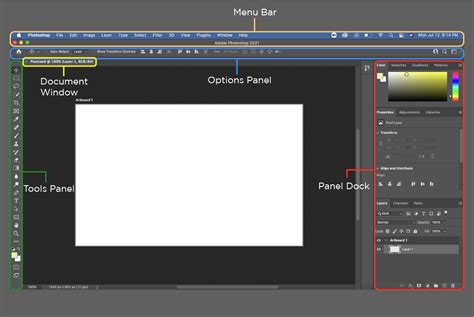
The initial step in mastering Photoshop involves acquiring the software and familiarizing yourself with its environment. For those new to the program, understanding how to purchase and install Photoshop is crucial. The course material highlights that it can be obtained through various channels, ensuring accessibility for different user needs. Once installed, the program presents a comprehensive interface, which can initially appear overwhelming. However, a systematic approach to understanding its layout is key. This involves learning to open and save images, a foundational skill for any editing task. Furthermore, identifying the location of frequently used tools within the interface will significantly streamline your workflow. The interface is broadly organized into several key areas: the Menu Bar at the top, offering access to commands and options; the Options Bar, which changes dynamically to display settings for the currently selected tool; the Tools Panel, typically located on the left, housing all the essential editing instruments; and the Panels, usually on the right, which control aspects like layers, color, and history. Becoming comfortable with these elements is the first stride towards proficiency.
Core Tools and Non-Destructive Editing: The Foundation of Your Skills
With a basic understanding of the Photoshop environment, the next phase involves delving into the most important tools that form the backbone of photo editing. The move tool, for instance, is essential for repositioning elements within your canvas. The crop tool allows for precise adjustments to image dimensions and composition, and, as noted, can even be used to expand an image beyond its original boundaries, a surprisingly cool capability that opens up creative possibilities. The brush tool is fundamental for painting, drawing, and applying various effects, while the healing brush tool is invaluable for seamlessly removing blemishes and imperfections from photographs.
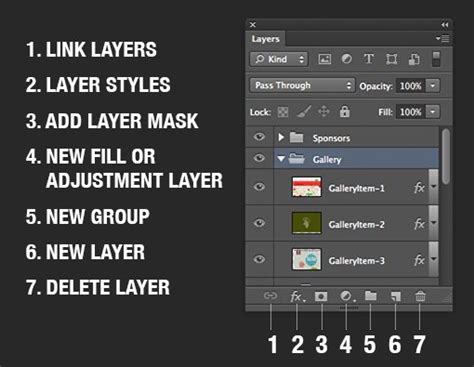
A cornerstone of modern digital editing, and a concept that will profoundly simplify your workflow, is the understanding and application of layers. Layers are like transparent sheets stacked on top of each other, allowing you to work on different elements of an image independently. This non-destructive editing approach means that changes made on one layer do not affect other layers or the original image data. This is immensely valuable because it allows for experimentation, easy correction of mistakes, and the flexibility to modify or remove edits at any stage without degrading image quality. Learning to manage layers effectively is paramount to creating complex compositions and achieving professional-looking results.
Hands-On Projects: Applying Your Knowledge
The true mastery of Photoshop comes through practical application. This course emphasizes a project-based approach, allowing you to immediately apply the skills you acquire. Examples of such hands-on projects include whitening a subject's teeth, a common retouching task that significantly improves portrait photography. Another valuable exercise is expanding an image using the crop tool, demonstrating how to creatively add to an image's canvas.
Beyond these specific examples, the curriculum is designed to build your confidence and rapidly grow your knowledge base. Within an hour of starting, you'll likely be able to perform basic tasks like cropping, fixing blemishes, and even cutting out and moving parts of your images. As you progress, you'll encounter more sophisticated techniques. For instance, understanding how to make selections and masks is critical for isolating specific areas of an image for targeted edits. This involves learning about tools like the Magic Wand for selecting areas of similar color, and the Pen tool for creating precise, custom selections.
How to Use Selection Tools | Photoshop Tutorial for Beginners | Adobe Photoshop
Advanced Techniques and Creative Possibilities
As your skills develop, you'll explore more nuanced aspects of Photoshop. The basics of retouching will extend to understanding how to correct imperfections beyond simple blemish removal, including techniques for cleaning up skin tones and textures to achieve a natural and polished look. This also extends to retouching still images with their unique challenges, focusing on achieving the right shape and perspective. Learning about image sizing and manipulation is another key area. This involves understanding how to scale, skew, and distort images using a range of tools, including specialized warping tools that can even be used to create animated GIFs from still images.
The course aims to equip you with the ability to perform valuable work in Photoshop, whether it's for retouching portraits, editing beauty and fashion photography, or creating dynamic animations. The skills gained extend beyond basic photo editing to encompass broader areas of graphic design. You'll build expertise in areas such as color correction, where understanding color theory becomes vital for achieving accurate and appealing hues. Typography, the art and technique of arranging type, is another crucial skill, enabling you to incorporate text effectively into your designs. Furthermore, you'll learn about compositing images, the process of combining elements from multiple images into a single, cohesive picture.
The integration of Artificial Intelligence (AI) is increasingly shaping the landscape of digital imaging. Courses now often introduce Generative AI, allowing for the creation of entirely new imagery or the enhancement of existing photos through AI-powered tools. This includes learning prompt engineering, the skill of crafting effective text prompts to guide AI in generating desired visual outcomes. Understanding AI workflows and responsible AI practices is becoming as important as mastering traditional tools.
Skills Acquired Through Photoshop Education
The breadth of skills that can be developed through Photoshop courses is extensive, catering to a wide range of creative and professional aspirations. Beyond the core competencies of Photo Editing and Adobe Photoshop itself, learners often gain proficiency in Color Theory, understanding how colors interact and evoke emotions, which is fundamental for aesthetically pleasing designs. Typography is another key area, enabling effective communication through text. For those interested in broader design fields, courses frequently cover Graphic and Visual Design, including principles of Design Elements And Principles, Layout Design, and Visual Design.
Furthermore, proficiency in related Adobe products like Adobe Illustrator and Adobe Acrobat is often integrated, providing a more comprehensive design toolkit. Skills in File Management and Workflow Management are essential for efficient project execution. For those venturing into digital art, Digital Painting and Digital Design are common outcomes. The advent of AI has introduced new skill sets, such as Generative AI, AI Workflows, and Prompt Engineering, allowing users to leverage artificial intelligence for content creation and manipulation.
The journey through Photoshop education can also foster Creativity and Creative Thinking, encouraging innovative approaches to problem-solving and visual expression. Skills in Image Quality enhancement, Image Analysis, and Computer Graphic Techniques further refine an individual's ability to work with digital imagery. For those aiming for career advancement, skills in Branding, Logo Design, and even User Interface (UI) and User Experience (UX) Design can be developed, making Photoshop a versatile tool for various professional roles. The ability to perform Post-Production for both images and video also becomes accessible.
Frequently Asked Questions about Photoshop
Navigating the world of Photoshop often brings up common questions. For instance, many beginners wonder about the difference between various versions of Photoshop, such as Photoshop CC and older CS versions. While the core functionalities remain, newer versions offer advanced features, particularly those related to AI and cloud integration. The course materials often address these differences, providing guidance on compatibility and advising on the best version for individual needs.
Another frequent query revolves around the learning curve. While Photoshop is a powerful tool, its complexity can be managed by breaking down the learning process into manageable steps. As highlighted, starting with the interface, then moving to essential tools, and finally engaging in hands-on projects, is an effective strategy. The promise of being able to perform tasks like cropping and blemish removal within an hour demonstrates that rapid progress is achievable.
The question of whether Photoshop is suitable for Mac users is also common. While the course might be recorded on a PC, tips and considerations for Mac users are often included, ensuring that the learning experience is inclusive. The fundamental principles and tools of Photoshop are consistent across operating systems, making the transition or adaptation straightforward.
The role of Photoshop in modern design workflows is also a point of interest. It's not just about photo editing; it's a foundational tool for graphic design, digital art, and even aspects of web and app design. Its ability to handle both raster and vector elements (when used in conjunction with Illustrator) makes it incredibly versatile. The integration of AI tools like Adobe Firefly further expands its capabilities, enabling rapid prototyping and content generation.
Ultimately, the goal of beginner Photoshop courses is to empower individuals to transform images, whether for personal projects, professional photography, graphic design endeavors, or even creating dynamic animations. The journey from understanding the interface to mastering complex manipulation techniques is a progressive one, built on a solid foundation of core skills and practical application. The challenge is to jump in, explore, and discover the immense creative potential that lies within this industry-standard software.