In the ever-evolving landscape of digital content creation, choosing the right video editing software can be a pivotal decision. For emerging social media editors and seasoned professionals alike, the debate between robust, industry-standard tools and more accessible, budget-friendly alternatives is a constant consideration. This article delves into a comprehensive comparison of Wondershare's FilmoraPro and Adobe's Premiere Pro, two prominent players in the video editing arena, examining their features, functionalities, pricing, and overall suitability for various user needs.
Understanding the Core Offerings: FilmoraPro and Premiere Pro
Wondershare's FilmoraPro positions itself as a powerful yet significantly less expensive video editing software alternative, particularly targeting emerging social media editors. It boasts cross-platform compatibility, running on both Mac and PC computers. The pricing structure is notably competitive: a lifetime license is available for $149.99, while a yearly subscription costs $89.00. A notable advantage is the option to download FilmoraPro for free, with the caveat that exported videos will feature a watermark. This affordability raises the question: can it truly rival the professional capabilities of Premiere Pro? For editors focused on social media content, the short answer is often yes. However, a deeper examination of FilmoraPro's offerings in relation to Premiere Pro is necessary to fully appreciate its strengths and limitations.
Adobe Premiere Pro, on the other hand, has long been considered an industry benchmark. Debuting in 2003, it has cemented its status as a go-to tool for editing everything from casual YouTube videos to full-blown feature films. Its comprehensive suite of tools and deep integration within the Adobe Creative Cloud ecosystem make it a powerful choice for professionals. However, this power often comes with a steeper learning curve and a higher price point, typically necessitating a subscription model.
FilmoraPro's Strengths: Accessibility and Familiarity
One of FilmoraPro's most lauded aspects is its user-friendly interface, which bears a striking resemblance to Adobe Premiere Pro's Non-Linear Editing (NLE) layout. This familiarity can significantly ease the transition for users accustomed to Adobe's ecosystem or those new to professional editing software. Upon opening FilmoraPro, users are greeted with a UI that instantly feels recognizable, featuring distinct panels for media, preview, and timeline editing.
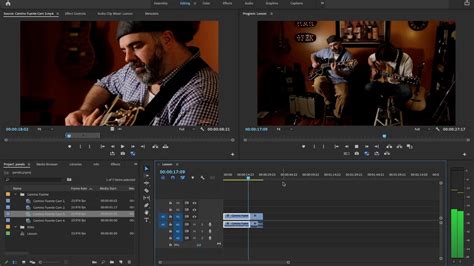
The software also offers customizable workspaces, mirroring Premiere Pro's ability to tailor the editing environment. Users can select dedicated workspaces for tasks such as editing, color grading, audio manipulation, text and titles, and effects. Furthermore, the ability to create and save custom workspace layouts allows for a personalized and efficient workflow.
The Media Panel in FilmoraPro functions similarly to Premiere Pro's "Project Panel," providing a space to import and organize footage, photos, and other media assets. The option to create folders within this panel aids in maintaining project organization, especially for larger productions.
While Premiere Pro utilizes "timelines," FilmoraPro refers to its editing canvas as an "Editor." A key difference is that FilmoraPro opens with a timeline already present, eliminating the initial step of creating one. Users can easily customize the timeline's frame size and frame rate by accessing a gear icon. The timeline tools themselves are robust, allowing for customization of track sizes, renaming of tracks, and the insertion of new video or audio tracks. Essential editing tools such as the selection tool, cut tool, slip edits, rate stretch tool, and the crucial snapping function for aligning clips are all readily available. Moreover, FilmoraPro enables users to customize keyboard shortcuts from the Preferences panel, allowing for a seamless transition for those migrating from Premiere Pro by replicating familiar keybindings.
Premiere Pro's Powerhouse Features: Depth and Professionalism
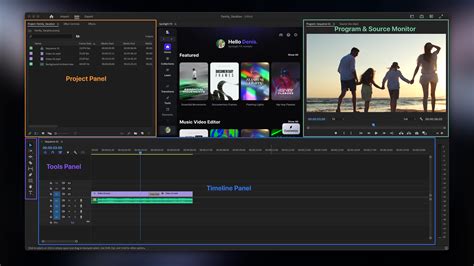
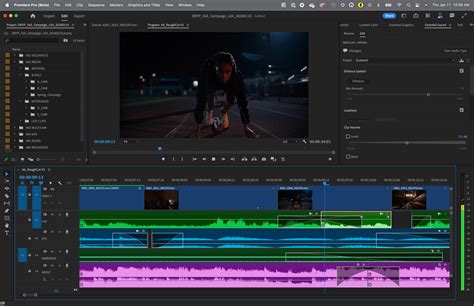
Adobe Premiere Pro's interface, while potentially daunting for beginners, is a testament to its extensive capabilities. The workspace is meticulously divided into sections, each serving a specific purpose. The Project panel, typically located in the lower left, houses all imported media. The Preview window, usually in the upper left, displays the current playback of the timeline. The Timeline itself, spanning the bottom of the interface, is where the core editing magic happens. The Effects panel, located on the right, provides access to a vast array of tools for enhancing and manipulating footage.
Premiere Pro's strength lies in its unparalleled depth and precision. It is capable of editing ultra-high-definition footage, including 8K resolutions and beyond, and handles intricate audio work, such as multi-channel surround sound mixing. Its broad format support ensures compatibility across various media types, making it a versatile tool for both Mac and PC users.
The editing process in Premiere Pro is highly refined. Users can import media via drag-and-drop into the Project panel or by using the 'Import' button. Clips are then placed onto the timeline for manipulation. The Razor tool allows for precise cutting, while clips can be easily reordered, trimmed, and layered.
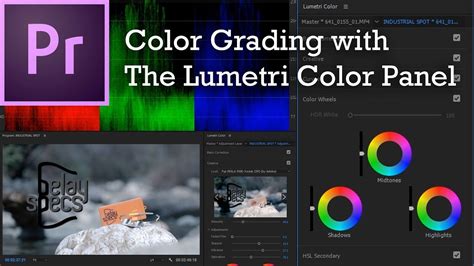
For adding creative flair, the Effects panel is indispensable. It offers a comprehensive selection of tools for color correction, transitions, and other visual enhancements. Premiere Pro's color grading capabilities are particularly noteworthy, with the Lumetri Color panel providing granular control over every aspect of color. This allows for sophisticated color matching, the creation of specific cinematic looks, and the precise manipulation of color wheels and scopes to achieve desired aesthetics.
Adding titles and graphics is also a streamlined process. Premiere Pro offers a wide array of templates, and users can also create custom designs from scratch within the 'Graphics' workspace, which houses all the necessary tools for text and motion graphics.
The true beauty of Premiere Pro lies in its ability to manage complexity. Its robust architecture is why it's the industry standard for major film and television productions. Even for smaller projects, once users become proficient, the editing process feels intuitive and second nature. Audio editing is equally comprehensive, with tools for adjusting levels, balancing soundscapes, and performing advanced mixing tasks. The software's flexibility extends to its export options, allowing users to render videos in numerous sizes and formats to suit diverse project requirements.
Feature Comparisons: A Detailed Breakdown
Interface and Customization
FilmoraPro: Offers a familiar NLE interface, customizable workspaces, and a media panel akin to Premiere's Project Panel. Its timeline, called an "Editor," is present upon opening and can be customized. Track sizes, renaming, and insertion of new tracks are supported. Keyboard shortcuts can be customized to match Premiere Pro.
Premiere Pro: Presents a more complex but highly customizable interface. Users can rearrange, hide, and save panel layouts for different workflows. It supports a vast array of editing tools and features, offering professional-grade precision.
Playback and Rendering
FilmoraPro: Lacks a dedicated render option for playback. It plays footage as best as it can in real-time, with the ability to reduce playback resolution. However, users may encounter lagging or freezing issues with high-resolution footage (2.7k and 4k), highlighting an area for potential improvement as 4k becomes a standard.
Premiere Pro: Offers more robust playback and rendering capabilities, allowing for smoother performance, especially with high-resolution footage. While it can be resource-intensive, its ability to handle complex timelines and effects without significant stuttering is a key advantage.
Titles and Motion Graphics
FilmoraPro: Comes equipped with a good selection of built-in title templates that are editable and customizable.
Premiere Pro: Provides a more extensive and sophisticated toolkit for creating and animating text and graphics. The 'Graphics' workspace offers advanced tools for motion design, allowing for intricate animations, text effects, and integration with objects in motion.
Effects and Transitions
FilmoraPro: Boasts a wide array of drag-and-drop effects and transitions, including unique options like light leak transitions and film grains, which often need to be purchased separately for Premiere Pro. Effects can be applied directly to clips or between them, with a control panel for customization and keyframing.
Premiere Pro: While it has a solid library of built-in effects and transitions, some of the more stylistic elements found in FilmoraPro might require third-party plugins. However, its strength lies in the depth and control offered for each effect, allowing for highly nuanced adjustments.
Color Correction and Grading
FilmoraPro: Includes core color effects such as curves, LUTs, vibrance, and temperature. The color workspace provides scopes for accurate color reading.
Premiere Pro: Features the Lumetri Color panel, a powerful and comprehensive toolset for color grading. It offers granular control over color wheels, curves, HSL adjustments, and scopes, enabling professional-level color correction and stylistic grading.
Audio Editing
FilmoraPro: Offers an "Essential Sound Panel" for universal audio adjustments and has audio hardware preferences for direct audio recording.
Premiere Pro: Lacks a dedicated "Essential Sound Panel" for universal audio adjustments. However, its audio editing capabilities are far more advanced, supporting multi-channel audio, detailed mixing, and integration with professional audio software like Adobe Audition.
Missing Features in FilmoraPro
FilmoraPro has several notable omissions compared to Premiere Pro:
- Multiple Sequences: FilmoraPro allows only one timeline (Editor) to be open at a time, whereas Premiere Pro supports multiple, nested sequences for complex projects.
- Adjustment Layers: The absence of adjustment layers means universal effects cannot be applied to multiple clips simultaneously, requiring individual application.
- Dedicated Color Panel: No direct equivalent to Premiere Pro's Lumetri Color panel for centralized and universal color grading.
- Dedicated Sound Panel: Lacks an "Essential Sound Panel" for quick, universal audio adjustments.
- Audio Preferences for Recording: Does not have audio hardware preferences that directly facilitate recording audio into the software as Premiere Pro does.
AI-Powered Features and Workflow Enhancements
In the realm of artificial intelligence, both platforms are integrating advanced features to streamline the editing process.
FilmoraPro: Stands out for its comprehensive multimodal AI capabilities. It extends beyond just video, offering AI assistance for text, images, audio, and video generation. Features like AI Audio Stretch, AI Audio Denoise, and AI Smart Cutout (for background removal) enhance audio quality and simplify complex tasks. Its AI features are designed to be versatile, aiming for an all-in-one solution for creators.
Premiere Pro: Focuses on AI tools specifically tailored for editing, such as Generative Extend and Generative B-Roll, which can intelligently fill gaps or create supplementary footage. While it offers powerful editing-focused AI, its scope is more specialized compared to FilmoraPro's broader AI suite.
I Spent 24 Hours Mastering Video Editing with Filmora AI Features
Pricing and Value Proposition
The pricing difference between FilmoraPro and Premiere Pro is substantial and plays a significant role in the decision-making process.
FilmoraPro: Offers highly accessible pricing. A lifetime license is available for $149.99, or an annual subscription for $89.00. The free version, while watermarked, allows users to experiment with its features extensively. This makes it an attractive option for budget-conscious individuals, students, or those new to video editing who want to explore professional-level tools without a significant financial commitment.
Premiere Pro: Operates on a subscription-based model as part of Adobe Creative Cloud. The single-app plan for Premiere Pro costs $20.99 per month, while the All Apps plan, which includes a suite of other Adobe software, is $52.99 per month. A 7-day free trial is available, allowing users to test the software before committing. While more expensive, the subscription provides continuous updates and access to the entire Adobe ecosystem.
Pricing Comparison Summary
| Feature | FilmoraPro | Premiere Pro |
|---|---|---|
| Lifetime | $149.99 | Not available |
| Annual | $89.00 | Not available (monthly plans offered) |
| Monthly | $19.99 (approx.) | $20.99 (Single App) / $52.99 (All Apps) |
| Free Trial | Watermarked export | 7-day full-featured trial |
| Value for Beginners | High | Moderate (due to learning curve & cost) |
| Value for Professionals | Moderate (for specific workflows) | High (for complex, industry-standard projects) |
Ease of Use and Learning Curve
FilmoraPro: Is widely recognized for its user-friendly interface and significantly shorter learning curve. The drag-and-drop functionality, intuitive layout, and readily available presets make it easy for beginners to start creating professional-looking videos quickly. Keyframing controls are straightforward, focusing on essential parameters like position, scale, rotation, and opacity.
Premiere Pro: Has a steeper learning curve due to its vast array of features and professional-grade complexity. However, for users willing to invest the time in learning its tools, it offers unparalleled precision and control. Nearly every effect parameter can be keyframed, with advanced options for speed curves and easing, enabling highly polished animations and transitions.
Motion Tracking and Keyframing
FilmoraPro: Offers built-in planar and motion tracking that is relatively easy to use with minimal setup, making it suitable for quick edits. For more advanced and precise tracking, it can integrate with plugins like Mocha. Its keyframe controls are designed for simplicity, making it accessible for newcomers.
Premiere Pro: Primarily relies on masks for its native tracking capabilities, which provide a high degree of accuracy and allow for manual refinements. When combined with the Mocha plugin, its tracking prowess is further amplified. The software's keyframing system is professional-grade, allowing for intricate control over almost any parameter.
Chroma Keying (Green Screen)
FilmoraPro: Features a one-click chroma keying tool that delivers good results quickly and conveniently, especially with clean footage.
Premiere Pro: The Ultra Key effect offers professional-grade results with extensive controls for transparency, spill suppression, edge refinement, and matte cleanup, providing a more nuanced and powerful chroma keying experience.
Multicam Editing
FilmoraPro: Simplifies multicam workflows with automatic syncing and generally lower hardware demands, making it a good choice for small to mid-sized projects.
Premiere Pro: Excels in handling complex multicam projects with numerous camera angles. It supports syncing via timecode, waveforms, or markers, and offers full post-production flexibility, including switch-point adjustments and advanced audio control for professional broadcast workflows.
Color Grading: LUTs and Beyond
FilmoraPro: Provides a library of built-in LUT presets for quick style changes, appealing to both beginners and professionals seeking rapid results. Its color grading tools include simple sliders for immediate adjustments and three basic color wheels (shadows, midtones, highlights) for quick grading. Masking options are also available, including basic shapes, freehand, and AI-powered masks.
Premiere Pro: Offers advanced control over color grading, supporting both Input LUTs and Creative LUTs, applied in layers for greater flexibility. Users can fine-tune exposure, brightness, and color parameters in detail. Its color tools allow for selective adjustments of specific color ranges using masks, alongside advanced features like denoise and blur. The precise control over tonal ranges and the ability to create complex masks with blending options make it a superior choice for meticulous color work.
Plugin Support
FilmoraPro: Supports a handful of plugin types, including NewBlue FX, Boris FX, and VST3, which can be downloaded and used directly within the software.
Premiere Pro: Boasts one of the richest plugin ecosystems in the industry. It is compatible with VST/AU audio plugins, OpenFX video plugins, and specialized suites built specifically for Adobe products, such as Red Giant, Sapphire, and Neat Video. This extensive plugin support significantly expands its capabilities.
Audio Features: From Presets to Professional Mixing
FilmoraPro: Comes with a set of easy-to-use audio presets for common needs like reverb, delay, pitch adjustment, and fades. Its noise reduction is a one-click process powered by built-in algorithms, offering fast results with real-time preview. Audio ducking is incredibly simple, requiring a single click to balance background music with voiceovers. It also provides a clean interface with ready-made EQ presets and a straightforward recording function for narration. Voice effects are available as instant, one-click applications. Music beat detection helps in quickly syncing background music.
Premiere Pro: Offers a full suite of professional-grade audio tools, including advanced noise reduction (DeNoise, Enhance Speech), multiband compression, parametric EQ, loudness metering, and pitch shifting. It supports automation modes and third-party VST3 plugins for broadcast-level mixing. While it lacks built-in beat detection, it offers intelligent tools like the Remix tool for re-timing music and deeper beat tracking through Adobe Audition. Its audio ducking generates automatic keyframes based on audio tags, offering precise control. Users can access both parametric and graphic EQs for surgical accuracy in frequency adjustments. Narration recording is a professional process with multi-track capabilities, real-time monitoring, and punch-in recording. Voice transformations are highly customizable using pitch and formant shifters.
AI-Powered Speech and Transcription
FilmoraPro: Features one-click subtitle generation, supporting multiple languages and dynamic caption effects. It also provides built-in AI-generated voices with various languages, genders, and tones.
Premiere Pro: Offers AI-powered transcription with higher accuracy and better handling of challenging audio. While it doesn't have a native text-to-speech engine, it integrates seamlessly with top-tier services like ElevenLabs, Azure, Amazon Polly, or Google Cloud TTS for more natural-sounding AI voices. The "Enhance Speech" feature is a powerful tool for improving dialogue quality.
Template and Preset Libraries
FilmoraPro: Comes with over 3,000 pre-designed templates, covering intros, outros, vlogs, news segments, and more, significantly speeding up content creation.
Premiere Pro: Primarily offers project templates that define technical settings like sequences and resolutions, rather than creative design templates. It also has a limited set of default transitions and title templates.
Trial Periods and Accessibility
FilmoraPro: Offers a time limit-free trial, allowing users to explore the software's capabilities at their own pace, with the only restriction being a watermark on exported videos.
Premiere Pro: Provides a full-featured 7-day free trial, which is a standard offering for professional software, allowing users to experience its full potential before committing to a subscription.
Which One Is Best?
Choosing between FilmoraPro and Premiere Pro is akin to selecting between versatile sneakers and specialized dress shoes. Both have their distinct advantages, and the optimal choice hinges on the specific project requirements and the user's experience level.
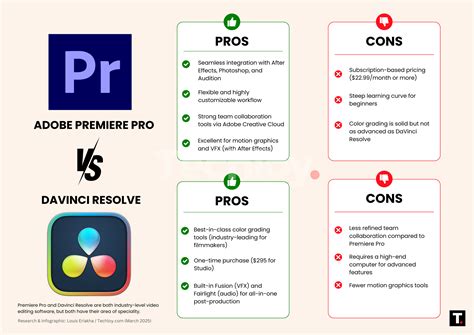
FilmoraPro: Is an excellent choice for beginners, social media content creators, and those who prioritize ease of use, affordability, and rapid content creation. It provides approximately 80% of the functionality needed for many common video editing tasks at a fraction of the cost and complexity of Premiere Pro. Its intuitive interface, extensive template library, and built-in AI features make it highly accessible and efficient for everyday video production.
Premiere Pro: Remains the undisputed champion for professionals, complex projects, and users who require the deepest level of control and integration within the Adobe ecosystem. Its robust feature set, industry-standard compatibility, and advanced tools for editing, color grading, and audio mixing make it indispensable for feature films, broadcast television, and high-end commercial work. While it has a steeper learning curve and a higher price tag, the investment in learning and subscription often pays dividends in terms of creative potential and workflow efficiency for demanding projects.
Ultimately, the decision rests on individual needs. For rapid, accessible video creation, FilmoraPro is a powerful contender. For unparalleled professional depth and control, Premiere Pro continues to set the standard.