The XP-Pen Star G640 has emerged as a compelling option in the entry-level digital art market, aiming to directly challenge established players like Wacom's Intuos series. This screen-less tablet, designed for both aspiring artists and seasoned professionals seeking a portable solution, offers a surprising array of features for its modest price point. This review delves into the specifics of the Star G640, examining its design, functionality, drawing experience, and overall value proposition.
Design and Build Quality: Minimalist and Robust
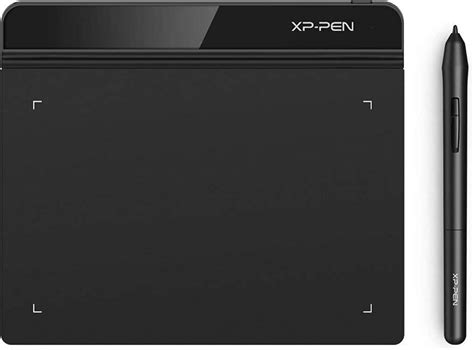
The XP-Pen Star G640 presents an extremely minimalistic aesthetic, a deliberate choice that allows users to focus purely on the drawing experience without unnecessary distractions. It boasts a flat, all-black design with no bezels, contributing to its sleek appearance. The tablet's defining characteristic is its ultra-thin profile, measuring a mere 2 millimeters in thickness. This slimness not only enhances its portability but also allows for comfortable use even when a portion of the user's hand rests off the tablet.
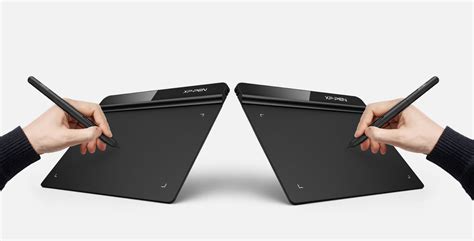
Despite its thinness, the build quality is surprisingly robust. The tablet is constructed from a very tough plastic that resists scratching effectively. In fact, a twist test reveals it to be even sturdier than some thicker competitors, dispelling concerns about fragility. The surface texture is a notable feature; it possesses a fairly rough texture that provides a good grip for the pen nib, mimicking a paper-like feel, though with a slightly more plastic-y sensation compared to Wacom's offerings. This texture, while contributing to a pleasant drawing experience, can lead to faster nib wear if pen pressure settings are not adjusted.
The back of the tablet is functional, featuring four rubber feet to keep it securely in place during use and the standard information sticker. Unlike some other tablets, the edges are not rounded, but this does not detract from the drawing experience due to the tablet's overall flatness. The cable port, located at the top right, uses a standard Micro-USB connection, offering flexibility if the included cable is lost, though using a good quality cable is recommended. A minor observation is that the port itself can exhibit a slight wiggle, which might be a point of concern for those who handle their devices roughly.
A key aspect of the Star G640's minimalistic design is the complete absence of shortcut buttons on the tablet itself. This design choice is presented as a positive by XP-Pen, ensuring users are not paying for features they might not utilize. For those accustomed to tablet-based shortcut buttons, this might be a drawback, but for users who prefer to rely on their keyboard or dedicated macro pads for shortcuts, this omission is not an issue.
The XP-Pen PN01 Pen: Battery-Free Precision
The included stylus, the XP-Pen PN01, is a battery-free pen utilizing EMR (Electromagnetic Resonance) technology. It is constructed from a simple matte plastic with a comfortable bulge near the end to aid grip. Despite being entirely plastic, the pen feels well-balanced and durable. Its lightweight nature contributes to comfortable handling, even during extended drawing sessions.
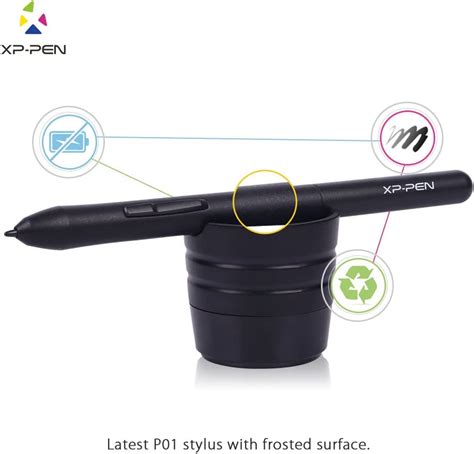
The PN01 pen features two side buttons that are easily identifiable by touch, allowing for quick function switching without needing to look at the pen. These buttons can be programmed to perform various functions, including mouse clicks and keyboard shortcuts, offering a degree of customization. The pen's primary strength lies in its 8192 levels of pressure sensitivity, a specification that rivals and even surpasses some higher-end tablets. This high sensitivity enables precise control over line weight and opacity, allowing for nuanced artistic expression.
A common misconception is that all Wacom pens are superior. However, the pen included with the Wacom Intuos (CTL-490), a direct competitor, is also a simple plastic stick, comparable to the XP-Pen PN01 in its basic construction.
One significant advantage of the Star G640 package is the inclusion of twenty (20) replacement pen nibs. This generous provision addresses the concern of nib wear, which can occur due to the tablet's rough surface texture, especially at default pressure settings. With such a substantial supply of replacement nibs, users can draw with greater peace of mind.
Tablet Drivers and Software: Streamlined Control
The XP-Pen Star G640 utilizes XP-Pen's latest tablet drivers, which are designed for extreme ease of installation. Notably, the drivers can be installed without the tablet being connected to the computer. After installation, a desktop shortcut provides quick access to the tablet settings. When the tablet is plugged in, the XP-Pen driver icon appears in the system tray, allowing users to access settings by clicking on it.
The driver interface is a refreshingly simple, single-page application that consolidates all essential settings into one window. This includes options for customizing pen buttons, adjusting pen pressure sensitivity, and mapping the tablet to specific monitors. A crucial setting to be aware of is the "Windows Ink" checkbox. For some applications, like Photoshop, enabling Windows Ink may be necessary, while for others, it's generally recommended to keep it disabled for optimal performance. The ability to toggle this setting is vital for troubleshooting and ensuring compatibility across different software.
A standout feature of the XP-Pen driver system is its ability to connect and manage multiple XP-Pen tablets simultaneously on a single computer. The driver software includes a drop-down menu at the top, typically displaying "Star G640." If other compatible XP-Pen devices using the same new drivers are connected, they can all be configured and used through this unified interface. This is particularly useful for users who own multiple XP-Pen products.
Pen Pressure Curve Customization
The "Click Sensitivity" section within the driver software is paramount for optimizing the drawing experience and mitigating nib wear. The default pen pressure curve is a straight diagonal line. To achieve a lighter pen pressure for more common artistic workflows, users are advised to adjust the graph. Specifically, moving the top dot towards the middle and the middle dot towards the upper middle section of the graph creates a more gradual response. This adjustment not only reduces the force required to achieve darker lines but also significantly decreases nib wear. The ease with which this curve can be customized is a significant advantage, especially for beginners who might not be aware of this crucial setting. The fact that XP-Pen offers this level of pen pressure customization, similar to what is found in Wacom's higher-end Intuos Pro and Cintiq drivers, is a testament to their commitment to user control.
Screen Mapping and Left-Handed Use
The "Current Screen" section allows users to define which monitor their tablet is mapped to and what portion of the tablet's active area is utilized. This is essential for users with multiple displays. The "Switch Monitor" function, which can be assigned to a pen button, allows for quick cycling between configured monitors. While the tablet is designed for ambidextrous use, the driver software does not require a specific "Left Hand Mode" toggle, as the tablet's functionality is inherently adaptable for both right-handed and left-handed users without any special configuration.
Drawing Experience: Smooth Strokes and Responsive Lines
The drawing experience on the XP-Pen Star G640 is generally quite satisfactory, especially considering its price point. Initially, some users might find they need to press harder than expected to achieve darker lines. However, this is where the adjustability of the pen pressure curve becomes indispensable. Once the curve is fine-tuned to personal preference, the stroke control becomes exceptionally smooth and accurate. Gradual increases and decreases in pen pressure translate directly to the digital canvas without any noticeable skips or jumps.
While drawing, the rough texture of the surface provides a tactile feedback that aids in control. However, when performing slow, diagonal lines with a ruler, some users might observe minor blips. These are likely caused by the spacing between the tablet's sensors and are generally not apparent when using stabilizers or employing quicker strokes. This is a minor artifact that is unlikely to impact most drawing workflows, particularly for those who utilize digital art software's built-in stabilization features.
The responsiveness of the tablet is a significant positive. There is no discernible cursor delay, meaning the cursor on screen moves in perfect sync with the pen's movement on the tablet. This creates a natural and intuitive drawing experience, akin to using a traditional pencil and paper. This lack of latency is crucial for precise work and contributes to a fluid workflow.
The compact size, while potentially restrictive for professionals accustomed to larger drawing surfaces, does not significantly impede the sketching or writing experience for most users. For those who require extensive canvas space, a larger tablet might be more suitable. However, for beginners or artists who primarily work on detailed sections of an image, zooming in and navigating the canvas is a manageable process.
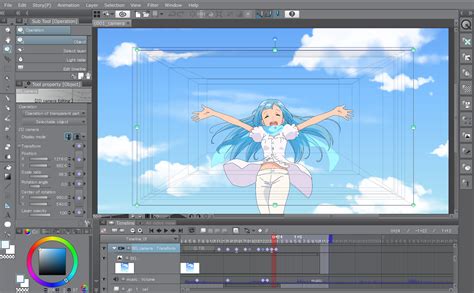
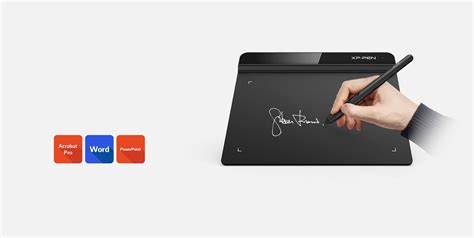
The tablet's compatibility with various art software is generally good. While direct confirmation with every program is recommended, major applications such as Adobe Photoshop, Illustrator, and Clip Studio Paint are known to work well with the Star G640.
Performance in Specific Applications and Gaming
The XP-Pen Star G640 has demonstrated its versatility across different creative and recreational applications. For photo editing in Adobe Photoshop CC, the precision offered by the pen tablet significantly surpasses that of a mouse, allowing for more nuanced adjustments and selections. Similarly, for vector graphics work in Adobe Illustrator, the tablet enables smoother and more controlled line creation. For digital painting, software like Krita also benefits from the tablet's responsiveness and pressure sensitivity, allowing for expressive brushwork.
Beyond traditional art applications, the XP-Pen Star G640 has garnered attention for its suitability in gaming, particularly for rhythm games like "osu!". The tablet's low latency and responsive surface make it an excellent tool for players who prefer using a tablet for gameplay. Both hovering and drag methods are reported to work effectively, with minimal input lag, providing a competitive edge.
Compatibility and Connectivity: Android Support and USB Interface
A significant advantage of the XP-Pen Star G640 is its compatibility with Android devices. This expands its usability beyond traditional desktop and laptop computers, allowing artists to create on the go with their smartphones or tablets. The tablet connects via a USB interface, ensuring broad compatibility with a wide range of devices. For Android connectivity, an OTG adapter (On-The-Go) is typically required, which may or may not be included in all retail packages. This feature positions the Star G640 as a highly portable and accessible creative tool.
The tablet supports USB connectivity, making it easy to connect to various devices. When connected to a computer, the drivers ensure seamless integration. For Android devices, the functionality relies on the device's OTG support and the appropriate adapter. This Android compatibility is a key differentiator, especially in the budget tablet segment, and opens up new avenues for mobile digital art creation.
Price and Value Proposition: An Affordable Entry Point
The XP-Pen Star G640 is positioned as a highly affordable digital drawing tablet, often retailing around the $30-$40 USD mark. This aggressive pricing makes it an exceptionally attractive option for individuals new to digital art, hobbyists, or those on a tight budget. It directly competes with and undercuts the entry-level offerings from Wacom, providing a comparable feature set at a significantly lower cost.
The value proposition is further enhanced by the inclusion of essential accessories, such as the ample supply of replacement nibs and a battery-free pen. While it lacks some of the advanced features found in more expensive tablets, such as express keys directly on the tablet or tilt sensitivity, its core functionality â precise pen input and pressure sensitivity â is well-executed.
The tablet is often available with free shipping through various online retailers, further enhancing its affordability. However, potential buyers should be aware that purchasing directly from the XP-Pen Store might result in higher prices and slower shipping times compared to platforms like Amazon.
Potential Drawbacks and Considerations
While the XP-Pen Star G640 offers excellent value, there are a few drawbacks to consider:
- Limited Drawing Area: The 6 x 4-inch active drawing area, while sufficient for many tasks, can feel restrictive for professionals accustomed to larger surfaces or for those working on very large-format pieces without frequent zooming.
- No Express Keys on Tablet: The absence of shortcut buttons on the tablet itself means users must rely on their keyboard or other input devices for shortcuts. This might be a significant drawback for artists who prefer an all-in-one solution.
- Nib Wear: As mentioned, the rough surface texture can lead to faster nib wear. While mitigated by the included replacement nibs and the ability to adjust the pressure curve, it's a factor to be aware of.
- No Pen Stand or Sleeve: The package does not include a pen stand or a protective sleeve, which are useful accessories, especially for portability. Users will need to find their own solutions for storing and protecting the pen when traveling.
- Port Wiggle: The slight wiggle in the Micro-USB port, while not a deal-breaker for most, could be a concern for those who are particularly rough with their equipment.
- Android Connectivity Requires OTG: While Android compatibility is a plus, users will need to ensure they have an OTG adapter to connect the tablet to their smartphone or tablet.
Conclusion: A Stellar Choice for Beginners and Budget-Conscious Artists
The XP-Pen Star G640 Drawing Tablet stands out as a remarkably capable and affordable device, particularly for its target audience. It offers a compelling blend of essential features, solid build quality, and a comfortable drawing experience at a price point that makes digital art accessible to a broader audience. Its ultra-thin and portable design, coupled with Android compatibility, makes it an excellent choice for students, hobbyists, or anyone looking for a secondary, travel-friendly drawing tablet.
For beginners venturing into digital art, the Star G640 provides a low-risk entry point without compromising on core functionality. The 8192 levels of pressure sensitivity and the responsive pen performance ensure that users can develop their skills effectively. The generous inclusion of twenty replacement nibs and the straightforward driver installation further enhance the user experience.
While professionals might find the drawing area limiting or miss the convenience of on-tablet express keys, the Star G640's performance and value are undeniable. It successfully competes with established brands by offering a feature set that punches above its weight class, making it a highly recommended option for anyone seeking an economical yet proficient digital drawing tablet.