Embarking on the journey of video editing can feel daunting, especially for those new to the craft. Wondershare Filmora has emerged as a popular and accessible tool for creators of all levels, from beginners looking to make their first cuts to seasoned professionals seeking advanced techniques. This guide delves into the core functionalities and advanced capabilities of Filmora, drawing from the experiences of diverse creators and educational initiatives like the Filmora Master Class.
Understanding the Wondershare Filmora Ecosystem
Wondershare Filmora is a versatile video editing software designed to empower users to create compelling visual stories. Its intuitive interface makes it a favorite among aspiring YouTubers, content creators in fashion and beauty, travel filmmakers, and even those looking to capture and share gameplay footage. The software's appeal lies in its ability to balance ease of use with a robust set of features, allowing for both quick edits and more intricate productions.
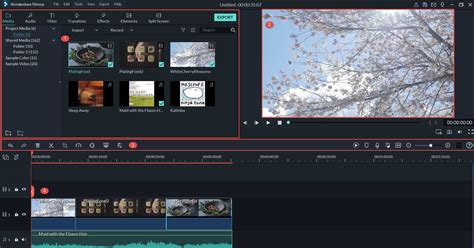
For newcomers, understanding the basic workflow is key. This typically involves importing media, arranging clips on a timeline, applying transitions and effects, editing audio, and finally exporting the finished project. Filmora excels at simplifying these steps, making the initial learning curve less steep than with some other professional editing suites.
Essential Video Editing Techniques in Filmora
Even with a user-friendly interface, mastering Filmora involves understanding fundamental editing techniques. These form the building blocks for creating engaging content, regardless of your niche.
Importing and Organizing Media
The first step in any video project is bringing your footage into the editing software. Filmora allows for the import of various media types, including video files, audio files, and images. Effective organization within the media library is crucial, especially for larger projects. Creating folders for different types of assets (e.g., B-roll, music, sound effects) can save significant time during the editing process.
Timeline Editing Fundamentals
The timeline is the heart of any video editor. In Filmora, users arrange their video and audio clips here. Key techniques include:
- Cutting and Trimming: Removing unwanted sections of clips to streamline the narrative. Precise cuts are essential for pacing and flow.
- Splitting Clips: Dividing a single clip into multiple segments for more granular control.
- Arranging Clips: Sequencing clips to tell a story, ensuring a logical progression of events.
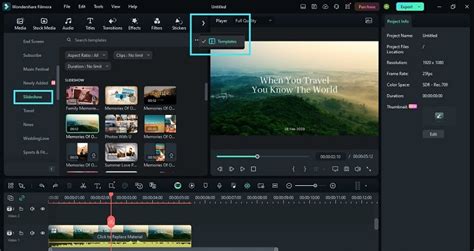
- Basic Transitions: Applying transitions (like fades, wipes, or dissolves) between clips to smooth out scene changes. While simple, overuse can detract from the content.
Working with Audio
Audio is often said to be as important as the video itself. Filmora offers comprehensive audio editing tools:
- Adjusting Volume: Ensuring dialogue is clear and music is not overpowering.
- Adding Background Music: Selecting and integrating music tracks to enhance the mood and atmosphere.
- Sound Effects: Incorporating sound effects to add realism and impact.
- Voiceover Recording: Recording narration directly within Filmora for tutorials, documentaries, or commentary.
A common issue encountered by users, particularly those recording gameplay with separate audio tracks, is synchronization drift. This occurs when the video and audio tracks gradually fall out of sync over time. This can be caused by differences in frame rates, recording software settings, or even the processing power of the computer. For gameplay recording using ShadowPlay and a separate vocal track, it's vital to ensure both are recorded at the same frame rate and sample rate. When importing, placing the audio and video tracks on the timeline and carefully aligning them at the beginning is crucial. If drift occurs, manual re-syncing might be necessary at intervals throughout the timeline, or exploring advanced audio/video sync tools if available in the software or through external plugins.
Exploring Advanced Video Editing Techniques in Filmora
Once the fundamentals are mastered, Filmora provides tools to elevate your videos to a more professional level. The Filmora Master Class, an educational initiative featuring video editing masters, highlights many of these advanced techniques.
Color Grading and Correction
Color plays a significant role in setting the mood and tone of a video. Filmora's color correction and grading tools allow users to:
- Adjust Exposure and Contrast: Fine-tuning the brightness and difference between light and dark areas.
- White Balance: Ensuring colors appear natural under different lighting conditions.
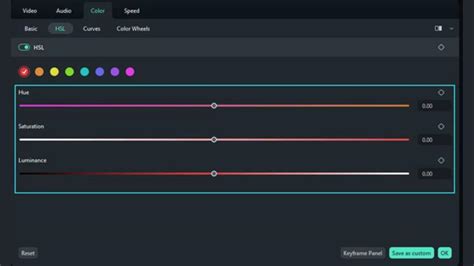
- HSL Adjustments: Modifying specific color hues, saturations, and luminance values for artistic effect.
- LUTs (Look-Up Tables): Applying pre-set color styles to quickly achieve a desired aesthetic, often used by travel filmmakers and fashion content creators.
Visual Effects and Motion Graphics
Filmora offers a wide array of visual effects and motion graphics to add flair and dynamism to your videos. This includes:
- Filters and Overlays: Applying stylistic visual enhancements.
- Keyframing: Animating properties of elements (like position, scale, or opacity) over time to create dynamic movement. This is essential for motion tracking and creating engaging intros.
- Green Screen (Chroma Key): Replacing a solid color background (typically green or blue) with another image or video, a technique widely used in vlogs and special effects.
Motion Tracking
Motion tracking allows you to attach an element, such as text or an image, to a moving object within your video. This is particularly useful for highlighting specific items, adding annotations to dynamic scenes, or creating more complex visual effects. The process typically involves identifying the object to track and then letting Filmora analyze its movement frame by frame.
Audio Editing and Mixing
Beyond basic volume adjustments, Filmora provides tools for more sophisticated audio manipulation:
- Audio Equalization (EQ): Shaping the tonal balance of audio to improve clarity or create specific sound characteristics.
- Noise Reduction: Removing unwanted background noise from recordings, crucial for clear vocal tracks in gameplay commentary or interviews.
- Audio Ducking: Automatically lowering the volume of background music when dialogue is present, ensuring the voice remains prominent.
The Filmora Master Class emphasizes that these advanced techniques are not just for professionals but are accessible to anyone willing to learn. The step-by-step lessons provided in such programs are designed to help users grasp complex editing techniques effortlessly, making the learning process enjoyable and effective.
The Filmora Master Class: A Gateway to Advanced Skills
Wondershare Filmora's Master Class is a notable free educational initiative that brings together four video editing masters to provide advanced Filmora video editing tutorials. This program is a must-have for aspiring YouTubers and content creators looking to significantly enhance their video production capabilities.
What the Master Class Offers
The Master Class tutorials cover a wide range of topics, including advanced editing techniques, color grading, visual effects, motion tracking, audio editing and mixing, and much more. These tutorials are designed to cater to both beginners and advanced users, offering diverse content suitable for various skill levels. The instructors are highly knowledgeable, and their step-by-step lessons are instrumental in helping users grasp complex editing techniques effortlessly.
Accessing and Engaging with the Master Class
To access the Master Class, users typically navigate to the official Wondershare Filmora website or their educational portal. While the tutorials are pre-recorded, engagement is encouraged. Users can ask questions and seek clarification by leaving comments below each tutorial. This feedback loop is used to continuously enhance the Master Class content, making it a dynamic and responsive learning resource.
While direct downloads for offline viewing are usually not offered, users can bookmark tutorials or save their URLs for quick access in the future. The program aims to ignite new creation ideas by showcasing various scenarios and advanced applications of Filmora's features. Participating in such a program is often described as a significant decision for one's creative journey, opening doors to new possibilities in video storytelling.
Filmora for Diverse Creative Fields
The versatility of Filmora makes it a valuable tool across various content creation domains:
Gameplay Recording and Editing
For gamers who use tools like ShadowPlay for recording, Filmora provides the editing power to transform raw footage into engaging videos. The ability to sync separate audio and video tracks, add commentary, incorporate game sound effects, and apply visual enhancements like text overlays or picture-in-picture effects is crucial for creating compelling gameplay content. Addressing synchronization issues, as mentioned earlier, is a key part of this process.
Travel Filmmaking and Vlogging
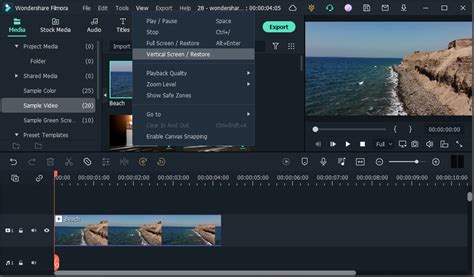
Travel filmmakers and YouTubers leverage Filmora to craft immersive travelogues. Advanced techniques like color grading to evoke specific moods of a destination, smooth transitions to guide viewers through different locations, and the inclusion of drone footage or time-lapses are all facilitated by Filmora. The software's ability to handle high-resolution footage and its efficient export options are vital for creators who frequently upload content.
Fashion and Beauty Content Creation
Content creators in the fashion and beauty industries use Filmora to produce polished tutorials, lookbooks, and product reviews. Precise editing to showcase details, the use of text overlays for product names or steps, and subtle color correction to ensure accurate representation of colors are all important aspects. Filmora's ease of use allows these creators to focus on their presentation and styling rather than getting bogged down in complex editing processes.
Influencer Marketing and Social Media
For influencers and social media specialists aiming to capture virality and enhance brand awareness, Filmora offers the tools to create eye-catching and shareable content. This includes creating short, impactful video clips for platforms like TikTok or Instagram Reels, incorporating trending effects, and ensuring a professional look that resonates with consumers. The ability to quickly edit and export content in various aspect ratios is a significant advantage.
Conclusion: Empowering Your Creative Vision
Wondershare Filmora stands as a powerful yet accessible video editing solution. From mastering fundamental cuts and audio adjustments to exploring advanced color grading, motion tracking, and visual effects, the software empowers creators to bring their visions to life. Initiatives like the Filmora Master Class further democratize advanced editing knowledge, offering structured learning paths for users of all levels. Whether you're a gamer, a travel filmmaker, a beauty vlogger, or an aspiring YouTuber, Filmora provides the tools and flexibility to create extraordinary video stories and connect with your audience effectively.