CorelDRAW, a name synonymous with professional vector graphics editing, has long been a staple for designers, illustrators, and production artists. Developed and marketed by Corel Corporation, this powerful software suite has evolved significantly since its inception in 1989. While subscription models have become increasingly prevalent, the concept of a CorelDRAW perpetual license remains a significant consideration for many users, offering a distinct ownership model compared to recurring payments. This article will explore the intricacies of the CorelDRAW perpetual license, its historical context, its advantages and disadvantages, and how it fits into the broader landscape of software licensing.
The Genesis of CorelDRAW and Early Licensing Models
The story of CorelDRAW begins in 1987 when Corel engineers Michel Bouillan and Pat Beirne embarked on a mission to create a vector-based illustration program. Their vision was to bundle this program with their desktop publishing systems, and the inaugural release of CorelDRAW in 1989 marked the beginning of a new era in graphics software. Early versions, such as CorelDRAW 1.x and 2.x, were designed to run on Windows 2.x and 3.0. The release of CorelDRAW 3.0 coincided with Microsoft's release of Windows 3.1, leading to a more robust and feature-rich experience.
These early iterations introduced groundbreaking tools that would become foundational to vector editing: the Envelope tool for distorting text or objects, the Blend tool for morphing shapes, the Extrusion tool for simulating perspective and volume, and the Perspective tool for distorting objects along X and Y axes. The Corel graphics suite also expanded to include complementary programs like Corel Photo-Paint (for bitmap editing), CorelSHOW (for presentations), CorelCHART (for charts), Mosaic, and CorelTRACE (for vectorizing bitmaps).
The licensing model at this time was predominantly perpetual. Users purchased a software package, often on physical media, and owned that specific version indefinitely. Updates and upgrades were typically separate purchases, allowing users to decide whether the new features warranted an additional investment. This model fostered a sense of ownership and predictability for users who invested in the software.
Evolution of CorelDRAW Features and Licensing Shifts
As CorelDRAW matured, so did its feature set, reflecting technological advancements and user demands. CorelDRAW 3.0, for instance, was the last version designed for Windows 3.x, while CorelDRAW 4.0 marked a significant leap as the first version for 32-bit Windows and Macintosh. Subsequent releases consistently introduced innovative tools and functionalities.
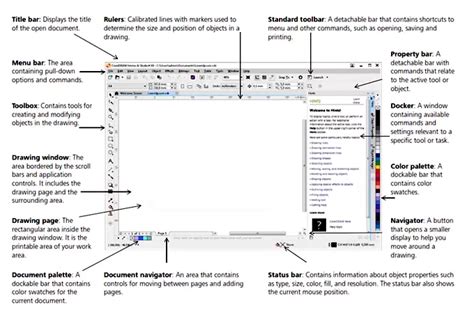
- CorelDRAW 5.0 brought forth a customizable interface, new drawing tools like Polygon, Spiral, Knife, and Eraser, a context-sensitive Property bar, Print Preview, and interactive Fill and Blend tools.
- CorelDRAW 6.0 introduced task automation through its proprietary scripting language, Corel SCRIPT, and later added support for VBA (Visual Basic for Applications) macros in version 9.0.
- CorelDRAW 7.0 featured Docker windows, interactive Distortion, 3D, Envelope tools, a Realistic Dropshadow tool, and interactive color mixing.
- CorelDRAW 8.0 included guidelines as objects, custom-sized pages, and duotone support.
- CorelDRAW 9.0 saw the introduction of the Mesh fill tool for complex color filling, the Artistic Media tool, Publish to PDF features, and embedded ICC color profiles.
- CorelDRAW 10.0 expanded the suite with Corel R.A.V.E. for vector animation, web graphics tools, and multilingual document support.
- CorelDRAW 11.0 introduced the Double-click Crop tool, Smart fill tool, Chamfer/Fillet/Scallop/Emboss tool, and the Image Adjustment Lab. It also included OpenType font families from Linotype.
- CorelDRAW X3 brought further enhancements to photo editing and fill tools.
- CorelDRAW X4 focused on improvements for large format and commercial print applications with tools like Border and Grommet and Canvas Prep. It also officially supported high-resolution displays with scalable UI elements.
- CorelDRAW X5 introduced a new Unicode OpenType-based text engine for enhanced international language support, Dynamic alignment guides, and CorelConnect content organizer for in-app access to online assets.
- CorelDRAW X6 consolidated object properties, styles, and color styling into docking toolbars.
- CorelDRAW X7 marked a significant shift by introducing 30-day and 365-day rental options (subscriptions) as an alternative to the traditional perpetual license purchase. This signaled a move towards more flexible, albeit recurring, payment models.
- CorelDRAW 2018 and 2019 continued to refine the software, with the 2019 release notably bringing CorelDRAW back to macOS with a completely new, native application built from the ground up. This was a significant development, as the previous Mac version (CorelDRAW 11) had been discontinued years prior.
The introduction of subscription models, like those seen with CorelDRAW X7 and subsequent versions, represented a fundamental change in Corel's licensing strategy. This shift, mirrored across the software industry, offered users lower upfront costs but meant continuous payments for access to the software and its updates.
Understanding the CorelDRAW Perpetual License
Despite the rise of subscription services, the CorelDRAW perpetual license still exists and appeals to a specific segment of users. A perpetual license, in essence, grants the user the right to use a specific version of the software indefinitely. This means that once purchased, you own that version of CorelDRAW and can continue to use it without ongoing fees.
Key Characteristics of a Perpetual License:
- Ownership of a Specific Version: You own the rights to use the version of CorelDRAW you purchased for as long as you wish.
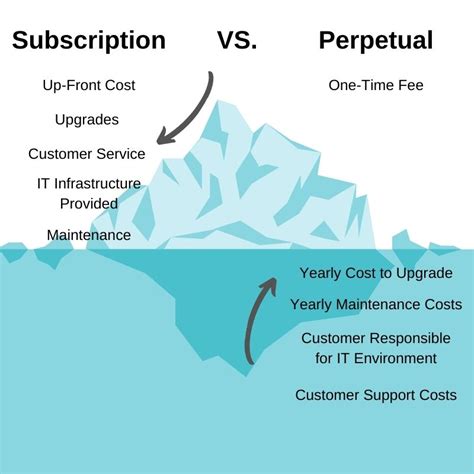
- No Recurring Fees: Unlike subscriptions, there are no monthly or annual payments required to maintain access to the purchased version.
- Upgrade Path: While you own a specific version perpetually, access to new features and major updates typically requires purchasing an upgrade. Corel has historically offered upgrade pricing for existing perpetual license holders, often at a reduced cost compared to a new full license.
- Offline Activation: In some cases, perpetual licenses can be activated offline, offering flexibility for users with limited or no internet access. However, online activation is becoming increasingly common even for perpetual licenses to manage installations and prevent piracy.
- Predictable Cost: For users who don't require the absolute latest features immediately, a perpetual license offers a one-time, predictable cost.
The Upgrade Plan and its Implications
Corel has offered an "Upgrade Plan" (previously known as Premium Membership) for perpetual license holders. This plan typically provides access to new versions released during the duration of the plan, along with other benefits like exclusive content and support. When this plan expires, users can choose to renew it to stay current with the latest releases, or they can retain their existing version indefinitely.
The decision to purchase an Upgrade Plan for a perpetual license introduces a layer of recurring cost, albeit one that is often less than a full subscription. For example, a user might pay an annual fee for the Upgrade Plan to receive all new versions released that year. If they decide not to renew, they keep the last version they received under the plan, but will need to pay for future upgrades at a higher rate if they wish to update again.
This model presents a choice: invest in continuous updates through the Upgrade Plan, or make a larger upfront purchase for a perpetual license and then decide on future upgrades on a case-by-case basis. The cost of the Upgrade Plan and the pricing of subsequent upgrades are crucial factors in this decision-making process.
Perpetual vs. Subscription: Making the Right Choice
The choice between a perpetual license and a subscription model for CorelDRAW hinges on individual needs, budget, and usage patterns.
Advantages of a Perpetual License:
- Long-Term Cost Savings: For users who don't need to constantly update to the latest version and plan to use a specific version for an extended period, a perpetual license can be more cost-effective in the long run.
- Ownership and Control: It offers a sense of ownership over the software, providing more control over when and if you upgrade.
- No Continuous Financial Outlay: Once purchased, there are no ongoing mandatory payments, which can be appealing for budgeting.
- Offline Use: While not always guaranteed, perpetual licenses often offer more flexibility for offline activation and use.
Disadvantages of a Perpetual License:
- Higher Upfront Cost: The initial purchase price for a perpetual license is significantly higher than the initial cost of a subscription.
- Outdated Features: Without purchasing upgrades, you will eventually be using an older version with features that may not be as advanced or efficient as newer releases.
- Upgrade Costs Can Add Up: While upgrades are typically cheaper than new licenses, frequent upgrades can still represent a substantial investment over time.
- Potential for "Yawn-Inducing" Updates: As noted by some users, not every upgrade offers groundbreaking features, making the decision to pay for an upgrade less compelling.
Advantages of a Subscription:
- Lower Upfront Cost: Subscriptions offer a more accessible entry point with lower initial financial commitment.
- Always Up-to-Date: Subscribers always have access to the latest version of CorelDRAW, including new features, performance improvements, and bug fixes as soon as they are released.
- Flexibility: Subscription models allow users to scale their software usage up or down as needed, which can be beneficial for freelancers or businesses with fluctuating project demands.
- Bundled Services: Subscriptions often include cloud services, content libraries, and other benefits that may not be available with a perpetual license.
Disadvantages of a Subscription:
- Continuous Financial Outlay: The recurring payments can add up significantly over time, potentially exceeding the cost of a perpetual license in the long run.
- Loss of Access: If you stop paying the subscription, you lose access to the software and any associated cloud services or content.
- Less Control: Users have less control over the upgrade cycle, as new versions are released periodically.
- Internet Dependency: Subscription models often require a persistent internet connection for activation and ongoing use.
I Replaced ALL my ADOBE APPS with these [free or cheaper] Alternatives!
CorelDRAW Licensing in the Modern Ecosystem
CorelDRAW's licensing strategy has adapted to the evolving software market. The introduction of subscription options alongside perpetual licenses reflects a broader industry trend. This dual approach aims to cater to a wider range of users, from those who prefer the traditional ownership model to those who value the flexibility and continuous updates of a subscription.
The rise of cloud-based collaboration and multi-device usage has also influenced licensing. CorelDRAW Graphics Suite, particularly in its subscription and business licensing tiers, now offers features for managing multiple users and devices. This includes functionalities for team management, license assignment, and device tracking through a Corel customer account.
For business and public sector organizations, Corel offers various licensing options, including volume subscriptions and academic site licenses, designed to meet the needs of larger deployments. These options often provide better unit pricing and centralized management capabilities.
Managing CorelDRAW Licenses
Corel provides tools and a customer portal for managing licenses, whether perpetual or subscription-based. Users can log in to their "My Account" on Corel.com to view their purchased products, access download links, and manage serial numbers. For subscription products, this portal allows for managing subscription status and billing. For perpetual products, it provides access to serial numbers and download links for the purchased version.
For business licenses, especially those with multiple seats, Corel has implemented a "Team Products" section. This allows administrators to invite team members, assign licenses (seats), and manage device installations. Each license (seat) is typically tied to a single device, and exceeding the device limit will trigger a warning. The system is designed to empower teams to focus on creativity by simplifying the logistical aspects of software management.
The concept of merging licenses, particularly for subscription-based business licenses, is also available to consolidate multiple licenses into a single "license package" with a prorated renewal date. This streamlines management for organizations with evolving licensing needs.
The Future of Perpetual Licenses
The future of perpetual licenses in the software industry is a subject of ongoing debate. While subscriptions offer predictable revenue streams for software companies, many users still value the ownership and long-term cost predictability of perpetual licenses. Corel's continued offering of perpetual licenses suggests an understanding of this user preference.
However, the trend towards cloud integration and continuous updates makes the distinction between perpetual and subscription models increasingly blurred. Features like online activation, cloud content, and the need to stay current with evolving file formats and operating systems can make even perpetual licenses feel less "permanent" in practice.
Ultimately, the CorelDRAW perpetual license represents a specific approach to software ownership that continues to resonate with a significant user base. It offers a path to owning a powerful design tool without the commitment of recurring payments, provided users are prepared for the potential costs and considerations associated with future upgrades. The choice between a perpetual license and a subscription remains a personal one, dependent on individual workflows, budgetary constraints, and the desire for the latest technological advancements.